Why we need structured logging for better observability? - Part 1
Why plain text logs fail at scale and how structured logging helps us find, relate and count log entries.
Why we need structured logging for better observability? - Part 1
Logs are the first place every developer goes when something is going wrong in production. Almost all applications write logs, but very few teams can find the answer from them quickly. A plain text log is written for a human to read one line, and when we have many servers, many services and thousands of requests per minute, nobody can read them. We end up with “grep” in the middle of an incident, and the customer is waiting. In this series, I share the structured logging guidelines we derived for our teams, with Serilog, Application Insights and Seq. In this article, we are going to see why we need structured logging, and what problems it is solving for our teams.
Structured Log Guidelines series:
- Why we need structured logging for better observability? (this article)
- What is structured logging? Message templates, named properties and Serilog
- How to write structured logs? Properties, log levels and the logging layer
- How to correlate logs, handle exceptions and protect sensitive data?
- How to use structured logs in e-commerce? A worked example
- How to use structured logs in the mutual fund world? Clients, funds and indices
- How to send structured logs to Seq and Application Insights?
TL;DR Summary
- A plain text log can be read only by a human, one line at a time. It is very difficult to query it when the volume grows.
- A structured log keeps the message and its values (properties) separately, so we can filter, group and count the log entries like a data set.
- The real value of logging is to retrieve all related entries of a transaction or request together. It needs correlation properties.
- Structured logs help us to reduce the time to detect and the time to resolve an issue, and to answer the business questions like “which client used which product?”.
- It is not free. We must decide the log levels, the correlation properties and the sensitive data rules before we write the logs.
Common Challenges
Let us discuss the key concerns with the plain text logs,
Finding the needle
When the log is a sentence like “Steve logged in with Module 01 permission”, the only way to find all the entries of Steve is a text search. It is slow, and it is wrong when the same name appears in some other message. The more the data, the worse it is.
No relation between the entries
A single user request travels through the web application, the API, the business layer and the database layer, and each layer writes its own message. Without something common in these entries, we can’t say which entries belong to the same request. The developer has to guess with the timestamps.
Same event, different words
One developer writes “User 100 imported portfolio”, another writes “Portfolio imported by user 100”. Both are the same event, but no query can find both of them. It is impossible to build common dashboards and alerts on top of this.
Business questions are not answered
Logs have lot of useful information, like which client is calling which service. But when it is buried in a sentence, nobody can count it. The product team asks “how many clients used this feature last week?” and the answer is “we don’t know”.
Sensitive data in the logs
When the logs are free text, it is very easy to write an email, a password or a token inside the message by mistake. Once it goes to the log store, it is difficult to find and remove.
What happens if we don’t act?
The chain is simple and it ends with the customer,
- The logs can’t be queried quickly, so the developer takes more time to find the failed request.
- The time to detect (MTTD) and the time to resolve (MTTR) are higher, because we first search and then understand.
- The customer waits longer, and sometimes the customer finds the problem before we do.
- The SLA is at risk, and the customer satisfaction is reduced.
We are always reactive in this situation. We read the logs only after the customer calls, and we spend the first hour just to find the right entries.
What is the way out?
Structured logging. In simple terms, instead of writing one sentence, we write a message template with named properties, and the logging library stores the values separately. The following diagram depicts the difference in the way we find the entries of a request,
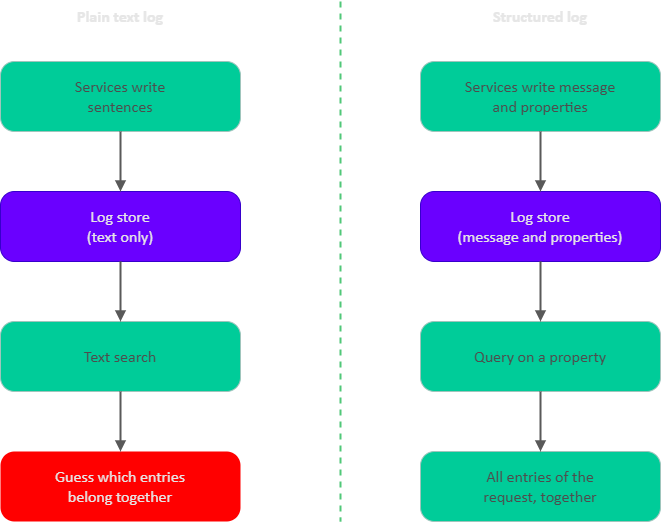
The following table shows the difference in more detail,
| Plain text log | Structured log | |
|---|---|---|
| What is stored | A sentence | A sentence plus the named properties as data |
| How to search | Text search | Query on the property (user, fund, client, etc.) |
| Related entries | Guess with the timestamp | Retrieve with the correlation property |
| Reports and dashboards | Almost not possible | Count, group and chart by any property |
| Sensitive data | Easy to leak in a sentence | Properties can be masked, hashed or not logged at all |
Think about a library. A plain text log is a pile of books in one room. A structured log is the same books with a catalog, we can search by the author, the subject and the year. The books are the same, but the catalog makes them useful.
Why is it important?
In order to reduce the blind spots, to improve the MTTD and MTTR, and to answer the business questions from the same data, structured logging is a must for every application which is running in production. At the same time, the structure doesn’t come automatically. Keep in mind that a structured log with wrong properties is as useless as a plain text log, so we need guidelines for the property names, the log levels, the correlation and the sensitive data. We will see all of them in this series.
Wrap up
In this article, we have looked at the challenges of plain text logs, what happens when we don’t act, and why structured logging is the way out. I really appreciate that you took the time to read this article. In the next article, I will walk you through what is structured logging, the message templates, the named properties and how Serilog stores them.
Related Posts
How to correlate logs, handle exceptions and protect sensitive data? - Part 4
How to correlate log entries with properties or BeginScope, decide between Fatal and Error, handle exceptions and log sensitive data safely.
How to send structured logs to Seq and Application Insights? - Part 7
How to send structured logs to Seq and Application Insights with Serilog, how the properties appear in each, and when to use which.
How to use structured logs in e-commerce? A worked example - Part 5
A worked e-commerce checkout example with agreed property names, BeginScope, log levels by failure and the queries which answer support questions.