How to write structured logs? Properties, log levels and the logging layer - Part 3
The rules to write structured logs with Serilog: property names, parameter order, log levels and the anti-corruption logging layer.
How to write structured logs? Properties, log levels and the logging layer - Part 3
A structured log is only as good as the way it is written. Two developers can use the same library and produce two completely different data sets, one is easy to query and the other is full of surprises. In the previous article, we discussed what is a structured log and the Serilog property types. In this article, we are going to see the rules to write the message templates and the properties, the log levels and when to use each one, and why we write the logs through an anti-corruption layer.
TL;DR Summary
- Write the property name between
{and}, in PascalCase, and it must match the C# identifier format. - Serilog matches the properties by their position, not by their names. If you change the parameter order, the values go to the wrong properties.
- Use
@before the property name only when you really want to destructure the object. - Use the right log level: Verbose and Debug for development, Information as the default, Warning for the possible issues, Error and Fatal for the failures.
- Don’t change the minimum level below Information if you want to log the traces. Don’t use Verbose in production.
- Don’t use Serilog or
ILoggerimplementations directly in the code, write through theMicrosoft.Extensions.Loggingabstraction.
Rules to write the properties
This section explains the best practices to write structured logs with Serilog. Find below the rules with a reason for each one,
| Rule | Example | Why |
|---|---|---|
Property name is written between { and } | {User} | It is how Serilog identifies a property |
| Property name follows PascalCase and matches the C# identifier format | ModulePermissions, but not Module.Permissions or Module-Permissions | Otherwise, the property is not captured properly and the queries become inconsistent |
| Brackets can be escaped by doubling them | {{ is rendered as { | To write a real bracket in the message |
Prefix @ to the property name to completely destructure the object | {@User} | To store the object as a structure. It is called as the destructure operator |
| Property names may be suffixed with an optional format | {Property:000} | To control how the property is rendered. The format strings behave exactly like their counterparts in string.Format() |
For more information, refer the Serilog writing log events page.
The order matters
Serilog follows the order of the parameters instead of the names. Look at the following example, where the parameters are passed in the wrong order,
logger.LogInformation("{User} successfully logged in with these module permissions {ModulePermissions}", modulePermissions, user);Here, the User is replaced with the modulePermissions parameter and the ModulePermissions is replaced with the user. The rendered message and the data set are both wrong, as you can see in the stored record,
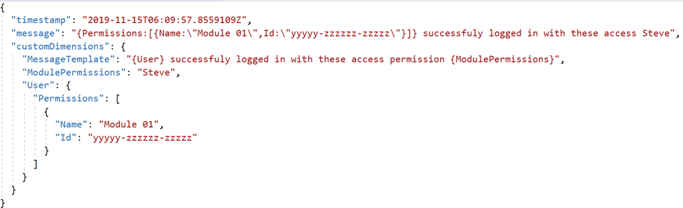
Warning: The compiler will not complain about this, and the log will look fine at first sight. Always check the order of the parameters with the order of the properties in the template.
Names must be consistent
The property name is the column name of our data set. If one developer writes {FundId} and another writes {FundCode} for the same thing, then a query on one of them will miss the other. Agree on the property names for the common concepts (user, client, fund, order, etc.) in your product, and reuse them. We will see a sample list in the Parts 5 and 6.
Log levels
Like other logging frameworks, Serilog supports six log levels. The following diagram shows how the severity increases from left to right,

Find below the details of each level,
| Level | When to use | Where |
|---|---|---|
| Verbose | Tracing information and debugging details; generally, only switched on in unusual situations | Not recommended in a production environment |
| Debug | Internal control flow and diagnostic state dump to facilitate pinpointing of recognized problems | More appropriate for the development environment |
| Information | Events of interest or that have relevance to outside observers; the default enabled minimum logging level | Everywhere. It is useful to track the state and events from various components of our application |
| Warning | Indicators of possible issues or service/functionality degradation. For example, resources consumed up to a specific threshold, taking more response time than usual, etc. | Everywhere |
| Error | A failure within the application or connected system. For example, input validation, authentication error, etc. | Everywhere |
| Fatal | Critical errors causing complete failure of the application. For example, database unavailability, network-related error, etc. | Everywhere |
Note: It is not advised to change the minimum level below Information if you want to log the traces, because the Information level is how we track the state and events of the application.
We will see how to decide between Error and Fatal in the next article.
Logging layer
Developers often use the third-party libraries directly in the code without any anti-corruption layer, and it might end up with lots of changes in their codebase when they want to switch to another vendor library at a later stage. There is no exception for the logging framework as well, and it is always recommended to use an anti-corruption layer for the third party frameworks.
Think about a power plug adapter. Your laptop doesn’t care which socket is in the wall, the adapter takes care. The Microsoft.Extensions.Logging library is that adapter for logging. It provides an anti-corruption layer, so we don’t need to create our own logging layer. Our package, built on top of it, provides the compatibility between .NET Full Framework and .NET Core, and it comes with the extension methods to simplify the Serilog configuration.
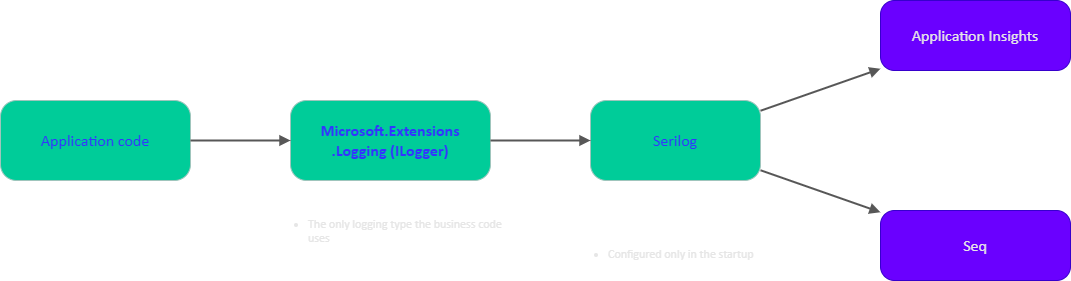
The following diagram depicts the layers. The business code knows only the ILogger, and Serilog and the sinks are behind it,
Must Do:
- Write the logs only with the
ILoggerofMicrosoft.Extensions.Logging. - Don’t refer to the Serilog types or any other logging vendor type directly in the business code.
- Configure Serilog, the sinks and the enrichment only in the startup of the application.
This way, when we want to add a sink (for example, Seq in the Part 7) or even change the library, the business code is not touched.
Wrap up
In this article, we have looked at the rules to write the properties, why the order and the names matter, the six log levels, and why we use an anti-corruption layer. I appreciate your time and efforts to read this article. In the next article, I will walk you through how to correlate the log entries of a request, how to handle the exceptions, and how to protect the sensitive data.
Related Posts
How to correlate logs, handle exceptions and protect sensitive data? - Part 4
How to correlate log entries with properties or BeginScope, decide between Fatal and Error, handle exceptions and log sensitive data safely.
How to send structured logs to Seq and Application Insights? - Part 7
How to send structured logs to Seq and Application Insights with Serilog, how the properties appear in each, and when to use which.
How to use structured logs in e-commerce? A worked example - Part 5
A worked e-commerce checkout example with agreed property names, BeginScope, log levels by failure and the queries which answer support questions.