How to use structured logs in e-commerce? A worked example - Part 5
A worked e-commerce checkout example with agreed property names, BeginScope, log levels by failure and the queries which answer support questions.
How to use structured logs in e-commerce? A worked example - Part 5
Theory is easy to agree on, and it is difficult to apply when you sit in front of a real checkout flow. A customer clicks “Place order”, the request goes through the web application, the basket service, the payment gateway, the stock service and the shipping service, and something fails in the middle. The customer calls the support, and the support asks “what happened to my order?”. In the previous article, we discussed the correlation, the exceptions and the sensitive data. In this article, we are going to apply the guidelines to an e-commerce checkout, with the property names, the log levels, the code and the queries. This is an illustrative scenario to explain the idea, not a real system.
TL;DR Summary
- Agree on a small set of property names for the e-commerce concepts (order, cart, customer, product, payment) and reuse them in every service.
- Use
OrderIdas the correlation property, and open aBeginScopeonce at the start of the checkout, so all the downstream log entries carry it. - A declined payment of one customer is an Error or a Warning, the payment gateway being down for everybody is Fatal.
- Hash the customer identifiers and mask the email and the card related data before logging.
- With the properties in place, the support question “what happened to order O-1001?” is one query.
The scenario
Assume an online shop with a checkout flow of the following steps,
| Step | Component | What can go wrong |
|---|---|---|
| 1. Validate the basket | Basket service | Item is out of stock, price changed |
| 2. Reserve the stock | Stock service | Stock service is not reachable |
| 3. Take the payment | Payment gateway (third party) | Payment is declined, gateway is down |
| 4. Create the shipment | Shipping service | Address is not valid |
| 5. Confirm the order | Order service | Database is not reachable |
The following diagram depicts the flow. All the services which run inside the checkout share one scope, and the payment gateway is a third party outside it,
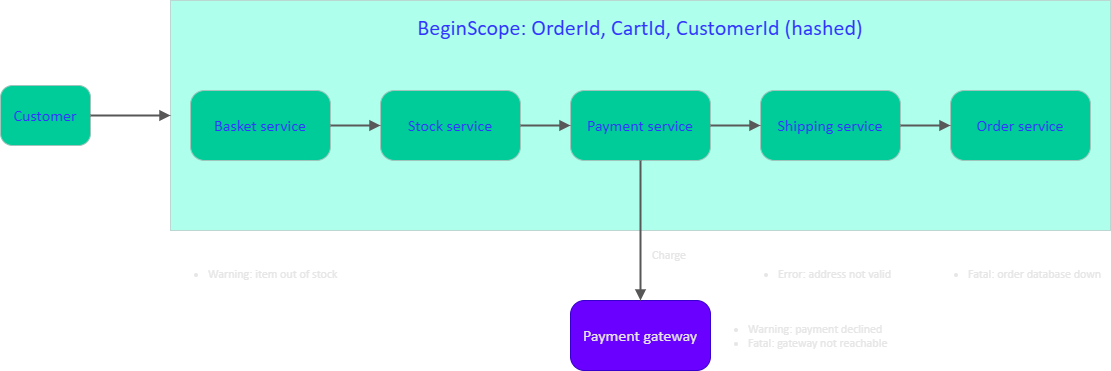
The support team gets calls like “my payment was taken, but I didn’t get the confirmation”. Without structured logs, someone has to search the text of five services and guess which entries belong to this customer.
Which properties do we log?
Let us decide the property names first. The names are the column names of our data set, so they must be the same in every service,
| Property | Example | Purpose | Note |
|---|---|---|---|
OrderId | O-1001 | Correlation id for the whole checkout | Available once the order is created. Before that, use CartId |
CartId | C-5589 | Correlation id before the order exists | |
CustomerId | hash of the customer id | Group the entries of a customer | Hash it. Don’t log the name or the email |
ProductId | P-778 | Which product the entry is about | |
PaymentProvider | ProviderA | Which payment gateway | |
DeclineReason | InsufficientFunds | Why the payment was declined | Use a fixed list of values, not free text |
Channel | Web, Mobile | Where the order came from |
Info: Just like the portfolio import example in the Part 4, the
OrderIdis not available in the first step. We useCartIdthere, and then both of them are logged once the order is created, so we can join the two halves.
How to write the logs?
We open a scope at the start of the checkout, so every downstream log entry (in the same process) has the properties. We don’t need to pass the order id to the stock or the payment code just for logging,
public async Task<OrderResult> PlaceOrderAsync(Order order)
{
    using (_logger.BeginScope(new Dictionary<string, object>
    {
        ["OrderId"] = order.Id,
        ["CartId"] = order.CartId,
        ["CustomerId"] = order.CustomerId.Hash(),
        ["Channel"] = order.Channel
    }))
    {
        _logger.LogInformation("Order received with {ItemCount} items and total {OrderTotal} {Currency}",
            order.Items.Count, order.Total, order.Currency);

        await _stockService.ReserveAsync(order);

        var payment = await _paymentService.TakePaymentAsync(order);
        if (payment.IsDeclined)
        {
            _logger.LogWarning("Payment declined by {PaymentProvider} with reason {DeclineReason}",
                payment.Provider, payment.DeclineReason);
            return OrderResult.PaymentDeclined(payment.DeclineReason);
        }

        _logger.LogInformation("Payment taken by {PaymentProvider}", payment.Provider);
        // create the shipment and confirm the order
    }
}
A few points to notice in this code,
- The message templates are written with named properties, not with string concatenation or interpolation. Otherwise, the values will not be stored as properties.
- The
OrderIdis not repeated in every statement, the scope adds it. - The
CustomerIdis hashed before it is logged (refer the Part 4), and the email and the card number are not logged at all. DeclineReasoncomes from a fixed list, so we can group by it.
Warning: Don’t write
$"Payment declined by {provider}"(string interpolation) in the log statement. It creates a plain text message and the property is lost. Always pass the values as the parameters.
Which log level for which failure?
The failure level depends on how many customers are impacted, as we discussed in the Part 4,
| Situation | Level | Reason |
|---|---|---|
| Item is out of stock for one customer | Warning | Expected business situation, one request is impacted |
| One customer’s payment is declined | Warning or Error | One request is impacted. Use Error if it is not an expected decline |
| Address validation failed | Error | Input or business validation of one request |
| Payment gateway is not reachable for everybody | Fatal | The checkout is not working for the whole application |
| Order database is down | Fatal | A dependent component is unavailable and the application is not usable |
In Microsoft.Extensions.Logging, the Serilog Fatal level is called as LogCritical. All the Fatal entries should trigger an alert to the product team, so we know about a broken checkout before the customers tell us.
How to answer the support question?
Now the support asks “what happened to order O-1001?”. In Application Insights, it is one query,
traces
| where timestamp >= ago(1h)
| where customDimensions.OrderId == "O-1001"
| order by timestamp asc
In Seq (we will see it in the Part 7), the same is a filter on the property,
OrderId = 'O-1001'And the business can ask a different question from the same data, “why are the payments declined today?”,
traces
| where timestamp >= ago(1d)
| where isnotempty(tostring(customDimensions.DeclineReason))
| summarize Declines = count() by DeclineReason = tostring(customDimensions.DeclineReason), PaymentProvider = tostring(customDimensions.PaymentProvider)
| order by Declines desc
Note: Traces are subject to the sampling rate of Application Insights (refer the Part 3 of the Application Insights guidelines). When you need the exact counts for the business, collect them as custom events with 100% sampling. Use the structured logs for the diagnosis.
What do we get at the end?
| Before | After |
|---|---|
| Search the text of five services and guess | One query on OrderId |
| ”Payment declined” is a sentence | DeclineReason and PaymentProvider are columns we can group by |
| Customer data may leak in the message | Customer id is hashed, email and card data are not logged |
| We know about a broken gateway from the customers | A Fatal entry triggers an alert |
Wrap up
In this article, we have looked at an e-commerce checkout, the property names to agree on, how to write the logs with BeginScope, how to select the log level for each failure, and the queries which answer the support and the business questions. I really appreciate that you took the time to read this article. In the next article, I will walk you through the use case of the mutual fund world: which client of which product is viewing which fund, sub-fund and share class, and which internal service is using which index.
Related Posts
How to correlate logs, handle exceptions and protect sensitive data? - Part 4
How to correlate log entries with properties or BeginScope, decide between Fatal and Error, handle exceptions and log sensitive data safely.
How to send structured logs to Seq and Application Insights? - Part 7
How to send structured logs to Seq and Application Insights with Serilog, how the properties appear in each, and when to use which.
How to use structured logs in the mutual fund world? Clients, funds and indices - Part 6
How to log which client of which product views which fund, sub-fund and share class, and which internal service uses which index.