How to use structured logs in the mutual fund world? Clients, funds and indices - Part 6
How to log which client of which product views which fund, sub-fund and share class, and which internal service uses which index.
How to use structured logs in the mutual fund world? Clients, funds and indices - Part 6
In the mutual fund world, the same data is consumed by many products and many clients. A client opens a factsheet of a fund, another client downloads the performance of a share class, an internal service reads an index to calculate a benchmark comparison. When a client calls and says “the chart of this share class is empty”, or when the business asks “which of our products use this index?”, the answer is hidden in the logs, if we wrote them in a structured way. In the previous article, we applied structured logging to an e-commerce checkout. In this article, we are going to apply it to the mutual fund world, with two use cases: which client of which product is viewing which fund, sub-fund and share class, and which internal product or service is using which index. These are illustrative scenarios to explain the idea, not real measurements.
TL;DR Summary
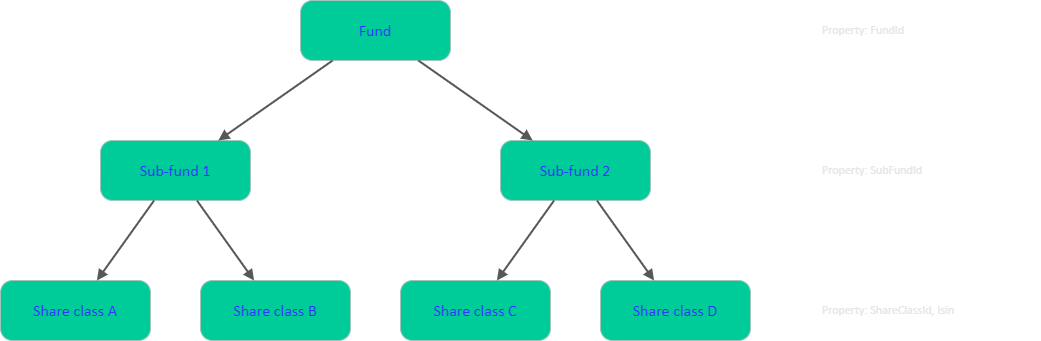
- Funds have a hierarchy: a fund (umbrella) has sub-funds, and a sub-fund has share classes. Log all the levels as separate properties, so we can query at any level.
- Log who is asking (the internal product and the client) and what is asked (fund, sub-fund, share class) with the same property names in every service.
- Add the product and the client with a
BeginScopein a middleware, so all the downstream entries have them without passing them across the layers. - For the index usage, log which internal service reads which index, and use it for the usage reports and the impact analysis.
- Use the structured logs for the diagnosis and the trend. For the exact usage numbers, use custom events with 100% sampling.
The data model
Let us be clear on the terms, since the log properties follow them,
| Term | Meaning | Example property |
|---|---|---|
| Fund | The umbrella or the legal fund which holds the sub-funds | FundId |
| Sub-fund | A portfolio under the fund | SubFundId |
| Share class | A class of the sub-fund (for example, with different currency or fees). It normally has its own ISIN | ShareClassId, Isin |
| Index | A benchmark which the fund performance is compared with | IndexId |
| Internal product | Our product which the client uses (portal, charting, factsheet, etc.) | ProductName |
| Internal service | A back-end service which is called by the products (fund data, performance, index, etc.) | ServiceName |
| Client | The organization which uses our product | ClientId |
The following diagram depicts the hierarchy and the log property for each level,
Use case 1: Which client of which product is viewing which fund, sub-fund and share class?
Why do we need it?
There are two kinds of questions. The first one is for the support, “the client says the chart of share class SC001 is empty, what did the system do for this client?”. The second one is for the business, “which clients are looking at this fund, and through which product?”. With plain text logs, both are impossible to answer. With the properties, both are queries on the same data.
How to log it?
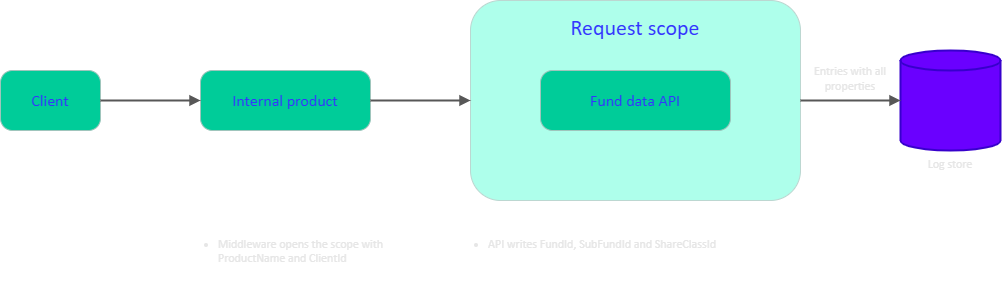
The product and the client are known at the entry point, so we open a scope in a middleware, and all the downstream log entries get them. The fund, sub-fund and share class are known in the API which serves the request, so it writes them as the properties. The following diagram depicts who adds what,
// In the middleware, after the client is identified from the request
using (_logger.BeginScope(new Dictionary<string, object>
{
    ["ProductName"] = productName,
    ["ClientId"] = clientId
}))
{
    await _next(context);
}
// In the API which serves the share class page
_logger.LogInformation("Share class {ShareClassId} of sub-fund {SubFundId} of fund {FundId} was requested",
shareClassId, subFundId, fundId);Because of the scope, the entry above also carries ProductName and ClientId, and so does every entry which is written by the services behind this API in the same request.
Info: Always log all three levels (fund, sub-fund and share class) in the same entry. If you log only the share class, then someone has to join the hierarchy at the query time to get the fund, and it is easy to get it wrong.
Property names to agree on
| Property | Example | Note |
|---|---|---|
ProductName | FactsheetPortal | Our internal product. Use a fixed list of names |
ClientId | CL001 | The client organization id. It is a business id, not a personal data |
FundId | FND001 | |
SubFundId | SF001 | |
ShareClassId | SC001 | Log the Isin also when it is available |
UserId | hash of the user id | Hash it, since it can identify a person |
Which queries do we run?
The support question, “what happened for client CL001 on share class SC001?”,
traces
| where timestamp >= ago(1h)
| where customDimensions.ClientId == "CL001" and customDimensions.ShareClassId == "SC001"
| order by timestamp asc
The business question, “which clients view which funds, through which product, in the last 7 days?”,
traces
| where timestamp >= ago(7d)
| where isnotempty(tostring(customDimensions.ShareClassId))
| summarize Views = count() by
    ProductName = tostring(customDimensions.ProductName),
    ClientId = tostring(customDimensions.ClientId),
    FundId = tostring(customDimensions.FundId),
    SubFundId = tostring(customDimensions.SubFundId),
    ShareClassId = tostring(customDimensions.ShareClassId)
| order by Views desc
In Seq, the same support question is a filter,
ClientId = 'CL001' and ShareClassId = 'SC001'Use case 2: Which internal product or service is using which index?
Why do we need it?
Indices are shared reference data. Many services read them to show the benchmark or to calculate the relative performance. When an index provider changes the data, or stops an index, or when we have to report the usage of an index, the first question is “who uses this index?”. If nobody logs it, the answer is a long search through the code and the configuration of every service, and still we may miss one.
How to log it?
The service which reads the index data writes one entry with the index and the purpose. The calling product comes from the scope, if the call is made on behalf of a client request. The following diagram depicts the idea. Each service which reads an index writes one entry, and the usage report is a query on these entries,
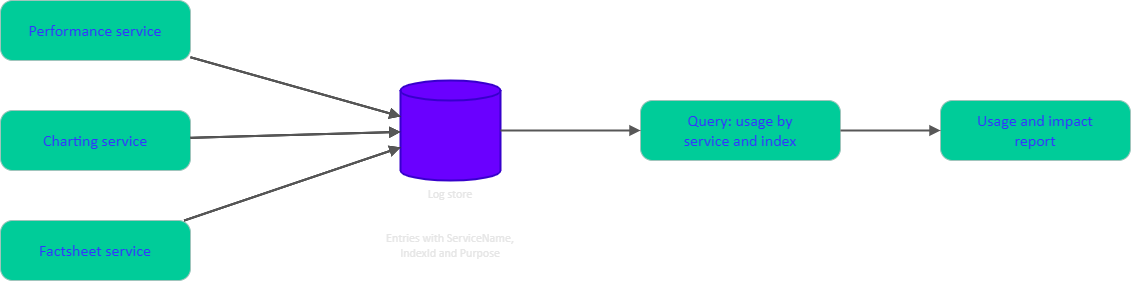
The code of the entry is,
_logger.LogInformation("Service {ServiceName} read index {IndexId} for {Purpose}",
"PerformanceService", indexId, "BenchmarkComparison");| Property | Example | Note |
|---|---|---|
ServiceName | PerformanceService | The internal service which reads the index |
IndexId | IDX001 | The index identifier |
Purpose | BenchmarkComparison | Use a fixed list of values |
Note: For a background job, which has no client request, the
ProductNameandClientIdwill not be there. It is fine, because theServiceNameand theIndexIdstill tell us who uses what.
Which queries do we run?
Which internal services use which indices in the last 30 days?
traces
| where timestamp >= ago(30d)
| where isnotempty(tostring(customDimensions.IndexId))
| summarize Calls = count() by
    ServiceName = tostring(customDimensions.ServiceName),
    IndexId = tostring(customDimensions.IndexId)
| order by IndexId asc, Calls desc
And, which products are impacted if the index IDX001 is changed or discontinued? Use the ProductName from the same entries,
traces
| where timestamp >= ago(30d)
| where customDimensions.IndexId == "IDX001"
| summarize Calls = count() by ProductName = tostring(customDimensions.ProductName), ServiceName = tostring(customDimensions.ServiceName)
What should we be careful about?
- Sampling. Traces are subject to the sampling of Application Insights, so the counts from the logs are not exact when the sampling is below 100%. Use the logs for the diagnosis and the trend. When the numbers are used for the billing or the license reporting, collect them as custom events with 100% sampling (refer the Part 3 of the Application Insights guidelines).
- Cardinality and volume. Logging one entry for every view of every share class is a lot of data on a busy system. Decide what you really need, and log it once per request, not once per layer.
- Personal data. The client id, fund id and index id are business identifiers. An investor’s name, email or account number is not, so never log them. Hash the user id.
- Naming. Keep the property names exactly the same in every service.
ShareClassIdin one service andShareClassin another will split the data.
Wrap up
In this article, we have looked at the fund, sub-fund and share class hierarchy, how to log which client of which product is viewing what, how to log which internal service uses which index, and the queries for both. Thanks for reading this article. In the next and last article, I will walk you through how to send these structured logs to Seq and Application Insights.
Related Posts
How to correlate logs, handle exceptions and protect sensitive data? - Part 4
How to correlate log entries with properties or BeginScope, decide between Fatal and Error, handle exceptions and log sensitive data safely.
How to send structured logs to Seq and Application Insights? - Part 7
How to send structured logs to Seq and Application Insights with Serilog, how the properties appear in each, and when to use which.
How to use structured logs in e-commerce? A worked example - Part 5
A worked e-commerce checkout example with agreed property names, BeginScope, log levels by failure and the queries which answer support questions.