How to correlate logs, handle exceptions and protect sensitive data? - Part 4
How to correlate log entries with properties or BeginScope, decide between Fatal and Error, handle exceptions and log sensitive data safely.
How to correlate logs, handle exceptions and protect sensitive data? - Part 4
The whole purpose of structured logging is to get all the related log entries of a request together, to understand the failures properly, and to do it without leaking the data which we should not keep. These three things are the difference between a log which helps us in an incident and a log which becomes a liability. In the previous article, we discussed the rules to write the properties and the log levels. In this article, we are going to see the two ways of log correlation, how to categorize and handle the exceptions, and how to log the sensitive data safely.
TL;DR Summary
- Correlate the log entries with a structured log property across all the layers, or with the
BeginScopemethod which adds the properties to all the downstream entries automatically. - Use
BeginScopewhere you want to track all the downstream log entries of a transaction, so you don’t pass the log specific data across the layers. - Log an error as Fatal when the whole application is impacted, and as Error when one part, one user or one request is impacted. All fatal errors must trigger an alert.
- Add context to exceptions with the exception data dictionary.
- In web applications and APIs, show only the correlation id and a generic message to the user, never the stack trace.
- Don’t log the sensitive data. When you must, mask, hash or encrypt it, and always log the user id.
Log correlation
The whole purpose of structured logging is retrieving the related log entries together for a transaction or request. Serilog facilitates us to achieve this in two different ways. The first one is using the same structured log property across all the layers’ log entries, and the second one is using the contextual logging.
Using the structured log property
In this approach, you should add one or more structured log properties to all the downstream log entries, so that you can retrieve all the related entries with the given properties.
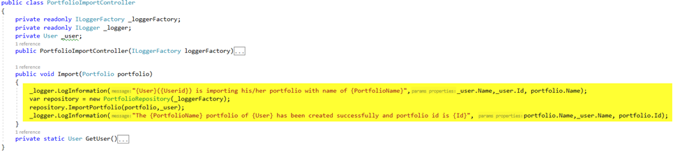
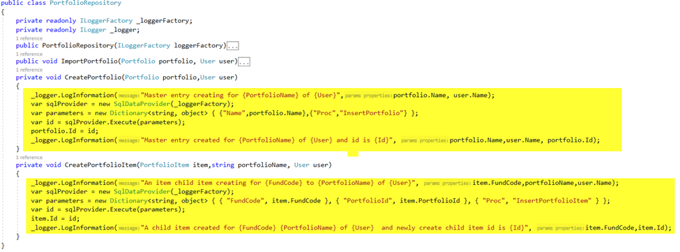
For example, in a portfolio import page, a user uploads an XML file which contains the portfolio name and the holdings. Since this is the portfolio creation process, we won’t get a PortfolioId in the first instance, so we can’t use it as a correlation id. Alternatively, we can use the user name, the user id and the portfolio name as the correlation ids. The following screenshots show the log statements in the controller and in the repository, which write the same properties,
You can use the following query to retrieve all these log entries,
traces
| where timestamp >= ago(10m)
| where customDimensions.PortfolioName == "Abeerdeen Max Life" and user_Id == "e76ac97a-d897-43aa-b5a2-2ad8a3c7e026"
| order by timestamp asc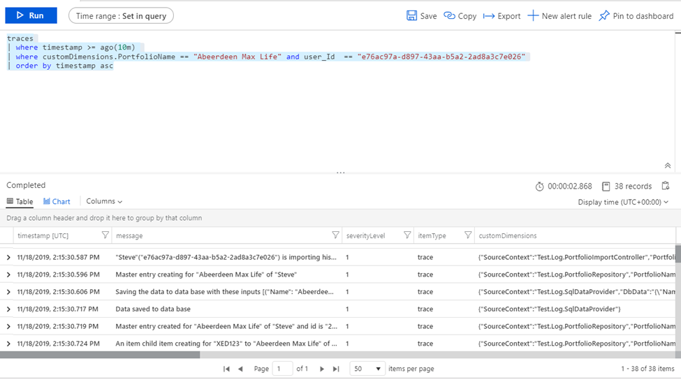
Using the contextual log feature
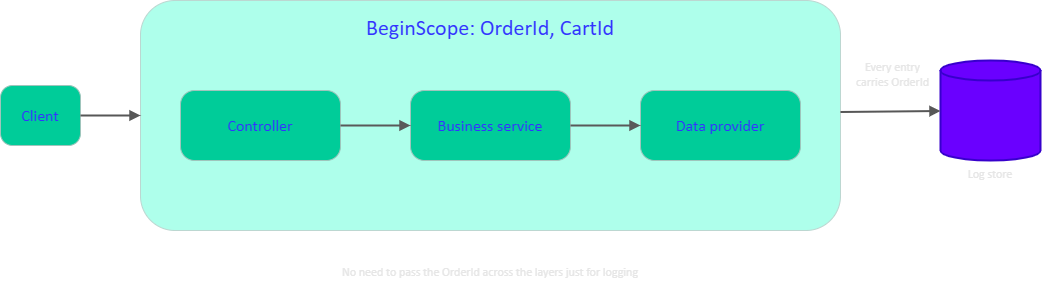
In the first approach, we should pass some additional data across the layers just for logging, and sometimes it is very difficult to pass it to the low-level layers like data providers, etc. Fortunately, the Microsoft.Extensions.Logging library comes with a log method called BeginScope, which automatically adds the given properties to the downstream log entries. So we don’t need to pass any additional log specific data across the layers.
The following diagram depicts how the scope works. The properties are added once at the top, and every entry which is written inside the scope carries them,
You can use the same query to retrieve the downstream log entries which are associated with a transaction,
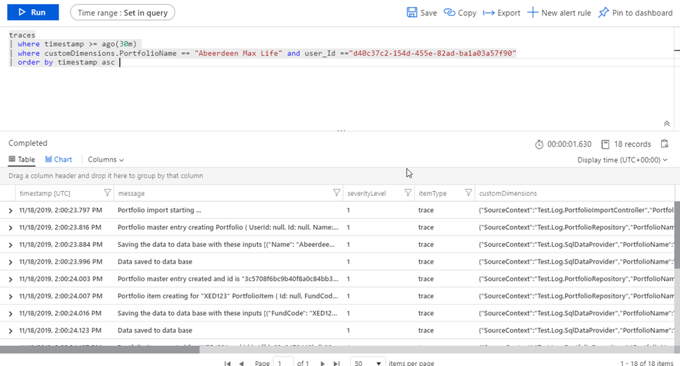
So, use the BeginScope method where you want to track all the downstream log entries of a transaction.
| Structured log property | BeginScope | |
|---|---|---|
| How | Pass and write the properties in every log statement | Open a scope once, all the downstream entries get the properties |
| Effort | The data must travel across the layers | Low, the data doesn’t travel |
| Risk | A developer may forget a property in a layer | Entries written outside the scope don’t get the properties |
| Pick when | The data is already available in every layer | A transaction crosses many layers and low-level components |
Exception handling
Exception handling is the most important thing in logging. We must categorize the level of logging, either it is Fatal or Error. When an application is not accessible completely due to the database or another dependent component unavailability, it must be considered as a Fatal error. When one part of the application, or a specific user or request is impacted due to an error, it should be considered as an Error.
The following diagram can be used to decide between them,
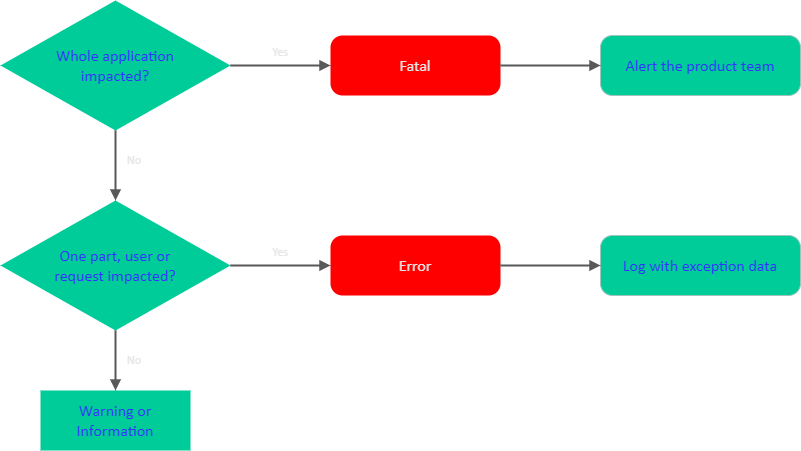
The following table shows some possible examples of Fatal and Error levels,
| Level | Example |
|---|---|
| Fatal | Network unavailability Database / dependent server is down or not able to establish the connection Expected table/field/file is missing Misconfiguration/Permission issue Unreachable sub-components Security attack Health failure |
| Error | Input validation Business validation Authorization error The specific resource does not exist, which impacts one specific page, not the whole application Serialization error |
Must Do: In case of a fatal error, an alert should be triggered by Application Insights. All fatal errors should trigger an alert to the respective product team, which enables the mean time to detect (MTTD).
How to add the context to an exception?
In general, Application Insights automatically captures all the unhandled exceptions which propagated to the HTTP module and sends them to the exception telemetry, which is stored separately in Application Insights. So, there is no option to add contextual data to the exception unless we manually track it. However, we can use the exception data dictionary to send the contextual data with the exception. Refer to the below example,
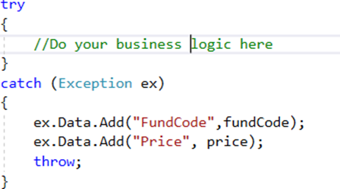
Exception handling in web application and API
Follow the following practices in a web application and an API,
- Configure the error page for the HTTP error status codes like 400, 401, 404, etc.
- Redirect to a custom error page upon any unhandled exception (500 status code). In the case of an API, provide an appropriate error message and status code without redirection.
- Do not show the stack trace or other sensitive information in the custom error page, especially in the production site.
- Log all the necessary data points and the message, and show only limited information like the correlation id (the operation id in case of Application Insights) and a generic error message to the user. This helps the developer to easily identify the specific request which caused the error, and it ensures the application security as well.
- When your application is integrated with Cloudflare, configure the custom error page for the Cloudflare specific errors.
Logging sensitive data
The important rule is don’t log the sensitive data if your application is processing any sensitive data like personally identifiable data, password, etc. Still, if you are required to log any of it, use any one of the following techniques to protect the data before logging, or a combination of two or more techniques. The following diagram depicts the decision,
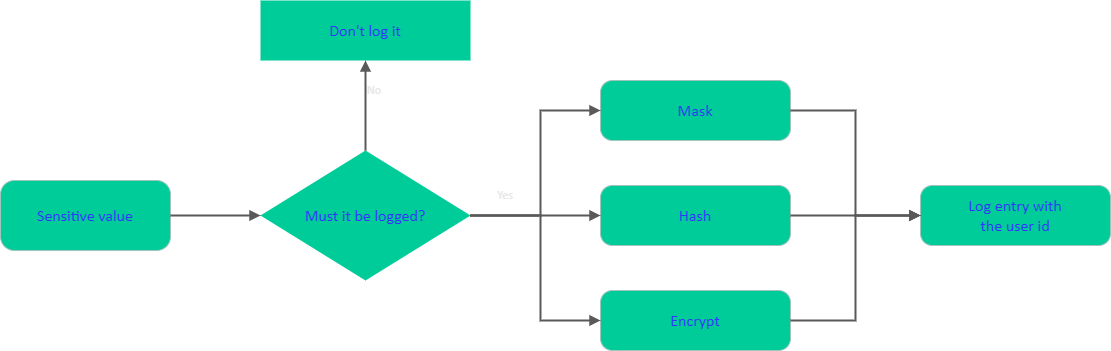
| Technique | Log | Example data |
|---|---|---|
| Mask | A partly hidden value | Email, IP address |
| Hash | The hash of the value instead of the actual value | Email id, mobile number |
| Encrypt | The encrypted value instead of the actual value | Email id, mobile number |
It is important to ensure all the sensitive data log entries are associated with the user id or an equivalent id, to group all these similar entries. In case we want to remove a specific user from the application, we should be able to easily remove the log entries of that user. Logging of the user id is a recommended practice whether you are storing sensitive data or not.
Our logging package comes with a few extension methods to add the sensitive data securely into the log, and those methods are,
string Mask(this string propValue, string maskText = DefaultMask, int showFirst = 0, int showLast = 0, bool preserveLength = true)

string Hash(this string propValue)
Warning: Be careful with the destructure operator (
@). If the object has a sensitive field, the field goes to the log with the rest of the object.
Wrap up
In this article, we have looked at the two ways of log correlation, how to decide between Fatal and Error, how to add context to exceptions, the practices for web applications and APIs, and how to protect the sensitive data. Thanks for reading this article. In the next article, I will walk you through a worked example of structured logging in an e-commerce application.
Related Posts
How to send structured logs to Seq and Application Insights? - Part 7
How to send structured logs to Seq and Application Insights with Serilog, how the properties appear in each, and when to use which.
How to use structured logs in e-commerce? A worked example - Part 5
A worked e-commerce checkout example with agreed property names, BeginScope, log levels by failure and the queries which answer support questions.
How to use structured logs in the mutual fund world? Clients, funds and indices - Part 6
How to log which client of which product views which fund, sub-fund and share class, and which internal service uses which index.