What is structured logging? Message templates, named properties and Serilog - Part 2
What a structured log is: message templates, named properties, the three Serilog property types and how the data is stored.
What is structured logging? Message templates, named properties and Serilog - Part 2
Before we write the guidelines, we must understand what exactly is stored when we write a structured log. A lot of confusion in the teams is from the thinking that a structured log is just a log with JSON in it. In the previous article, we discussed why we need structured logging. In this article, we are going to see what is a structured log, the message template and the named properties, the three property types in Serilog, and how it looks in Application Insights.
TL;DR Summary
- A structured log uses a predefined message template, and the template has one or more named properties.
- Named properties are place holders, written between
{and}, and they are replaced with the actual values in the rendered message. - Serilog keeps the properties separately in the log store, in addition to the rendered message. In our case, Application Insights is the log store.
- Serilog has three categories of the named property types: stringification, destructuring and scalars.
- Understanding these types is important, because they decide what is stored in the property.
What is a structured log?
A structured log uses the predefined message templates, and a message template has one or more named variables or properties. Normally, these named properties are place holders to replace the value in the rendered message. Each of these named properties is represented with an open and close parenthesis.
Named property syntax: {Name of the property}
Example:
_logger.LogInformation("{User} successfully logged in with these access permissions {ModulePermissions}", user, modulePermissions);Here, User and ModulePermissions are named properties. Serilog preserves these properties separately into the log store, and replaces all the place holders with the actual property values in the rendered message. The above message is stored as a record in the Application Insights’ Trace table with the property data in addition to the default information. From this example, you can understand how the structured log creates data sets in addition to the textual message, which helps us to query the log entries effectively.
The following diagram depicts what Serilog does with the template and the values,
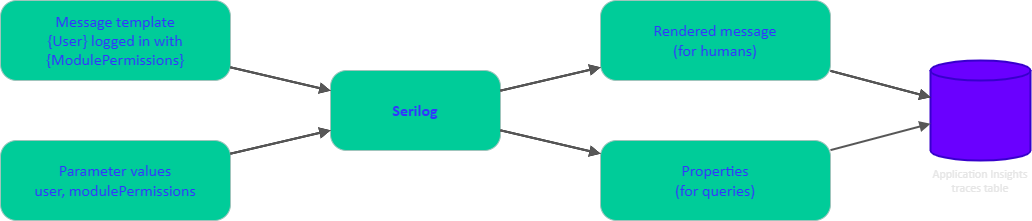
In simple terms, the log entry has three parts,
| Part | Example | Used for |
|---|---|---|
| Rendered message | Steve successfully logged in with these access permissions ... | Reading by a human |
| Message template | {User} successfully logged in with these access permissions {ModulePermissions} | Grouping the same kind of events |
| Properties | User, ModulePermissions | Querying, filtering and counting |
Info: Because the template is the same for every user, we can group all “successfully logged in” events with the template, whatever the user or permission is. In a plain text log, every message is different.
What is Serilog?
Serilog is a .NET logging library which is built for structured logging. It is the library we use, and the logs go to Application Insights through it. We use Serilog behind the Microsoft.Extensions.Logging abstraction, so the code writes the log with ILogger and the Serilog is configured only in the startup. We will see why in the Part 3.
What are the property types in Serilog?
In Serilog, the named variable types are classified into three different categories, as the following diagram shows,
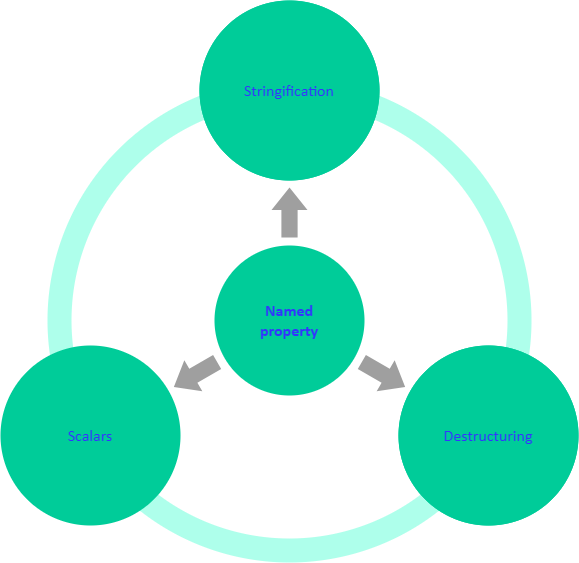
and those are,
| Type | What it means | Good for |
|---|---|---|
| Stringification | The object is converted to a string with ToString() and stored as a text | Simple values where the text is enough |
| Destructuring | The object is broken into its properties and stored as a structure. It is requested with the @ operator | Objects where we want to query the inner properties |
| Scalars | Simple values like numbers, strings, dates and booleans, which are stored as they are | Ids, names, amounts, flags |
It is very important to understand the structural data types in Serilog, so go through the Serilog structured data page before proceeding further.
What is the difference in practice?
Take the user object in the above example. Without the @ operator, the object is converted to a text. With the @, the object is destructured and its properties are stored as a structure, which we can query. We will see a stored record of this kind in the Part 3.
Warning: Destructuring a big object puts a lot of data in every log entry, and it may leak the sensitive fields. Destructure only what you need, and never destructure an object which has the sensitive data. We will see this in the Part 4.
What is different from “logging in JSON”?
A common question is “we already write the logs in JSON, is it not the same?”. It is not the same. JSON is only the format, and the structure of a structured log comes from the message template and the named properties. If the developer writes a sentence and wraps it in JSON, the result is a JSON with one field called message. The structure is the discipline of writing the properties, not the format.
Wrap up
In this article, we have looked at what is a structured log, the message template and the named properties, what is Serilog, and the three property types. Thanks for reading this article. In the next article, I will walk you through how to write structured logs: the property rules, the log levels and the logging layer.
Related Posts
How to correlate logs, handle exceptions and protect sensitive data? - Part 4
How to correlate log entries with properties or BeginScope, decide between Fatal and Error, handle exceptions and log sensitive data safely.
How to send structured logs to Seq and Application Insights? - Part 7
How to send structured logs to Seq and Application Insights with Serilog, how the properties appear in each, and when to use which.
How to use structured logs in e-commerce? A worked example - Part 5
A worked e-commerce checkout example with agreed property names, BeginScope, log levels by failure and the queries which answer support questions.