What is technology governance? - Part 1
What technology governance is, what it covers and what it doesn't, and why the default status of a new technology is New.
What is technology governance? - Part 1
Almost every software organization starts with a small set of technologies, and in few years the list has grown to dozens of languages, frameworks, libraries, tools and cloud services. Nobody took a bad decision on the day, each team picked what was best for its own problem. But when we look at the whole organization together, it is difficult to say what we really use, which version is allowed, and which one is going to be removed. In this series, I share the approach we derived to manage the technology stack of our applications, from the technology governance to the Tech Radar. In this article, we are going to see what is technology governance, what it covers, and what it doesn’t cover.
Technology Governance series:
- What is technology governance? (this article)
- Why we need technology governance?
- How to implement technology governance?
- What is a Tech Radar?
- Why we need a Tech Radar?
- How to build and run a Tech Radar? Stages, categories and the assessment
TL;DR Summary
- Technology governance is the way an organization decides, documents and reviews which technologies can be used, and where.
- It gives clarity to the product development teams and other tech stakeholders when they design and build features or solutions.
- The lifecycle status of each technology decides how and where it may be used. The default status of every new technology is New.
- The list covers significant technologies and their major versions. It doesn’t manage security vulnerabilities.
- It is owned by a team (in our case the Platform/Framework team) and reviewed at a regular interval.
- Governance is not about saying no. It is about a controlled and thoughtful integration of new technologies into the stack.
What is technology governance?
Technology governance is the set of decisions, rules and ownership which guide the choice of technologies in an organization. In simple terms, it is the answer to the questions “what are we allowed to use?” and “who decides it?”.
Think about the traffic rules of a city. Nobody likes the signals when they are in a hurry, but without them every driver has to guess what the others will do. The rules don’t decide where you go, they make sure that everybody can reach safely. Technology governance is the same for the technology stack.
The following diagram depicts what it covers,
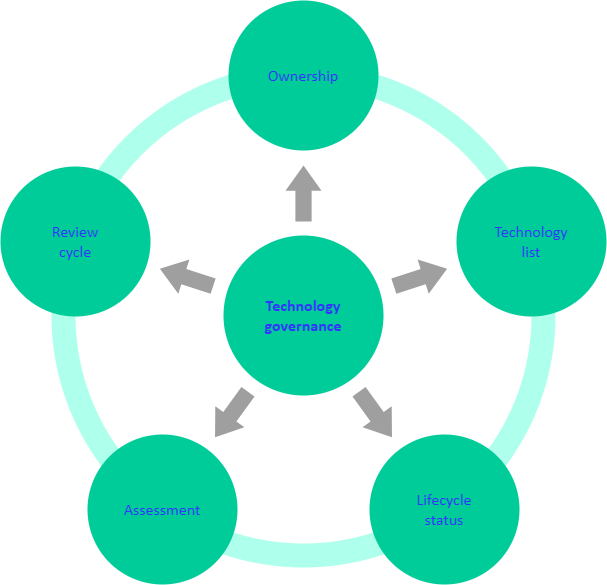
Let us look at each part,
| Part | What it means |
|---|---|
| Ownership | One team owns and maintains the list, so there is always someone to ask and someone who decides |
| Technology list | The documented list of the significant technologies, and where applicable their major versions |
| Lifecycle status | Each technology has a status (for example, New, Assess, Adopt, Hold, Retire) which tells how and where it may be used |
| Assessment | The way a new technology is evaluated before it is allowed |
| Review cycle | The list is reviewed and updated at a regular interval, so it doesn’t go stale |
What is the default?
The lifecycle status of each technology determines how and where it may be used. The default status of every new technology is New, which means it should not be used without consulting the owner team (in our case, the Frameworks team). This approach ensures a controlled and thoughtful integration of the new technologies into the application stack.
It is an important point. The default is not “allowed unless somebody objects”. The default is “not yet”, and the team has to talk to the owner first.
What is the scope?
Technologies and versions
The technology list includes significant technologies and, where applicable, major versions. Technologies are considered distinct by version when significant upgrade challenges exist. For example, Angular 1 and Angular 2 are two different entries, because moving from one to another is a big effort, not a simple upgrade.
What it doesn’t do
The list does not capture or manage security vulnerabilities, as other tools and systems exist for this purpose. Technology governance tells us which technology is allowed, it doesn’t tell us whether the version we run has a known vulnerability.
Note: If you use the governance list as a replacement for vulnerability scanning, you will have a false sense of security. Keep both of them, they answer different questions.
What is not governance?
| It is | It is not |
|---|---|
| A shared list with a status for each technology | A list of “banned” technologies |
| A guide for the teams when they design a solution | A gate which stops the innovation |
| Reviewed at a regular interval | A one-time document |
| Owned by a team | Owned by nobody, or by everybody |
Wrap up
In this article, we have looked at what is technology governance, what it covers, what is the default status for a new technology, and what it doesn’t cover. I really appreciate that you took the time to read this article. In the next article, I will walk you through why we need technology governance, and what problems it is solving for our teams.
Related Posts
How to build and run a Tech Radar? Stages, categories and the assessment - Part 6
How to build and run a Tech Radar with eight lifecycle stages, the assessment steps, the categories and a run checklist.
How to implement technology governance? - Part 3
How to implement technology governance with ownership, a clear scope, version rules, a default status and a review cycle.
What is a Tech Radar? - Part 4
What a Tech Radar is, how it is created from the technology list, and how to read the rings, quadrants and dots.