Why we need a Tech Radar? - Part 5
Why a plain technology list is not enough, and what a Tech Radar gives to new joiners, development teams and the owner team.
Why we need a Tech Radar? - Part 5
A document with the technology list is a good start, but if the teams don’t open it, the governance is on paper only. The question every new joiner and every team asks is simple, “what should we use?”, and they want the answer in minutes, not after a week of asking around. In the previous article, we discussed what is a Tech Radar. In this article, we are going to see why we need it, what problems it solves, and what changes for the new joiners, the teams and the organization.
TL;DR Summary
- A Tech Radar makes the governance visible. A list nobody opens doesn’t govern anything.
- It is a guide for the new joiners, so they learn the preferred technologies, not the old ones.
- It assists in technology selection. A team gets a quick answer about the status of a technology before it designs a solution.
- It makes the retirement visible and plans the migration, instead of surprising the teams.
- It shows the gaps and the duplicates, which helps the owner team to decide where to invest.
- It reduces the debates and the repeated assessments, because the decision and its reason are published.
Why a list alone is not enough?
Let us see the problems of a plain list,
It is long and flat
A list of many technologies with a status column is correct, but there is no picture. The reader has to scan all rows to see what is preferred and what is going away.
It is not where the people look
People look for answers in the place they work, a portal, a wiki or the chat. A document in some folder will be found only by those who already know it exists.
It doesn’t tell a story
The status of one technology is a fact. The status of the whole stack, which are growing and which are retiring, is a story, and the radar tells it in one look.
Why we need a Tech Radar?
The following diagram depicts what changes when a person needs to choose a technology,
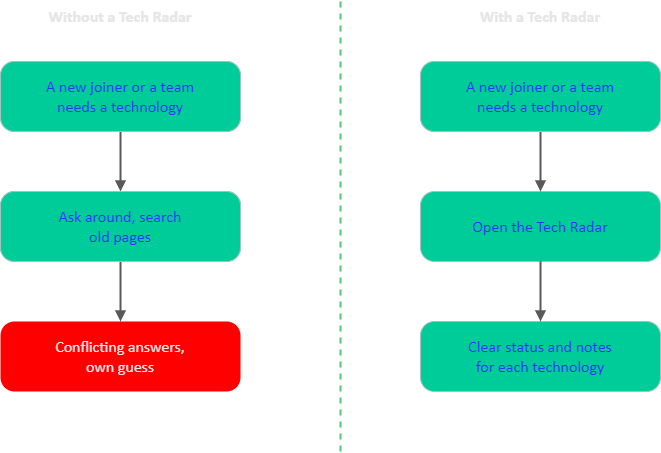
Let us see who gets what,
| Who | Without a radar | With a radar |
|---|---|---|
| New joiner | Learns the stack from the code, and picks up the old technologies too | Sees the preferred technologies from day one |
| Development team | Asks around, gets different answers, and decides with a guess | Checks the status in minutes, and goes to the owner team only when the technology is New |
| Owner team | Answers the same question again and again | Points to the radar, and spends the time on the assessments |
| Architects and leadership | No overall picture of the stack | One picture of the stack, with the gaps and the duplicates visible |
What does it enable?
Technology selection
When a team designs a new feature, the radar tells which technology is in Adopt (the preferred one), which one is only for the existing applications (Hold), and which one is not to be used at all. It assists in the technology selection, and it is the main purpose.
Onboarding
A new joiner can understand the stack in an hour, instead of learning it slowly from the code of each application. It is a good start for him to know what he should learn first.
Planned retirement
When a technology moves to Retire, the radar shows it to everybody. The teams can plan the migration before the end of life, instead of getting a surprise. When a technology moves to Hold, the replacement is mentioned in the Notes, so the teams know where to go.
Visible decisions
The outcome of an assessment is published with the decision. The next team which has the same question finds the answer in the radar, and doesn’t repeat the work.
What should we be careful about?
- A stale radar is worse than no radar. If the list is not reviewed, the radar will show the wrong status, and the teams will take wrong decisions with confidence. Keep the review cycle.
- It is a guide, not a replacement for the discussion. For a technology in the New stage, the teams must still talk to the owner team.
- Too much detail makes it unreadable. Keep the radar for the significant technologies, as we discussed in the Part 3.
- It doesn’t show the security vulnerabilities. Other tools do it, so don’t use the radar for that.
Must Do: Publish the radar where the teams already work, and tell about it in the onboarding. A radar which nobody knows is the same as a list in a folder.
Wrap up
In this article, we have looked at why a list alone is not enough, why we need a Tech Radar, what it enables for the new joiners, the teams and the owner team, and what to be careful about. Thanks for reading this article. In the next and last article, I will walk you through how to build and run a Tech Radar with the stages, the categories and the assessment.
Related Posts
How to build and run a Tech Radar? Stages, categories and the assessment - Part 6
How to build and run a Tech Radar with eight lifecycle stages, the assessment steps, the categories and a run checklist.
How to implement technology governance? - Part 3
How to implement technology governance with ownership, a clear scope, version rules, a default status and a review cycle.
What is a Tech Radar? - Part 4
What a Tech Radar is, how it is created from the technology list, and how to read the rings, quadrants and dots.