How to implement technology governance? - Part 3
How to implement technology governance with ownership, a clear scope, version rules, a default status and a review cycle.
How to implement technology governance? - Part 3
An idea like “let us have a list of technologies” is easy to agree on in a meeting, and it is also easy to forget the next month. A governance list is useful only when somebody owns it, when everybody knows what goes inside, and when it is reviewed on time. In the previous articles, we discussed what is technology governance and why we need it. In this article, we are going to see how to implement it: the ownership, the scope of the list, the versions, the review cycle, and a simple cycle which keeps it alive.
TL;DR Summary
- Give the list to one team. In our case, the list is owned and maintained by the Platform/Framework team.
- Decide the review cycle (quarterly, half yearly or yearly) and keep to it.
- Include the major technologies which significantly impact the application stack and can be reused across multiple applications.
- Don’t list the libraries which are part of a framework, and don’t list very granular libraries of a single application, unless there is a potential for reuse.
- Treat the versions as separate entries when the upgrade is a big challenge (for example, Angular 1 vs Angular 2).
- Set the default status of every new technology to New. Teams must consult the owner team before they use it.
The governance cycle
The following diagram depicts how the list lives. The teams propose or use technologies, the owner team assesses them, the list is updated, and the result is published as a Tech Radar. The teams look at it before they choose the next technology, and the cycle continues,
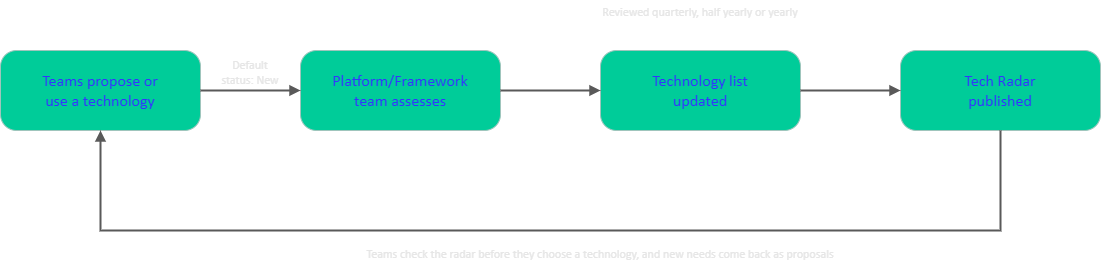
Let us see each step in the next sections.
Step 1: Decide the ownership
The list is owned and maintained by the Platform/Framework team. It is important to name a team, not a person, so the list doesn’t die when somebody changes the job. The owner team does three things,
| Responsibility | What it means |
|---|---|
| Maintain | Keep the list accurate and up to date |
| Decide | Move the technologies between the stages, after the assessment |
| Support | Answer the teams when they ask “can we use this?” |
Step 2: Decide what to include
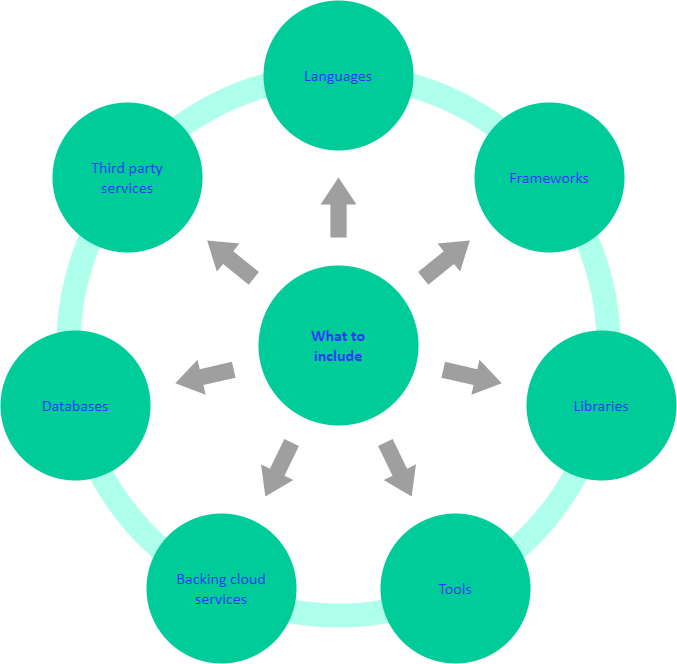
Include the major technology items which significantly impact the application stack, and could potentially be reused across multiple applications. The following diagram shows the seven types,
| Type | Examples | Note |
|---|---|---|
| Languages | C#, JavaScript, TypeScript, Java, Python, PHP | |
| Frameworks | .NET Framework, .NET Core, Laravel, Spring Boot | Do not list the libraries which are part of these frameworks (for example, the HTTP or serialization libraries within .NET Framework) |
| Libraries | Serilog, Newtonsoft.Json, React, jest | |
| Tools | VSCode, Visual Studio | |
| Backing cloud services | Web App, Service Bus, Azure Storage | |
| Databases | SQL Server, MongoDB | |
| Third party services | PDFReactor, Host FTP, Checkmarx |
Must Consider: Avoid listing very granular libraries which are used in a single application, unless there is a potential for reuse across multiple applications. Otherwise, the list will be too long, and nobody will read it.
Step 3: Decide how to treat the versions
The list includes the major versions where applicable. Two versions of a technology are separate entries when significant upgrade challenges exist. Angular 1 and Angular 2 are a good example. They have the same name, but moving between them is almost a rewrite, so they need different statuses.
If the upgrade between two versions is easy, one entry is enough. Don’t create an entry for every minor version.
Step 4: Set the default status
The default status for all new technologies is New. It means they should not be used without consulting the Frameworks team. It is the entry point of the lifecycle, and we will see all the stages in the Part 6.
Step 5: Fix the review cycle
The list is reviewed and updated quarterly, half yearly or yearly. Choose one based on how fast your stack changes, and then keep it. A list which was reviewed two years ago is worse than no list, because the teams trust it.
| Review cycle | Pick when |
|---|---|
| Quarterly | The stack changes fast, or many new technologies are proposed |
| Half yearly | A moderate change |
| Yearly | A stable stack with few changes |
Step 6: Keep the scope clear
The list does not capture or manage the security vulnerabilities, as other tools and systems exist for this purpose. Say it clearly in the document, so nobody expects it to do that.
Step 7: Publish it
A list in a document is read once. Publish it in a way which is easy to navigate, and that is why we create a Tech Radar from the documented data. We will see the Tech Radar in the next articles.
Must Do:
- Name the owner team for the list.
- Define what is in the scope and what is out of the scope.
- Treat the major versions separately when the upgrade is a big challenge.
- Make New the default status of every new technology.
- Fix the review cycle, and keep it.
- Publish the list as a Tech Radar.
Wrap up
In this article, we have looked at how to implement technology governance with the ownership, the scope, the versions, the default status, the review cycle and the publishing. I appreciate your time and efforts to read this article. In the next article, I will walk you through what is a Tech Radar, and how it presents the list.
Related Posts
How to build and run a Tech Radar? Stages, categories and the assessment - Part 6
How to build and run a Tech Radar with eight lifecycle stages, the assessment steps, the categories and a run checklist.
What is a Tech Radar? - Part 4
What a Tech Radar is, how it is created from the technology list, and how to read the rings, quadrants and dots.
What is technology governance? - Part 1
What technology governance is, what it covers and what it doesn't, and why the default status of a new technology is New.