How to build and run a Tech Radar? Stages, categories and the assessment - Part 6
How to build and run a Tech Radar with eight lifecycle stages, the assessment steps, the categories and a run checklist.
How to build and run a Tech Radar? Stages, categories and the assessment - Part 6
The Tech Radar is useful only when the stages mean the same thing to everybody. If “Hold” means “avoid” to one team and “forbidden” to another, the radar will create more confusion than clarity. In the previous articles, we discussed what is technology governance, how to implement it, what is a Tech Radar and why we need it. In this last article, we are going to see how to build and run it: the stages with what developers can do in each one, the categories, the assessment process, and the checklist to keep it running.
TL;DR Summary
- There are eight stages: New, Assess, Adopt, Hold, Retire, Replace, Declined and Discontinued.
- Each stage tells three things: whether it is available to the developer, whether it may be included in deploys, and whether it can be used in new development.
- New is the default for every new technology. Assess is how it gets evaluated, with a deeper study, a comparison, a PoC and a published decision.
- Adopt is the preferred stage. Hold is for the existing applications only. Retire starts the move away, and the default time to the end of life is 12 months.
- Replace is for the technologies which are an operational risk, and it needs a migration plan.
- Use the categories to group the technologies: Framework, Language, Service, Azure service, Library, Frontend library, Tool, internal service and Infrastructure.
- Publish the radar, review the list on the fixed cycle, and keep the decisions visible.
The stages
The following diagram depicts the stages. The main path goes from New to Assess, Adopt, Hold and Retire, and then the technology is Discontinued. A technology which is not fit for purpose is Declined after the assessment, and a technology which is a risk is marked as Replace,
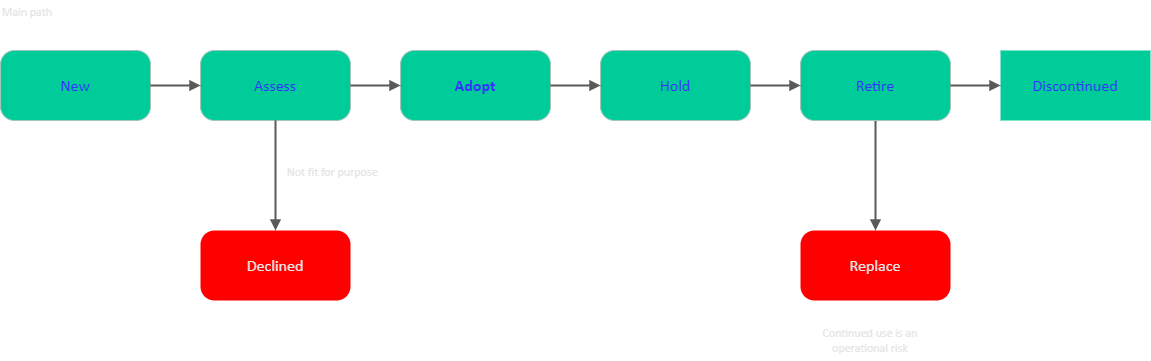
The following table explains each stage and what it means for the developers,
| Stage | Description | Available to developer | May include in deploys | New development |
|---|---|---|---|---|
| New | Technology or framework which has not been considered yet. It may be already established in the industry, or emerging and trending, which we think might be relevant | No | No | No |
| Assess | The items in New are picked up for assessment based on the priority (see the next section) | In collaboration with the community | Yes | In collaboration with the community |
| Adopt | Approved for use in the applications, and the preferred technologies. New applications should tend towards the solutions based on the technologies in Adopt | Yes | Yes | Yes |
| Hold | Approved for use. Continue to use in the existing applications. Avoid if possible in new applications. The replacement is mentioned in the Notes column, where applicable | Yes | Yes | No |
| Retire | Begin moving away. No new development. In general, expect the end of life in the next 12 months, which may change based on the support, a discovered vulnerability, etc. If it is different from the default 12 months, the duration is specified explicitly | No | Yes | No |
| Replace | Do not use. Replace as soon as possible. Continued use presents an operational risk to the product. A migration plan must be available | No | No | No |
| Declined | Do not use. Not fit for purpose | No | No | No |
| Discontinued | The items which were used earlier and have been discontinued | No | No | No |
Must Be Aware: Retire is the only stage where a technology is not available to the developer, but it may still be included in deploys. It is because the existing applications still run on it while they move away.
The assessment
The items in New are picked up for assessment based on the priority. The assessment involves one or more of the following steps, as the diagram shows,

| Step | What happens |
|---|---|
| 1. Deeper understanding | Understand the new technology or tool in depth |
| 2. Comparison study | Compare with either the alternatives which are already in use, or something new in the market |
| 3. Proof of concept | The architecture team and the development teams collaborate to identify the relevant use cases and build a PoC |
| 4. Publish | Publish the findings from the above tasks along with the decision on the technology |
The decision moves the technology to Adopt, or to Declined. In both cases, the reason is published, so the next team doesn’t repeat the work.
The categories
Group the technologies with a small set of categories. The categories become the quadrants or the filters of the radar,
| Category | Definition | Examples |
|---|---|---|
| Framework | Language framework for applications | .NET, Laravel, Angular |
| Language | Programming language which needs a dedicated compiler or runtime | C#, Java, PHP, T-SQL, Go, Python |
| Service (3rd party) | Online service provided by an external party | A CDN or a security service |
| Azure service | Cloud service provided by Azure | Web App, Traffic Manager |
| Library | Server side code or component provided and maintained by a third party | log4net, Swagger |
| Frontend library | JavaScript code or component provided and maintained by a third party | jQuery, React |
| Tool | Tool used to support the development | VSCode, Visual Studio, ReSharper |
| Internal service | Service developed in-house which is consumed by other applications and products | A shared authentication service |
| Infrastructure | Server applications running on real or virtual hardware. It also includes the entities which are not directly related to the development, for example the CI/CD related tools | SQL Server, Windows Server, IIS, Git, SonarQube |
How to run it?
Steps to Implement:
Follow the following instructions to build and run the radar,
- Create the technology list with the name, the category, the stage and the notes for each technology (refer the Part 3 for the scope).
- Set New as the default stage for every technology which is not in the list yet.
- Assess the New items based on the priority, with the steps above, and publish the decision.
- Create the Tech Radar from the documented data, and publish it in a place which is easy to access and navigate.
- Tell the teams and the new joiners where it is.
- Review and update the list on the fixed cycle (quarterly, half yearly or yearly), and republish the radar.
- When a technology moves to Hold, add its replacement in the Notes. When it moves to Retire, say clearly if the end of life is different from the default 12 months.
Just to pulse check, ask a developer who is new to the team to find the status of a technology in the radar and to tell what he can do with it. If he can’t answer in a minute, the radar or the stage descriptions need to be improved.
Must Do:
- Make sure every stage has a clear description of what developers can do in it.
- Keep the owner team and the review cycle visible on the radar.
- Never leave a technology in New without a plan for the assessment.
- Add the replacement in the Notes for every Hold technology, and a migration plan for every Replace technology.
Wrap up
In this article, we have looked at the eight stages and what they mean for the developers, the assessment steps, the categories, and how to run the radar. Over the six articles, we covered what is technology governance, why we need it, how to implement it, what is a Tech Radar, why we need it and how to build and run it. I hope this series provided you some insights into managing the technology stack of your organization. I appreciate your time and efforts to read these articles.
Related Posts
How to implement technology governance? - Part 3
How to implement technology governance with ownership, a clear scope, version rules, a default status and a review cycle.
What is a Tech Radar? - Part 4
What a Tech Radar is, how it is created from the technology list, and how to read the rings, quadrants and dots.
What is technology governance? - Part 1
What technology governance is, what it covers and what it doesn't, and why the default status of a new technology is New.