What is a Tech Radar? - Part 4
What a Tech Radar is, how it is created from the technology list, and how to read the rings, quadrants and dots.
What is a Tech Radar? - Part 4
A list of fifty technologies with statuses is correct, but nobody enjoys reading a long table. We need a way to see the whole stack in one look, to understand what is preferred, what is being evaluated and what is going away. This is where the Tech Radar comes. In the previous articles, we discussed what is technology governance, why we need it and how to implement it. In this article, we are going to see what is a Tech Radar, how it is made from the technology list, and how to read it.
TL;DR Summary
- A Tech Radar is a visual presentation of the technology list, which shows each technology with its category and its lifecycle stage.
- The documented data of the technology list is the source. The radar is created from it, so there is one source of truth.
- It is a guide for the new joiners and it assists the teams in the technology selection.
- It is published in a place which is easy to access and navigate, for example in an internal developer portal.
- In a radar, the rings show the stage (how close a technology is to be used) and the quadrants show the category.
- A radar is only as good as its data, so the review cycle of the list is also the review cycle of the radar.
What is a Tech Radar?
A Tech Radar is a presentation of the technologies of an organization on a radar-like chart. The word “radar” comes from the way a ship or an air traffic controller sees everything around in one screen. In simple terms, it is a one-page picture of our technology stack.
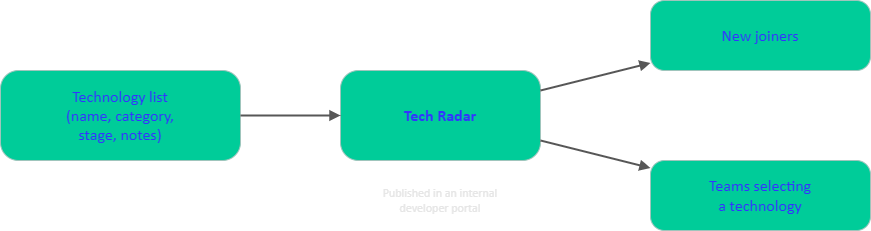
The documented data is used to create the presentable Tech Radar, which serves as a guide for the new joiners and assists in the technology selection. The Tech Radar is available through a specified URL, ensuring easy access and navigation.
The following diagram depicts how it is made. The technology list is the data, and the radar is the view of it. The same radar serves the new joiners and the teams which are selecting a technology,
What is in the data?
Each technology in the list needs a few fields to appear in the radar,
| Field | Example | Used for |
|---|---|---|
| Name | A language, framework, library, tool, service | The label of the dot |
| Category | Framework, Language, Library, Tool, Infrastructure, etc. | The quadrant |
| Stage | New, Assess, Adopt, Hold, Retire, Replace, Declined, Discontinued | The ring, or the colour |
| Notes | For example, the replacement of a technology which is moved to Hold | Extra information for the reader |
We will see the stages and the categories in detail in the Part 6.
How to read a Tech Radar?
The following diagram shows the anatomy of a radar. It is an illustrative example, the letters A to F are placeholders for the technologies,
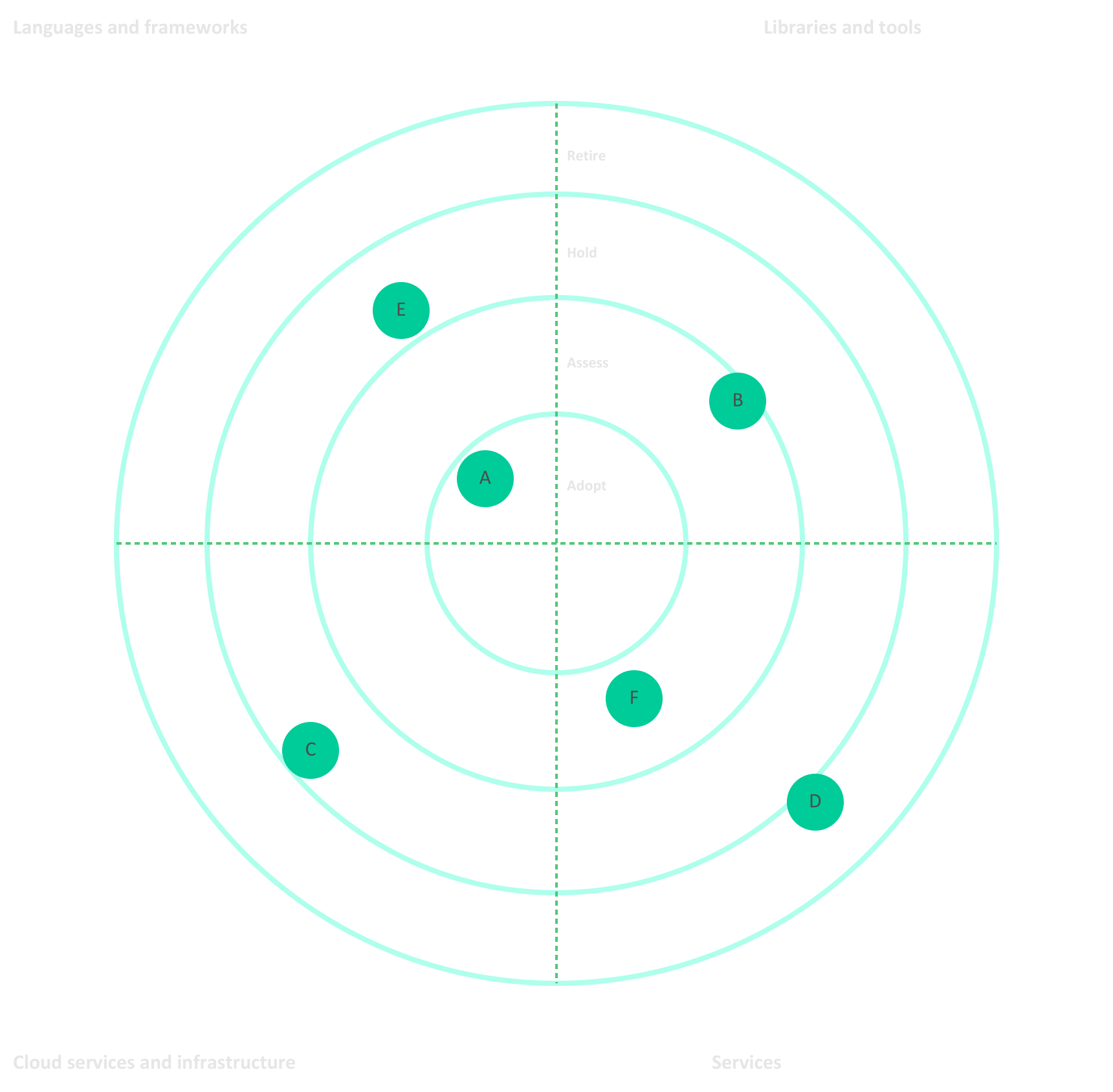
- Rings - They show the stage. The ring in the centre is the most recommended one. In this example, the rings are Adopt, Assess, Hold and Retire from the centre to the outside.
- Quadrants - They split the radar by the category, so the reader can find the technologies of the same kind together.
- Dots - Each dot is one technology, in the ring of its stage and in the quadrant of its category.
Note: The rings and the quadrants in the picture are only an example. Our technology list has more stages and categories than what a radar can show comfortably, so decide which stages are rings, and which are shown with a colour or a filter.
What is the difference between the list and the radar?
| Technology list | Tech Radar | |
|---|---|---|
| Purpose | The data and the source of truth | The view for people |
| Best for | The owner team who maintains it | New joiners and the teams who choose a technology |
| Format | A table | A chart with a way to navigate |
| Effort to read | High, when the list is long | Low, one look gives the overall picture |
The radar doesn’t replace the list. It is created from the list, and if the list is wrong, the radar is wrong.
Wrap up
In this article, we have looked at what is a Tech Radar, how it is created from the technology list, what data it needs, and how to read it. I really appreciate that you took the time to read this article. In the next article, I will walk you through why we need a Tech Radar, and what changes for the teams when it is there.
Related Posts
How to build and run a Tech Radar? Stages, categories and the assessment - Part 6
How to build and run a Tech Radar with eight lifecycle stages, the assessment steps, the categories and a run checklist.
How to implement technology governance? - Part 3
How to implement technology governance with ownership, a clear scope, version rules, a default status and a review cycle.
What is technology governance? - Part 1
What technology governance is, what it covers and what it doesn't, and why the default status of a new technology is New.