How to structure an ASP.NET MVC application? - Part 1
This article defines the Student Management System, explains the MVC pattern and shows how to split an ASP.NET MVC 4 solution into layers where the dependencies point towards the domain.
How to structure an ASP.NET MVC application? - Part 1
Most of the web applications we write start as a small CRUD (Create, Read, Update, Delete) screen, and after a year they become the biggest and the most important application of the team. A student management system is a good example, it looks like a simple list of students with an add and edit screen, but it has courses, departments, enrollments, grades, reports and many rules. If we don’t decide the structure on day one, all of this ends up in the controllers, and the application becomes hard to test and hard to change. In the previous series, Maintainable Code, we discussed the principles to avoid it. In this new series, we are going to apply those principles by building one complete application with ASP.NET MVC 4 and the .NET Framework 4.5. In this article, we are going to see what we are going to build, what is the MVC pattern, and how to structure the solution in layers.
Student Management System series:
- How to structure an ASP.NET MVC application? - Part 1 (this article)
- How does an ASP.NET MVC request work from .NET 4.0 to 4.5? - Part 2
- How does routing work, with custom, nested and area routes? - Part 3
- How to model the data with Entity Framework and LINQ? - Part 4
- How lambda expressions, extension methods, delegates and events reduce the code? - Part 5
- How to build CRUD with Razor views and dependency injection? - Part 6
- How to remove the repeated code with a base controller, base service and base repository? - Part 7
- How to build the views with layouts, partial views and HTML helpers? - Part 8
- How to use filters, model binding and validation? - Part 9
- How to add registration, login, forgot password, change password, profile and logout? - Part 10
- How to build a Web API with ASP.NET MVC 4? - Part 11
- How to test the application and keep it clean? - Part 12
TL;DR Summary
- We build a Student Management System with ASP.NET MVC 4, Entity Framework 5 and Razor on .NET Framework 4.5, using Visual Studio 2012.
- MVC separates the application into Model (data and rules), View (HTML) and Controller (the coordinator of a request).
- A controller should only coordinate, it must not hold the business rules or the data access code.
- Split the solution into projects, Domain, Services, Data and Web. The dependencies point inwards, towards the Domain.
- The Domain and the Services projects must not reference ASP.NET MVC or Entity Framework, then they can be tested alone.
- Start with the small set of must-have features, and add the others in the later iterations.
Common Challenges
Everything in the controller
In the first version, it is the fastest way to write the query, the validation and the save code inside the controller action. It works, but now the controller has many responsibilities, and the only way to test a rule is to run the web site with a database. When the same rule is required in a second screen, it is copied.
The database shapes the application
When the screens are designed from the database tables, the business rules are scattered in the stored procedures, the controllers and the views. Nobody knows where the rule “a student can’t enroll in the same course twice” really lives.
Fear of the change
When the layers are tied together, a change in the table forces a change in the controller and the view. The team becomes afraid to improve anything, and we are back to the reactive mode we discussed in the Maintainable Code series.
What are we going to build?
The Student Management System helps a college office to manage the students and their courses. Find below the features, prioritised with MoSCoW (Must, Should, Could, Won’t for now),
| Feature | MoSCoW |
|---|---|
| List the students, with search and paging | Must |
| Create, edit, view and delete a student | Must |
| List the courses of a department | Must |
| Enroll a student in a course and record the grade | Must |
| Validation messages and friendly errors | Must |
| Email notification when a student is enrolled | Should |
| Audit of who changed what | Should |
| Export the student list to a file | Could |
| Online fee payment | Won’t (for now) |
We will build the Must features completely, and a few of the Should ones to explain the delegates and events. The Won’t features are listed to remind us that we must not build them (YAGNI).
Find below the MVC features which we will explain in this series, and the article which has each of them, with the code and the screens,
| MVC feature | Article |
|---|---|
| MVC pattern, layers, solution structure | Part 1 |
| The request pipeline, Razor, the async actions of .NET 4.5 | Part 2 |
| Routing, constraints, nested routes, URL generation, areas | Part 3 |
| Entity Framework, LINQ | Part 4 |
| Lambda expressions, extension methods, delegates and events | Part 5 |
| CRUD, view models, Post-Redirect-Get, dependency injection | Part 6 |
| Base controller, base service and base repository, exceptions, common response, logs and traces | Part 7 |
| Layouts, sections, partial views, child actions, HTML helpers, templates | Part 8 |
| Filters, model binding, validation | Part 9 |
| Registration, login, logout, forgot and change password, profile | Part 10 |
| Web API, content negotiation, AJAX with jQuery | Part 11 |
| Unit tests, route tests and integration tests | Part 12 |
This is the screen of the student list which we will have at the end of this series.
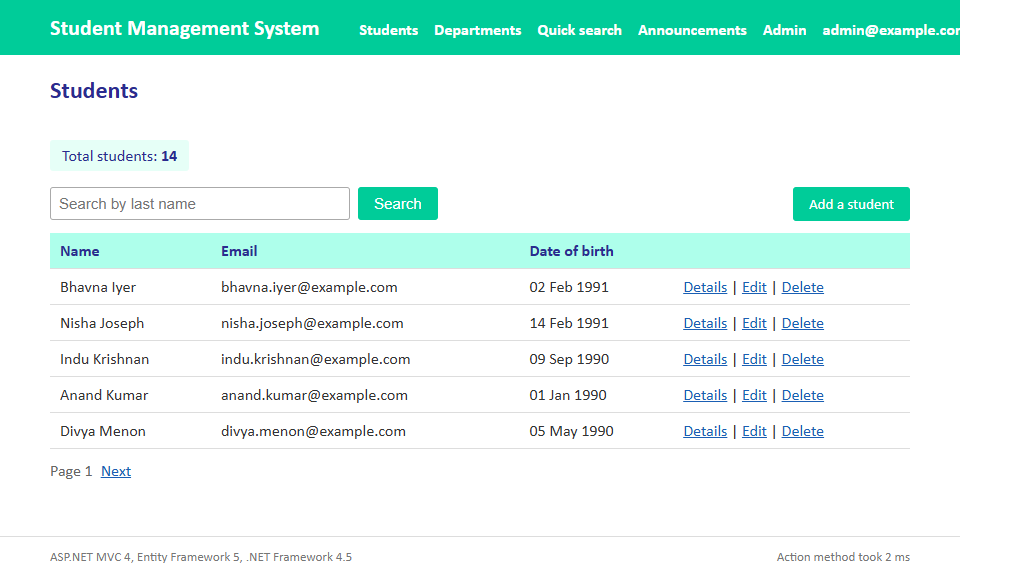
Note: This is a technical tutorial, so every article has the code and the screens of the real application. The complete source code is available in the download the sample code folder, and the code of the articles is taken from it. Part 6 shows the first, plain version of the controller and the service, and Part 7 refactors them to the final version which is in the sample. The sample builds and its tests pass, with ASP.NET MVC 4, Entity Framework 5 and the .NET Framework 4.5.
What is the MVC pattern?
Model-View-Controller (MVC) is an architectural pattern which separates an application into three parts,
- Model - The data and the business rules of the application, like the Student and the Course.
- View - The HTML which is shown to the user, it only displays the data.
- Controller - It receives the request, asks the model to do the work, and chooses the view to show the result.
In simple terms, the controller is the traffic police, it doesn’t do the work, it directs it. The following diagram depicts the flow of one request.
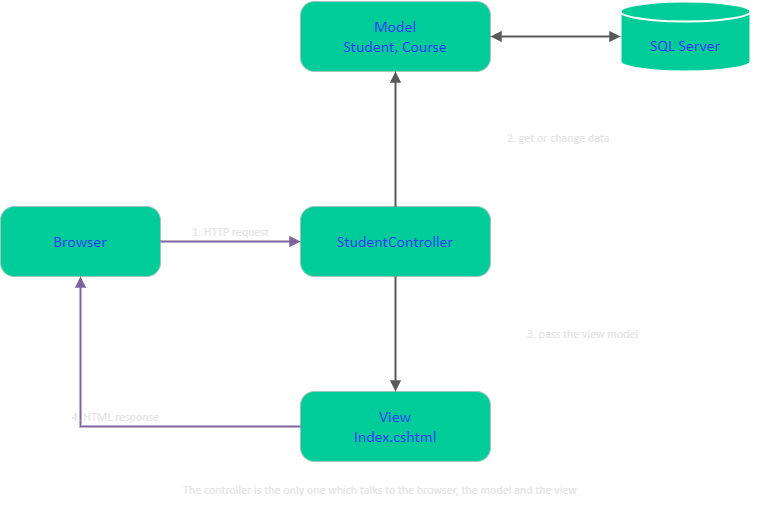
ASP.NET MVC is the implementation of this pattern on the top of the ASP.NET. A request is mapped to a controller class and an action method by the URL, so /Students/Details/5 calls the Details action with id 5 of the StudentsController. Compared to ASP.NET Web Forms, it gives us full control of the HTML, clean URLs and, most importantly, the code which is easy to test, because a controller is a normal class.
How to structure the solution?
The MVC pattern tells how to organise the web layer only. The business rules and the data access need their own place. If we keep everything in one web project, nothing stops a controller from using the DbContext directly. So we split the solution in projects, and the project references enforce the boundaries.
| Project | Responsibility | References |
|---|---|---|
| SMS.Domain | Entities and the interfaces like IStudentRepository | Nothing |
| SMS.Services | Application logic, like enrolling a student | SMS.Domain |
| SMS.Data | Entity Framework, implements the repository interfaces | SMS.Domain |
| SMS.Web | ASP.NET MVC controllers, views and the composition root | SMS.Services, SMS.Domain, SMS.Data |
| SMS.Tests | Unit tests | SMS.Domain, SMS.Services |
| SMS.IntegrationTests | Tests with the real database | All projects |
The following diagram shows the dependencies.
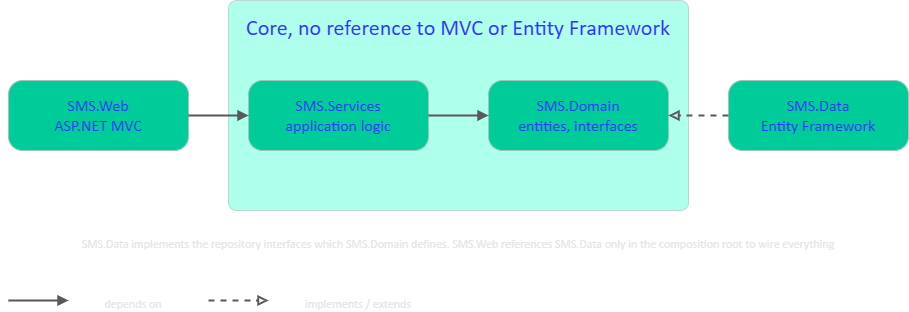
Look at the direction of the arrows. The Services depend on the Domain, and the Data project depends on the Domain by implementing its interfaces. The Domain depends on nothing. It is the Dependency Inversion Principle from Part 5 of the Maintainable Code series applied to the whole solution. This style is also known as onion or hexagonal architecture, the core is in the centre and the details like the database and the web framework are at the edge.
Must Be Aware: SMS.Web references SMS.Data, but only to wire up the objects at the start of the application (the composition root, which we will see in Part 6). A controller must never use a type from SMS.Data.
What is inside the Domain?
The Domain project holds the entities and the interfaces which the other layers need. A first look at it,
public class Student : Entity
{
    public Student()
    {
        Enrollments = new List<Enrollment>();
    }

    public string FirstName { get; set; }
    public string LastName { get; set; }
    public string Email { get; set; }
    public DateTime DateOfBirth { get; set; }
    public bool IsActive { get; set; }
    public virtual ICollection<Enrollment> Enrollments { get; set; }
}

public interface IStudentRepository
{
    IQueryable<Student> GetAll();
    Student Find(int id);
    void Add(Student student);
    void Remove(Student student);
}
We will build the Entity base class and the relationships in Part 4.
How to create the solution?
Find below the steps to create the solution in Visual Studio 2012,
- Create a blank solution called
SMS. - Add three Class Library projects,
SMS.Domain,SMS.ServicesandSMS.Data, and select the .NET Framework 4.5 as the target framework. - Add an ASP.NET MVC 4 Web Application project called
SMS.Web, and select the Empty template with the Razor view engine. We don’t need the sample code of the Internet template, we will write the code ourselves. - Add two Class Library projects for the tests,
SMS.TestsandSMS.IntegrationTests. - Add the project references as per the table above. For the
SMS.Domainno reference is required. - Install the NuGet packages,
EntityFramework5.0 inSMS.DataandSMS.Web,UnityinSMS.Web, andNUnitin the two test projects.
After this, the solution looks like this,
SMS.sln
  SMS.Domain             Entities.cs, Contracts.cs, Exceptions.cs, Logging.cs, Security.cs
  SMS.Services           StudentService.cs (BaseService), AccountService.cs, TraceLogger.cs
  SMS.Data               SchoolContext.cs (EfRepository), SchoolInitializer.cs
  SMS.Web
    App_Start            RouteConfig.cs, WebApiConfig.cs, FilterConfig.cs, Bootstrapper.cs
    Areas/Admin          AdminAreaRegistration, Controllers, Views
    Api                  StudentsController.cs (Web API)
    Controllers          Students, Departments, Courses, Announcements, Account
    Infrastructure       BaseControllers.cs, Authentication.cs, HtmlHelpers.cs, route constraint, filter, validation attribute
    Models               StudentFormModel.cs, StudentSearchModel.cs, DTOs
    Views                _ViewStart.cshtml, Shared, Students
    Content, Scripts     Site.css, jQuery
    App_Data             announcements.txt
    Global.asax          Web.config
  SMS.Tests              Fakes.cs, service, controller, routing, helper and API tests
  SMS.IntegrationTests   StudentRepositoryTests.cs, App.config
The sample folder has the same projects. You can build it with dotnet build and run it with IIS Express, refer the README file of the folder.
Which rules do we follow?
Find below the rules which we will follow in the whole series,
- Controllers coordinate only, the logic lives in the services and the entities.
- The Domain and the Services must not reference System.Web.Mvc or System.Data.Entity.
- Every dependency comes through the constructor and is an interface.
- Every rule has a unit test, and every query has an integration test.
- Add a feature only when it is on the list.
Wrap up
In this article, we have looked at what the Student Management System does, the MVC pattern, and how to split the solution into layers where the dependencies point towards the Domain. I really appreciate that you took the time to read this article. In the next article, I will walk you through what exactly happens inside ASP.NET MVC when a request arrives, and what is different between the .NET Framework 4.0 and 4.5.
Related Posts
How does an ASP.NET MVC request work from .NET 4.0 to 4.5? - Part 2
This article follows one ASP.NET MVC request from routing to the Razor view, and explains what changes between .NET 4.0 and 4.5, mainly the async actions.
How to build a Web API with ASP.NET MVC 4? - Part 11
This article builds an ASP.NET Web API for students on the same service, with routing, status codes, content negotiation, validation, dependency injection and a jQuery client.
How to build CRUD with Razor views and dependency injection? - Part 6
This article builds the student list, create, edit, details and delete screens with a service layer, view models, validation, Post-Redirect-Get and dependency injection with Unity.