How to add registration, login, forgot password, change password, profile and logout? - Part 10
This article adds registration, login, logout, forgot password, change password and a profile page, with salted password hashes, account lock, one-time reset tokens and a testable design.
How to add registration, login, forgot password, change password, profile and logout? - Part 10
Until now every screen of our application was open to anybody who knew the URL. A student management system has the names, the emails and the grades of the people, so the first question of any college office is “who can see this?”. The users must register, log in, change a forgotten password without calling the support, see their profile and log out. These look like simple screens, but each of them has a security trap, a password which is stored as plain text, an error message which tells which emails exist, a reset link which never expires, a login page which sends the user to another site. In the previous articles, we built the screens, the base classes, the filters and the validation. In this article, we are going to add the registration, the login, the forgot password, the change password, the profile and the logout, in a way which is usable on the screen and testable in the unit tests, and we will see the security decisions behind each step.
Student Management System series:
- How to structure an ASP.NET MVC application? - Part 1
- How does an ASP.NET MVC request work from .NET 4.0 to 4.5? - Part 2
- How does routing work, with custom, nested and area routes? - Part 3
- How to model the data with Entity Framework and LINQ? - Part 4
- How lambda expressions, extension methods, delegates and events reduce the code? - Part 5
- How to build CRUD with Razor views and dependency injection? - Part 6
- How to remove the repeated code with a base controller, base service and base repository? - Part 7
- How to build the views with layouts, partial views and HTML helpers? - Part 8
- How to use filters, model binding and validation? - Part 9
- How to add registration, login, forgot password, change password, profile and logout? - Part 10 (this article)
- How to build a Web API with ASP.NET MVC 4? - Part 11
- How to test the application and keep it clean? - Part 12
TL;DR Summary
- The application uses the ASP.NET forms authentication. After a successful login, the server gives a signed cookie, and every next request is signed in by that cookie.
- A global
[Authorize]filter protects all the controllers, and[AllowAnonymous]opens only the login, register, forgot password and reset password actions. - Never store a password. Store a salted hash, we use PBKDF2 with a random salt for each password, and verify it in a constant time.
- The login says only “the email or the password is not correct”, for both the unknown email and the wrong password, so nobody can find which emails have an account. The account is locked for 15 minutes after 5 wrong passwords.
- The forgot password sends a link with a random token. Only the hash of the token is stored, the token is valid for one hour and it can be used once. The page gives the same answer for every email.
- Use the
returnUrlonly when it is a local URL, and make the logout aPOSTwith the anti-forgery token. - Everything is behind interfaces (
IPasswordHasher,IClock,IEmailSender,IAuthenticator), so the lock time, the token expiry and the email can be tested without waiting or a mail server.
Common Challenges
Passwords which can be read
A table with a password column which has the real passwords gives all the passwords to anybody who gets a copy of the database, and the people use the same password at many sites.
Messages which help the attacker
“There is no user with this email” and “The password is wrong” are two different messages, and a script can try thousands of emails and keep the ones which exist.
Reset links which live for ever
A reset link which doesn’t expire, or which can be used again, is another password for the account, which sits in an old email.
A login which cannot be tested
When the login code calls FormsAuthentication, the clock and the SMTP directly, a test for “the account is locked for 15 minutes” has to wait 15 minutes, and a test for the email needs a mail server.
How the authentication works
The flow of the ASP.NET forms authentication is simple. The user posts the email and the password, our code checks them, and if they are right, the framework writes an encrypted and signed cookie (.SMSAUTH). The cookie has only the name of the user, it doesn’t have the password. On the next requests, the FormsAuthenticationModule reads the cookie and sets User.Identity before our code runs. The following diagram shows how a protected page and the login work together.
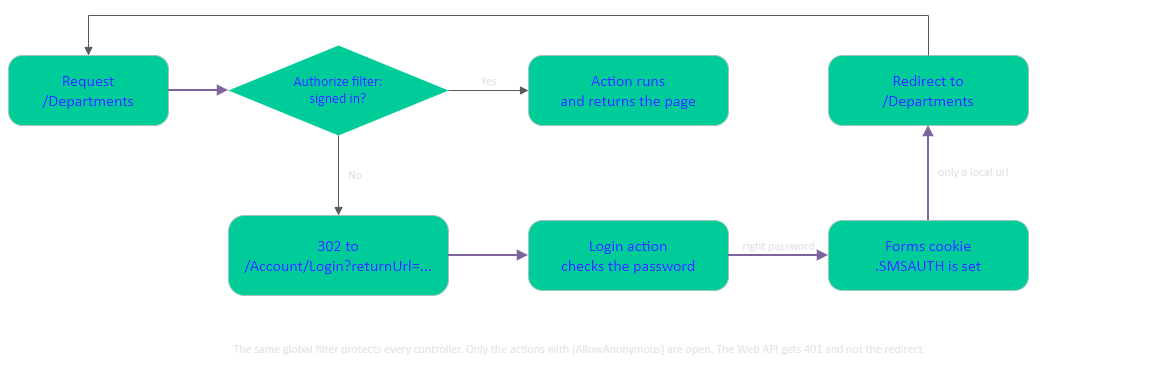
The configuration is in the Web.config, the loginUrl is where the unauthenticated users are sent,
<system.web>
  <authentication mode="Forms">
    <forms name=".SMSAUTH" loginUrl="~/Account/Login" timeout="30" slidingExpiration="true" />
  </authentication>
  ...
</system.web>
The slidingExpiration extends the cookie while the user is active. For a real site, add requireSSL="true", so the cookie is sent over HTTPS only. We don’t set it, because the sample runs on a local HTTP address.
Protecting everything by default
The safe way is to close everything and open the few pages, and not to remember to close each page. A global filter (Part 9) does it,
public static class FilterConfig
{
    public static void RegisterGlobalFilters(GlobalFilterCollection filters)
    {
        filters.Add(new AuthorizeAttribute());
        filters.Add(new ActionTimerAttribute());
    }
}
Now every action of every controller needs a signed in user, including the ones which we will write next year. A new controller is protected without anybody remembering to do it. The few open actions say it with [AllowAnonymous], which is in the MVC 4. Without the cookie, a request to /Students is redirected to /Account/Login?ReturnUrl=%2fStudents, and the Web API gets 401. The forms authentication would also turn the 401 of the API into the redirect to the login page, which is wrong for a client which is not a browser, so the API has its own attribute,
// The Web API answers 401 and not the redirect to the login page of the forms authentication
public class ApiAuthorizeAttribute : System.Web.Http.AuthorizeAttribute
{
    protected override void HandleUnauthorizedRequest(HttpActionContext actionContext)
    {
        if (HttpContext.Current != null)
            HttpContext.Current.Response.SuppressFormsAuthenticationRedirect = true;

        base.HandleUnauthorizedRequest(actionContext);
    }
}
The SuppressFormsAuthenticationRedirect is a property of the .NET Framework 4.5, which is another reason to use 4.5. It is registered in the WebApiConfig with config.Filters.Add(new ApiAuthorizeAttribute()). The Quick search screen of Part 11 still works, because the browser sends the login cookie with its AJAX call.
Storing the passwords
The User entity has the fields which the account features need. Look at the first ones, there is no Password field, only the PasswordHash,
public class User : Entity
{
    public string Email { get; set; }
    public string DisplayName { get; set; }
    public string PasswordHash { get; set; }
    public int FailedLogins { get; set; }
    public DateTime? LockedUntil { get; set; }
    public DateTime? LastLoginOn { get; set; }
    public string ResetTokenHash { get; set; }
    public DateTime? ResetTokenExpiresOn { get; set; }
}
A hash is a one-way function, we can check a password against it but we can’t get the password back. A fast hash like MD5 or SHA1 is not good for the passwords, because an attacker with a copy of the table can try billions of guesses in a second. A good password hash is slow on purpose and has a salt, a random value for each password, so two users with the same password have different hashes. The .NET has the PBKDF2 in the Rfc2898DeriveBytes class, and we use it behind an interface,
public interface IPasswordHasher
{
    string Hash(string password);
    bool Verify(string password, string hash);
}

// PBKDF2 with a random salt for each password, the stored text is iterations.salt.hash
public class Pbkdf2PasswordHasher : IPasswordHasher
{
    private const int Iterations = 10000;
    private const int SaltSize = 16;
    private const int HashSize = 32;

    public string Hash(string password)
    {
        var salt = new byte[SaltSize];
        using (var random = new RNGCryptoServiceProvider())
            random.GetBytes(salt);

        return Iterations + "." + Convert.ToBase64String(salt) + "." + Convert.ToBase64String(Compute(password, salt, Iterations));
    }

    public bool Verify(string password, string hash)
    {
        if (string.IsNullOrEmpty(password) || string.IsNullOrEmpty(hash))
            return false;

        var parts = hash.Split('.');
        int iterations;
        if (parts.Length != 3 || !int.TryParse(parts[0], out iterations))
            return false;

        var expected = Convert.FromBase64String(parts[2]);
        var actual = Compute(password, Convert.FromBase64String(parts[1]), iterations);

        // the time does not depend on the position of the first different byte
        var difference = expected.Length ^ actual.Length;
        for (var i = 0; i < expected.Length && i < actual.Length; i++)
            difference |= expected[i] ^ actual[i];

        return difference == 0;
    }

    private static byte[] Compute(string password, byte[] salt, int iterations)
    {
        using (var pbkdf2 = new Rfc2898DeriveBytes(password, salt, iterations))
            return pbkdf2.GetBytes(HashSize);
    }
}
The stored text has the number of iterations, the salt and the hash, separated by dots. The iterations are in the text, so we can increase the number in the future, and the old passwords are still verified with their own number. The comparison loop doesn’t stop at the first different byte, because the time of a normal comparison tells an attacker how many bytes were right. The RNGCryptoServiceProvider is the cryptographic random generator, the System.Random is predictable and must never be used for the salts and the tokens.
The password rules are in one place, and the service uses them for the registration, the change and the reset,
public static class PasswordPolicy
{
    public const int MinimumLength = 8;

    public static void Check(string password)
    {
        if (string.IsNullOrEmpty(password) || password.Length < MinimumLength || !password.Any(char.IsLetter) || !password.Any(char.IsDigit))
            throw new BusinessRuleException("The password must have at least " + MinimumLength + " characters, with a letter and a digit");
    }
}
The unit tests prove the hasher and the policy,
[Test]
public void Verify_AcceptsTheRightPasswordOnly()
{
    var hasher = new Pbkdf2PasswordHasher();
    var hash = hasher.Hash("Passw0rd1");

    Assert.IsTrue(hasher.Verify("Passw0rd1", hash));
    Assert.IsFalse(hasher.Verify("Passw0rd2", hash));
}

[Test]
public void Hash_UsesANewSaltForEachPassword()
{
    var hasher = new Pbkdf2PasswordHasher();

    Assert.AreNotEqual(hasher.Hash("Passw0rd1"), hasher.Hash("Passw0rd1"));
}

[TestCase("short1")]
[TestCase("onlyletters")]
[TestCase("12345678")]
public void PasswordPolicy_RejectsAWeakPassword(string password)
{
    Assert.Throws<BusinessRuleException>(() => PasswordPolicy.Check(password));
}
The account service
All the rules of the accounts are in one service, which derives from the BaseService of Part 7, so every operation is logged and timed, and the rule errors are the BusinessRuleException which the base controller shows. The service gets the things which are hard to test from outside, the hasher, the clock and the email sender,
public interface IClock { DateTime UtcNow { get; } }

public interface IEmailSender { void Send(string to, string subject, string body); }

public interface IAccountService
{
    int Register(string displayName, string email, string password);
    User Authenticate(string email, string password);
    void ChangePassword(int userId, string currentPassword, string newPassword);
    void RequestPasswordReset(string email, Func<string, string> createLink);
    void ResetPassword(string token, string newPassword);
    User FindByEmail(string email);
    void UpdateProfile(int userId, string displayName);
}
The RequestPasswordReset takes the createLink as a lambda expression, because only the web layer knows the URLs, and the service must not know about the MVC. We will see how it is used. Let us go through the features one by one, with the screens.
Registration
The user types the name, the email and the password twice. The model has the data annotations of Part 9, and the Compare attribute checks the confirmation,
public class RegisterModel
{
    [Required, StringLength(50)]
    [Display(Name = "Your name")]
    public string DisplayName { get; set; }

    [Required, EmailAddress, StringLength(256)]
    public string Email { get; set; }

    [Required, DataType(DataType.Password), StringLength(100, MinimumLength = 8)]
    public string Password { get; set; }

    [DataType(DataType.Password), Compare("Password", ErrorMessage = "The password and the confirmation are not same")]
    [Display(Name = "Confirm password")]
    public string ConfirmPassword { get; set; }
}
The action is the same shape as the create screen of Part 6, with the Execute of the base controller. The new user is signed in at once, so he doesn’t have to log in again,
[HttpPost, AllowAnonymous, ValidateAntiForgeryToken]
public ActionResult Register(RegisterModel model)
{
    return Execute(() =>
    {
        if (!ModelState.IsValid)
            return View(model);

        _accounts.Register(model.DisplayName, model.Email, model.Password);
        _authenticator.SignIn(model.Email.Trim().ToLowerInvariant(), false);

        return Success("Welcome, your account is created", RedirectToAction("Index", "Students"));
    },
    ex => ShowError(ex, model));
}
The IAuthenticator is a very small interface over the FormsAuthentication, and it is the reason why the controller can be unit tested without a web server,
public interface IAuthenticator
{
    void SignIn(string email, bool persistent);
    void SignOut();
}

public class FormsAuthenticator : IAuthenticator
{
    public void SignIn(string email, bool persistent)
    {
        FormsAuthentication.SetAuthCookie(email, persistent);
    }

    public void SignOut()
    {
        FormsAuthentication.SignOut();
    }
}
The service does the real work. The email is normalised to the lower case, so Anand@Example.com and anand@example.com are the same account, the password policy is checked, and the duplicate email is the business rule,
public int Register(string displayName, string email, string password)
{
    return Execute("Register", () =>
    {
        email = Normalize(email);
        PasswordPolicy.Check(password);

        if (_users.GetAll().Any(u => u.Email == email))
            throw new BusinessRuleException("An account with the email " + email + " already exists");

        var user = new User
        {
            Email = email,
            DisplayName = displayName.Trim(),
            PasswordHash = _hasher.Hash(password),
            CreatedOn = _clock.UtcNow
        };
        _users.Add(user);
        _unitOfWork.Commit();
        return user.Id;
    });
}
Two requests at the same time can both pass the check of the duplicate email. The database is the last guard, the Seed method of our initializer creates a unique index on the email, CREATE UNIQUE INDEX IX_Users_Email ON Users (Email), and the second insert fails with the DataAccessException of Part 7. An integration test proves it,
[Test]
public void Commit_WithTheSameEmailTwice_ThrowsADataAccessException()
{
    var users = new UserRepository(_context, new NullLogger());
    users.Add(NewUser("same@example.com"));
    users.Add(NewUser("same@example.com"));

    Assert.Throws<DataAccessException>(() => new UnitOfWork(_context, new NullLogger()).Commit());
}
The first screen is the one which a user sees when he opens a page without the login. This is the login page with the ReturnUrl in the address, and below it the registration. The registration was taken with the JavaScript disabled, so the messages come from the server,
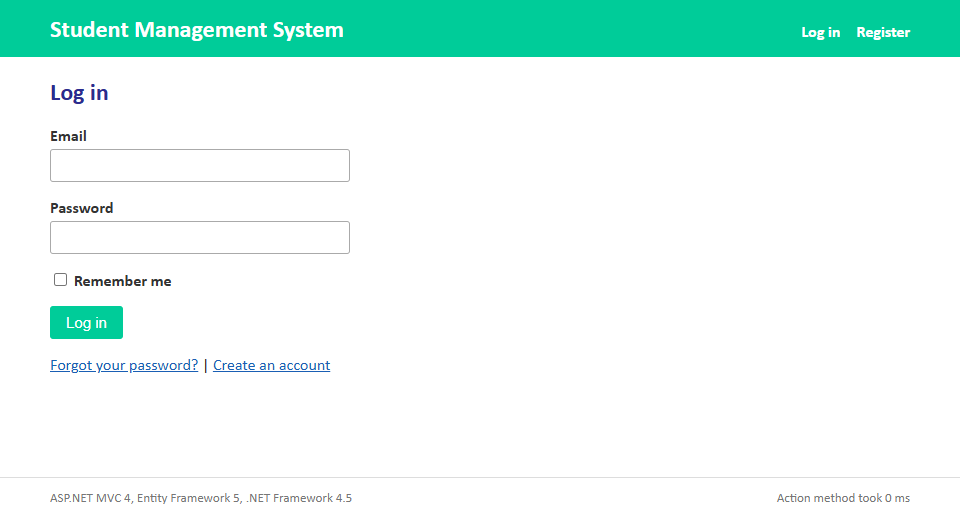
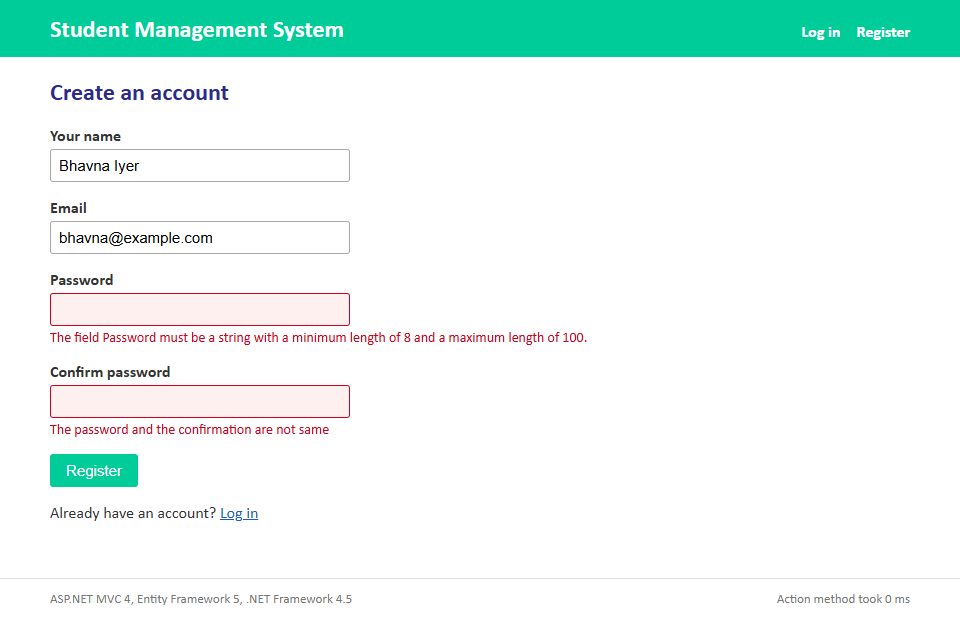
After the successful registration, the user is signed in. Note that the menu is different now, it has the name of the user, which is the link to the profile, and the Log out button,
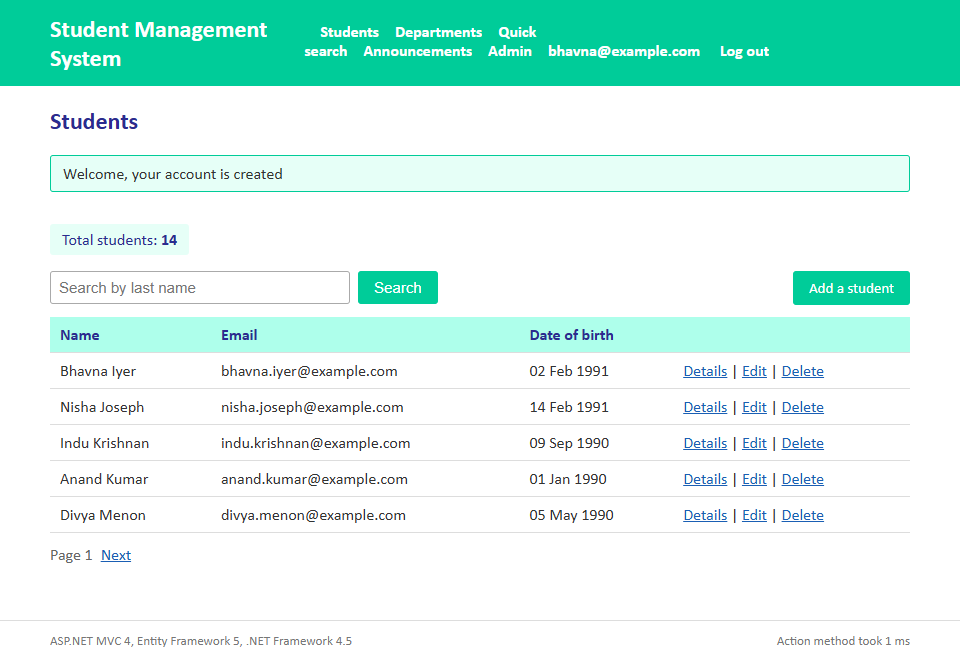
The menu of the layout depends on Request.IsAuthenticated. An anonymous user sees only the Log in and the Register links,
<nav>
    @if (Request.IsAuthenticated)
    {
        @Html.ActionLink("Students", "Index", "Students", new { area = "" }, null)
        ...
        @Html.ActionLink(User.Identity.Name, "Profile", "Account", new { area = "" }, new { title = "Your profile" })
        using (Html.BeginForm("Logout", "Account", new { area = "" }, FormMethod.Post, new { id = "logout" }))
        {
            @Html.AntiForgeryToken()
            <button type="submit" class="linklike">Log out</button>
        }
    }
    else
    {
        @Html.ActionLink("Log in", "Login", "Account", new { area = "" }, null)
        @Html.ActionLink("Register", "Register", "Account", new { area = "" }, null)
    }
</nav>
Login
The login is the most attacked page of any site, so the rules of the service are strict. It never tells which part was wrong, and it counts the failures,
public User Authenticate(string email, string password)
{
    return Execute("Authenticate", () =>
    {
        var user = FindUser(email);
        if (user == null)
            throw new BusinessRuleException(InvalidLogin);

        if (user.LockedUntil.HasValue && user.LockedUntil.Value > _clock.UtcNow)
            throw new BusinessRuleException("The account is locked for some minutes, because of too many wrong passwords. Try again later");

        if (!_hasher.Verify(password, user.PasswordHash))
        {
            user.FailedLogins++;
            if (user.FailedLogins >= MaxFailedLogins)
            {
                user.LockedUntil = _clock.UtcNow.Add(LockDuration);
                user.FailedLogins = 0;
                Logger.Warn("The account {0} is locked until {1:HH:mm:ss}", user.Email, user.LockedUntil);
            }

            _unitOfWork.Commit();
            throw new BusinessRuleException(InvalidLogin);
        }

        user.FailedLogins = 0;
        user.LockedUntil = null;
        user.LastLoginOn = _clock.UtcNow;
        _unitOfWork.Commit();
        return user;
    });
}
InvalidLogin is the constant text “The email or the password is not correct”, which is used for both the unknown email and the wrong password. After five wrong passwords the account is locked for 15 minutes (LockDuration), which makes the guessing of a password very slow. Note that the failed count is committed before the exception is thrown, otherwise the transaction of the failed login would be lost and nothing would be counted. The lock has a cost, an attacker can lock the account of somebody else on purpose. For this application the cost is acceptable, and it is the reason why the lock is short and why it is released by a successful password reset.
The tests don’t wait 15 minutes, because the clock is a fake and the test moves it,
[Test]
public void Authenticate_LocksTheAccountAfterTooManyWrongPasswords()
{
    Register();
    for (var i = 0; i < AccountService.MaxFailedLogins; i++)
        Assert.Throws<BusinessRuleException>(() => _service.Authenticate("anand@example.com", "Wrong1234"));

    var ex = Assert.Throws<BusinessRuleException>(() => _service.Authenticate("anand@example.com", "Passw0rd1"));

    StringAssert.Contains("locked", ex.Message);
}

[Test]
public void Authenticate_AfterTheLockTime_WorksAgain()
{
    Register();
    for (var i = 0; i < AccountService.MaxFailedLogins; i++)
        Assert.Throws<BusinessRuleException>(() => _service.Authenticate("anand@example.com", "Wrong1234"));

    _clock.UtcNow = _clock.UtcNow.Add(AccountService.LockDuration).AddMinutes(1);

    Assert.IsNotNull(_service.Authenticate("anand@example.com", "Passw0rd1"));
}

[Test]
public void Authenticate_GivesTheSameMessageForAWrongPasswordAndAnUnknownEmail()
{
    Register();

    var wrongPassword = Assert.Throws<BusinessRuleException>(() => _service.Authenticate("anand@example.com", "Wrong1234"));
    var unknownEmail = Assert.Throws<BusinessRuleException>(() => _service.Authenticate("nobody@example.com", "Passw0rd1"));

    Assert.AreEqual(wrongPassword.Message, unknownEmail.Message);
}
The controller signs the user in and goes back to the page which he wanted. The returnUrl comes from the address and an attacker can put any address in it, so we follow only the local ones,
[HttpPost, AllowAnonymous, ValidateAntiForgeryToken]
public ActionResult Login(LoginModel model, string returnUrl)
{
    ViewBag.ReturnUrl = returnUrl;

    return Execute(() =>
    {
        if (!ModelState.IsValid)
            return View(model);

        var user = _accounts.Authenticate(model.Email, model.Password);
        _authenticator.SignIn(user.Email, model.RememberMe);

        return RedirectToLocal(returnUrl);
    },
    ex =>
    {
        model.Password = null;
        return ShowError(ex, model);
    });
}

// Only the URLs of our own site are accepted, otherwise the login page could send the user to another site
private ActionResult RedirectToLocal(string returnUrl)
{
    if (!string.IsNullOrEmpty(returnUrl) && Url.IsLocalUrl(returnUrl))
        return Redirect(returnUrl);

    return RedirectToAction("Index", "Students");
}
Without the IsLocalUrl check, a link like /Account/Login?returnUrl=http://evil.example.com/ would send the user to a copy of our site after he typed the real password, which is an open redirect. The form of the login view keeps the returnUrl with Html.BeginForm(new { returnUrl = ViewBag.ReturnUrl }), and the Remember me check box decides if the cookie lives after the browser is closed (persistent). The screens, the wrong password and the locked account,
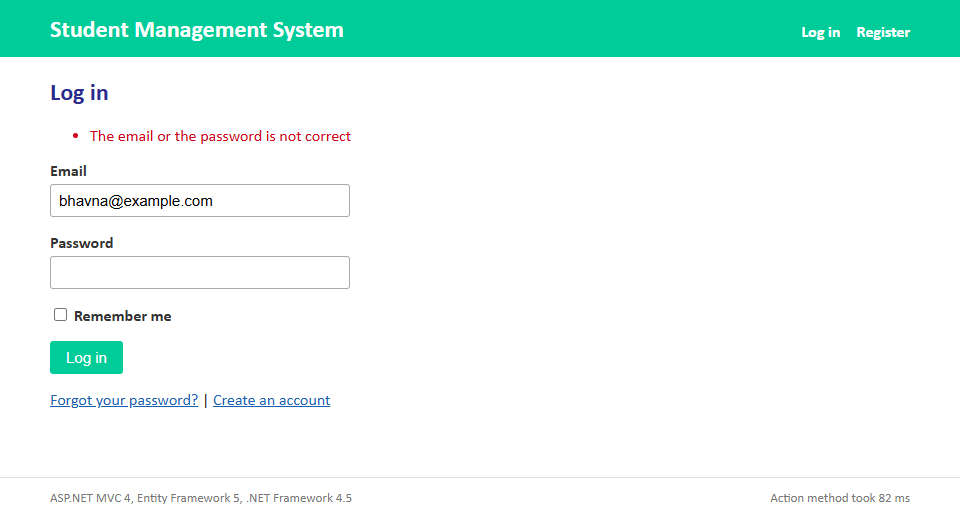
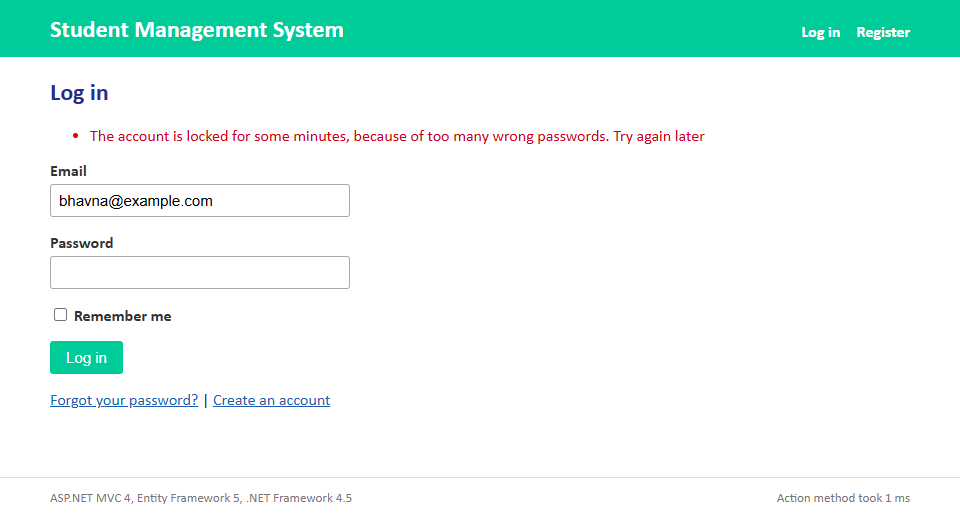
The login with a returnUrl goes back to the page which the user wanted, /Departments in our test, and not to the home page. The controller tests prove it, and also that the external address is ignored,
[Test]
public void Login_WithALocalReturnUrl_GoesBackThere()
{
    var result = _controller.Login(new LoginModel { Email = "anand@example.com", Password = "Passw0rd1" }, "/Departments") as RedirectResult;

    Assert.IsNotNull(result);
    Assert.AreEqual("/Departments", result.Url);
}

[Test]
public void Login_WithAnExternalReturnUrl_IgnoresIt()
{
    var result = _controller.Login(new LoginModel { Email = "anand@example.com", Password = "Passw0rd1" }, "http://evil.example.com/") as RedirectToRouteResult;

    Assert.IsNotNull(result);
    Assert.AreEqual("Students", result.RouteValues["controller"]);
}
Logout
The logout changes the state (the cookie is removed), so it is a POST with the anti-forgery token, as the delete of Part 6. If it was a GET link, any page could log the users out by an image tag which points to the logout address. It is the Log out button in the menu above, which is a one button form,
// The sign out changes the state, so it is a POST with the anti-forgery token
[HttpPost, ValidateAntiForgeryToken]
public ActionResult Logout()
{
    _authenticator.SignOut();
    return RedirectToAction("Login");
}
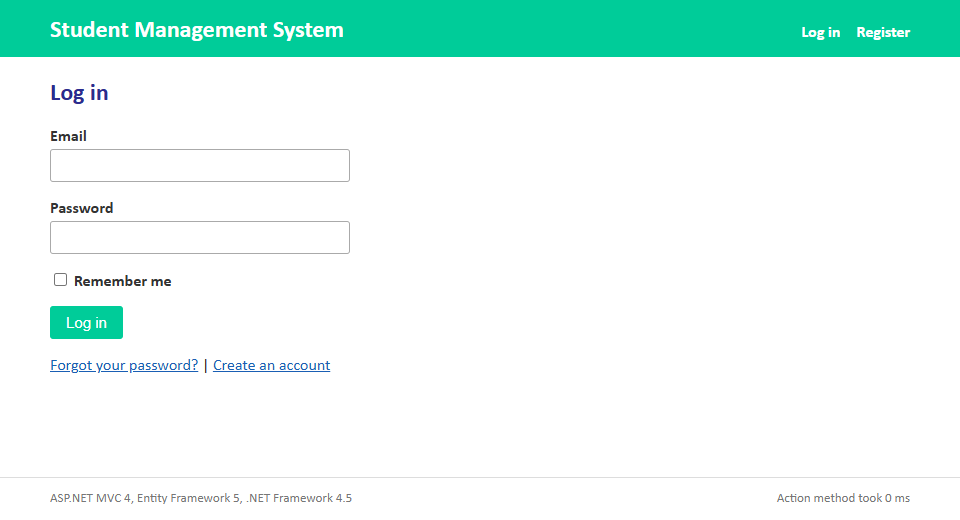
After the logout, the same protected URL goes to the login page again, which we saw in the test flow (/Students redirects to /Account/Login?ReturnUrl=%2fStudents).
Forgot password and reset password
Nobody can read a password back from the hash, so a user who forgot it needs a new one. The usual way is the email with a link. The security of the whole feature is in the details of the token. The following diagram shows the steps.
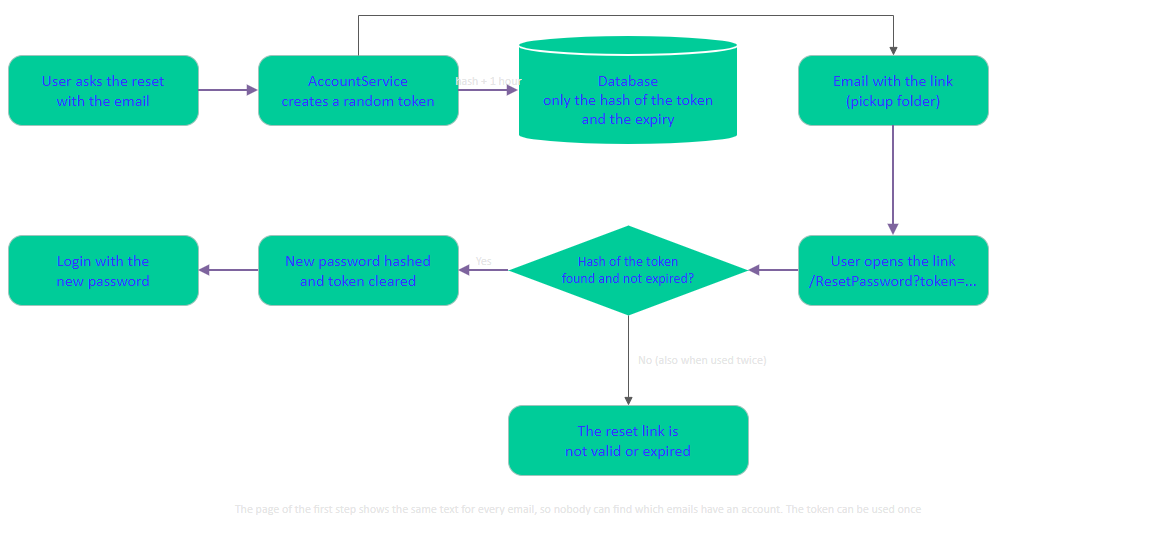
The first page asks the email, and the answer is the same for every email. If the page said “no account with this email”, it would be the same leak as in the login,
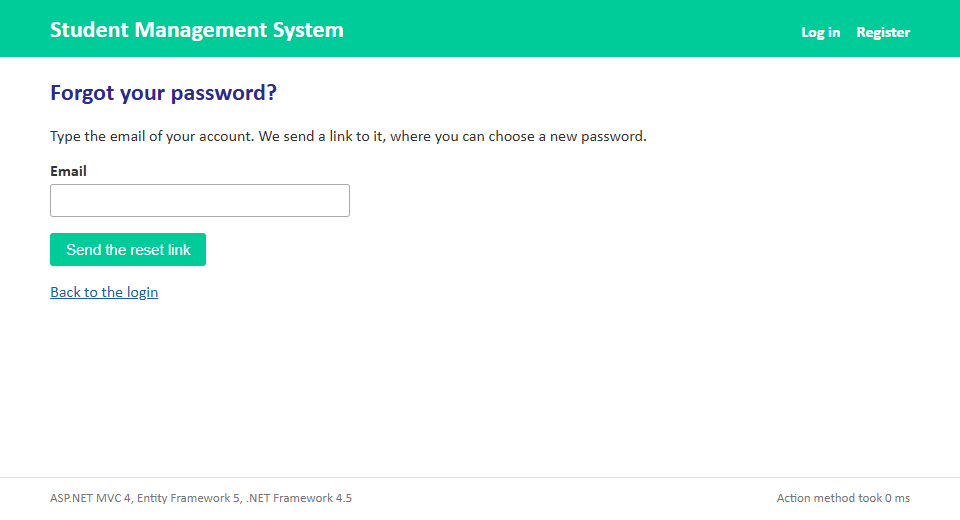
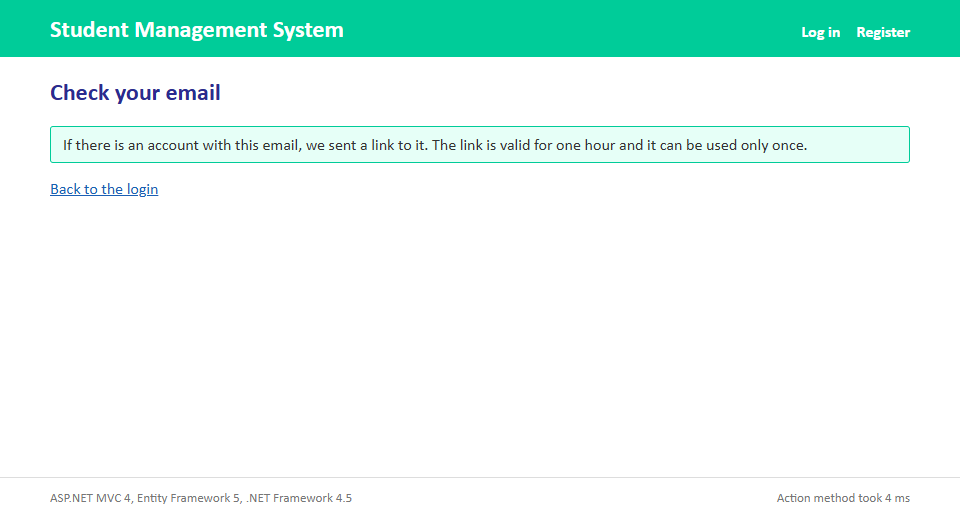
The controller gives the service a lambda which knows how to build the link of this site with the token. The service doesn’t know the routes,
[HttpPost, AllowAnonymous, ValidateAntiForgeryToken]
public ActionResult ForgotPassword(ForgotPasswordModel model)
{
    return Execute(() =>
    {
        if (!ModelState.IsValid)
            return View(model);

        // The same answer for every email, the page doesn't tell which emails have an account
        _accounts.RequestPasswordReset(model.Email,
            token => Url.Action("ResetPassword", "Account", new { token = token }, Request.Url.Scheme));

        return View("ForgotPasswordSent");
    });
}
The Url.Action with the Request.Url.Scheme builds the full address, http://host/Account/ResetPassword?token=.... The service makes the token, stores its hash with the expiry, and sends the email,
public void RequestPasswordReset(string email, Func<string, string> createLink)
{
    Execute("RequestPasswordReset", () =>
    {
        var user = FindUser(email);
        if (user == null)
        {
            Logger.Info("A password reset was requested for an unknown email");
            return;
        }

        var token = CreateToken();
        user.ResetTokenHash = HashToken(token);
        user.ResetTokenExpiresOn = _clock.UtcNow.Add(ResetTokenLifetime);
        _unitOfWork.Commit();

        _email.Send(user.Email, "Reset your password",
            "Hello " + user.DisplayName + ",\r\n\r\n" +
            "Use this link to choose a new password. It is valid for one hour and it can be used only once:\r\n\r\n" +
            createLink(token) + "\r\n\r\n" +
            "If you did not ask for it, ignore this email, your password is not changed.");
    });
}

// 32 random bytes, in the characters which are safe in a URL
private static string CreateToken()
{
    var bytes = new byte[32];
    using (var random = new RNGCryptoServiceProvider())
        random.GetBytes(bytes);

    return Convert.ToBase64String(bytes).Replace('+', '-').Replace('/', '_').TrimEnd('=');
}

// Only the hash of the token is stored, so a copy of the database can't be used to reset the passwords
private static string HashToken(string token)
{
    using (var sha = SHA256.Create())
        return Convert.ToBase64String(sha.ComputeHash(Encoding.UTF8.GetBytes(token)));
}
The token is 32 random bytes, and nobody can guess it. The database has only the SHA256 hash of it, the same idea as the password hash. A fast hash is enough for the token, because the token is random and long, there is nothing to guess. The email is sent by the IEmailSender. The sample uses the SmtpClient with the SpecifiedPickupDirectory delivery, which writes the email as a .eml file in the App_Data/emails folder, so we need no mail server, and the same code works with a real SMTP server when the DeliveryMethod is changed in the configuration,
public class PickupEmailSender : IEmailSender
{
    private readonly string _folder;
    private readonly string _from;

    public PickupEmailSender(string folder, string from = "noreply@sms.example.com")
    {
        _folder = folder;
        _from = from;
    }

    public void Send(string to, string subject, string body)
    {
        Directory.CreateDirectory(_folder);

        using (var client = new SmtpClient())
        {
            client.DeliveryMethod = SmtpDeliveryMethod.SpecifiedPickupDirectory;
            client.PickupDirectoryLocation = _folder;
            client.Send(new MailMessage(_from, to, subject, body));
        }
    }
}
This is the real email file which the test flow produced. The long lines are wrapped by the quoted-printable encoding (= at the end of a line, and =3D is the = character), which any mail client decodes,
From: noreply@sms.example.com
To: bhavna@example.com
Subject: Reset your password
Content-Type: text/plain; charset=us-ascii
Content-Transfer-Encoding: quoted-printable

Hello Bhavna Iyer-Nair,

Use this link to choose a new password. It is valid for one hour and it can be used only once:

http://localhost:8099/Account/ResetPassword?token=6ViQHoOK7P4b935UdMWk7K31vEdVcVpydsbT8Sj8NaU

If you did not ask for it, ignore this email, your password is not changed.
The link opens the reset page with the token in a hidden field. The user chooses the new password,
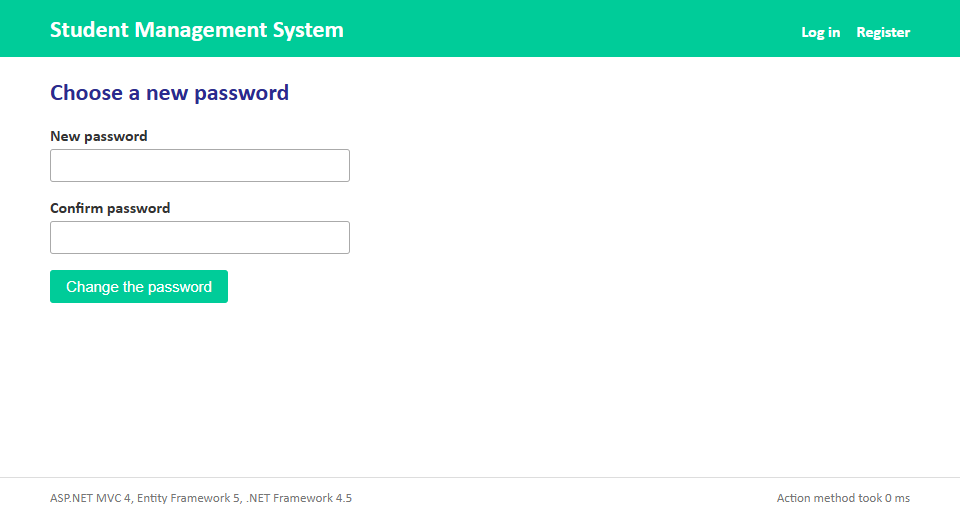
The service finds the user by the hash of the token, and checks the expiry. After the change the token is cleared, so the link works only once. It also clears the failed logins and the lock, a user who forgot the password because he was locked out is free again,
public void ResetPassword(string token, string newPassword)
{
    Execute("ResetPassword", () =>
    {
        PasswordPolicy.Check(newPassword);

        var hash = HashToken(token ?? string.Empty);
        var user = _users.GetAll().FirstOrDefault(u => u.ResetTokenHash == hash);
        if (user == null || !user.ResetTokenExpiresOn.HasValue || user.ResetTokenExpiresOn.Value < _clock.UtcNow)
            throw new BusinessRuleException("The reset link is not valid or it is expired. Ask for a new one");

        user.PasswordHash = _hasher.Hash(newPassword);
        user.ResetTokenHash = null;
        user.ResetTokenExpiresOn = null;
        user.FailedLogins = 0;
        user.LockedUntil = null;
        _unitOfWork.Commit();
    });
}
The result after the change is the login page with the message, and the second use of the same link shows the error,
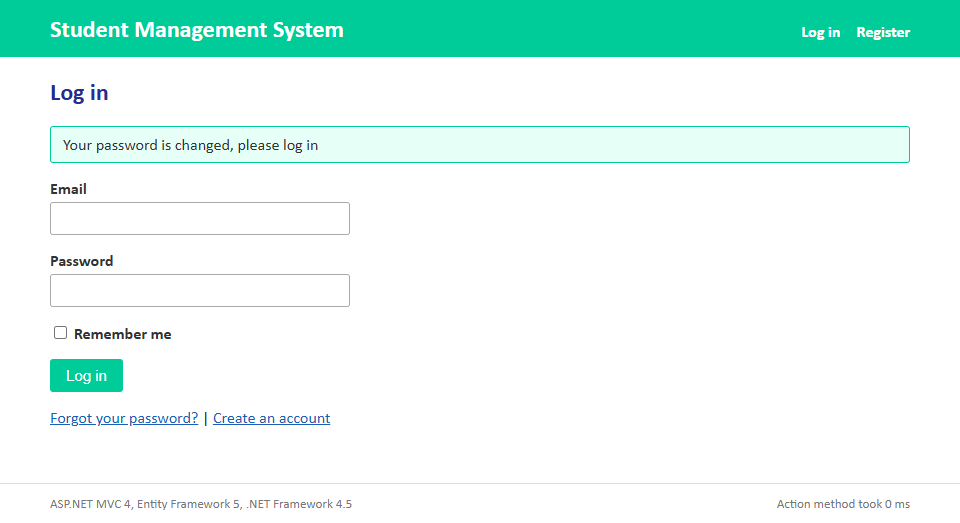
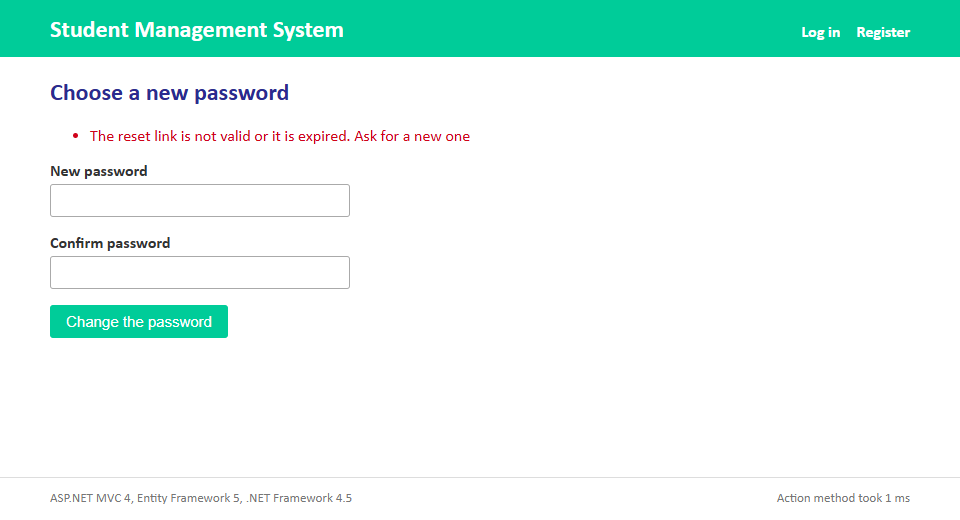
The tests cover the cases which are the most important for the security, and none of them waits for an hour or needs a mail server,
[Test]
public void RequestPasswordReset_SendsTheLinkAndStoresOnlyTheHashOfTheToken()
{
    Register();
    string token = null;

    _service.RequestPasswordReset("anand@example.com", t => { token = t; return "http://site/Account/ResetPassword?token=" + t; });

    Assert.AreEqual(1, _email.Sent.Count);
    Assert.AreEqual("anand@example.com", _email.Sent[0][0]);
    StringAssert.Contains("http://site/Account/ResetPassword?token=" + token, _email.Sent[0][2]);
    Assert.AreNotEqual(token, _users.Users[0].ResetTokenHash);
}

[Test]
public void RequestPasswordReset_ForAnUnknownEmail_SendsNothingAndDoesNotFail()
{
    _service.RequestPasswordReset("nobody@example.com", t => "link");

    Assert.AreEqual(0, _email.Sent.Count);
}

[Test]
public void ResetPassword_WithTheToken_ChangesThePasswordAndTheTokenWorksOnlyOnce()
{
    Register();
    var token = RequestToken();

    _service.ResetPassword(token, "BrandNew123");

    Assert.IsNotNull(_service.Authenticate("anand@example.com", "BrandNew123"));
    Assert.Throws<BusinessRuleException>(() => _service.ResetPassword(token, "Another1234"));
}

[Test]
public void ResetPassword_WithAnExpiredToken_IsRejected()
{
    Register();
    var token = RequestToken();
    _clock.UtcNow = _clock.UtcNow.Add(AccountService.ResetTokenLifetime).AddMinutes(1);

    Assert.Throws<BusinessRuleException>(() => _service.ResetPassword(token, "BrandNew123"));
}
Change password
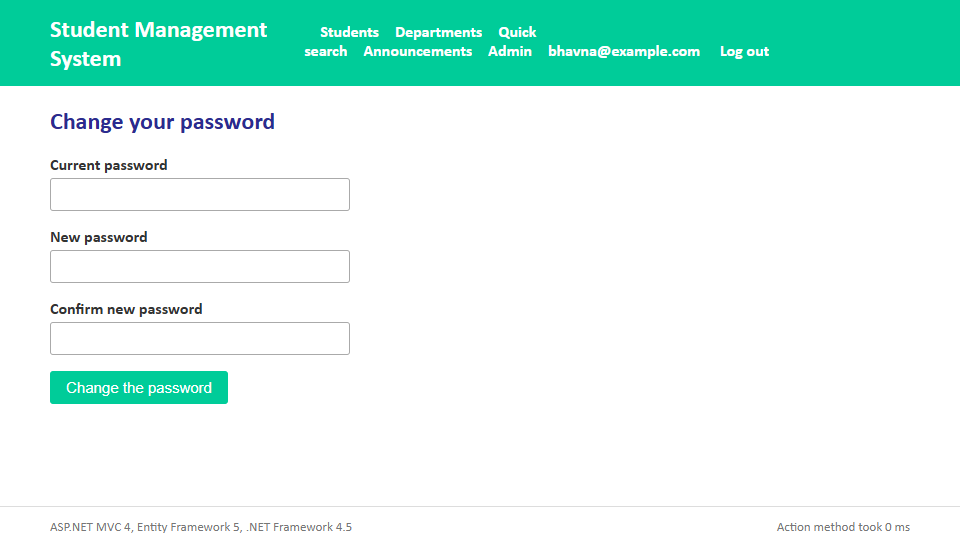
A signed in user changes the password with the current one, so somebody who finds an open browser can’t take over the account without knowing the password,
[HttpPost, ValidateAntiForgeryToken]
public ActionResult ChangePassword(ChangePasswordModel model)
{
    return Execute(() =>
    {
        if (!ModelState.IsValid)
            return View(model);

        _accounts.ChangePassword(CurrentUser().Id, model.CurrentPassword, model.NewPassword);
        return Success("Your password is changed", RedirectToAction("Profile"));
    },
    ex => ShowError(ex, model));
}

private User CurrentUser()
{
    var user = _accounts.FindByEmail(User.Identity.Name);
    if (user == null)
        throw new NotFoundException("User", User.Identity.Name);

    return user;
}
The CurrentUser() finds the user by the name in the cookie, User.Identity.Name, which is the email. The service verifies the current password and applies the same password policy,
public void ChangePassword(int userId, string currentPassword, string newPassword)
{
    Execute("ChangePassword", () =>
    {
        var user = _users.Find(userId);
        if (user == null)
            throw new NotFoundException("User", userId);

        if (!_hasher.Verify(currentPassword, user.PasswordHash))
            throw new BusinessRuleException("The current password is not correct");

        PasswordPolicy.Check(newPassword);

        user.PasswordHash = _hasher.Hash(newPassword);
        _unitOfWork.Commit();
    });
}
A wrong current password shows the message of the rule in the form, and the right one goes to the profile with a message,
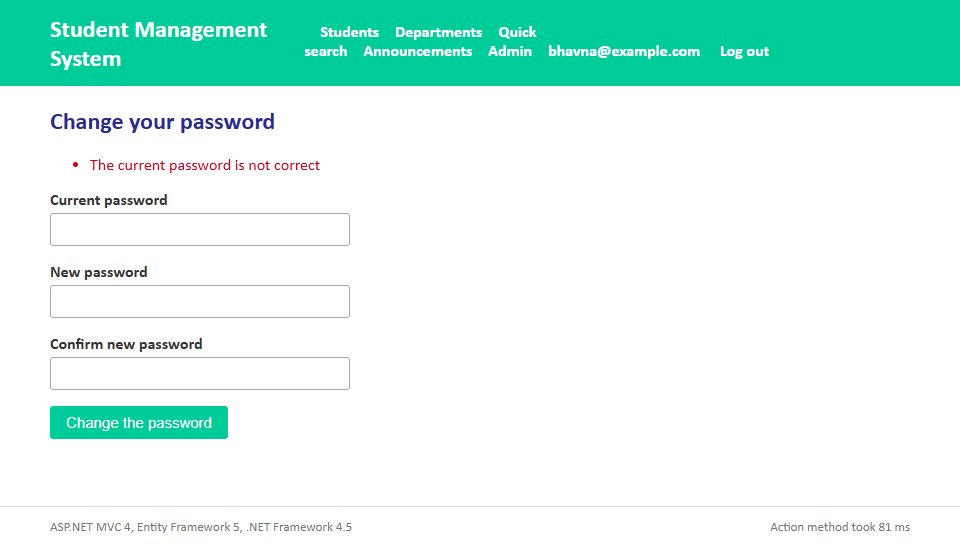
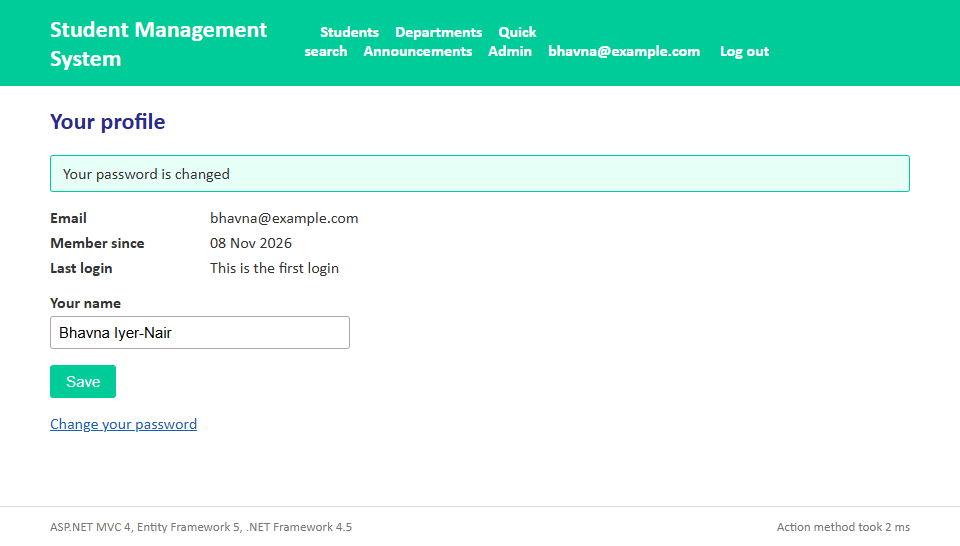
The unit test of the controller needs a signed in user, but there is no web server. We give the controller a fake HttpContext with a GenericPrincipal, which is what the forms authentication module creates from the cookie,
private void SignInAs(string email)
{
    var context = new FakeHttpContext("~/") { User = new GenericPrincipal(new GenericIdentity(email), null) };
    _controller.ControllerContext = new ControllerContext(context, new RouteData(), _controller);
}

[Test]
public void ChangePassword_WithAWrongCurrentPassword_ShowsTheMessage()
{
    SignInAs("anand@example.com");

    var result = _controller.ChangePassword(new ChangePasswordModel
    {
        CurrentPassword = "Wrong1234", NewPassword = "NewPassw0rd", ConfirmPassword = "NewPassw0rd"
    }) as ViewResult;

    Assert.IsNotNull(result);
    Assert.IsFalse(_controller.ModelState.IsValid);
}
Profile
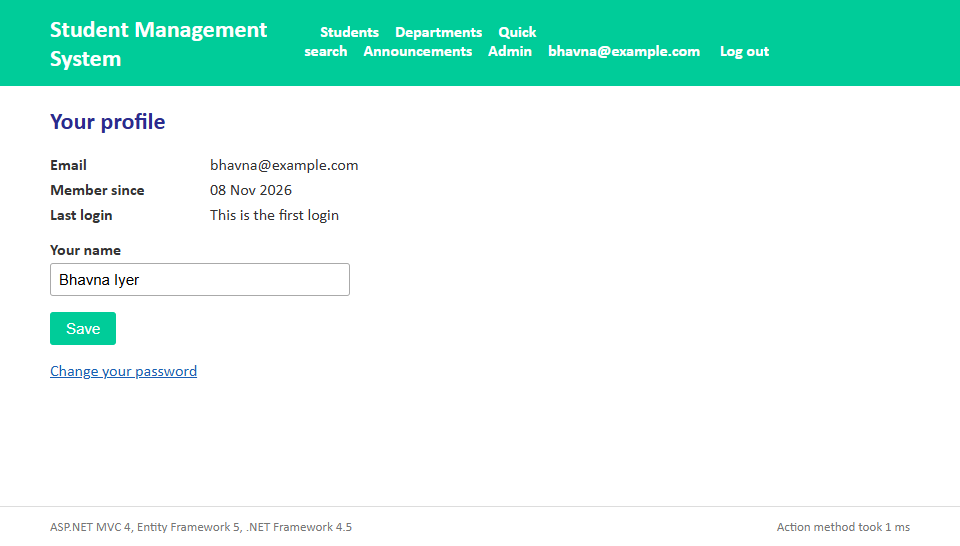
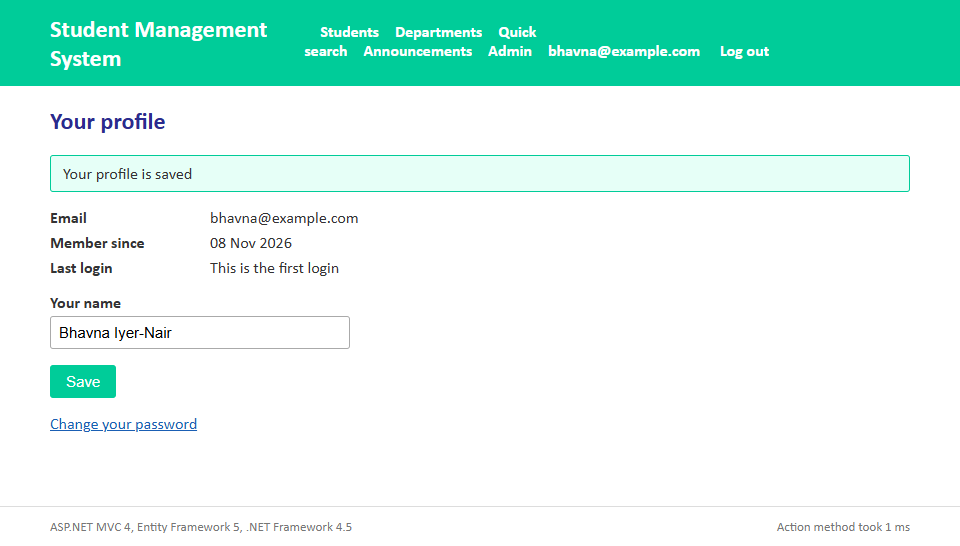
The profile page shows the data of the signed in user and lets him change his name. The email is shown but it is not editable, it is the login name. The view model has the editable field and the read only data, which is filled again when the form is shown after an error,
public class ProfileModel
{
    [Required, StringLength(50)]
    [Display(Name = "Your name")]
    public string DisplayName { get; set; }

    public string Email { get; set; }
    public DateTime MemberSince { get; set; }
    public DateTime? LastLoginOn { get; set; }
}
public ActionResult Profile()
{
return Execute(() => View(BuildProfile(CurrentUser())));
}
[HttpPost, ValidateAntiForgeryToken]
public ActionResult Profile(ProfileModel model)
{
return Execute(() =>
{
var user = CurrentUser();
if (!ModelState.IsValid)
{
FillReadOnly(model, user);
return View(model);
}
_accounts.UpdateProfile(user.Id, model.DisplayName);
return Success("Your profile is saved", RedirectToAction("Profile"));
},
ex =>
{
FillReadOnly(model, CurrentUser());
return ShowError(ex, model);
});
}The email and the dates are not taken from the posted form. A user can’t change his email or his member since date by adding a field to the post, because the binder fills only the DisplayName which we read, and the others are filled from the database again (the over-posting problem of Part 6). The page,
What the log shows
The base classes of Part 7 give the audit trail of the security events without any extra code. Find below the lines of the failed logins and the lock of the test flow. Each failed attempt is a warning with the same text for the user, and the line of the lock has the email and the time. The log never has the passwords,
22:01:31.017 WARN  [f5adead7] AccountService.Authenticate stopped: The email or the password is not correct
22:01:31.096 INFO  [0cc957c8] Account.Login started
22:01:31.174 WARN  [0cc957c8] AccountService.Authenticate stopped: The email or the password is not correct
22:01:31.252 INFO  [fa0de41a] AccountService.Authenticate started
22:01:31.337 WARN  [fa0de41a] The account bhavna@example.com is locked until 16:46:31
22:01:31.419 INFO  [8e9b3c3e] AccountService.Authenticate started
22:01:31.419 WARN  [8e9b3c3e] AccountService.Authenticate stopped: The account is locked for some minutes, because of too many wrong passwords. Try again later
A monitoring tool can count these warnings by the email or the trace id, and tell a person who forgot the password from a script which is guessing.
The tests which prove the pages are protected
The most dangerous bug of the security is the page which is open by mistake. We have two kinds of tests for it. The first one checks by reflection that the actions which must be open have [AllowAnonymous], and the others (profile, change password and logout) don’t have it. If somebody adds the attribute by mistake or removes it from the login, the test fails,
[Test]
public void TheActionsWhichNeedNoLogin_AreMarkedAllowAnonymous()
{
    foreach (var name in new[] { "Login", "Register", "ForgotPassword", "ResetPassword" })
        foreach (var method in typeof(AccountController).GetMethods().Where(m => m.Name == name))
            Assert.IsTrue(method.GetCustomAttributes(typeof(AllowAnonymousAttribute), false).Any(), name);

    foreach (var name in new[] { "Profile", "ChangePassword", "Logout" })
        foreach (var method in typeof(AccountController).GetMethods().Where(m => m.Name == name))
            Assert.IsFalse(method.GetCustomAttributes(typeof(AllowAnonymousAttribute), false).Any(), name);
}
The second kind is a request without the cookie. Against the running sample, these are the real results,
GET /Students                      302  /Account/Login?ReturnUrl=%2fStudents
GET /api/students                  401
GET /Account/Login                 200
The Web API needs the same cookie now. A client which is not a browser must log in first and keep the cookie, or the application needs a token based authentication, which is outside of this series.
Security checklist
Find below the list of the decisions of this article. Use it when you review any login of any application,
- Must store only a salted and slow hash of the password (PBKDF2), never the password and never a fast hash.
- Must give the same message and the same page for the unknown email and the wrong password.
- Must limit the failed attempts (lock for a time), and log them.
- Must use a random token for the password reset, store only its hash, give it an expiry and allow one use only.
- Must make the sign in, the sign out and every change of the state a
POSTwith the anti-forgery token. - Must follow only the local
returnUrl. - Should protect all by default (the global
[Authorize]) and open the few actions by[AllowAnonymous]. - Should use HTTPS for the whole site and
requireSSLfor the cookie. - Don’t write the passwords, the tokens or the reset links in the log.
Must Be Aware: The sample has the users but no roles. Every signed in user can open the Admin area, so a real application needs the roles (
[Authorize(Roles = "Admin")]) or a rule in the service. Also the sample creates the database again when the model changes (theDropCreateDatabaseIfModelChangesinitializer), which is good for learning and wrong for production. Use the migrations of Part 4 for a real database. The sample seeds one demo user,admin@example.comwith the passwordPassw0rd1, so that you can log in at once, and you must never seed a known password in a real system.
Wrap up
In this article, we have looked at the registration, the login, the logout, the forgot password, the change password and the profile, with the global [Authorize] filter, the salted password hash, the lock after the wrong passwords, the one-time reset token, the local returnUrl and the POST logout. We have seen how the interfaces for the hasher, the clock, the email sender and the authenticator make all of them testable, and the real screens, the email and the log lines. I really appreciate that you took the time to read this article. In the next article, I will walk you through how to build a Web API with the ASP.NET MVC 4, which uses the same login cookie.
Related Posts
How does an ASP.NET MVC request work from .NET 4.0 to 4.5? - Part 2
This article follows one ASP.NET MVC request from routing to the Razor view, and explains what changes between .NET 4.0 and 4.5, mainly the async actions.
How to build a Web API with ASP.NET MVC 4? - Part 11
This article builds an ASP.NET Web API for students on the same service, with routing, status codes, content negotiation, validation, dependency injection and a jQuery client.
How to build CRUD with Razor views and dependency injection? - Part 6
This article builds the student list, create, edit, details and delete screens with a service layer, view models, validation, Post-Redirect-Get and dependency injection with Unity.