How does routing work, with custom, nested and area routes? - Part 3
This article explains ASP.NET MVC routing with constraints, custom route constraints, nested routes, URL generation and areas, with screens and the real route table.
How does routing work, with custom, nested and area routes? - Part 3
A URL is the address of the screen, and the users copy it, bookmark it and send it in the emails. When the URLs are generated by the framework with the default pattern only, they work, but they show the technical structure of the application and not the structure of the business. And when the URL patterns are written in many places, the links in the views, the redirects in the controllers and the routes, one change in the URL breaks all of them. In the previous article, we saw the life of an ASP.NET MVC request, and the routing was the first step of it. In this article, we are going to see the routing in detail, how a route is matched, how to write the routes with the constraints, how to nest the courses under a department, how to write our own constraint, how to generate the URLs from the same routes, and how to organise the big application with the areas.
Student Management System series:
- How to structure an ASP.NET MVC application? - Part 1
- How does an ASP.NET MVC request work from .NET 4.0 to 4.5? - Part 2
- How does routing work, with custom, nested and area routes? - Part 3 (this article)
- How to model the data with Entity Framework and LINQ? - Part 4
- How lambda expressions, extension methods, delegates and events reduce the code? - Part 5
- How to build CRUD with Razor views and dependency injection? - Part 6
- How to remove the repeated code with a base controller, base service and base repository? - Part 7
- How to build the views with layouts, partial views and HTML helpers? - Part 8
- How to use filters, model binding and validation? - Part 9
- How to add registration, login, forgot password, change password, profile and logout? - Part 10
- How to build a Web API with ASP.NET MVC 4? - Part 11
- How to test the application and keep it clean? - Part 12
TL;DR Summary
- A route has a URL pattern, the default values, the constraints and the optional namespaces.
- Routing works in two directions. It matches the incoming URL to a controller and an action, and it generates the outgoing URL from the route values.
- The routes are tried in the order of registration, and the first one which matches wins. Register the specific routes before the general ones.
- A constraint decides whether a route matches. It can be a regular expression, like
\d+, or a class which implementsIRouteConstraint. - A nested route like
/departments/2/courses/3shows the relationship between the resources in the URL. - Generate the links with
Html.ActionLinkandUrl.Action, never write the URLs by hand. - An area is a section of a big application with its own controllers, views and routes.
Common Challenges
URLs which show the implementation
The URL /Courses/Details?departmentId=2&id=3 works, but it says nothing to the user. /departments/2/courses/3 tells that the course 3 belongs to the department 2, and the user can remove the last part to go one level up.
Hard coded links
When the links are written as strings in the views, <a href="/Students/Details/5">, a change in the URL pattern needs a search in all the views, and one missed link is a broken page.
The wrong route catches the URL
When a general route is registered before a specific one, it catches the URLs which were meant for the specific one, and the controller is not even called. It is a hard bug to find, because no exception is thrown.
What is routing?
The routing is the part of ASP.NET which maps the URL of a request to the code which handles it. It has a route table, which is a list of the routes, and it is filled at the start of the application. It works in two directions, and the following diagram depicts them.
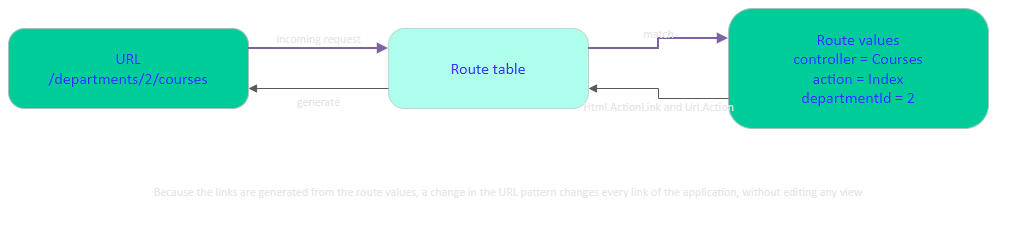
- Match - A request comes with a URL, and the routing finds the first route which fits and returns the route values,
controller = Courses,action = IndexanddepartmentId = 2. - Generate - We give the route values, for example to
Html.ActionLink, and the routing finds the route which can produce them and returns the URL.
The anatomy of a route
We have seen the default route in Part 2. Let us look at the parts of a route with our own route of the sample,
routes.MapRoute(
    name: "DepartmentCourses",
    url: "departments/{departmentId}/courses",
    defaults: new { controller = "Courses", action = "Index" },
    constraints: new { departmentId = @"\d+" },
namespaces: new[] { "SMS.Web.Controllers" });| Part | Meaning |
|---|---|
name | The name of the route. It is used to generate a URL from a specific route, Url.RouteUrl("DepartmentCourses", ...) |
url | The pattern. The words in the braces are the parameters, the others are the fixed text |
defaults | The values which are used when the URL doesn’t have them. A parameter can be optional with UrlParameter.Optional |
constraints | The rules for the parameters. A route doesn’t match when a rule fails |
namespaces | Where to look for the controller class. It avoids the confusion when two controllers have the same name |
A segment which is not a parameter, like departments and courses here, must match exactly. So the URL /departments/2/courses has the three segments, and the second one is the departmentId.
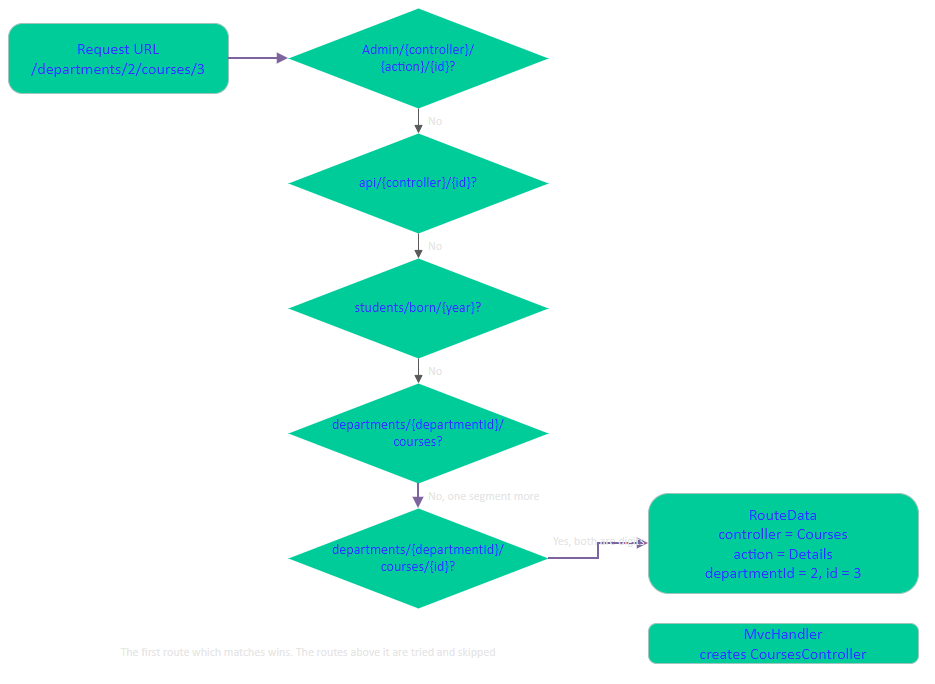
The first match wins
The routing tries the routes from the top to the bottom, and stops at the first one which matches. Find below the route table of our sample,
public static void RegisterRoutes(RouteCollection routes)
{
    routes.IgnoreRoute("{resource}.axd/{*pathInfo}");

    routes.MapRoute("StudentsBornIn", "students/born/{year}", ...);
    routes.MapRoute("DepartmentCourses", "departments/{departmentId}/courses", ...);
    routes.MapRoute("DepartmentCourse", "departments/{departmentId}/courses/{id}", ...);
    routes.MapRoute("Default", "{controller}/{action}/{id}", ...);
}
The Default route is the last one, because it is the most general, almost any URL with up to three segments fits it. If we had registered it first, the URL /departments/2/courses would go to the DepartmentsController with the action 2 and the id courses, and we would get the 404. The following diagram shows how our URL travels through the table.
We can see the real route table of the application with a small page in the Admin area (we will build the area at the end of this article),
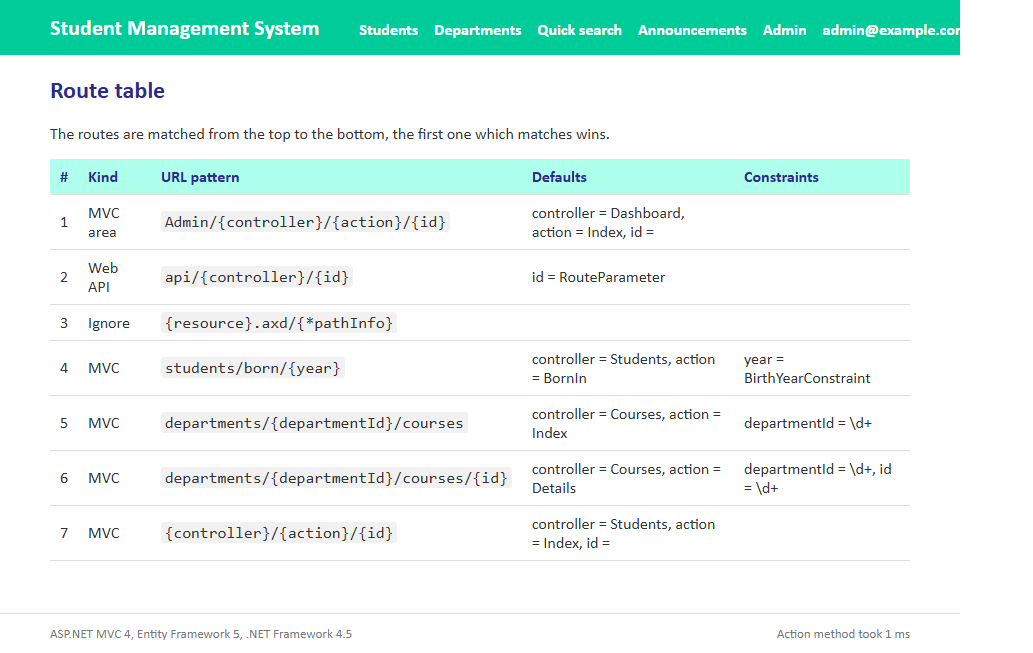
The first three rows are not written in RouteConfig. The Admin area route is added by the AreaRegistration.RegisterAllAreas(), and the api/{controller}/{id} is the Web API route which we will see in Part 11. Both are registered before the MVC routes, so they are tried first.
Must Be Aware: The order of the registration is the most common reason for the routing bugs. Write the rule as the habit: the more specific the route, the earlier it is registered. The routes with the fixed words come first, the routes with only the parameters come last.
Nested routes
The courses belong to a department. We want the URL to show it, /departments/1/courses for the courses of the department 1 and /departments/1/courses/2 for one of them. This is called as the nested route (or the hierarchical URL). We need two routes, one for the list and one for the details,
// /departments/2/courses
routes.MapRoute(
    name: "DepartmentCourses",
    url: "departments/{departmentId}/courses",
    defaults: new { controller = "Courses", action = "Index" },
    constraints: new { departmentId = @"\d+" },
    namespaces: Namespaces);

// /departments/2/courses/3
routes.MapRoute(
    name: "DepartmentCourse",
    url: "departments/{departmentId}/courses/{id}",
    defaults: new { controller = "Courses", action = "Details" },
    constraints: new { departmentId = @"\d+", id = @"\d+" },
    namespaces: Namespaces);
The URL doesn’t say which controller to use, so the controller and the action are given in the defaults. The constraints \d+ say that the ids must be digits. Without it, /departments/abc/courses would match and the model binder would fail later to convert abc to an int. With the constraint, the route doesn’t match, and the request goes down to the next route. The controller receives the route values as the parameters of the actions,
public class CoursesController : Controller
{
    private readonly ICatalogService _catalog;

    public CoursesController(ICatalogService catalog)
    {
        _catalog = catalog;
    }

    // /departments/{departmentId}/courses
    public ActionResult Index(int departmentId)
    {
        var department = _catalog.FindDepartment(departmentId);
        if (department == null)
            return HttpNotFound();

        return View(department);
    }

    // /departments/{departmentId}/courses/{id}
    public ActionResult Details(int departmentId, int id)
    {
        var course = _catalog.FindCourse(id);
        if (course == null || course.DepartmentId != departmentId)
            return HttpNotFound();

        return View(course);
    }
}
Look at the check in the Details action. The route accepts any department id and any course id, so /departments/2/courses/3 is valid for the routing even if the course 3 is of the department 1. The routing can’t know our data, so the action must verify the relationship and return the 404, otherwise the same course is available under many URLs. These are the screens, the department list and its courses,
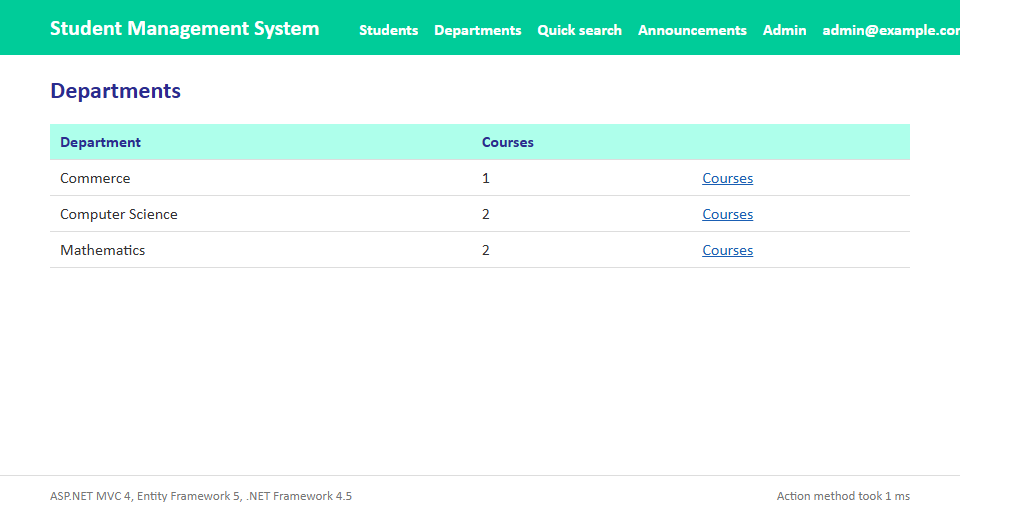
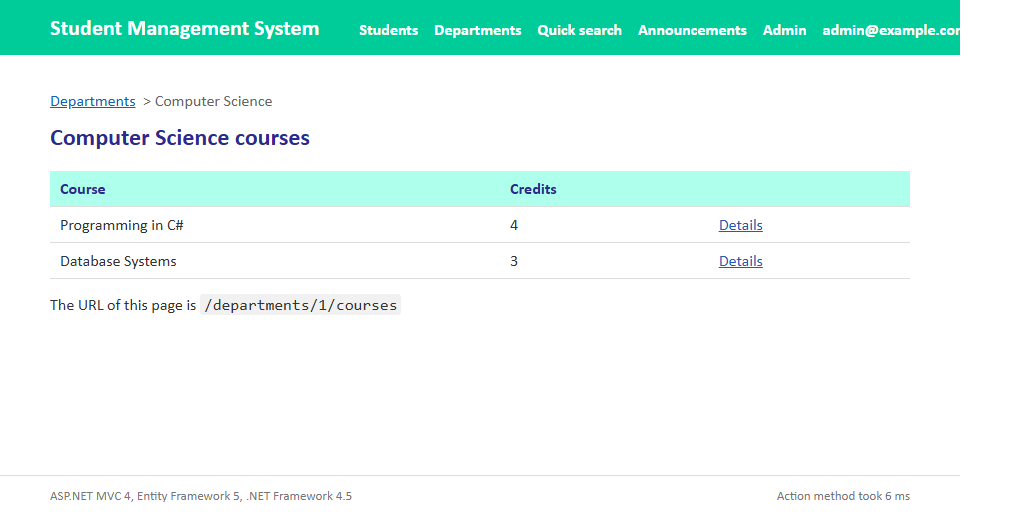
The page shows its own URL, /departments/1/courses, and the breadcrumb on top follows the same hierarchy. The details of the course,
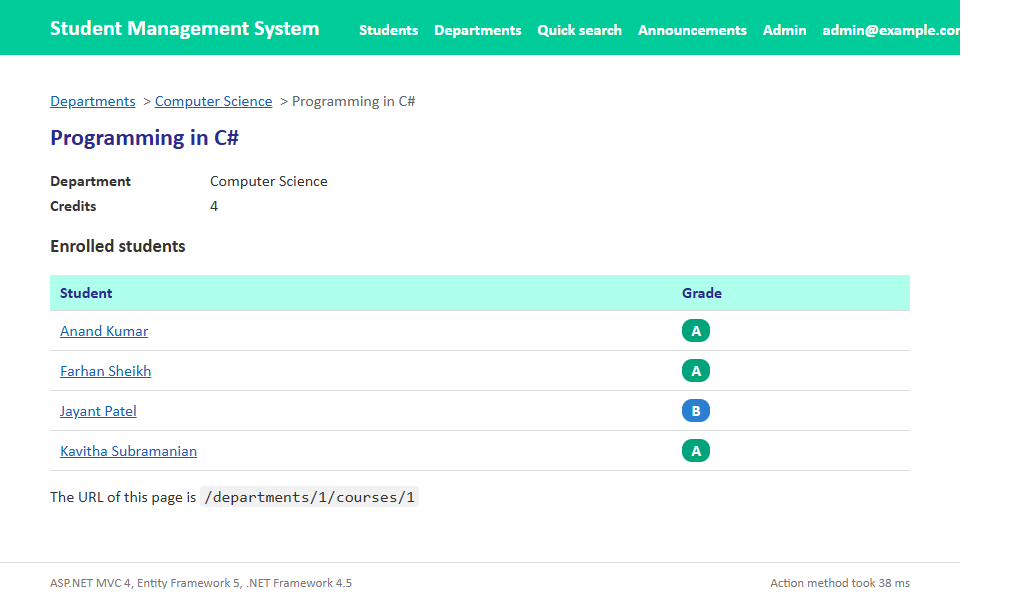
Custom route constraints
A regular expression is enough for the digits, but some rules need code. For the URL /students/born/{year} we want to accept only the realistic birth years. A class which implements IRouteConstraint can do any check,
public class BirthYearConstraint : IRouteConstraint
{
    public bool Match(HttpContextBase httpContext, Route route, string parameterName,
        RouteValueDictionary values, RouteDirection routeDirection)
    {
        object value;
        int year;

        if (!values.TryGetValue(parameterName, out value) || value == null)
            return false;

        return int.TryParse(value.ToString(), out year) && year >= 1950 && year <= DateTime.Today.Year;
    }
}
and it is used in the route in place of the regular expression,
routes.MapRoute(
    name: "StudentsBornIn",
    url: "students/born/{year}",
    defaults: new { controller = "Students", action = "BornIn" },
    constraints: new { year = new BirthYearConstraint() },
    namespaces: Namespaces);
The BornIn action of the StudentsController is a normal action with the year parameter. For /students/born/1991 it shows the students born in that year,
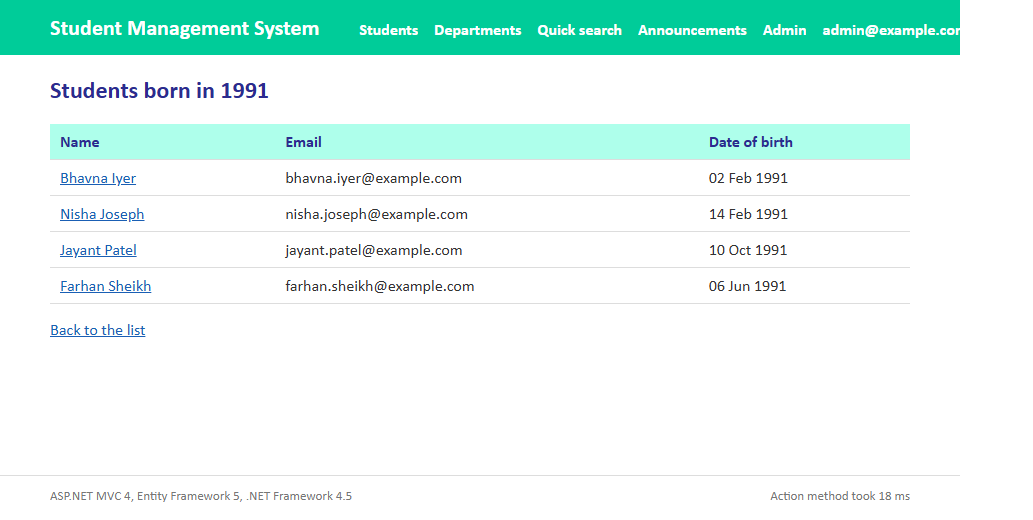
What happens with /students/born/1800? The constraint returns false, so the route doesn’t match, and the routing goes to the next routes. The Default route matches it, with controller = students, action = born and id = 1800, but the StudentsController has no action named born, so the response is the 404. It is exactly what we want, and no check is required in the action.
Note: The
routeDirectionparameter tells whether the constraint is called for an incoming request or for the generation of a URL. The same constraint is used in both directions, so a link to/students/born/1800can’t even be generated.
Generating the URLs
We never write the URLs in the views. We give the route values, and the routing generates the URL from the first route which can produce them. In the department list, the link to the courses is written as,
@Html.ActionLink("Courses", "Index", "Courses", new { departmentId = department.Id }, null)and the output in the page is,
<a href="/departments/1/courses">Courses</a>The ActionLink didn’t know the pattern. It gave controller = Courses, action = Index and departmentId = 1, and the DepartmentCourses route is the first one which can produce these values. If we change the pattern to faculty/{departmentId}/courses tomorrow, all the links change without touching any view. The other generators are,
| Helper | Use |
|---|---|
Html.ActionLink(text, action, controller, values, attributes) | An anchor with a text |
Url.Action(action, controller, values) | Only the URL, for the href of a custom tag or for the JavaScript |
Url.RouteUrl("DepartmentCourses", values) | The URL from a named route |
RedirectToAction("Details", new { id = id }) | The redirect from a controller, which uses the same generation |
Url.Content("~/api/students") | The URL of a file or a folder, which is relative to the application root |
Areas
A big application has many sections, and when all the controllers and views are in the same folders, it becomes difficult to find anything. An area is a section of the application with its own controllers, views and routes. Our Admin section is an area. The following diagram shows the structure.
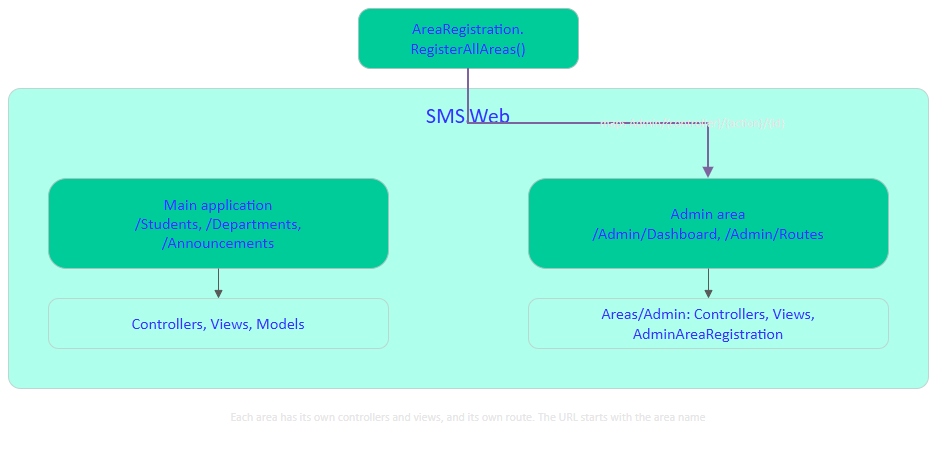
An area has a class which registers its route. The AreaRegistration.RegisterAllAreas() in the Application_Start finds all of them,
public class AdminAreaRegistration : AreaRegistration
{
    public override string AreaName
    {
        get { return "Admin"; }
    }

    public override void RegisterArea(AreaRegistrationContext context)
    {
        context.MapRoute(
            name: "Admin_default",
            url: "Admin/{controller}/{action}/{id}",
            defaults: new { controller = "Dashboard", action = "Index", id = UrlParameter.Optional },
            namespaces: new[] { "SMS.Web.Areas.Admin.Controllers" });
    }
}
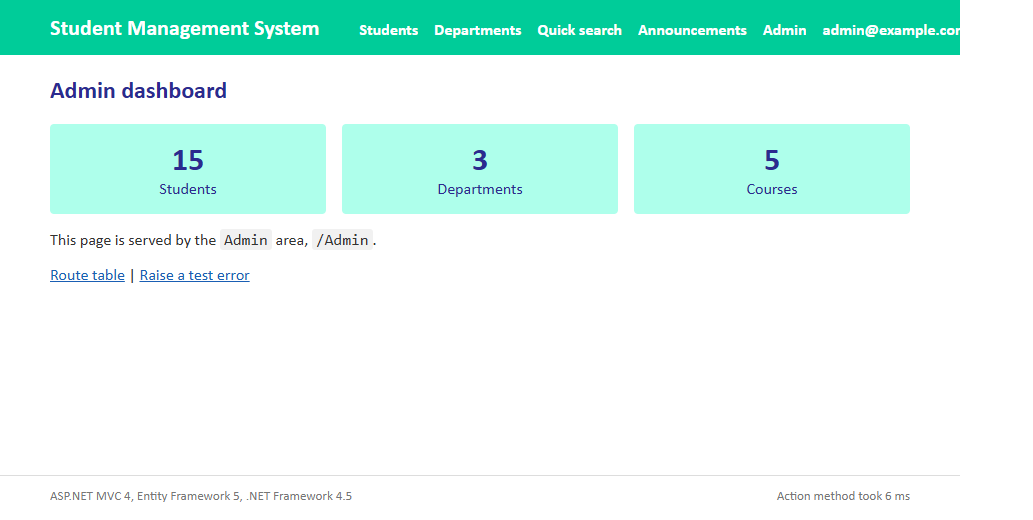
The controllers are in the Areas/Admin/Controllers folder, and the views are in Areas/Admin/Views, which needs its own Web.config (a copy of the Views/Web.config) and a _ViewStart.cshtml. Find below the dashboard controller of the area, and the screen,
namespace SMS.Web.Areas.Admin.Controllers
{
    public class DashboardController : Controller
    {
        private readonly IStudentService _students;
        private readonly ICatalogService _catalog;

        public DashboardController(IStudentService students, ICatalogService catalog)
        {
            _students = students;
            _catalog = catalog;
        }

        public ActionResult Index()
        {
            ViewBag.Students = _students.Count();
            ViewBag.Departments = _catalog.Departments().Count;
            ViewBag.Courses = _catalog.Courses().Count;
            return View();
        }
    }
}
There are two things to remember when we use the areas,
- The links between the main application and the area need the
arearoute value. The layout of our sample is used by both, so the links are written asHtml.ActionLink("Students", "Index", "Students", new { area = "" }, null)for the main application andnew { area = "Admin" }for the Admin. Without the empty area, a link on an Admin page would try to find theStudentscontroller inside the Admin area. - Give the namespaces in all the routes, in the main routes also. If the main application and an area have the controllers with the same name, for example both have a
HomeController, the routing can’t decide which one to use and throws an exception. Thenamespacesparameter of ourRouteConfigavoids it.
Wrap up
In this article, we have looked at how the routing matches and generates the URLs, the anatomy of a route, the importance of the order, the constraints (a regular expression and our own class), the nested routes with the department and the courses, and the areas. I really appreciate that you took the time to read this article. In the next article, I will walk you through how to model the data with the Entity Framework and how to query it with LINQ.
Related Posts
How does an ASP.NET MVC request work from .NET 4.0 to 4.5? - Part 2
This article follows one ASP.NET MVC request from routing to the Razor view, and explains what changes between .NET 4.0 and 4.5, mainly the async actions.
How to build a Web API with ASP.NET MVC 4? - Part 11
This article builds an ASP.NET Web API for students on the same service, with routing, status codes, content negotiation, validation, dependency injection and a jQuery client.
How to build CRUD with Razor views and dependency injection? - Part 6
This article builds the student list, create, edit, details and delete screens with a service layer, view models, validation, Post-Redirect-Get and dependency injection with Unity.