How to model the data with Entity Framework and LINQ? - Part 4
This article models students, courses and enrollments with Entity Framework 5 Code First and queries them with LINQ, explaining deferred execution and the path from LINQ to SQL.
How to model the data with Entity Framework and LINQ? - Part 4
Almost every business application is about data, and the way we model and query this data decides the performance and the maintainability of the application for years. If we write the SQL strings in the code, every change in the table needs a search in the whole code base. If we use an Object Relational Mapper (ORM) without understanding it, we may load thousands of rows to show ten of them. In the previous article, we discussed how an ASP.NET MVC request works. In this article, we are going to see how to model the students, courses and enrollments as entities with a base class, how to map them with the Entity Framework 5 Code First, and how to query them with LINQ.
Student Management System series:
- How to structure an ASP.NET MVC application? - Part 1
- How does an ASP.NET MVC request work from .NET 4.0 to 4.5? - Part 2
- How does routing work, with custom, nested and area routes? - Part 3
- How to model the data with Entity Framework and LINQ? - Part 4 (this article)
- How lambda expressions, extension methods, delegates and events reduce the code? - Part 5
- How to build CRUD with Razor views and dependency injection? - Part 6
- How to remove the repeated code with a base controller, base service and base repository? - Part 7
- How to build the views with layouts, partial views and HTML helpers? - Part 8
- How to use filters, model binding and validation? - Part 9
- How to add registration, login, forgot password, change password, profile and logout? - Part 10
- How to build a Web API with ASP.NET MVC 4? - Part 11
- How to test the application and keep it clean? - Part 12
TL;DR Summary
- Entity Framework (EF) is an ORM, it maps the classes to the tables and the LINQ queries to SQL.
- Code First means we write the classes first, and EF creates and updates the database from them.
- A base class (
Entity) is the right place for the members which every entity has, likeIdandCreatedOn. Use inheritance only for such common things. DbContextis a unit of work, andDbSet<T>is a collection of the entities. Create one context for one web request.- LINQ queries are not executed when they are written, they are executed when the result is needed (deferred execution).
- Filter, sort and page in the database with
IQueryable, don’t load all rows and filter in the memory.
Common Challenges
SQL strings everywhere
When the queries are strings inside the code, the compiler can’t help us. A renamed column is found only at the runtime, and the same query is repeated in many places.
Loading too much data
A list page which loads all students and then takes the first ten in the memory works well in the test with twenty rows. In the production with fifty thousand rows, it becomes slow and uses lot of memory.
The same members in every class
Every table has an id and the audit columns. If each class defines them again, we repeat the same code (DRY) and some classes will miss them.
Modelling the entities
The Entity base class
The Id and the creation time are common to all entities, so we put them in a base class in SMS.Domain,
public abstract class Entity
{
    public int Id { get; set; }
    public DateTime CreatedOn { get; set; }
}
This is the good use of the inheritance, the reuse of the implementation, for the real “is a” relationship. Every Student is an Entity. Be careful here, keep the base class small and stable. If you add a member which is not needed by all entities, the Liskov Substitution Principle will start to hurt, we discussed it in Part 4 of the Maintainable Code series.
The relationships
The following diagram shows our entities.
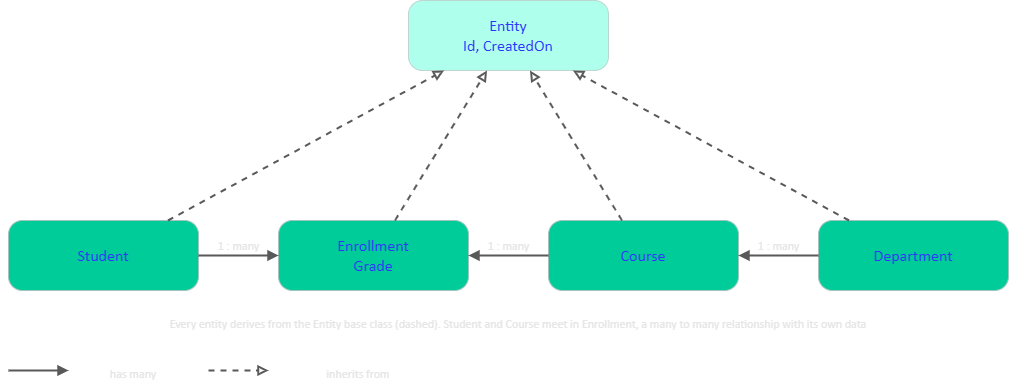
- A Department has many Courses.
- A Student has many Enrollments, and a Course has many Enrollments.
- The Enrollment is the link between a Student and a Course, and it has its own data, the Grade. That is why it is an entity and not a hidden join table.
public class Department : Entity
{
    public string Name { get; set; }
    public virtual ICollection<Course> Courses { get; set; }
}

public class Course : Entity
{
    public string Title { get; set; }
    public int Credits { get; set; }
    public int DepartmentId { get; set; }
    public virtual Department Department { get; set; }
    public virtual ICollection<Enrollment> Enrollments { get; set; }
}

public class Enrollment : Entity
{
    public int StudentId { get; set; }
    public int CourseId { get; set; }
    public string Grade { get; set; }
    public virtual Student Student { get; set; }
    public virtual Course Course { get; set; }
}
The virtual navigation properties allow EF to load the related data lazily when we read them. The DepartmentId style property is the foreign key, and EF finds the relationship by this naming convention.
Mapping with Code First
With the Code First approach, we write the classes, and the DbContext tells EF which of them are tables. The context belongs to SMS.Data, because it is the Entity Framework code.
public class SchoolContext : DbContext
{
    static SchoolContext()
    {
        Database.SetInitializer(new SchoolInitializer());
    }

    public DbSet<Student> Students { get; set; }
    public DbSet<Course> Courses { get; set; }
    public DbSet<Department> Departments { get; set; }
    public DbSet<Enrollment> Enrollments { get; set; }

    protected override void OnModelCreating(DbModelBuilder modelBuilder)
    {
        modelBuilder.Entity<Student>()
            .Property(s => s.LastName).IsRequired().HasMaxLength(50);
    }
}
EF 5 creates the database for us on the first run, using the connection string with the same name as the context class. Find below the connection string in the Web.config, it points to the SQL Server LocalDB, which is installed with Visual Studio 2012 (on SQL Server 2012 Express LocalDB the instance name is v11.0),
<connectionStrings>
  <add name="SchoolContext"
       connectionString="Data Source=(LocalDb)\v11.0;Initial Catalog=SMS;Integrated Security=True"
       providerName="System.Data.SqlClient" />
</connectionStrings>
Note: The sample code folder uses
(LocalDb)\MSSQLLocalDB, which is the instance name of the newer LocalDB versions. Change it tov11.0if you run it with the SQL Server 2012 LocalDB.
It is useful to have some data when the database is created. An initializer class with the Seed method gives us that. The CreateDatabaseIfNotExists initializer runs it only once, when the database is created,
public class SchoolInitializer : CreateDatabaseIfNotExists<SchoolContext>
{
    protected override void Seed(SchoolContext context)
    {
        var now = DateTime.UtcNow;

        var department = new Department { Name = "Computer Science", CreatedOn = now };
        context.Departments.Add(department);
        context.SaveChanges();

        var course = new Course { Title = "Programming in C#", Credits = 4, DepartmentId = department.Id, CreatedOn = now };
        context.Courses.Add(course);
        context.SaveChanges();

        var student = new Student
        {
            FirstName = "Anand", LastName = "Kumar", Email = "anand.kumar@example.com",
            DateOfBirth = new DateTime(1990, 1, 1), IsActive = true, CreatedOn = now
        };
        student.Enrollments.Add(new Enrollment { CourseId = course.Id, Grade = "A", CreatedOn = now });
        context.Students.Add(student);
        context.SaveChanges();
    }
}
The sample has more rows (three departments, five courses and fourteen students), but the idea is the same. The Seed method receives the context, so we use the same classes and the same SaveChanges() to insert the data. When the classes change later, the Code First Migrations (Add-Migration and Update-Database in the Package Manager Console) create the scripts to update the database, so we don’t write them by hand. A DbContext tracks the changes of the loaded entities, and SaveChanges() writes them in one transaction. It is the unit of work pattern. Create one context for one web request, and don’t keep it in a static variable, otherwise it will hold the old data and is not thread safe.
Note: The EF 5 on the .NET 4.5 supports the enum properties, and it is one of the reasons to move to 4.5. On the .NET 4.0 you have to keep the value as an int or a string.
Querying with LINQ
Language Integrated Query (LINQ) lets us write the query in C# with the compile time checking. The same syntax works for the collections in the memory and for the database.
var students = context.Students
    .Where(s => s.LastName.StartsWith("Kum"))
    .OrderBy(s => s.LastName)
    .ThenBy(s => s.FirstName)
    .ToList();
Find below the query to list the students of one course with their grades,
var report = context.Enrollments
    .Where(e => e.CourseId == courseId)
    .Select(e => new { e.Student.FirstName, e.Student.LastName, e.Grade })
    .ToList();
The Select loads only the three columns, and not the whole Student object. Project to what you need.
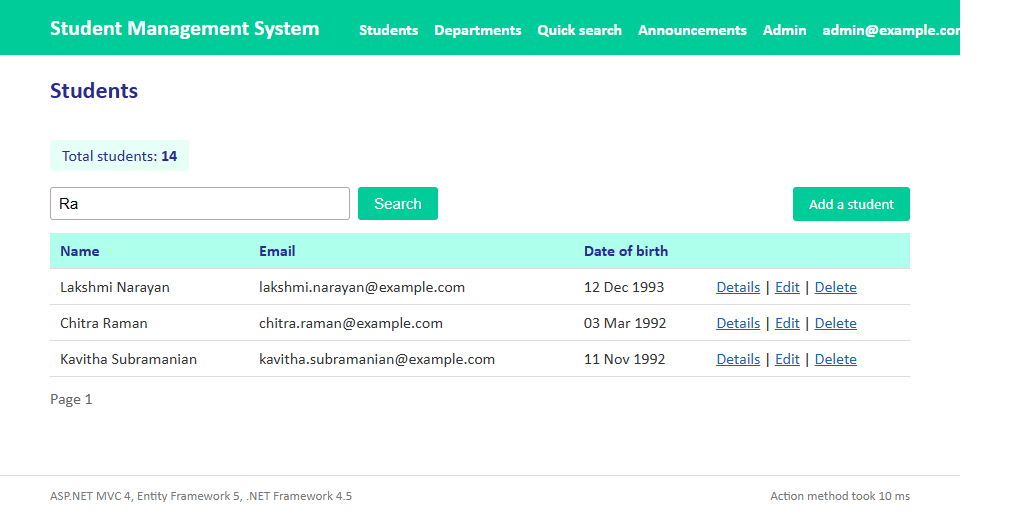
The following screen is the result of the search query of our application, for the search term “Ra”, it shows the students whose last name contains these letters.
From LINQ to SQL
The following diagram depicts what happens with the query.
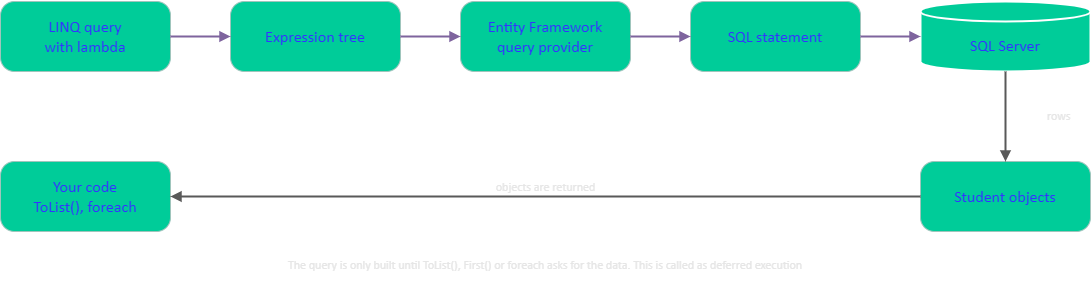
The lambda expression s => s.LastName.StartsWith("Kum") is not compiled to the code when it is given to a DbSet. It is kept as an expression tree, the data describing the code. The EF query provider reads this tree and translates it to a SQL WHERE ... LIKE 'Kum%'. That is why we can use only the things which EF knows to translate. If you call your own method inside the lambda, EF can’t translate it and throws an exception at the runtime.
Deferred execution
A LINQ query is only built when we write it, and it is executed when the result is needed, with ToList(), First(), Count() or a foreach. It has an important advantage, we can keep adding conditions and the database receives one query,
IQueryable<Student> query = context.Students;

if (!string.IsNullOrEmpty(searchTerm))
    query = query.Where(s => s.LastName.Contains(searchTerm));

var page = query.OrderBy(s => s.LastName)
                .Skip((pageNumber - 1) * pageSize)
                .Take(pageSize)
                .ToList();
The search, the sorting and the paging all happen in the database, and only one page of students comes to the web server. The danger is the same deferred nature. If you return an IQueryable to the view and the context is already disposed, the query runs after the disposal and fails. Run the query (ToList()) before the context goes away.
Must Be Aware: The lazy loading of the navigation properties inside a loop causes the “N+1 queries” problem, one query for the list and one more query for each row. If you know that you need the related data, load it in the same query with
Include(s => s.Enrollments)(it needsusing System.Data.Entity;).
The repository of our sample uses it to load a student with the enrollments and the courses in a single query,
public Student Find(int id)
{
    return _context.Students
        .Include(s => s.Enrollments.Select(e => e.Course))
        .SingleOrDefault(s => s.Id == id);
}
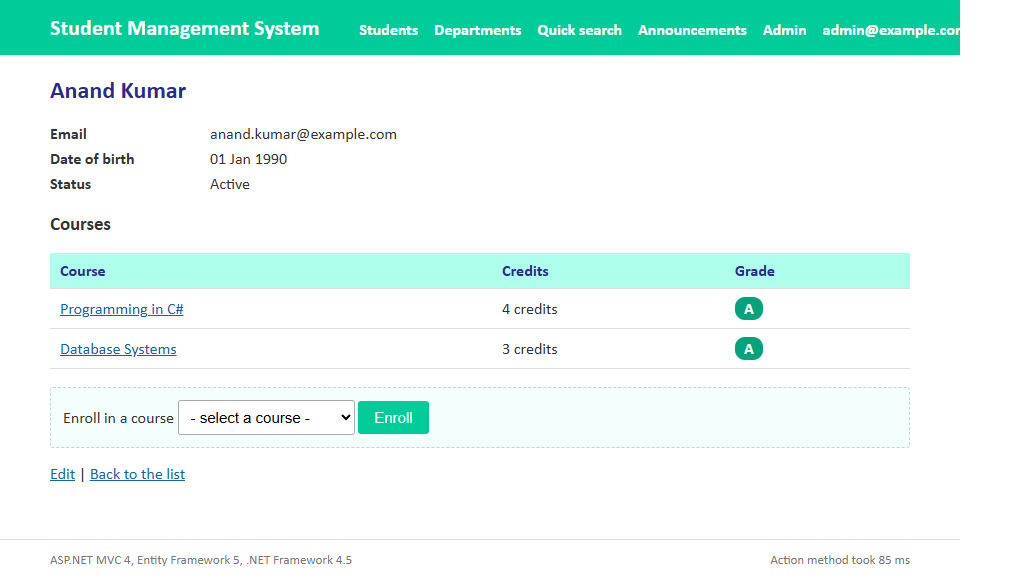
The details screen of a student shows the data of three tables, which this one query brings.
Wrap up
In this article, we have looked at how to model the entities with a common base class, how to map them with the Entity Framework 5 Code First, and how the LINQ queries become SQL with the deferred execution. I really appreciate that you took the time to read this article. In the next article, I will walk you through the C# features which we used in this article, lambda expressions, extension methods, delegates and events, and how they reduce the amount of code.
Related Posts
How does an ASP.NET MVC request work from .NET 4.0 to 4.5? - Part 2
This article follows one ASP.NET MVC request from routing to the Razor view, and explains what changes between .NET 4.0 and 4.5, mainly the async actions.
How to build a Web API with ASP.NET MVC 4? - Part 11
This article builds an ASP.NET Web API for students on the same service, with routing, status codes, content negotiation, validation, dependency injection and a jQuery client.
How to build CRUD with Razor views and dependency injection? - Part 6
This article builds the student list, create, edit, details and delete screens with a service layer, view models, validation, Post-Redirect-Get and dependency injection with Unity.