How to build a Web API with ASP.NET MVC 4? - Part 11
This article builds an ASP.NET Web API for students on the same service, with routing, status codes, content negotiation, validation, dependency injection and a jQuery client.
How to build a Web API with ASP.NET MVC 4? - Part 11
The screens are not the only clients of the student data. A mobile application, a JavaScript page which updates a part of the screen without reloading it, or another system of the college, all of them need the data and not the HTML. If we make the MVC controllers return the JSON for them, the same controller serves two different clients, and the rules of HTTP, the status codes and the verbs, are forgotten. ASP.NET MVC 4 comes with the ASP.NET Web API for this purpose. In the previous article, we looked at the filters, the model binding and the validation. In this article, we are going to build a Web API for the students on the top of the same service, see its routing and the status codes, try it with real requests, and consume it from a screen with jQuery.
Student Management System series:
- How to structure an ASP.NET MVC application? - Part 1
- How does an ASP.NET MVC request work from .NET 4.0 to 4.5? - Part 2
- How does routing work, with custom, nested and area routes? - Part 3
- How to model the data with Entity Framework and LINQ? - Part 4
- How lambda expressions, extension methods, delegates and events reduce the code? - Part 5
- How to build CRUD with Razor views and dependency injection? - Part 6
- How to remove the repeated code with a base controller, base service and base repository? - Part 7
- How to build the views with layouts, partial views and HTML helpers? - Part 8
- How to use filters, model binding and validation? - Part 9
- How to add registration, login, forgot password, change password, profile and logout? - Part 10
- How to build a Web API with ASP.NET MVC 4? - Part 11 (this article)
- How to test the application and keep it clean? - Part 12
TL;DR Summary
- The ASP.NET Web API is part of the MVC 4 project template. It builds the HTTP services which any client can call.
- A Web API controller derives from
ApiController, and the HTTP verb selects the action,GETselectsGet,POSTselectsPostand so on. - The route is
api/{controller}/{id}, registered withMapHttpRoute, and it must be registered before the MVC routes. - The response is the data, and the format (JSON or XML) is selected by the
Acceptheader, which is called as the content negotiation. - Return the right status code,
200for a read,201with aLocationfor a create,204for a delete,400for an invalid request and404for a missing resource. - A value type with
[Required]needs[DataMember(IsRequired = true)]in the Web API, so use a separate input class. - The Web API has its own dependency resolver, we give it the same Unity container.
Common Challenges
JSON from the screen controllers
When the MVC controller returns a JsonResult for the AJAX call, the URL is a screen URL, the error is a redirect to the error page, and the HTTP verb is ignored. A client which is not a browser can’t use it properly.
The logic is copied for the second client
When the API controller is written separately, it often gets its own copy of the rules of the screen controller. The rules differ after some months.
The client can’t know what happened
A response with the status 200 and a text “error” in the body forces every client to read the body. The HTTP status codes exist for this purpose.
MVC controller or Web API controller?
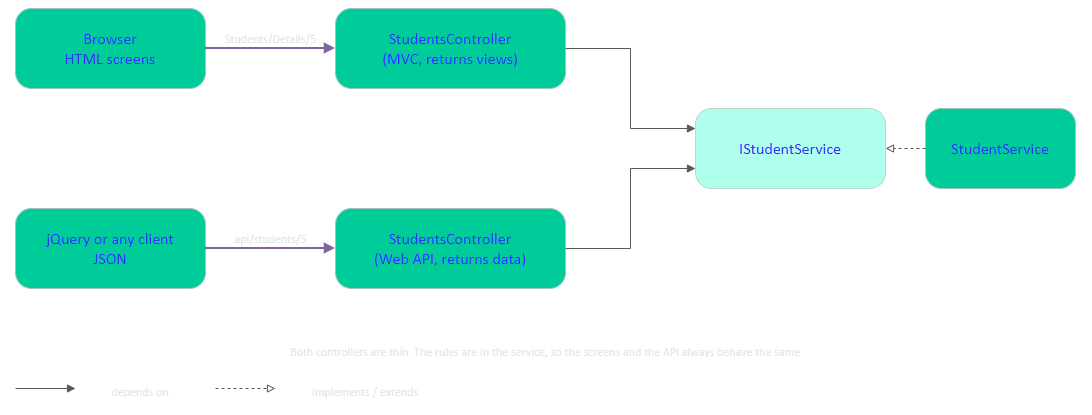
Both are controllers, and both are thin. The difference is what they return and how they are selected. The following diagram shows the same service behind two front doors.
| MVC controller | Web API controller | |
|---|---|---|
| Base class | Controller | ApiController |
| Action is selected by | The action name in the URL | The HTTP verb |
| Returns | An ActionResult, mostly a view | The data, or an HttpResponseMessage |
| The format | HTML | JSON or XML, by the content negotiation |
| The route | {controller}/{action}/{id} | api/{controller}/{id} |
| The clients | The browser | Any HTTP client |
Our Web API controller has the same name as the MVC one, StudentsController, but it is in the SMS.Web.Api namespace. There is no conflict, because the MVC looks for the classes which implement IController, and the Web API looks for the IHttpController.
The routing of the Web API
The Web API has its own route collection, but in the web hosted application it shares the route table with the MVC. The route is registered in the WebApiConfig,
public static class WebApiConfig
{
    public static void Register(HttpConfiguration config)
    {
        config.Routes.MapHttpRoute(
            name: "DefaultApi",
            routeTemplate: "api/{controller}/{id}",
            defaults: new { id = RouteParameter.Optional });
    }
}
There is no {action} in the pattern. The Web API selects the method by the HTTP verb and by the name, so a method which starts with Get handles the GET requests, Post handles POST, and so on. When we have more methods for the same verb, they are selected by the parameters, Get(int id) for api/students/5 and Get(string term, ...) for api/students?term=Ra.
The order of the registration is important, as we saw in Part 3. The Application_Start registers the Web API route before the MVC routes,
WebApiConfig.Register(GlobalConfiguration.Configuration);
FilterConfig.RegisterGlobalFilters(GlobalFilters.Filters);
RouteConfig.RegisterRoutes(RouteTable.Routes);
If the MVC Default route came first, the URL /api/students would match it with controller = api and action = students, and the Web API would never get the request. The route table screen of Part 3 shows the api/{controller}/{id} as the Web API route, on the second row.
The controller
The controller of the sample covers the five operations of a student. Find below the code with the URL of each method,
public class StudentsController : BaseApiController
{
    private readonly IStudentService _service;

    public StudentsController(IStudentService service, ILogger logger) : base(logger)
    {
        _service = service;
    }

    // GET api/students?term=Ra&page=1&pageSize=5
    public HttpResponseMessage Get(string term = null, int page = 1, int pageSize = 5)
    {
        return Execute(() => _service.Search(term, page, pageSize).Select(StudentDto.From).ToList());
    }

    // GET api/students/5
    public HttpResponseMessage Get(int id)
    {
        return Execute(() => StudentDto.From(FindStudent(id)));
    }

    // POST api/students
    public HttpResponseMessage Post(StudentInputDto model)
    {
        if (model == null || !ModelState.IsValid)
            return InvalidModel();

        var baseUrl = Request.RequestUri.GetLeftPart(UriPartial.Path).TrimEnd('/');

        return Execute(() =>
        {
            var student = new Student
            {
                FirstName = model.FirstName,
                LastName = model.LastName,
                Email = model.Email,
                DateOfBirth = model.DateOfBirth,
                IsActive = true
            };
            _service.Create(student);
            return StudentDto.From(student);
        },
        HttpStatusCode.Created,
        dto => new Uri(baseUrl + "/" + dto.Id));
    }

    // PUT api/students/5
    public HttpResponseMessage Put(int id, StudentInputDto model)
    {
        if (model == null || !ModelState.IsValid)
            return InvalidModel();

        return Execute(() =>
        {
            var student = FindStudent(id);
            student.FirstName = model.FirstName;
            student.LastName = model.LastName;
            student.Email = model.Email;
            student.DateOfBirth = model.DateOfBirth;
            _service.Update(student);
            return StudentDto.From(student);
        });
    }

    // DELETE api/students/5
    public HttpResponseMessage Delete(int id)
    {
        return Execute(() =>
        {
            FindStudent(id);
            _service.Delete(id);
        });
    }

    private Student FindStudent(int id)
    {
        var student = _service.Find(id);
        if (student == null)
            throw new NotFoundException("Student", id);

        return student;
    }
}
The controller derives from the BaseApiController of Part 7. Each method gives its work to Execute as a lambda, and the base class wraps the result in the common response (ApiResponse<T>, with the Success, Data, Message, Errors and TraceId) and selects the status code from the exception. There is no try and catch and no Request.CreateResponse in the actions, and the Location header of the POST is built by the third lambda.
The controller uses the same IStudentService as the MVC controller, and it has the same thin shape. The not found and the rule errors are the domain exceptions of Part 7, so the MVC and the API react to them in the same way. The rules of the application, like the StudentService.Create and the Enroll are in one place. The table summarises the verbs and the status codes,
| Request | Success | Failure |
|---|---|---|
GET api/students?term=Ra | 200 OK with the list | |
GET api/students/5 | 200 OK with the student | 404 Not Found |
POST api/students | 201 Created with the Location header and the new student | 400 Bad Request with the errors, 409 Conflict for the duplicate email |
PUT api/students/5 | 200 OK with the updated student | 404, 400 |
| Any unexpected error | 500 with a generic message and the trace id | |
DELETE api/students/5 | 204 No Content | 404 |
We return a StudentDto and not the Student entity. The entity has the navigation properties, Enrollments, which have the Student again, and the serializer would go in a loop or load the whole database through the lazy loading. The DTO (Data Transfer Object) has only what the client needs, and the contract of the API doesn’t change when the entity changes.
public class StudentDto
{
    public int Id { get; set; }
    public string FirstName { get; set; }
    public string LastName { get; set; }
    public string FullName { get; set; }
    public string Email { get; set; }
    public DateTime DateOfBirth { get; set; }
    public bool IsActive { get; set; }

    public static StudentDto From(Student student)
    {
        return new StudentDto
        {
            Id = student.Id,
            FirstName = student.FirstName,
            LastName = student.LastName,
            FullName = student.FullName(),
            Email = student.Email,
            DateOfBirth = student.DateOfBirth,
            IsActive = student.IsActive
        };
    }
}
The input class and the validation gotcha
In the first version of the controller we reused the StudentFormModel of the MVC form for the body of the POST. The first request failed with the status 500 and this message,
Property 'DateOfBirth' on type 'SMS.Web.Models.StudentFormModel' is invalid. Value-typed properties
marked as [Required] must also be marked with [DataMember(IsRequired=true)] to be recognized as
required. Consider attributing the declaring type with [DataContract] and the property with
[DataMember(IsRequired=true)].
In the MVC, a missing DateTime gets the default value 0001-01-01, and the [Required] can’t detect it. The Web API reads the JSON body with a formatter, and it can detect a missing value only when the property is marked as required for the serializer. A nullable type didn’t help in our test, so we use a separate input class, which has both the attributes,
[DataContract]
public class StudentInputDto
{
    [DataMember(IsRequired = true), Required, StringLength(50)]
    public string FirstName { get; set; }

    [DataMember(IsRequired = true), Required, StringLength(50)]
    public string LastName { get; set; }

    [DataMember(IsRequired = true), Required, EmailAddress]
    public string Email { get; set; }

    [DataMember(IsRequired = true), Required, MinimumAge(16)]
    public DateTime DateOfBirth { get; set; }
}
It is a good example for why the API should have its own input classes. The form model is made for a screen, the input class is made for the contract with the clients, and the two will differ with the time. The custom MinimumAge attribute of Part 9 works here without any change, which shows the value of the data annotations.
The dependency resolver
The Web API has its own IDependencyResolver interface in the System.Web.Http.Dependencies namespace, and it is not the MVC one. It also has the concept of a scope, which is the lifetime of one request. We give it the same Unity container, and the scope is a child container, exactly as we did for the MVC,
public class UnityWebApiDependencyResolver : System.Web.Http.Dependencies.IDependencyResolver
{
    private readonly IUnityContainer _container;

    public UnityWebApiDependencyResolver(IUnityContainer container)
    {
        _container = container;
    }

    public IDependencyScope BeginScope()
    {
        return new UnityWebApiDependencyResolver(_container.CreateChildContainer());
    }

    public object GetService(Type serviceType)
    {
        try { return _container.Resolve(serviceType); }
        catch (ResolutionFailedException) { return null; }
    }

    public IEnumerable<object> GetServices(Type serviceType)
    {
        try { return _container.ResolveAll(serviceType); }
        catch (ResolutionFailedException) { return new object[0]; }
    }

    public void Dispose()
    {
        _container.Dispose();
    }
}
and it is set in the Application_Start,
GlobalConfiguration.Configuration.DependencyResolver = new UnityWebApiDependencyResolver(container);For each request the Web API calls BeginScope() and resolves the controller from the child container, and disposes it at the end. The SchoolContext is registered with the HierarchicalLifetimeManager, so the service, the repository and the unit of work of that request share one context, as in the MVC. Because both the interfaces have the same name, the full name of the Web API one is written in the class declaration. The MVC resolver of Part 6 has the full name of the MVC interface for the same reason.
Note: The API is protected by the same login as the screens (Part 10), so a request without the login cookie gets
401 Unauthorized. The responses below were taken with a client which had logged in and kept the cookie.
Trying the API
We can call the API with any HTTP client. Find below the real responses of the sample, which were taken with curl. All the responses have the same envelope of the base controller (Part 7). The TraceId can be searched in the log file. First one student, and a student which doesn’t exist,
GET /api/students/1

HTTP/1.1 200 OK
{"Success":true,"Data":{"Id":1,"FirstName":"Anand","LastName":"Kumar","FullName":"Anand Kumar",
 "Email":"anand.kumar@example.com","DateOfBirth":"1990-01-01T00:00:00","IsActive":true},
 "Message":null,"Errors":null,"TraceId":"b170aeca"}

GET /api/students/999

HTTP/1.1 404 Not Found
{"Success":false,"Data":null,"Message":"Student 999 was not found","Errors":null,"TraceId":"1245351e"}
A valid POST returns the 201 with the Location of the new resource,
POST /api/students
Content-Type: application/json

{"FirstName":"Aarav","LastName":"Bose","Email":"aarav.bose@example.com","DateOfBirth":"1993-05-17"}

HTTP/1.1 201 Created
Location: http://localhost:8099/api/students/21
{"Success":true,"Data":{"Id":21,"FirstName":"Aarav","LastName":"Bose","FullName":"Aarav Bose",
 "Email":"aarav.bose@example.com","DateOfBirth":"1993-05-17T00:00:00","IsActive":true},
 "Message":null,"Errors":null,"TraceId":"4f1f08c9"}
The same request again is rejected by the business rule of the service (the email must be unique), and the status is 409,
HTTP/1.1 409 Conflict
{"Success":false,"Data":null,"Message":"A student with the email aarav.bose@example.com already exists",
 "Errors":null,"TraceId":"54773792"}
An invalid one returns the 400 and the list of the errors by the field, which is the ModelState of the controller. The three messages come from [Required], [EmailAddress] and our MinimumAge,
POST /api/students

{"FirstName":"","LastName":"Bose","Email":"not-an-email","DateOfBirth":"2015-01-01"}

HTTP/1.1 400 Bad Request
{"Success":false,"Data":null,"Message":"The request is invalid","Errors":{
  "model.FirstName":["The FirstName field is required."],
  "model.Email":["The Email field is not a valid e-mail address."],
  "model.DateOfBirth":["The student must be at least 16 years old"]},"TraceId":"aa2b5447"}
A body without the DateOfBirth also returns 400, because of the DataMember(IsRequired = true). The DELETE of the new student returns 204 No Content without a body, as the HTTP rules say,
DELETE /api/students/21

HTTP/1.1 204 No Content
Content negotiation
We didn’t write any code for the format. The same action returns the XML when the client asks for it with the Accept header,
GET /api/students/1
Accept: application/xml

HTTP/1.1 200 OK
Content-Type: application/xml; charset=utf-8

<ApiResponseOfStudentDtosRpsQH80 xmlns:i="http://www.w3.org/2001/XMLSchema-instance"
    xmlns="http://schemas.datacontract.org/2004/07/SMS.Web.Models">
  <Data>
    <DateOfBirth>1990-01-01T00:00:00</DateOfBirth>
    <Email>anand.kumar@example.com</Email>
    <FirstName>Anand</FirstName>
    <FullName>Anand Kumar</FullName>
    <Id>1</Id>
    <IsActive>true</IsActive>
    <LastName>Kumar</LastName>
  </Data>
  <Errors xmlns:d2p1="http://schemas.microsoft.com/2003/10/Serialization/Arrays" i:nil="true" />
  <Message i:nil="true" />
  <Success>true</Success>
  <TraceId>aca924f3</TraceId>
</ApiResponseOfStudentDtosRpsQH80>
The Web API looks at the Accept header, selects a formatter (JSON by the Json.NET, or XML), and writes the object. The XML contract serializer gives a generated name to the generic envelope (ApiResponseOfStudentDto...), which is ugly, and it is one more reason why many APIs support only JSON. A browser sends the header with the HTML and the XML, so the address bar of a browser shows the XML, and the JavaScript which asks for the JSON gets the JSON. Note the names of the JSON properties, they are the same as the C# properties, FullName and not fullName. The JavaScript must use the same case.
Consuming the API from a screen
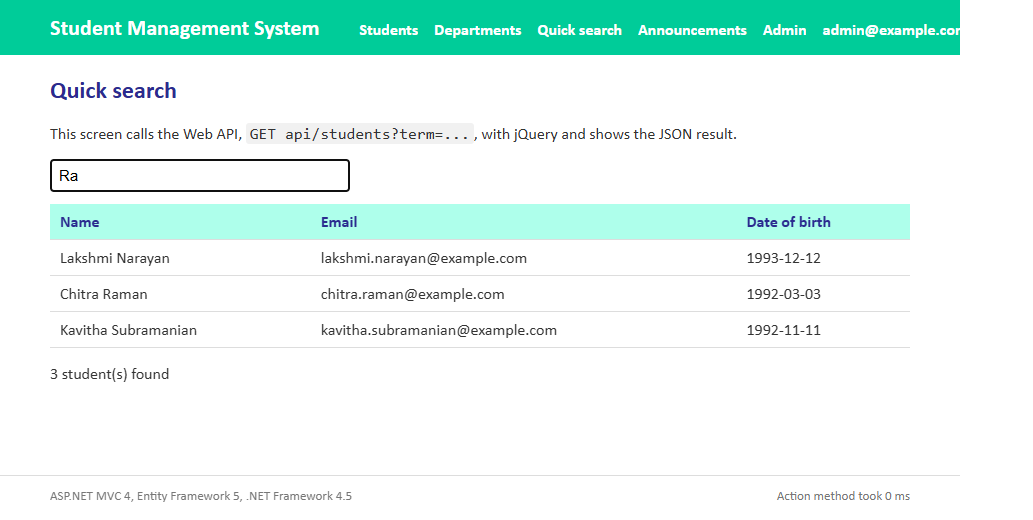
The Quick search screen of the sample doesn’t post a form or reload the page. It calls GET api/students?term=... with jQuery on every key up, and builds the rows of the table from the Data property of the JSON envelope,
<input type="text" id="term" placeholder="Type a part of the last name" />

<table id="results">
    <thead>
        <tr><th>Name</th><th>Email</th><th>Date of birth</th></tr>
    </thead>
    <tbody></tbody>
</table>
<p id="status"></p>

@section Scripts {
    <script>
        $(function () {
            var apiUrl = '@Url.Content("~/api/students")';

            function load() {
                $.getJSON(apiUrl, { term: $('#term').val(), pageSize: 20 }, function (response) {
                    var students = response.Data;
                    var rows = '';
                    $.each(students, function (i, s) {
                        rows += '<tr><td>' + $('<div/>').text(s.FullName).html() + '</td><td>' +
                            $('<div/>').text(s.Email).html() + '</td><td>' + s.DateOfBirth.substring(0, 10) + '</td></tr>';
                    });
                    $('#results tbody').html(rows);
                    $('#status').text(students.length + ' student(s) found');
                });
            }

            $('#term').keyup(load);
            load();
        });
    </script>
}
There are three points in this code. The URL is generated with Url.Content("~/api/students"), so it works even when the application is hosted in a virtual folder. The values from the JSON are put in the HTML with .text(...).html() and not by the plain concatenation, because the API returns the data which the users typed, and it must be encoded like the Razor does. The getJSON sends the Accept: application/json header, and the content negotiation does the rest. This is the screen after the user typed “Ra”,
Must Be Aware: The sample API has no authentication, so anybody can delete a student. A real API must be protected, with the
[Authorize]filter at the least, and it must be called over HTTPS. Don’t publish an API like this on the Internet.
Testing the API controller
The Web API controller is a normal class, so it can be unit tested without a server. We need to give it a Request, which has a configuration, because the CreateResponse of the request uses it for the content negotiation,
private Web.Api.StudentsController CreateController(FakeStudentService service, FakeLogger logger = null)
{
    logger = logger ?? new FakeLogger();
    var request = new HttpRequestMessage(HttpMethod.Post, "http://localhost/api/students");
    request.Properties[HttpPropertyKeys.HttpConfigurationKey] = new HttpConfiguration();

    return new Web.Api.StudentsController(service, logger) { Request = request };
}

[Test]
public void Post_WithAValidStudent_ReturnsCreatedWithTheLocation()
{
    var service = new FakeStudentService();
    var controller = CreateController(service);

    var response = controller.Post(new StudentInputDto
    {
        FirstName = "A", LastName = "Kumar", Email = "a@example.com", DateOfBirth = new DateTime(1990, 1, 1)
    });

    Assert.AreEqual(HttpStatusCode.Created, response.StatusCode);
    Assert.AreEqual("http://localhost/api/students/42", response.Headers.Location.ToString());
    Assert.AreEqual(1, service.CreateCalls);
}
We build the Location from the Request.RequestUri (and not from a UrlHelper) only to keep this unit test simple. We will see more tests in the last article.
Wrap up
In this article, we have looked at the Web API as the second front door of the same service, its routing and the order of the registration, the controller with the correct status codes, the separate input class and the validation gotcha, the dependency resolver with the scope, the real requests and responses, the content negotiation, and a screen which consumes the API with jQuery. I really appreciate that you took the time to read this article. In the next article, I will walk you through how to test all of this, with the unit tests and the integration tests, and a summary of the whole series.
Related Posts
How does an ASP.NET MVC request work from .NET 4.0 to 4.5? - Part 2
This article follows one ASP.NET MVC request from routing to the Razor view, and explains what changes between .NET 4.0 and 4.5, mainly the async actions.
How to build CRUD with Razor views and dependency injection? - Part 6
This article builds the student list, create, edit, details and delete screens with a service layer, view models, validation, Post-Redirect-Get and dependency injection with Unity.
How to add registration, login, forgot password, change password, profile and logout? - Part 10
This article adds registration, login, logout, forgot password, change password and a profile page, with salted password hashes, account lock, one-time reset tokens and a testable design.