How does an ASP.NET MVC request work from .NET 4.0 to 4.5? - Part 2
This article follows one ASP.NET MVC request from routing to the Razor view, and explains what changes between .NET 4.0 and 4.5, mainly the async actions.
How does an ASP.NET MVC request work from .NET 4.0 to 4.5? - Part 2
When a page doesn’t show the expected data, most of the developers start to debug from the action method. But the request has travelled through many steps before it reaches our action, and many more after it leaves, and the bug may be in any one of them. A route which matches the wrong controller, a filter which short circuits the call, a model binder which fails silently, or a view which can’t be found, all of them look the same from the browser. In the previous article, we discussed the MVC pattern and the structure of our solution. In this article, we are going to see the life of one request in ASP.NET MVC step by step, the Razor view engine, and what is changed between the .NET Framework 4.0 and 4.5.
Student Management System series:
- How to structure an ASP.NET MVC application? - Part 1
- How does an ASP.NET MVC request work from .NET 4.0 to 4.5? - Part 2 (this article)
- How does routing work, with custom, nested and area routes? - Part 3
- How to model the data with Entity Framework and LINQ? - Part 4
- How lambda expressions, extension methods, delegates and events reduce the code? - Part 5
- How to build CRUD with Razor views and dependency injection? - Part 6
- How to remove the repeated code with a base controller, base service and base repository? - Part 7
- How to build the views with layouts, partial views and HTML helpers? - Part 8
- How to use filters, model binding and validation? - Part 9
- How to add registration, login, forgot password, change password, profile and logout? - Part 10
- How to build a Web API with ASP.NET MVC 4? - Part 11
- How to test the application and keep it clean? - Part 12
TL;DR Summary
- The request goes through Routing, Controller factory, Authorization filters, Model binding, Action filters, the Action method, Result filters, the ActionResult and the View engine.
- Routing maps the URL to a controller and an action, the first matching route wins.
- The controller factory creates the controller, and it is the place where the dependency injection plugs in.
- Filters let us add the cross-cutting concerns like authorization and logging without touching the actions.
- Razor is the default view engine of MVC 3 and 4, it mixes C# and HTML with the
@symbol. - The pipeline is same on .NET 4.0 and 4.5. The big difference is the async support, with
asyncandawaitin .NET 4.5 and MVC 4.
The life of a request
The following diagram depicts the steps. The purple path is the one request we are going to follow.
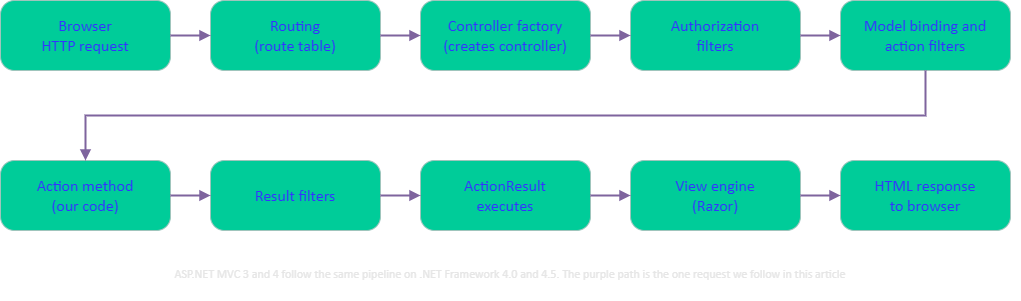
Let us take the request GET /Students/Details/5 and see each step.
1. Routing
The UrlRoutingModule of ASP.NET looks at the URL and compares it with the route table, which is registered at the application start in RouteConfig. The first route which matches wins, so the order matters.
public static void RegisterRoutes(RouteCollection routes)
{
    routes.IgnoreRoute("{resource}.axd/{*pathInfo}");

    routes.MapRoute(
        name: "Default",
        url: "{controller}/{action}/{id}",
        defaults: new { controller = "Students", action = "Index", id = UrlParameter.Optional });
}
For our URL, controller is Students, action is Details and id is 5. If you have a specific route like Students/Search/{term}, register it before the default route, otherwise the default one catches it first. The next article is fully about the routing, with the constraints, nested routes and areas.
2. Controller factory
The MvcHandler asks the controller factory to create StudentsController. The default factory creates it by calling its constructor. In MVC 3 and later, it first asks the IDependencyResolver, and that is the extension point for our IoC container. We will use it in Part 6, to give the controller its IStudentService through the constructor.
3. Authorization filters
Before the action is called, MVC runs the authorization filters, like [Authorize]. If the user is not allowed, the filter returns a result (for example the redirect to the login page) and the rest of the pipeline is skipped. It is the right place for the security rules, because we can’t forget to call it from an action.
4. Model binding and action filters
The model binder reads the values from the route, the query string and the form and converts them to the parameters of the action, id = 5 here. The validation errors are collected in the ModelState. Then the action filters run, OnActionExecuting before the action and OnActionExecuted after it. A filter is the good place for logging, timing or caching, and we will write one in Part 9.
5. Action method
Now our code runs. The action should be thin, it calls the service and chooses the result.
public ActionResult Details(int id)
{
    var student = _studentService.Find(id);
    if (student == null)
        return HttpNotFound();

    return View(student);
}
6. Result filters and the ActionResult
The action returns an ActionResult, which is only a description of what to do, ViewResult, RedirectToRouteResult, HttpNotFoundResult, JsonResult and so on. The result filters run, and then ExecuteResult does the real work. This separation is the reason why a controller is easy to test, we check the returned object, and no web server is needed.
7. View engine and Razor
For a ViewResult, the view engine looks for the view in Views/Students/Details.cshtml and then in Views/Shared. Razor is the default view engine in MVC 3 and 4. It starts the code with @ and finds the end of the code by itself,
@model SMS.Domain.Student

<h2>@Model.FirstName @Model.LastName</h2>
<p>Email: @Model.Email</p>

@if (Model.Enrollments.Any())
{
    <ul>
    @foreach (var enrollment in Model.Enrollments)
    {
        <li>@enrollment.Course.Title - @enrollment.Grade</li>
    }
    </ul>
}
This is how the view looks in the browser, for the request /Students/Details/1.
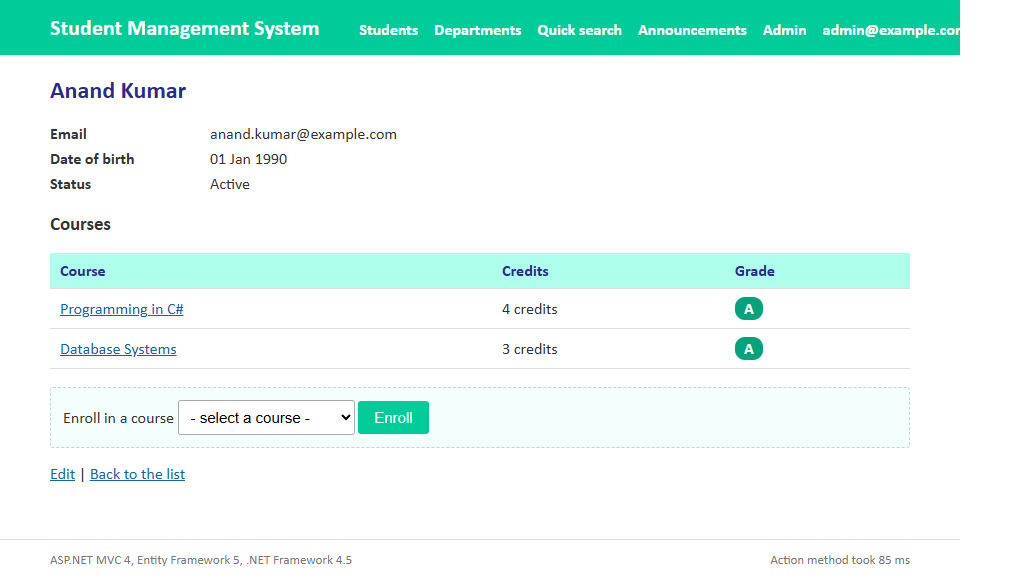
Razor encodes the output as HTML by default, so @Model.FirstName is safe from the script injection. Use @Html.Raw(...) only when you really need the raw HTML and you trust the source.
Must Be Aware: Keep the views simple. A view should format the data, not decide the business rules. If you write a long
ifinside a view to decide something about the student, move it to the entity or the view model.
What is different between .NET 4.0 and 4.5?
The pipeline above is the same for ASP.NET MVC 3 and MVC 4, and both run on the .NET Framework 4.0. MVC 4 also runs on 4.5, and that is where we get the important new things.
| Area | .NET 4.0 (MVC 3 or 4) | .NET 4.5 (MVC 4) |
|---|---|---|
| Async actions | AsyncController with IndexAsync and IndexCompleted methods | async and await with a Task<ActionResult> action |
| Language | C# 4 | C# 5, which has async and await |
| Bundling and minification | Available in MVC 4 | Available in MVC 4 |
| Entity Framework 5 | Works, but without enum support | Enum properties are supported |
Synchronous vs asynchronous action
A web server has a limited number of threads to serve the requests. When an action waits for a file or a web service and the thread is blocked, the thread can’t serve any other request. Under the load, the waiting threads are used up, and the new requests are queued. The following diagram shows the difference.
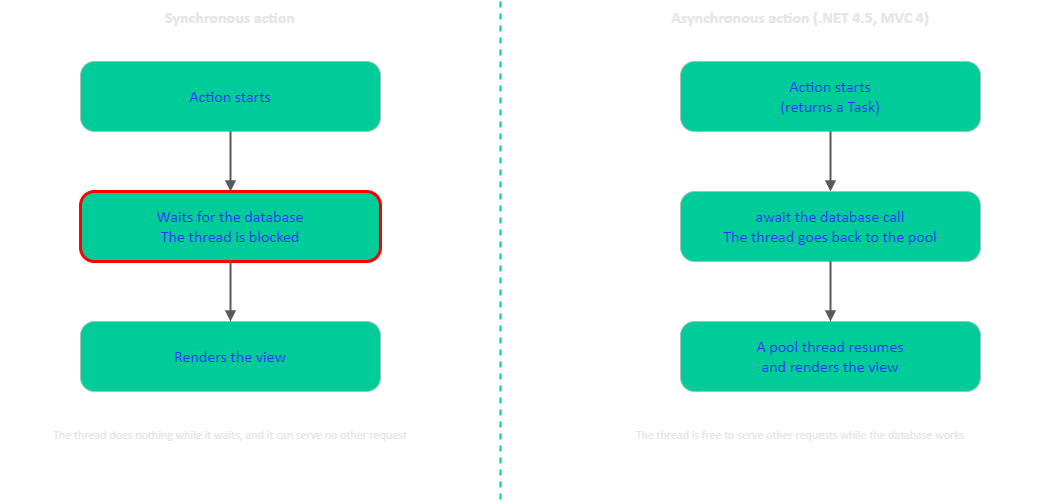
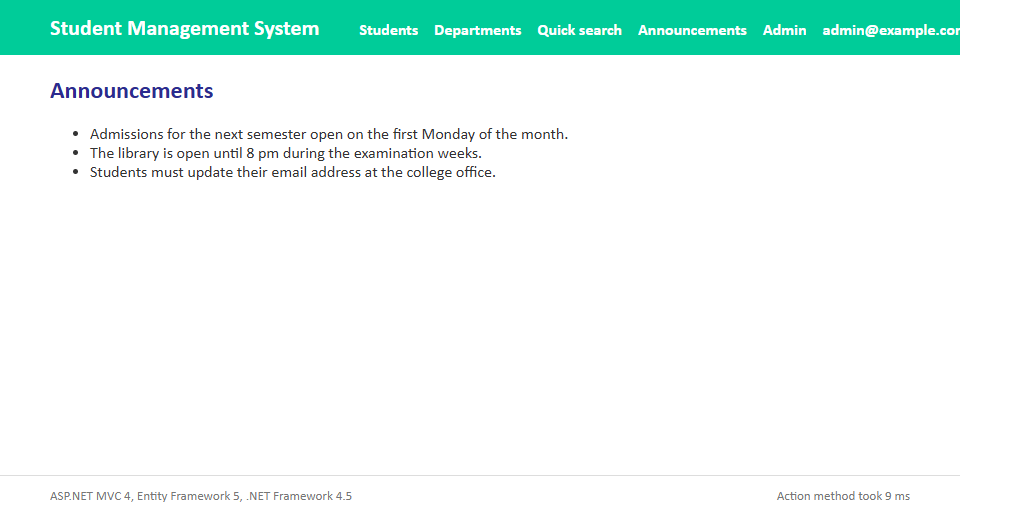
On .NET 4.0 we had to write the AsyncController with two methods for each action, IndexAsync to start the work and IndexCompleted to finish it. With .NET 4.5, it is just a normal looking method. Find below the action of the Announcements screen in our sample, which reads the announcements from a file,
public class AnnouncementsController : Controller
{
    public async Task<ActionResult> Index()
    {
        var path = Server.MapPath("~/App_Data/announcements.txt");

        string text;
        using (var reader = new StreamReader(path))
            text = await reader.ReadToEndAsync();

        return View((object)text);
    }
}
The thread is released at the await, and any free thread continues the action when the file read is finished. To get the full benefit, set targetFramework="4.5" in the web.config, which a new project of Visual Studio 2012 already has,
<system.web>
  <compilation debug="true" targetFramework="4.5" />
  <httpRuntime targetFramework="4.5" />
</system.web>
Note: The Entity Framework 5 doesn’t have the asynchronous queries, so the database calls of our sample are synchronous. Use
asyncandawaitfor the I/O which has the async API in .NET 4.5, like the files,HttpClientcalls to a web service and the streams.
Must Consider: The async is not a way to make a single request faster. It helps the server to serve more requests at the same time. Use it for the I/O bound calls, like a web service or a file, and don’t use it for the CPU bound code, because there is no thread to give back.
Wrap up
In this article, we have looked at the life of an ASP.NET MVC request, from the routing to the Razor view, and the differences between .NET 4.0 and 4.5, mainly the async support. I appreciate your time and efforts to read this article. In the next article, I will walk you through how to model the students, courses and enrollments with the Entity Framework, and how to query them with LINQ.
Related Posts
How to build a Web API with ASP.NET MVC 4? - Part 11
This article builds an ASP.NET Web API for students on the same service, with routing, status codes, content negotiation, validation, dependency injection and a jQuery client.
How to build CRUD with Razor views and dependency injection? - Part 6
This article builds the student list, create, edit, details and delete screens with a service layer, view models, validation, Post-Redirect-Get and dependency injection with Unity.
How to add registration, login, forgot password, change password, profile and logout? - Part 10
This article adds registration, login, logout, forgot password, change password and a profile page, with salted password hashes, account lock, one-time reset tokens and a testable design.