Cloudflare Workers use cases and lessons learned - Part 4
Where Cloudflare Workers fit best, how a worker cut our origin requests by about 84%, and the lessons we learned running it in production.
Cloudflare Workers use cases and lessons learned - Part 4
A technology earns its place when it solves a real problem better than the alternatives, and when the team can run it without surprises. Workers solved a problem for us which page rules and server-side caching couldn’t, but running code at the edge also taught us a few lessons about testing, logging, failures and operations which we didn’t think about on day one. In the previous article, we discussed the common worker patterns with examples. In this last article of the series, we are going to see the real world use cases where workers fit well, a closer look at how we used a worker to stop over 80% of requests to our web servers, and the lessons we learned running workers in production.
Cloudflare Workers series:
- What is Cloudflare Worker and why do we need it?
- How to set up a local development environment for Cloudflare Workers?
- How to write Cloudflare Workers? Common patterns with examples
- Cloudflare Workers use cases and lessons learned (this article)
TL;DR Summary
- Workers fit best for cache optimization, smart routing and redirects, edge security, maintenance and fallback pages, and A/B or canary releases.
- In our case, a worker reduced the SPA related requests to our origin servers from ~300K to ~50K per day (~84%).
- Treat worker code as production code: version control, unit tests, code review and automated deployments.
- Start with a narrow route, fail open with
passThroughOnException, and make sure the origin still works without the worker. - Workers have no built-in log storage; send logs to an external service with
event.waitUntil, and measure the effect of every change. - A worker is one more place to manage the application; keep the logic small and document it in the operations and DR processes.
Use cases
1. Cache optimization
Problem: The same content is served from many URL variations (case, query string order, tracking parameters), so the cache hit ratio is low and the origin serves the same content over and over again.
Worker solution: Normalize the URL (Pattern 5 in the previous article), or map all the variations to one canonical URL, and fetch it through the Cloudflare cache.
This is exactly the use case which brought us to workers. We will take a closer look at it in the next section.
2. Smart routing and redirects
Problem: Some requests must go to other in-house applications or third-party services, and the routing rules are too many or too complex for page rules. Without a worker, every request travels to the web servers just to decide where it should go.
Worker solution: Keep the routing rules or the redirect table in the worker (Patterns 3 and 4), and send each request directly to the right destination from the edge.
3. Edge security
Problem: Many applications behind the zone, some of them legacy, need the same security headers and custom blocking rules, and changing each application takes time.
Worker solution: Add the security headers and remove the internal headers in one worker for all applications (Pattern 2), and block or restrict requests with custom rules (Pattern 3).
4. Maintenance and fallback pages
Problem: During a deployment or an outage, users see a raw server error or a timeout.
Worker solution: Serve a friendly maintenance page when the origin returns a server error or is not reachable (Pattern 6). This also helps during a DR failover, while the traffic is switched to the secondary region (refer to the DR Guidelines series).
5. A/B testing and canary releases
Problem: We want to send a small percentage of users to a new version of the application, and keep each user on the same version.
Worker solution: Assign the user to a group with a cookie, and route each group to its back-end.
export async function handleRequest(request: Request): Promise<Response> {
  const cookie = request.headers.get('Cookie') || '';
  let group = cookie.indexOf('release=canary') !== -1 ? 'canary'
            : cookie.indexOf('release=stable') !== -1 ? 'stable'
            : (Math.random() < 0.1 ? 'canary' : 'stable'); // 10% to canary

  const url = new URL(request.url);
  const host = group === 'canary' ? 'https://canary-origin.example.com' : 'https://origin.example.com';
  const response = await fetch(new Request(host + url.pathname + url.search, request));

  const newResponse = new Response(response.body, response);
  newResponse.headers.append('Set-Cookie', `release=${group}; Path=/; Max-Age=86400`);
  return newResponse;
}
6. Caching large read-only queries sent with POST
Problem: Some APIs use POST for read-only queries because the inputs are too large for a URL (refer to the REST API Design Guidelines - Part 3). The Cloudflare cache only caches GET requests, so every such query reaches the origin.
Worker solution: Build a cache key from the URL and a hash of the request body, and store and read the response with the worker’s cache API. Only do this for queries which are truly read-only, and set a short cache time.
A closer look: stopping over 80% of SPA requests
Our SPA was reachable through over a thousand URLs, and all of them returned the same SPA shell. Certain requests also had to be redirected to other in-house applications and third-party services, so all requests went through our web servers. Page rules reduced the requests to the web servers by only about 11%, because the cache key was case sensitive and depended on the order of the query string parameters.
The following diagram explains how we implemented the worker for this use case.
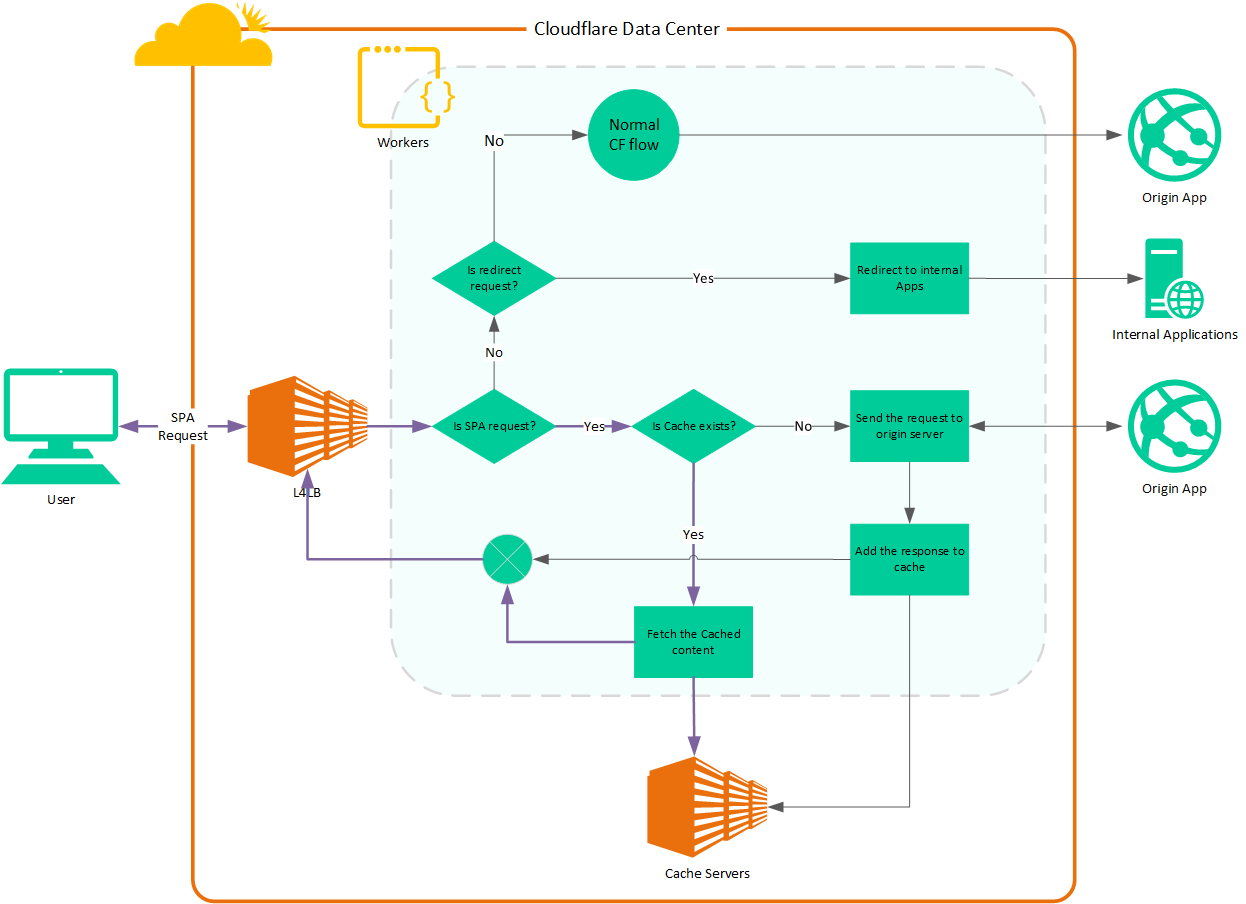
- The worker checks whether the request is an SPA request.
- If it is, the worker checks the cache for the SPA shell. When it exists, the worker returns the cached content (the purple flow). When it doesn’t, the worker sends the request to the origin, adds the response to the cache and returns it.
- If it is not an SPA request, the worker checks whether it is a redirect request, and redirects it to the internal applications.
- All other requests follow the normal Cloudflare flow to the origin.
Results:
| Before worker | After worker | |
|---|---|---|
| SPA requests to the origin server | ~300K per day | ~50K per day |
| Load on the server (average) | 350 rpm | 80 rpm |
The SPA related requests to the origin were reduced by ~84%, and the request queuing on the servers was reduced as well. For the full story, refer to How we reduced over 80% of requests to the web servers?.
Lessons learned
Treat worker code as production code
A worker sits in front of all the matching traffic; a bug in it is an outage for every user. Keep the worker in version control, write unit tests (see Part 2), review every change with a pull request, and deploy it through a pipeline instead of pasting code into the dashboard editor. The same Git and CI/CD process we use for our applications applies here (refer to the Git Process series and the CI/CD Process series).
Start narrow and widen the route
Deploy a new worker to a narrow route first (one path or a test subdomain), verify it, and then widen the route. A route like *example.com/* sends every request of the zone through the worker from the first second.
Fail open
Call event.passThroughOnException() in the entry file, so an unhandled exception in the worker sends the request to the origin instead of returning an error to the user. And make sure the origin still works correctly without the worker; this is our way back when we need to disable the worker in a hurry.
Log without slowing down the response
A worker has no built-in log storage, and console.log output is only visible in the preview of the dashboard editor. So, send the important events and errors to an external logging service with a subrequest, and use event.waitUntil so the user doesn’t wait for it.
addEventListener('fetch', (event: any) => {
  event.passThroughOnException();
  event.respondWith(handleRequest(event.request).catch(error => {
    event.waitUntil(fetch('<logging service endpoint>', {
      method: 'POST',
      body: JSON.stringify({ message: error.message, url: event.request.url })
    }));
    return fetch(event.request);
  }));
});
Measure every change
Validate the effect of each change with data: the cached vs uncached requests in Cloudflare analytics, and the load and response time of the origin in your APM tool. In our case, the numbers above came from Cloudflare analytics and New Relic, and they told us when the worker worked and when it didn’t.
Know the limits
A worker gets only a small amount of CPU time per request, and there are limits on the script size and the number of subrequests. Keep the logic small and fast, and refer to the Workers documentation for the current limits and pricing.
Don’t keep state in global variables
Global variables may survive between requests in the same isolate, but they are not shared across data centers and can disappear at any time. Use them only as a best-effort cache for data you can rebuild, never as the source of truth.
Plan for operations and DR
A worker is one more place where our application logic lives. Document what each worker does and which routes it serves, include it in the deployment and DR runbooks, and make sure the on-call team knows how to disable it. It is a trade-off between performance and maintenance, so keep the logic in the worker as small as possible.
Wrap up
In this article, we have looked at the real world use cases for Cloudflare Workers, a closer look at how a worker stopped over 80% of the SPA requests to our web servers, and the lessons we learned running workers in production. With this, we have completed the Cloudflare Workers series: from what a worker is and when to use it, the local development environment, the common patterns, to the use cases and lessons learned. I really appreciate that you took the time to read this series. I hope it helps you to move the right pieces of logic to the edge, and keep the rest where it belongs.
Related Posts
How to write Cloudflare Workers? Common patterns with examples - Part 3
Common Cloudflare Worker patterns with examples: modify requests and responses, redirect and block at the edge, route to back-ends and handle origin failures.
What is Cloudflare Worker and why do we need it? - Part 1
Cloudflare Workers run our JavaScript at the edge. See what a worker is, how it works with routes, how it compares with page rules and when to use it.
How to set up a local development environment for Cloudflare Workers? - Part 2
Set up a local development environment for Cloudflare Workers with Node.js, Yeoman and TypeScript, unit test the handler and bundle it with webpack.