What is CI/CD and why do we need it? - Part 1
What CI, Continuous Delivery and Continuous Deployment mean, why we need CI/CD, the goals of our process and its six phases.
What is CI/CD and why do we need it? - Part 1
Every team wants to deliver new features to users quickly, but without breaking what already works. When the build, test and release steps are manual and different for each project, every release becomes a risky event: builds are done on someone’s machine, testing waits for a “ready” build, and production deployment needs a long checklist and a late night. CI/CD solves this by making every change go through the same automated and visible path from the developer’s machine to production. In this series, I share the CI/CD process which we defined for our teams. In this article, we are going to see what CI/CD is, why we need it, the goals of the process and its phases on a high level.
CI/CD Process series:
- What is CI/CD and why do we need it? (this article)
- Who does what in CI/CD? Roles and environments
- How does a change flow from commit to production in CI/CD?
- How to implement CI/CD with Azure DevOps?
TL;DR Summary
- Continuous Integration (CI) - developers integrate code into a shared repository several times a day, and each check-in is verified by an automated build.
- Continuous Delivery (CD) - the software is always in a state where it can be released to production at any time.
- Continuous Deployment - every change that passes the pipeline goes to production automatically. You can’t do Continuous Deployment without Continuous Delivery.
- The goals are standardization, less manual intervention, more confidence and trust in the code, and “build once, deploy many”.
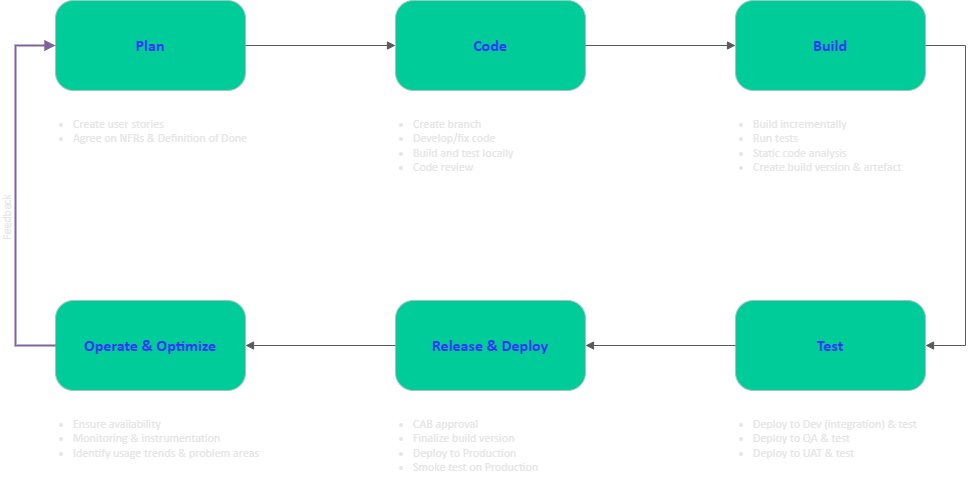
- The process has six phases: Plan, Code, Build, Test, Release & Deploy, and Operate & Optimize.
Scope
This series describes the CI/CD process and its various phases. It does not have project specific details or recommendations. What is given here is the minimum number of steps we think are needed to achieve the necessary goals. You can add more steps based on your project needs.
What is CI/CD?
CI/CD is a process for continuous development, testing and delivery of new code.
Continuous Integration (CI) is a development practice that requires developers to integrate code into a shared repository several times a day. Each check-in is then verified by an automated build, allowing teams to detect problems early.
Continuous Delivery (CD) is a software development discipline where you build software in such a way that the software can be released to production at any time. CD can be achieved by continuously integrating the software done by the development team, building executables, running automated tests on those executables to detect problems, and pushing the executables into increasingly production-like environments to ensure the software will work in production.
Continuous Delivery is sometimes confused with Continuous Deployment. Continuous Deployment means that every change goes through the pipeline and automatically gets put into production, resulting in many production deployments every day. Continuous Delivery just means that the team is able to do frequent deployments but may choose not to do it, usually due to businesses preferring a slower rate of deployment. In order to do Continuous Deployment, the team must be doing Continuous Delivery.
The following table summarizes the difference,
| Practice | What is automated? | Who decides to go to production? | Output |
|---|---|---|---|
| Continuous Integration | Build and tests on every check-in | Not applicable | A verified build |
| Continuous Delivery | Build, tests and deployment to all pre-production environments | People (approvals and sign-off) | A build which can be released at any time |
| Continuous Deployment | Everything, including production deployment | The pipeline | Many production deployments every day |
Simply put, CI tells us “the code works together”, Continuous Delivery tells us “the build is ready to go live whenever we want”, and Continuous Deployment takes it live without waiting for anyone.
Why CI/CD?
Following are a few of the reasons for the need to move to CI/CD,
- Deliver working software into the hands of real users as quickly as possible.
- Allow stakeholders and users to access newly created features and provide feedback as soon as possible, so features can be iteratively improved upon.
- Limit work-in-progress.
- Make incremental changes.
- Make the workflow visible to all team members always.
- Encourage collaboration between the Developer, QA and Ops teams.
- Release high-quality value.
Goals
Based on our knowledge of the existing process and some inputs received from other teams, the following are the primary objectives we considered when forming the process,
- Standardization of the build and release process across various projects
- Reduce manual intervention as much as possible
- Increase developer confidence in refactoring or adding features
- Increase code quality and the trust in code
- Build once, deploy many - the same build artefact is promoted from one environment to the next, instead of rebuilding it for each environment
- Continuous improvement
Process
The following diagram depicts the process and its phases on a high level. The environments and the primary owner (role) of each phase are described in the next article.
Plan Phase
| Description | The phase that decides what stories/bugs get released to the user |
| Environment | Not applicable |
| Owner | SDM/BA |
| Artefacts | User stories, Definition of Done, NFRs (Non-Functional Requirements), story to engineer assignment |
| Tools/Tasks | Azure DevOps - Work Items (Boards) |
Code Phase
| Description | The work gets converted to code, tested and stored in a source repository |
| Environment | Local development |
| Owner | Developer |
| Artefacts | Source code in the repository |
| Tools/Tasks | Development IDE, ReSharper |
Build Phase
| Description | The source code is analysed for vulnerabilities and a build is generated |
| Environment | A separate build server or a build service is used |
| Owner | Development team |
| Artefacts | Versioned build |
| Tools/Tasks | Azure DevOps - Build Pipeline (or appropriate build servers) |
Test Phase
| Description | Various types and levels of testing are conducted to ascertain quality |
| Environment | Integration (Dev), QA, UAT |
| Owner | QA team |
| Artefacts | Build artefact signed off in each environment |
| Tools/Tasks | Azure DevOps - Release Pipeline, unit, manual and other automated tests |
Release & Deploy Phase
| Description | Preparatory work for release, approvals and deployment to production |
| Environment | Production |
| Owner | SDM/BA |
| Artefacts | Versioned build deployed, tagged source code, sign-off on production |
| Tools/Tasks | Azure DevOps - Release Pipeline |
Operate & Optimize Phase
| Description | The running code is monitored for availability and instrumented |
| Environment | Production |
| Owner | DevOps |
| Artefacts | Performance dashboards/feedback, notifications |
| Tools | Application Insights and other monitoring tools |
The phases form a loop. The flow highlighted in purple in the diagram is the feedback loop: the feedback and usage trends from the Operate & Optimize phase become new user stories in the next Plan phase, and this is where the “continuous” in CI/CD really comes from.
Wrap up
In this article, we have looked at what CI, Continuous Delivery and Continuous Deployment are, why we need CI/CD, the goals of our process and its six phases. I really appreciate that you took the time to read this article. In the next article, I will walk you through the roles and responsibilities in the process and the environments a build goes through before it reaches production.
Related Posts
Who does what in CI/CD? Roles and environments - Part 2
The roles and responsibilities in the CI/CD process, which role owns which phase and the environments a build goes through, with their gates.
How does a change flow from commit to production in CI/CD? - Part 3
How a change flows from commit to production: the release branch workflow, CI and CD steps, quality gates and how we handle build failures.
How to implement CI/CD with Azure DevOps? - Part 4
Implement the CI/CD workflow with Azure DevOps: pipeline building blocks, recommended tools and tasks, a CI pipeline skeleton and lessons learned.