How to use verbs, representations and status codes in a REST API? - Part 3
Design incoming and outgoing representations, choose the right status codes and use each HTTP verb correctly, with examples.
How to use verbs, representations and status codes in a REST API? - Part 3
Once the resources and URIs are in place, the next question is how a client talks to them: what it sends, what it gets back and how both sides know whether the request succeeded or not. Many APIs return 200 for everything and put the real result inside the body, and this forces every consumer to write custom logic and breaks caches, proxies and monitoring tools which rely on HTTP semantics. In the previous article, we discussed how to identify resources and design URIs. In this article, we are going to see how to design the incoming and outgoing representations, which status codes to use, and when and how to use each HTTP verb with examples.
REST API Design Guidelines series:
- Why REST and what makes an API RESTful?
- How to design resources and URIs for a REST API?
- How to use verbs, representations and status codes in a REST API? (this article)
- How to handle errors and secure a REST API?
- How to improve REST API performance and handle concurrency?
- How to handle long running requests, versioning, testing and documentation in a REST API?
TL;DR Summary
- Send the outgoing representation in JSON by default, and make the incoming media type match the outgoing one.
- Don’t expose all internal domain entity details in a representation; send only what the consumer needs.
- Validate the incoming representation before processing it.
- Don’t stick only with 200 for success and 500 for errors; use 2xx, 3xx, 4xx and 5xx with their real meaning.
- GET reads, POST creates, PUT creates or replaces, PATCH updates part, DELETE removes, OPTIONS discovers and HEAD reads only the headers.
Representation
A representation can be any machine-readable document containing any information about a resource. A resource can be represented in different media types like JSON, XML, HTML, etc. Representations are transferred back and forth between consumer and provider.
Incoming Representation
It refers to the request representation of a resource state. Generally, it has two kinds of representation. Simple representations are usually key-value pairs: set this item of resource state to that value, for example fundcode=PF342&fundname="Fund name goes here...". Form-encoding is the most popular one for this format. When your resource state is too complex to represent with key-value pairs, then you should choose a different media type like JSON, XML, etc. However, it should match with the response representation.
Must Do: By default, our services should accept the JSON document type for the incoming representation when the resource state is complex.
Outgoing Representation
It refers to the response representation of a resource state. By default, our API should send the JSON response representation, and it should also support other media types depending on consumer requirements. The outgoing representation should reflect the current state of a resource, and it should not expose all internal entity details; instead, it should send only what the consumer is interested in or requires.
Must Be Aware: The response representation should not expose all internal domain entity details; instead, it should expose only what is required for the consumer. It should share the current state of the resource and not send a stale state. This could happen when we introduce inappropriate middleware caching. Refer to the caching section in Part 5 for more information.
Validation
It is so important to validate the incoming representation and other elements of the request before we start processing it. Refer to the error handling section in Part 4 for more information.
Status Codes
Find below the status codes which we use in our APIs.
| Status Code | Category | Description |
|---|---|---|
| 200 | Success | OK - It indicates that the server successfully carried out whatever action the client requested. |
| 201 | Success | Created - It indicates that the server successfully created a new resource for a client request. |
| 202 | Success | Accepted - It indicates that the server can’t handle the given request in real time and it will be processed later. This is an appropriate response when a request triggers an asynchronous action. |
| 204 | Success | No Content - It indicates that the server successfully processed the PUT, POST or DELETE request. Sometimes we want to perform some action on the server end, but a response body is not required. In this case we can use this status code. |
| 301 | Redirection | Moved Permanently - The server instructs the client to use the new URI in the future. |
| 303 | Redirection | See Other - The request has been processed, but instead of sending a response document, the server is sending the client the URL of a response document. |
| 304 | Redirection | Not Modified - It is like 204 (No Content) in that the response body must be empty. But 304 is used when there is data, but the client already has it. |
| 307 | Redirection | Temporary Redirect - The server instructs the client to temporarily use some other URI. |
| 400 | Client-Side Error | Bad Request - The server rejects the request when it is not in the right format. |
| 401 | Client-Side Error | Unauthorized - The server rejects the request when the client requests a protected resource without providing valid authentication credentials. |
| 403 | Client-Side Error | Forbidden - The server rejects the request when the client doesn’t have enough access rights on a resource. |
| 404 | Client-Side Error | Not Found - The server is not able to find or map a resource for the given URI. |
| 405 | Client-Side Error | Method Not Allowed - The server rejects the request when the given method is not applicable for a resource. |
| 415 | Client-Side Error | Unsupported Media Type - The server rejects the request when the client sends an unsupported media type. |
| 429 | Client-Side Error | Too Many Requests - The server rejects requests when the client sends too many requests from a specific IP or location. |
| 500 | Server-Side Error | Internal Server Error - The server is not able to handle a request due to an internal exception in the system. |
| 503 | Server-Side Error | Service Unavailable - The server or an underlying data store or service is not able to respond (for example, overloaded or timed out). |
Verbs
A resource can have one or more operations, and these operations map to any one verb from GET, POST, PUT, PATCH, DELETE, HEAD and OPTIONS. For each verb below, we will see when to use it, what the request and response contain and which status code to send. For error and fault status codes, refer to Part 4.
GET
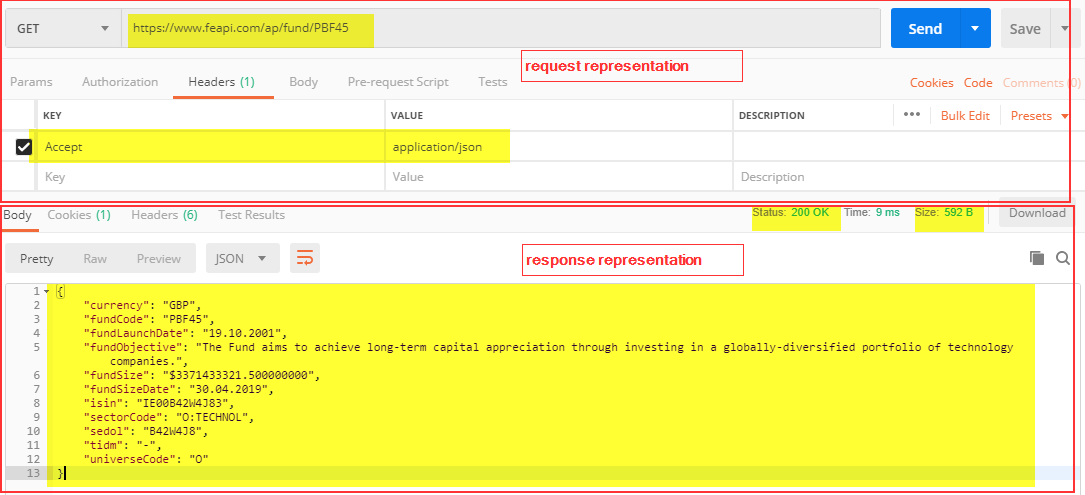
Get a safe and idempotent representation of a resource. The infrastructure of the Web strongly relies on the idempotent and safe nature of GET.
When to use:
- To read the current state of a resource
- To read the output representation of processing or computing functions
Request: Headers but no body.
Response: A representation of the resource and response headers like Content-Type, Content-Length, etc.
Status Code: 200 (OK).
POST
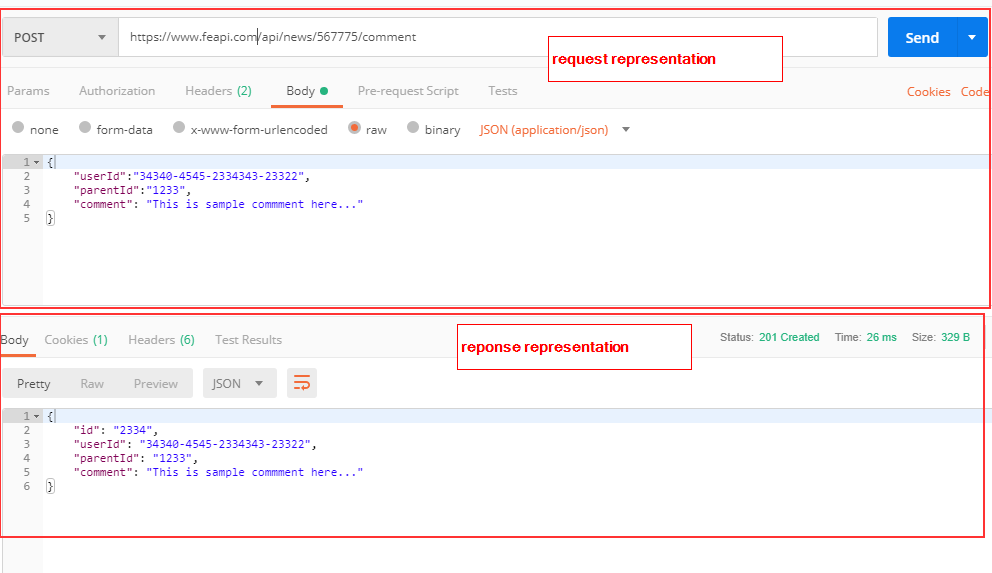
Create a new resource based on the given representation. The POST verb is neither safe nor idempotent, so we should keep this in mind while retrying on failures, and the server should validate the resource uniqueness.
When to use:
- To create a new resource
- To run queries with large inputs
- To perform any unsafe or non-idempotent operation when no other HTTP method seems appropriate
Request: A representation of the resource.
Response: A representation of the resource and headers or instructions for a redirect.
Status Code: 201 (Created) when a resource is successfully created, and 200 (OK) when an operation is successfully completed.
PUT
Create or replace the state of a resource with the given representation.
When to use:
- Use PUT to create new resources only when clients can decide the URLs of resources. Otherwise, use POST.
- Use PUT to create or update a resource when the consumer is not sure whether it exists or not.
- To update the state of a resource.
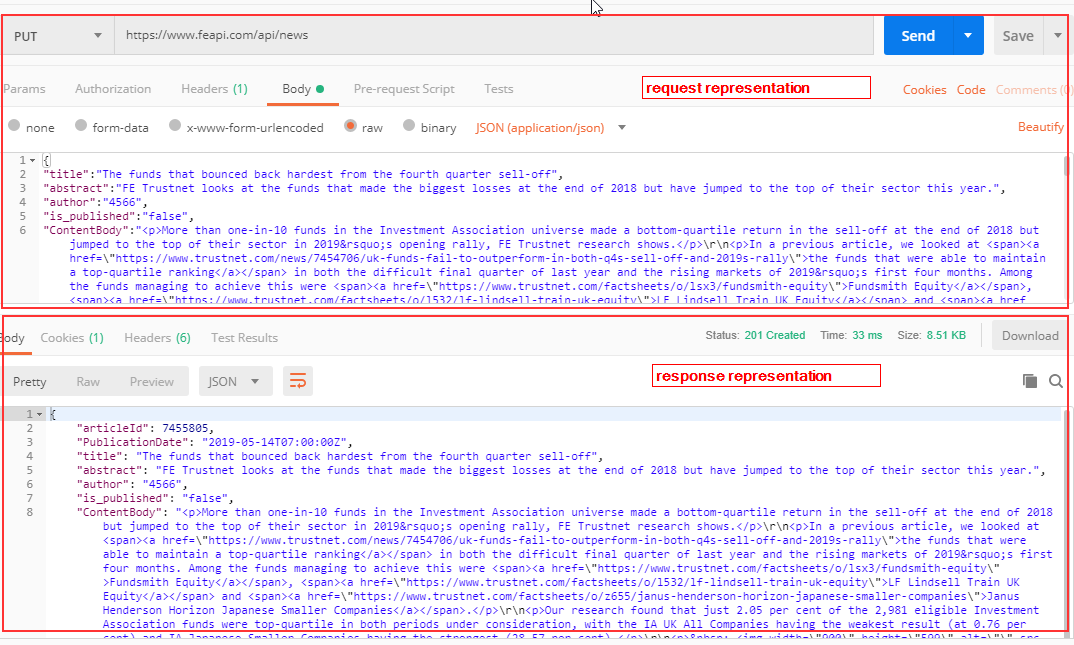
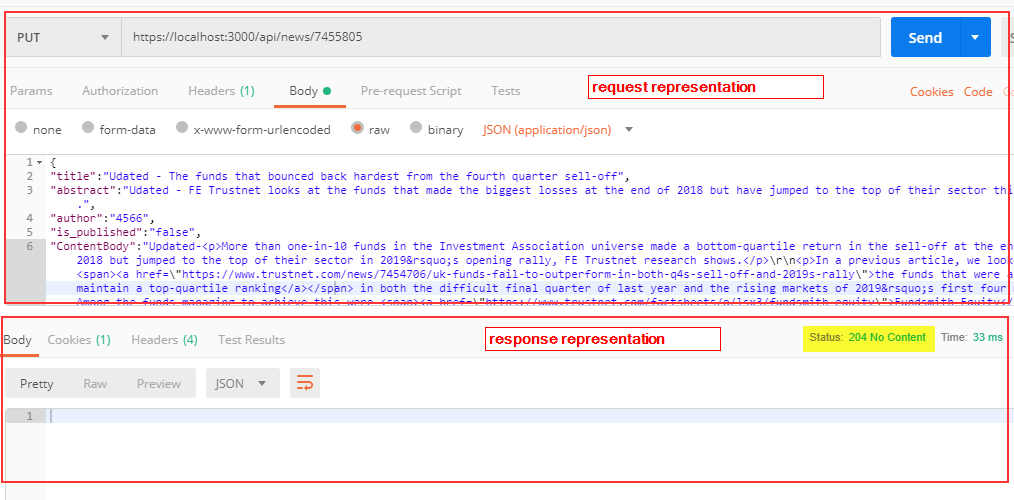
Request: A representation of the resource.
Response: Status of the update. Optionally, we can include the updated representation.
Status Code: 200 (OK) for a success response with a body in the representation, or 204 (No Content) for a success response without a body.
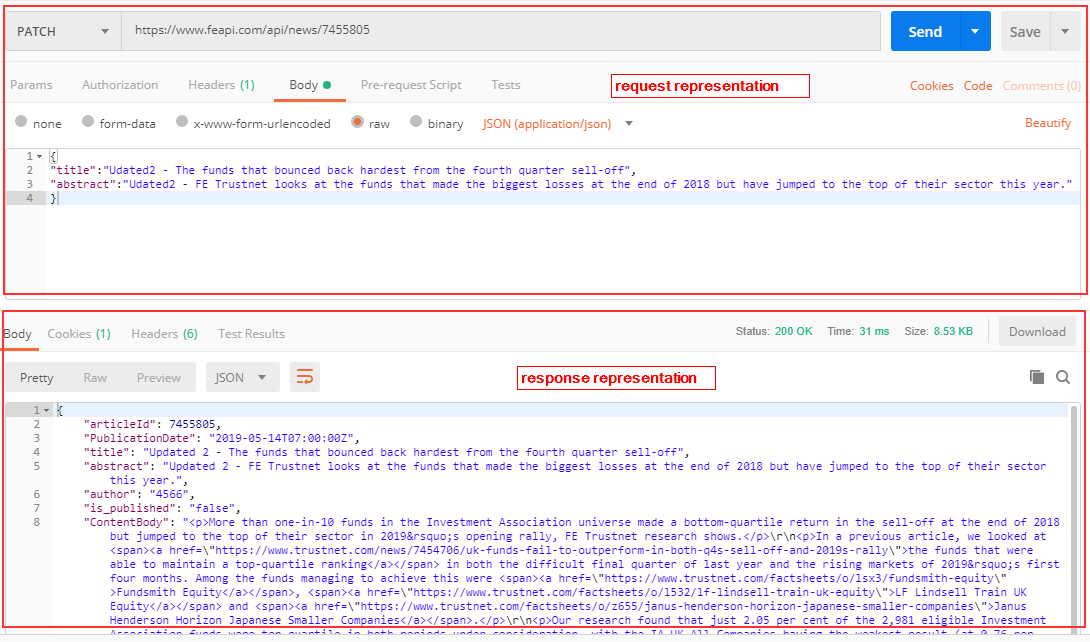
PATCH
Change part of the state of a resource based on the given representation.
When to use:
- Use the PATCH verb when the client wants to update part of the state of a resource.
Request: A partial representation of the resource.
Response: Status of the update. Optionally, we can include the updated representation.
Status Code: 200 (OK) for a success response with a body in the representation, or 204 (No Content) for a success response without a body.
DELETE
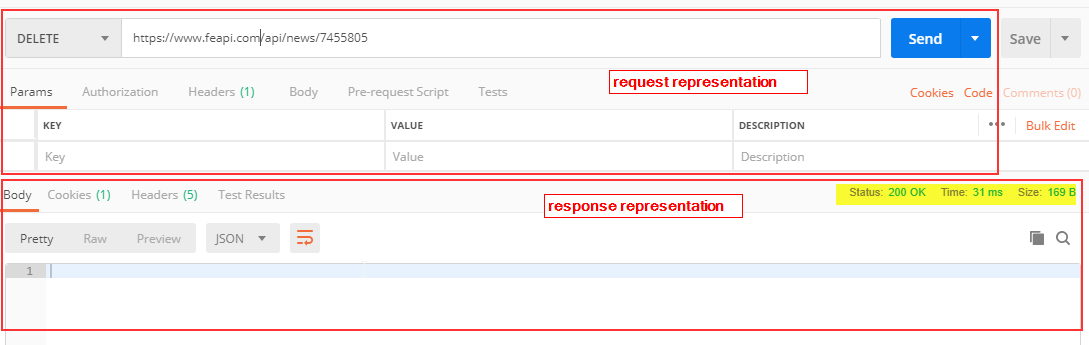
Destroy a resource.
When to use:
- Use the DELETE verb when the client wants to remove a resource from the server.
Request: Headers but no body.
Response: Success or failure state of the delete.
Status Code: 200 (OK) for a success response with a body in the representation, or 204 (No Content) for a success response without a body.
OPTIONS
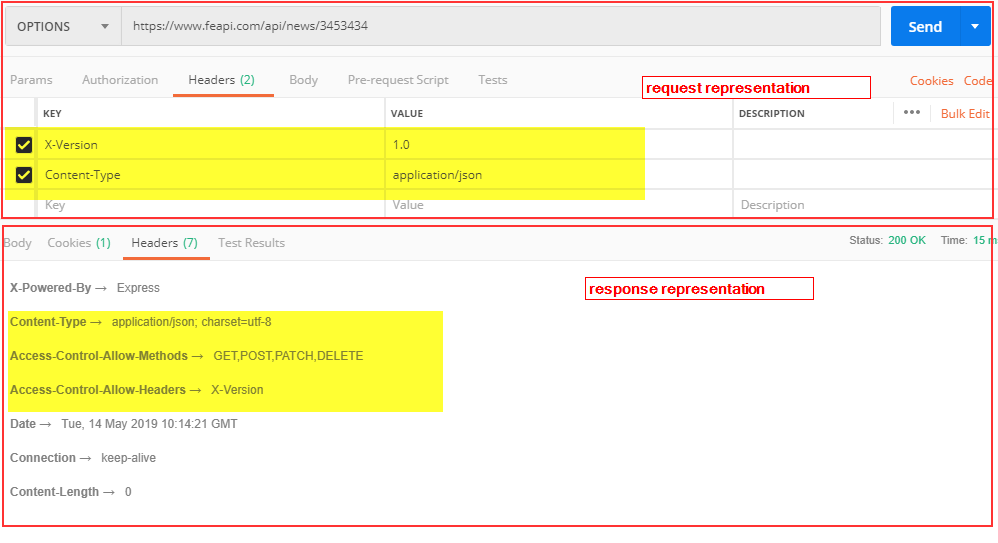
Discover which HTTP methods this resource responds to.
When to use:
- Use this verb to find the list of HTTP methods supported by any resource or to ping the server.
Request: Headers but no body.
Response: Headers but no body.
Status Code: 200 (OK).
HEAD
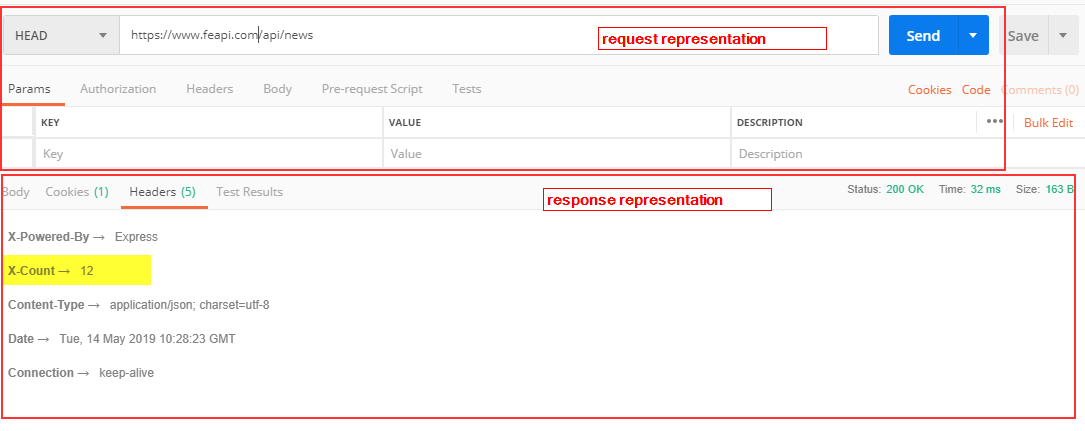
Get the headers that would be sent along with a representation of a resource, but without the representation.
When to use:
- Use this verb when the client wants to see the details of a GET request without the response body.
Request: Headers but no body.
Response: Headers but no body.
Status Code: 200 (OK).
Best practices checklist
Representation
- API should send the output representation in JSON.
- Incoming representation media type should match with the outgoing representation.
Response and Status Codes
- Don’t stick only with 200 status for success.
- Don’t stick only with 500 status for error or fault.
- Use 2xx response codes to send a successful response to the client.
- Use 4xx response codes to send an error response to the client.
- Use 5xx response codes to send a fault response to the client.
Verbs
| Verb | Use it to | Success status |
|---|---|---|
| GET | Read the state of a resource, or the output of processing or computing functions | 200 |
| POST | Create a new resource, run queries with large inputs, or perform any unsafe or non-idempotent operation when no other verb seems appropriate | 201 when created, 200 when completed |
| PUT | Create or update a resource when the consumer is not sure whether it exists or not, or update a resource | 204 without body, 200 with body |
| PATCH | Update part of the state of a resource | 204 without body, 200 with body |
| DELETE | Remove a resource from the server | 204 without body, 200 with body |
| OPTIONS | Find the list of HTTP methods supported by a resource, or ping the server | 200 |
| HEAD | See the details of a GET request without the response body | 200 |
Wrap up
In this article, we have looked at how to design incoming and outgoing representations, the status codes to use and when and how to use each HTTP verb with examples. I really appreciate that you took the time to read this article. In the next article, I will walk you through how to handle errors and faults, and how to secure a REST API.
Related Posts
How to design resources and URIs for a REST API? - Part 2
Identify resources from domain nouns and functions, choose the right granularity with an example and follow the conventions to design URIs.
Why REST and what makes an API RESTful? - Part 1
Why REST replaced WS-* services, what makes an API RESTful and the six REST constraints, with resources, URIs, verbs, safety and idempotence.
How to handle errors and secure a REST API? - Part 4
Classify errors and faults, design the error body and apply the security techniques for a REST API: authentication, CORS and rate limiting.