What is resiliency and why do we need a DR strategy? - Part 1
What resiliency is, why we need a DR strategy, how high availability, disaster recovery and backup differ and the principles we follow.
What is resiliency and why do we need a DR strategy? - Part 1
Failures are normal in the cloud. A VM gets rebooted for a host update, a data center loses power, a deployment goes wrong, or in a rare case an entire Azure region becomes unavailable. We can’t stop these failures from happening, but we can decide how much they hurt our customers and our business. Most teams think about Disaster Recovery (DR) only after the first major outage, and by then the cost of an hour of downtime is already known the hard way. In this series, I share the DR guidelines and best practices which we defined for our applications on Azure. In this article, we are going to see what resiliency is, how high availability, disaster recovery and backup differ from each other, and the principles behind a good DR strategy.
DR Guidelines series:
- What is resiliency and why do we need a DR strategy? (this article)
- How to measure resiliency? RTO, RPO, MTTR and SLA
- What are the DR strategy patterns and how to choose one?
- How to implement DR for Azure resources?
- How to define a DR strategy for your application? A worked example
TL;DR Summary
- Resiliency is the ability of a system to gracefully handle and recover from failures.
- High Availability (HA) avoids single points of failure with redundancy within a region; Disaster Recovery (DR) keeps the business running when HA fails, for example when an entire region is lost.
- Backup protects the data, but it doesn’t keep the application running on its own.
- The blast radius tells us what a protection mechanism protects from: availability sets protect within a data center, availability zones protect within a region and region pairs protect across regions.
- Be proactive, embrace failure, remove single points of failure, build cost effective redundancy, automate everything and practice frequently.
Why we need a DR strategy?
When an application goes down, the impact is not only technical. Customers can’t access the service, support teams get flooded with calls, SLA penalties may apply, and the trust we built with our customers takes a hit. The longer it takes to recover, the bigger the impact. And when the outage also loses data, some of the impact can’t be undone at all.
Without a DR strategy, the recovery depends on who is available at that moment and what they remember. It becomes reactive: we start thinking about the secondary region, backups and DNS changes in the middle of an incident. With a DR strategy, the recovery is planned, automated and practiced, so it becomes proactive: we know in advance how long the recovery takes, how much data we might lose and who does what.
What is Resiliency?
Resiliency is the ability of a system to gracefully handle and recover from failures.
Resiliency is not a single feature. It is the result of a few capabilities working together, and the following are the key terms we use in this series.
- High Availability - It avoids single points of failure with redundancy. It maintains acceptable continuous performance despite temporary failures in services, hardware or data centers, or fluctuations in load.
- Disaster Recovery - It enables business continuity without or with minimal outage of applications when high availability fails. It protects against the loss of an entire region through asynchronous replication of virtual machines and data, using services such as Azure Site Recovery and geo-redundant storage (GRS).
- Backup - Replication of virtual machines and data to one or more regions using Azure Backup.
- Blast radius - The radius of protection for applications and data. For example, availability sets protect applications within a data center, and availability zones protect applications and data within an Azure region.
- Data residency boundary - Two regions that share the same regulatory requirements for data replication and storage for the country or region in which they operate.
Simply put, HA keeps the application running through small and frequent failures, DR brings it back after large and rare failures, and backup makes sure we still have the data whatever happens.
HA vs DR vs Backup
| High Availability | Disaster Recovery | Backup | |
|---|---|---|---|
| Protects from | Hardware, software and data center level failures | Loss of an entire region | Data loss or corruption |
| Scope | Within a region | Across regions | Data only |
| Typical mechanism | Redundant instances, availability sets and zones | Secondary region, geo-replication, failover | Scheduled backups, point-in-time restore |
| Recovery | Automatic and almost transparent | Failover (automatic or manual) to the secondary region | Restore, which takes time |
Blast radius
The following diagram depicts how each level of redundancy increases the blast radius, i.e. the size of the failure it can protect from.
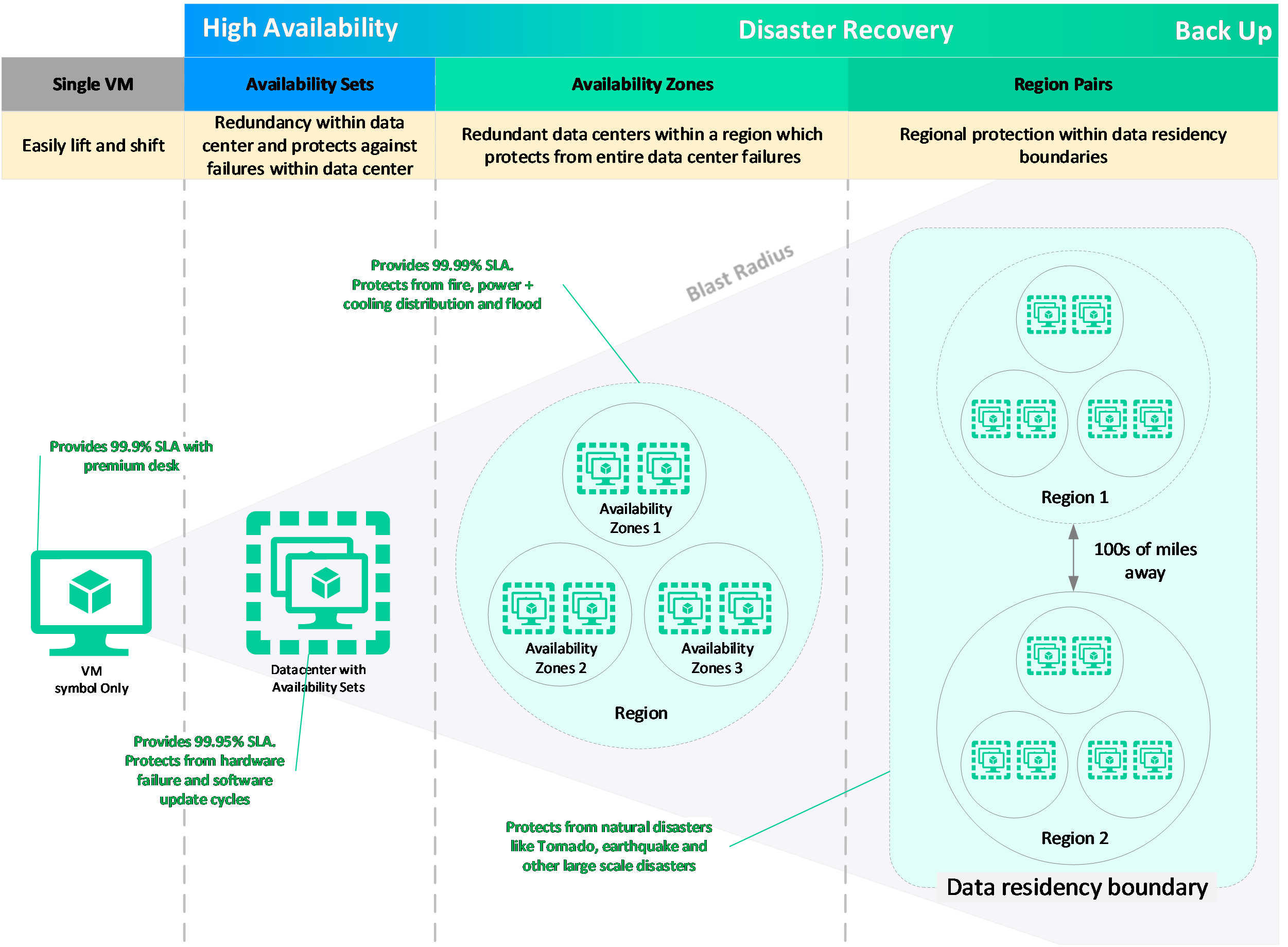
- Single VM - Easy to lift and shift. It provides 99.9% SLA with premium disks, but any failure of that VM or its host is an outage.
- Availability Sets - Redundancy within a data center. It provides 99.95% SLA and protects from hardware failures and software update cycles.
- Availability Zones - Redundant data centers within a region, which protect from an entire data center failure. It provides 99.99% SLA and protects from fire, power and cooling distribution failures and flood.
- Region Pairs - Regional protection within data residency boundaries. The regions are hundreds of miles away from each other, and this protects from natural disasters like tornado, earthquake and other large scale disasters.
The first three levels are about High Availability, and region pairs are about Disaster Recovery. Backup sits across all of them.
Must Be Aware: Pick the secondary region within the same data residency boundary, otherwise the replication itself may break the regulatory requirements for your data.
Principles
We follow these principles while designing for resiliency,
- Be proactive - Plan the recovery before the failure happens. Decide the DR strategy as part of the architecture, not after the first incident.
- Embrace failure - Assume every component will fail at some point, and design the application to handle it gracefully.
- Identify and address single points of failure early - Every component without redundancy, in the infrastructure or in the application, is a potential outage.
- Cost effective redundancy by design - Redundancy costs money. Choose the level of redundancy based on the business impact, not the maximum possible.
- Cross region DR architecture - Design the architecture so that the application can run from the secondary region.
- Automate everything - Infrastructure spin up, deployment, alerting, site switch and smoke tests. A manual step in the middle of an incident is slow and error prone.
- Frequent maneuvers - Practice the failover and failback regularly. A DR plan which has never been tested is only a hope.
Wrap up
In this article, we have looked at why we need a DR strategy, what resiliency is, the difference between high availability, disaster recovery and backup, the blast radius and the principles we follow. I really appreciate that you took the time to read this article. In the next article, I will walk you through the metrics we use to measure resiliency: RTO, RPO, MTTR, MTBF and SLA, including how to calculate a composite SLA for an application.
Related Posts
How to define a DR strategy for your application? A worked example - Part 5
Define a DR strategy for your application with a worked example: the process to identify the strategy, a worked example and the DR lifecycle.
What are the DR strategy patterns and how to choose one? - Part 3
The DR strategy patterns from Redeploy to Active-active, their architecture, RTO and RPO, a side by side comparison and a simple guide to choose one.
How to implement DR for Azure resources? - Part 4
Resource-wise DR guidelines for Azure storage, SQL Database and Cosmos DB, the implementation patterns and the thumb rules we follow.