What is Cloudflare Worker and why do we need it? - Part 1
Cloudflare Workers run our JavaScript at the edge. See what a worker is, how it works with routes, how it compares with page rules and when to use it.
What is Cloudflare Worker and why do we need it? - Part 1
Most of us use Cloudflare for DNS, security and caching, and we control its behavior with settings and page rules. This works well until a requirement doesn’t fit into a checkbox: a cache key which ignores the case of the URL, a redirect based on a lookup table, a header that depends on the country of the user. Until now, the only option for these was to send the request to the origin and handle it in our application code. Cloudflare Workers changes this by letting us run our own JavaScript code at the Cloudflare edge, right next to the user. In this series, I share what we learned while building and running Cloudflare Workers in production. In this article, we are going to see what a Cloudflare Worker is, how it works, how it compares with the other options, and when to use it and when not to.
Cloudflare Workers series:
- What is Cloudflare Worker and why do we need it? (this article)
- How to set up a local development environment for Cloudflare Workers?
- How to write Cloudflare Workers? Common patterns with examples
- Cloudflare Workers use cases and lessons learned
TL;DR Summary
- A Cloudflare Worker is a serverless function which runs our JavaScript code in every Cloudflare data center and intercepts the requests for the routes we configure.
- It uses the same API as browser Service Workers: listen to the
fetchevent, and respond with aResponse. - A worker can modify the request, call the origin or any other service, use the Cloudflare cache, and modify or build the response.
- Use workers when page rules and settings are not enough, and the logic is small, fast and stateless.
- Don’t use workers for long running work, heavy computation or business logic which belongs to the application.
- A worker adds one more place to develop, deploy, monitor and recover; treat it as production code.
Why we need Cloudflare Workers?
Cloudflare sits between our users and our origin servers as a reverse proxy. Every request goes through a Cloudflare data center near the user, and Cloudflare decides whether to block it, serve it from the cache or forward it to the origin. We influence these decisions with zone settings and page rules.
Page rules are powerful, but they are rules, not code. In our case, we hit their limits when we tried to cache the same SPA (Single Page Application) shell served from over a thousand URLs. The cache key was case sensitive and depended on the order of the query string parameters, so the same content was cached many times and most requests still reached our web servers. I shared the full story in How we reduced over 80% of requests to the web servers?.
The common pattern behind such problems is this: the decision is simple, but it needs a bit of logic. Without workers, we have two bad choices,
- Push the logic to the origin - Every request travels to our servers just to make a small decision, which adds latency for the user and load on the servers.
- Live without it - Accept the extra cache misses, redirects in the application, or duplicated logic in multiple applications.
Workers give us a third choice: run the small piece of logic at the edge.
What is Cloudflare Worker?
A Cloudflare Worker is a serverless function that intercepts the requests between the Cloudflare edge and the origin servers, and runs our custom JavaScript code for them. It was strongly influenced by the browser-based Service Workers, and therefore it is called a “worker”.
Simply put, a worker is a small JavaScript program which Cloudflare runs for every request matching a URL route, in every one of its data centers.
The following diagram depicts the architecture of a Cloudflare Worker.
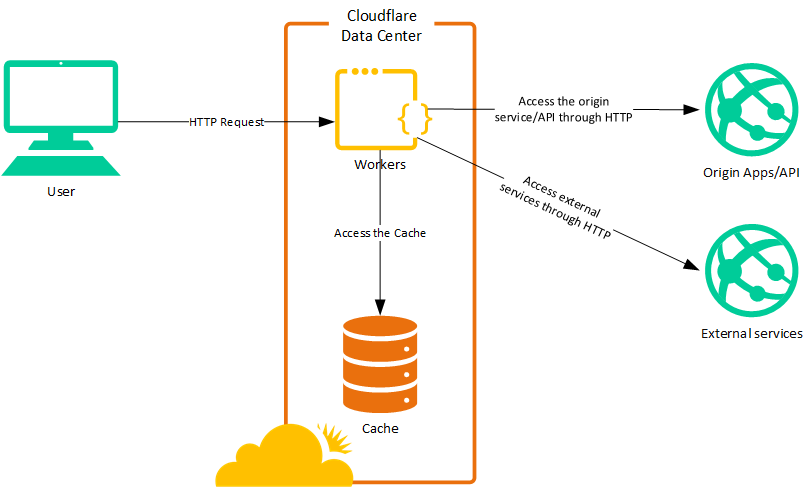
A worker can,
- Read and modify the incoming request (URL, method, headers and body).
- Make one or more HTTP requests (called subrequests) to the origin or to any external service.
- Use the Cloudflare cache through those subrequests.
- Read, modify or build the response from scratch, and send it back to the user.
How does it work?
Route
We configure one or more URL routes (patterns like www.example.com/products/*) for the worker in the Cloudflare dashboard. When a request matches a route, the worker is executed for it; all other requests follow the normal Cloudflare flow.
Service Worker API
A worker uses the same programming model as a browser Service Worker. It registers a listener for the fetch event, and responds to the event with a Response (or a promise of a Response).
addEventListener('fetch', event => {
  event.respondWith(handleRequest(event.request))
})

async function handleRequest(request) {
  return new Response('Hello from the edge!', {
    headers: { 'content-type': 'text/plain' }
  })
}
The standard Web APIs like fetch, Request, Response, Headers and URL are available, so if you have written a Service Worker in the browser, you already know most of it.
Runtime
Workers don’t run in containers or virtual machines. Cloudflare runs them on the V8 JavaScript engine (the same engine as Chrome and Node.js), using isolates: lightweight contexts which share one process but keep each script’s memory separate. This is why a worker starts in a few milliseconds and doesn’t have the cold start delays which we see in container based serverless platforms. The other side of this is that a worker is not Node.js: there is no file system and no Node.js modules like fs or http, and every worker must be a single script.
Request flow
- The user sends a request, and it reaches the nearest Cloudflare data center.
- Cloudflare applies the security features (like WAF and DDoS protection).
- If the URL matches a worker route, the worker receives the
fetchevent. - The worker decides what to do: respond directly, or send one or more subrequests to the origin (through the Cloudflare cache) or to other services.
- The worker returns the response, and Cloudflare sends it to the user.
Workers vs the other options
| Page Rules | Cloudflare Workers | Origin application code | Cloud functions (e.g. Azure Functions) | |
|---|---|---|---|---|
| Where it runs | Cloudflare edge | Cloudflare edge, near the user | Our servers | One cloud region |
| What we write | Configuration | JavaScript code | Any language | Many languages |
| Flexibility | Limited to the available settings | Full control over request and response | Full control | Full control |
| Latency added | None | Very low | Full round trip to the origin | Round trip to the region, plus cold starts |
| Typical use | Cache, redirect and security settings per URL pattern | Small, fast decisions on every request | Business logic and data | Background and event-driven work |
| Operational effort | Low | Medium (code, tests, deployments) | Already part of the application | Medium |
The rule of thumb we follow: use a page rule when it can do the job, use a worker when the decision needs logic, and keep the business logic in the application.
When to use Cloudflare Workers?
Workers are a good fit when the logic is small, fast, stateless and related to the request itself, for example,
- Normalizing URLs to improve the cache hit ratio
- Routing requests to different back-ends based on the path, header or country
- Redirects based on a lookup table
- Adding security headers to every response
- Blocking or challenging requests based on custom rules
- Serving a maintenance page or a fallback when the origin is down
- A/B testing and canary releases
We will see examples of these in the next articles.
When not to use Cloudflare Workers?
- Long running or heavy work - A worker gets only a small amount of CPU time per request. Refer to the Workers documentation for the current limits.
- Business logic - Logic which belongs to the application domain should stay in the application, where it is tested, versioned and deployed with the rest of the code.
- Stateful processing - A worker has no local storage which is shared across requests or data centers. Don’t rely on global variables to keep state.
- When a page rule or a setting does the job - A worker is code; code needs tests, deployments and maintenance.
Must Be Aware: A worker adds one more place to manage our application. It might break the existing development, deployment, operations and DR processes if we don’t plan for it. It is a trade-off between performance and maintenance.
Wrap up
In this article, we have looked at why we need Cloudflare Workers, what a worker is, how it works with routes, the Service Worker API and V8 isolates, how it compares with page rules, origin code and cloud functions, and when to use it and when not to. I really appreciate that you took the time to read this article. In the next article, I will walk you through how to set up a local development environment for workers with TypeScript, write unit tests, and deploy a worker to Cloudflare.
Related Posts
Cloudflare Workers use cases and lessons learned - Part 4
Where Cloudflare Workers fit best, how a worker cut our origin requests by about 84%, and the lessons we learned running it in production.
How to write Cloudflare Workers? Common patterns with examples - Part 3
Common Cloudflare Worker patterns with examples: modify requests and responses, redirect and block at the edge, route to back-ends and handle origin failures.
How to set up a local development environment for Cloudflare Workers? - Part 2
Set up a local development environment for Cloudflare Workers with Node.js, Yeoman and TypeScript, unit test the handler and bundle it with webpack.