How to upgrade from .NET Core 1.x to 2.0?
This guide upgrades an application from .NET Core 1.x to 2.0, covering project files, package changes, tooling, API updates and a controlled path to ASP.NET Core 2.0.
How to upgrade from .NET Core 1.x to 2.0?
Last year, we migrated an ASP.NET MVC 5 app to ASP.NET Core 1.0, and it gave us a good starting point for running our fund applications on the new platform. The first release was useful, but the tooling, project files and APIs were changing quickly, and many applications were carrying individual package references and preview configuration. Upgrading without a plan can create a long list of compile errors and runtime surprises.
In this article, we are going to see how to upgrade an ASP.NET Core 1.x application to .NET Core 2.0. We will install the SDK, migrate an old project.json project when required, update the SDK-style project file, change the host and authentication setup, and run a pulse check after each important step.
TL;DR Summary
- Install the .NET Core 2.0 SDK and use Visual Studio 2017 with the matching tooling.
- Migrate
project.jsonfirst withdotnet migratewhen the application is still using the old preview tooling. - Target
netcoreapp2.0and use theMicrosoft.AspNetCore.All2.0 metapackage for an ASP.NET Core application. - Move configuration and logging setup into
WebHost.CreateDefaultBuilder(args). - Replace individual authentication middleware calls with
AddAuthentication()and oneapp.UseAuthentication(). - Check ASP.NET Core Identity and Entity Framework Core packages separately, then run tests and publish a clean build.
Challenges
Tooling and project format
The application may be using project.json, an early global.json SDK selection and individual package references. The .NET Core 2.0 tools are using the SDK-style .csproj format, so first we need to make the project format consistent before solving application code changes.
Many packages moving together
ASP.NET Core, Entity Framework Core, Identity and test packages are having related versions. Updating one package and leaving another 1.x package can produce confusing dependency resolution or runtime errors. A central metapackage reduces direct references, but it does not remove the need to check application-specific packages.
Behaviour changes hidden by compile success
The application may compile after the upgrade while authentication, configuration, Razor views or database migrations are behaving differently. A successful build is only one pulse check. We must also run HTTP tests, login tests, database tests and a publish check.
What is .NET Core 2.0?
.NET Core 2.0 is a cross-platform .NET implementation and SDK release which provides the runtime, command-line tools, libraries and application model used by ASP.NET Core 2.0 applications.
In simple terms, it is the platform version and tooling which our application is targeting after the upgrade. ASP.NET Core is the web framework running on top of it, and Entity Framework Core 2.0 is the data-access framework which can be upgraded alongside the web application.
The following diagram depicts the main upgrade path from an ASP.NET Core 1.x project to a .NET Core 2.0 application.
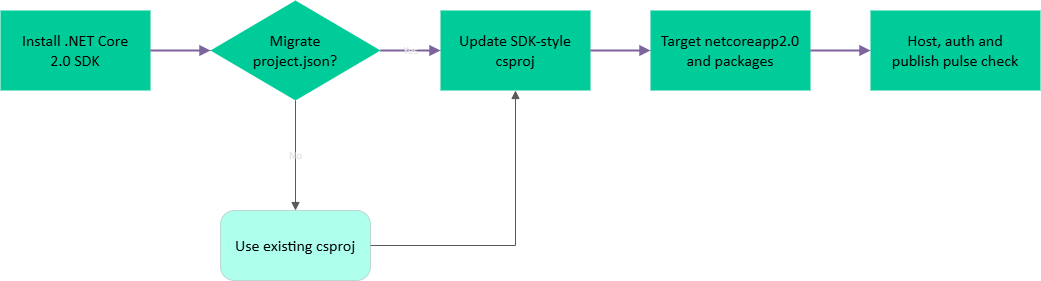
The purple path is the normal route: install the SDK, migrate the project file if required, update the target and packages, then verify the host, authentication and data access.
Why the upgrade is important?
The upgrade is important because the application gets a supported SDK-style project structure, a simpler ASP.NET Core package reference and the APIs which are expected by the 2.0 tooling. It also gives us a repeatable build command for local machines and the build server.
We should not upgrade only because the version number is higher. We should upgrade when the current toolchain is making development, deployment or maintenance difficult, and then verify all business paths before release.
Option comparison
There are two common approaches,
| Approach | Pros | Cons |
|---|---|---|
Migrate project.json with dotnet migrate | + Keeps most project references and code + Good for an existing 1.x application | − May retain obsolete references − Needs a review of generated .csproj |
| Create an SDK-style project and move files | + Clean project structure + Removes old tooling assumptions | − More setup work − Easy to miss content or build settings |
For a normal fund API, migrate first, compile, then simplify the generated project file. For a small application, a clean SDK-style project can be easier.
Steps to Implement:
Follow the following instructions to upgrade the application,
Install the SDK and verify the tools
-
Install the .NET Core 2.0 SDK and the Visual Studio 2017 .NET Core workload.
-
Open a new command prompt so the new
dotnetpath is available. -
Check the installed SDK,
cd <solution-folder>
dotnet --info
Note: Keep the SDK version used by the build server and developer machines aligned, otherwise a successful local build may not be reproducible.
Update global.json
-
Select the 2.0 SDK in
global.json,{ "sdk": { "version": "2.0.0" } }
If global.json is not needed by the solution, remove an old preview SDK entry instead of pointing to a version which is not installed.
Migrate project.json when required
-
Run the migration from the project folder,
dotnet migrate -
Open the generated
.csproj, review package references and remove preview-only properties. -
Replace any old
dnx,dnuordotnet5commands in documentation and build scripts.
Info:
dotnet migrateis only for projects still usingproject.json. An SDK-style.csprojdoes not need this command.
Update the target and ASP.NET Core package
-
Set the target framework,
<TargetFramework>netcoreapp2.0</TargetFramework> -
Replace individual ASP.NET Core 1.x package references with the metapackage,
<PackageReference Include="Microsoft.AspNetCore.All" Version="2.0.0" /> -
Keep packages which are not part of ASP.NET Core, such as a database provider or a client SDK, as explicit compatible references.
Remove old Microsoft.AspNetCore.* 1.x references after the application compiles against the metapackage. Replace the input place holders with actual values when the project has a different target or package patch version.
Update Program.cs
-
Use the 2.0 host builder,
public static IWebHost BuildWebHost(string[] args)
{
    return WebHost.CreateDefaultBuilder(args)
        .UseStartup<Startup>()
        .Build();
}
The default builder is setting the content root, configuration sources, logging and the web server defaults. Move custom configuration and logging additions into the builder or the application startup, instead of keeping the 1.x manual host setup.
Update authentication
-
Register one authentication scheme and its handler,
public void ConfigureServices(IServiceCollection services) { services.AddAuthentication() .AddCookie() .AddJwtBearer(options => { options.Authority = Configuration["Authority"]; options.Audience = "fund-api"; }); services.AddMvc(); } -
Add one authentication middleware call in the pipeline,
app.UseAuthentication();
app.UseMvc();
Remove older calls such as UseCookieAuthentication and UseJwtBearerAuthentication. Check the default scheme when more than one handler is registered, otherwise [Authorize] may not use the scheme we expect.
Check Identity and EF Core
- Update ASP.NET Core Identity packages together with the metapackage.
- Check password, cookie and user-store options after the package update.
- Update Entity Framework Core references to 2.0-compatible packages and run the existing migration tests.
- Verify that a fund, unit value and document can be read and written using a test database.
IHostingEnvironment is unchanged in the 2.0 application model, so services using it do not need a rename only for this upgrade.
Publish and pulse check
-
Restore, build and test the solution,
dotnet restore dotnet build dotnet test -
Publish a release build,
dotnet publish -c Release -
Start the published application and check the health endpoint, login flow, one fund read, one document write and one database query.
Note: Razor view precompilation is enabled on publish by default in ASP.NET Core 2.0. Check the published output and do not depend on a view which is present only in the source folder.
Must Do / Should / Don’t
Must Do
- Must install the same SDK family locally and on the build server.
- Must migrate
project.jsonbefore making unrelated code changes. - Must update authentication middleware and test both authenticated and anonymous requests.
- Must run
dotnet testand a Release publish before deploying.
Should
- Should keep the generated project file small and remove obsolete individual 1.x package references.
- Should upgrade Identity and EF Core as separate checklist items.
- Should commit
global.jsonwhen the team needs a fixed SDK. - Should verify Razor views, configuration and logging in the published application.
Don’t
- Don’t assume a successful compile means the authentication behaviour is unchanged.
- Don’t mix a framework upgrade with a large business refactoring.
- Don’t leave old preview tooling commands in scripts.
- Don’t copy a local SDK path into the build pipeline without documenting it.
Wrap up
In this article, we have looked at installing the .NET Core 2.0 SDK, migrating project.json, updating the target framework and metapackage, changing the host and authentication setup, and checking Identity, EF Core and publish output.
I really appreciate that you took the time to read this article. In the next article, I will walk you through how to share code with .NET Standard 2.0 libraries.
Related Posts
How to share code with .NET Standard 2.0 libraries?
.NET Standard 2.0 libraries allow shared business rules across applications, and this guide covers project setup, API compatibility, package versioning and practical testing.
Cloud cost optimization - right-sizing, reserved capacity and auto-shutdown
Azure cloud cost optimisation combines right-sizing, reserved capacity, auto-shutdown, autoscale, tagging, cleanup, Advisor metrics and showback into a repeatable loop.
Cosmos DB vs Azure SQL Database - choosing the right data store
Cosmos DB and Azure SQL Database are compared across data models, consistency, transactions, partitioning, scale and operational fit for a fund workload.