Cosmos DB vs Azure SQL Database - choosing the right data store
Cosmos DB and Azure SQL Database are compared across data models, consistency, transactions, partitioning, scale and operational fit for a fund workload.
Cosmos DB vs Azure SQL Database - choosing the right data store
Choosing a data store is affecting the data model, consistency, scale and operational cost of an application. A fund platform may need relational integrity for transactions, while a document workload may need global distribution and flexible schema. Choosing only from a familiar database name is creating a mismatch between the workload and the storage model.
In the 2016 polyglot persistence article, we discussed selecting SQL, document, table and cache storage for the right job. In this article, we are going to compare Cosmos DB and Azure SQL Database, and define when each one is a better fit for a fund workload.
TL;DR Summary
- Cosmos DB is a globally distributed, multi-model database with provisioned RU/s and five consistency levels.
- Azure SQL Database is a managed relational database with transactions, integrity, DTU tiers, elastic pools and mature tooling.
- Cosmos DB is a good fit for document access, flexible schema and global distribution.
- Azure SQL Database is a good fit for relational joins, constraints, transactions and existing SQL tooling.
- Polyglot persistence is often the right answer; one application can use both stores with clear ownership.
- The selected store should follow access patterns, consistency, scale, cost, skills and operational needs.
Challenges
Flexible data versus relational integrity
Fund documents and events are naturally represented as JSON documents, but fund holdings, orders and settlement records may require relational constraints and transactions. Forcing every shape into one model is creating either unnecessary joins or weak integrity.
Scale and distribution
Cosmos DB is designed for global distribution and partitioned access. Azure SQL Database is providing relational scale, geo-replication and elastic pools, but the schema and transaction model are requiring more deliberate design for horizontal scale.
Existing skills and tooling
SQL Database has mature SQL tooling, reporting integrations and operational knowledge in many teams. Cosmos DB introduces request units, partition keys and consistency choices. The new capability is useful only when the team can model and operate it correctly.
What is Cosmos DB?
Cosmos DB is an Azure globally distributed, multi-model database service. In this release it supports the SQL/DocumentDB API, MongoDB API, Table API and Gremlin in preview, with turnkey global distribution and five consistency levels.
In simple terms, Cosmos DB is a document and globally distributed platform where we choose a partition key and consistency level, and pay for provisioned request capacity in RU/s. It is not a relational SQL Server replacement for every workload.
What is Azure SQL Database?
Azure SQL Database is a managed relational database service based on the SQL Server engine. It provides relational tables, constraints, transactions, indexes, DTU-based Basic, Standard and Premium tiers, elastic pools and geo-replication.
In simple terms, Azure SQL Database is a managed relational store for workloads which need SQL queries, strong integrity and mature database tooling without managing the database server.
The following diagram compares the decision paths for Cosmos DB and Azure SQL Database.
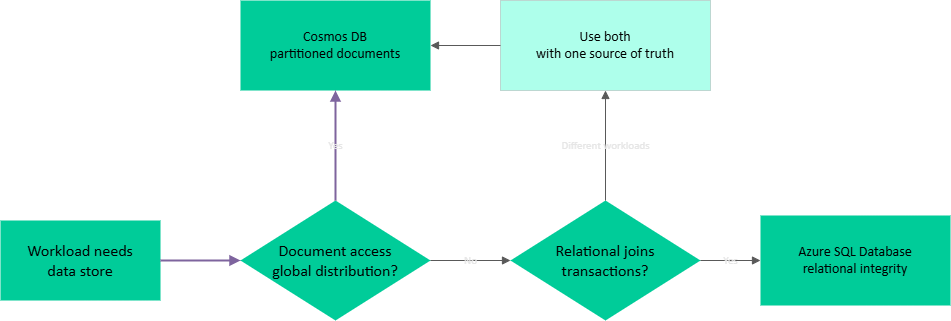
The purple path is the Cosmos DB route for a partitioned document workload. A relational transaction or join-heavy workload is moving toward Azure SQL Database.
Why the data-store choice is important?
The data store is important because it is shaping application code and operating cost for many years. A poor choice is not only a migration task; it is changing every repository, query, report and operational process.
In our case, the fund transaction system is starting with Azure SQL Database when integrity, joins and transactions are central. A document-oriented fund profile or event projection may use Cosmos DB, while the ownership between the two systems is explicit.
Comparison table
| Capability | Cosmos DB | Azure SQL Database |
|---|---|---|
| Data model | Document and other APIs | Relational tables |
| Scale model | Partitions and provisioned RU/s | DTU tiers and elastic pools |
| Distribution | Turnkey global distribution | Geo-replication and regional options |
| Consistency | Five selectable levels | Relational transaction consistency |
| Query | Document query and API-specific models | T-SQL, joins and mature tools |
| Best fit | Flexible documents and global low-latency access | Integrity, transactions, joins and reporting |
| Main design risk | Hot partition and RU unpredictability | Schema coupling and scale planning |
Cosmos DB also provides a latency SLA for supported operations and configurations. Azure SQL Database provides mature relational operations and a broad ecosystem. Neither SLA removes the need to define a useful application-level objective.
Review the SLA assumptions with the selected region, consistency, partition and workload settings. A platform guarantee is not meaning that every query is meeting the application’s target, especially when a query is scanning more data than the access pattern expected.
Selection criteria
Data shape and query
Use Cosmos DB when a document is read as a document and the access pattern is known by partition key. Use SQL Database when queries need multiple joins, constraints, relational reporting or shared transactions.
Consistency and transactions
Cosmos DB offers Strong, Bounded Staleness, Session, Consistent Prefix and Eventual consistency. Choose the lowest level which satisfies the business requirement. SQL Database is a better starting point when a business operation must update multiple relational records in one transaction.
Scale and cost
Cosmos DB cost is based on provisioned request units per collection and partition distribution. SQL Database cost is based on the selected DTU tier, elastic pool or related service option. Estimate from real reads, writes, document size and query shape instead of only counting rows.
Distribution and latency
Global distribution is a strong reason to choose Cosmos DB, especially when users need low-latency access in multiple regions. SQL geo-replication can meet other requirements, but read/write topology and failover must be designed.
Skills and operations
If the team already has strong SQL and reporting skills, SQL Database can reduce operational risk. If the team understands partitioning, RU/s and document modelling, Cosmos DB can reduce the complexity of globally distributed documents.
Polyglot recommendation
Polyglot persistence means using more than one data store when different workloads have different needs. Keep one system as the source of truth for a business fact, and publish a controlled projection to another store when a different read model is required.
For example, Azure SQL Database can own fund orders and settlement, while Cosmos DB stores a read-optimised document used by a global fund profile API. Do not write the same business fact independently to both stores without a reconciliation and failure design.
In an upcoming article, we will see Cosmos DB consistency and partition-key choices in more detail.
Must Do / Should / Don’t
Must Do
- Must choose from data shape, query, consistency, distribution and team operations.
- Must define the source of truth when two stores are used.
- Must measure RU/s or DTU usage with realistic workloads.
Should
- Should use SQL Database for integrity and transaction-heavy fund operations.
- Should use Cosmos DB for partitioned documents and global distribution.
- Should document the consistency and failover choice.
Don’t
- Don’t choose Cosmos DB only because it is globally distributed.
- Don’t force a relational transaction into several independent document writes.
- Don’t duplicate business truth across stores without reconciliation.
Wrap up
In this article, we have looked at Cosmos DB, Azure SQL Database, data models, consistency, RU/s, DTU tiers, distribution, polyglot persistence and selection criteria.
I really appreciate that you took the time to read this article. In the next article, I will walk you through Infrastructure as Code with ARM templates and Terraform.
Related Posts
How to choose a Cosmos DB consistency level and partition key?
Cosmos DB consistency levels and partition keys shape correctness, latency, throughput and cost, with practical guidance for selecting them for a distributed fund workload.
Cloud cost optimization - right-sizing, reserved capacity and auto-shutdown
Azure cloud cost optimisation combines right-sizing, reserved capacity, auto-shutdown, autoscale, tagging, cleanup, Advisor metrics and showback into a repeatable loop.
Environment drift - why UAT and production are not the same
Environment drift makes UAT and production behave differently, so this article explains how to control configuration, infrastructure, access policies and deployment evidence.