Cloud cost optimization - right-sizing, reserved capacity and auto-shutdown
Azure cloud cost optimisation combines right-sizing, reserved capacity, auto-shutdown, autoscale, tagging, cleanup, Advisor metrics and showback into a repeatable loop.
Cloud cost optimization - right-sizing, reserved capacity and auto-shutdown
Cloud cost is becoming difficult to control when resources are created for experiments, scaled for peak traffic and then left running after the need has ended. A monthly invoice is showing the result, but it is not explaining which team, workload or decision created the spend. Cost optimization is not one discount; it is a continuous practice of matching capacity and commitment to the workload.
In this article, we are going to see right-sizing, reserved capacity, auto-shutdown, autoscale, tagging and cleanup practices for Azure workloads. We will use Azure Advisor, metrics, B-series VMs, DevTest Labs, Cloudyn and a showback model to create a practical cost-optimization loop.
TL;DR Summary
- Right-size from Azure Advisor recommendations and real CPU, memory, network and disk metrics.
- Use B-series burstable VMs for suitable intermittent workloads.
- Reserved VM Instances can reduce predictable one- or three-year VM cost, after availability is confirmed.
- Auto-shutdown and DevTest Labs can stop development resources outside working hours.
- Autoscale should match capacity to traffic instead of keeping peak capacity all day.
- Delete orphaned disks and IPs, tag resources and assign owners for showback.
Challenges
Paying for peak all the time
A service may need ten instances during a release or market event and only two instances during normal traffic. Keeping ten instances all month is simple, but it is not making the most of the cloud elasticity.
Resources without owners
An unattached disk, public IP or test VM is continuing to cost money after the application has been deleted. Without tags and an owner, the team is afraid to remove it because nobody knows whether it is still required.
Discount decisions without commitment
Reserved capacity can reduce cost when the workload is predictable, but a reservation is a commitment. Buying before right-sizing or before understanding the workload lifetime can make the organisation pay for the wrong capacity.
What is cloud cost optimization?
Cloud cost optimization is the continuous practice of measuring cloud usage, removing waste, selecting the right capacity and committing only when the workload is predictable.
In simple terms, it is asking whether each resource is needed, correctly sized, running at the right time and owned by the right team. The answer is changing as the workload and business are changing.
The following diagram depicts the cost-optimization levers around a cloud workload.
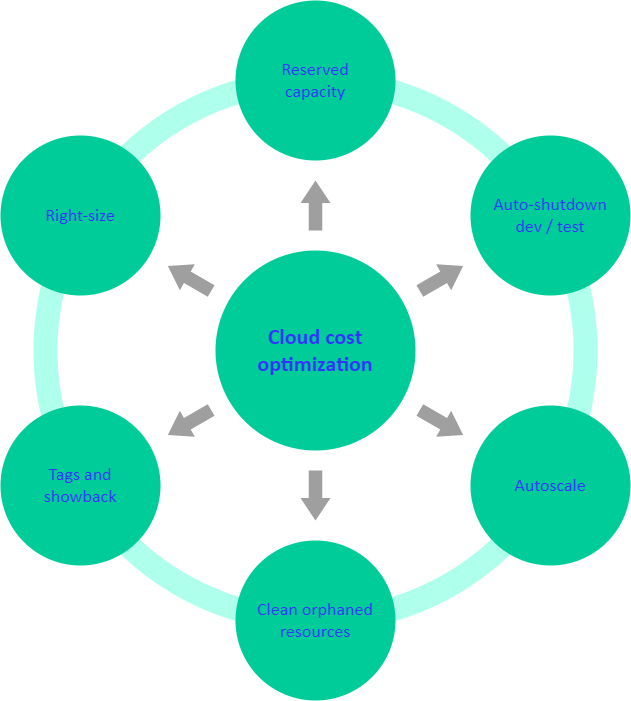
The purple path is the optimization loop: measure usage, right-size or scale, stop unused capacity, then review the result again. A discount without measurement is not a complete optimization.
Why cost optimization is important?
Cost optimization is important because cloud waste is reducing the budget available for customer features and reliability improvements. It is also improving architecture discipline: owners must know why a resource exists, what capacity it needs and when it can be stopped.
In our case, start with development and test resources because auto-shutdown and schedule rules can reduce waste without changing the production SLA. Apply production reservations only after usage is stable and the service owner accepts the commitment.
Cost levers
| Lever | Use when | Watch out |
|---|---|---|
| Right-sizing | Metrics show persistent over-capacity | Do not size from one quiet day |
| B-series VMs | Preview burstable VM fits intermittent workload | Credits and burst profile have limits |
| Reserved VM Instances | VM usage is predictable for one or three years | Confirm purchase availability and commitment |
| Auto-shutdown | Development VM is not needed overnight | Do not stop a scheduled test or production VM |
| Autoscale | Request load changes by time or demand | Test scale-out latency and limits |
| Cleanup | Disks, IPs or resources are orphaned | Check ownership and recovery needs |
| Tags and showback | Teams need cost ownership | Enforce required tags at provisioning |
Cloudyn, acquired by Microsoft in June 2017, can provide a cost-management view for organisations using it. Azure Advisor recommendations are another starting point, but every recommendation needs workload context.
Steps to Optimize:
Measure the current state
- Open Azure Advisor and review cost recommendations.
- Check CPU, memory, network, disk and request metrics for the workload.
- Record the current monthly cost as
<current monthly cost>.
Replace the input place holders with actual values. Do not invent a saving number; record the measured result after the change.
Right-size compute
- Compare the VM size with average and peak metrics.
- Move an intermittent workload to a suitable B-series VM when burst credits fit the profile.
- Test a smaller App Service plan or worker count in a non-production environment.
- Check response latency and error rate after the change.
Right-sizing is not meaning always choosing the smallest VM. A smaller resource which is constantly throttled can cost more through poor reliability and slower delivery.
Use autoscale for variable traffic
- Define scale-out and scale-in rules from requests, CPU or queue depth.
- Set minimum capacity for the normal workload and maximum capacity for an accepted peak.
- Observe how long a new instance takes before it can serve traffic.
App Service autoscale can fit a web API with predictable metrics. A container platform or another service may have a different scaling model. Select the rule which measures customer impact, not only CPU.
Configure auto-shutdown
- Enable the VM auto-shutdown setting for development and test machines.
- Use DevTest Labs policies when the organisation needs shared schedules and quotas.
- Add an owner and start-up instruction to the resource metadata.
Auto-shutdown is not suitable for production or a test which must run overnight. A schedule is useful only when its exception process is clear.
Evaluate reserved capacity
- Review at least the recent stable usage for VM family, region and quantity.
- Compare one-year and three-year Reserved VM Instance options.
- Confirm that the workload will remain on the selected VM family and region.
- Check the purchase availability before committing.
Note:
[confirm: Reserved VM Instances purchase availability by Nov 30, 2017]Confirm that the required reservation purchase path is available before publishing a cost estimate.
Clean up and tag resources
- Find unattached disks, public IPs and unused resource groups.
- Confirm ownership and recovery requirements before deletion.
- Apply tags such as
Application,Team,Environment,CostCenterandOwner. - Use tags to create a showback report rather than hiding shared cost.
Review the result
- Compare current usage, cost and application metrics with
<before value>. - Record the result as
<after value>and the date of the change. - Review the optimization monthly and after major traffic or architecture changes.
Info: A cost reduction is not a success if it is increasing errors, latency or recovery time. Review the reliability and customer metrics together with the invoice.
Selection criteria
Choose right-sizing when metrics show persistent spare capacity. Choose B-series when the workload is normally low and occasionally bursts. Choose reserved capacity when usage, region and VM family are predictable. Choose auto-shutdown for development and test resources with a known schedule.
Use DevTest Labs when many teams are creating temporary resources and a shared policy is useful. Use autoscale when traffic is variable and the application can add capacity safely. Use tagging and showback for every model because ownership is the first step in removing waste.
Must Do / Should / Don’t
Must Do
- Must measure usage before changing a size or buying a reservation.
- Must protect production SLA while optimizing cost.
- Must tag resources with an owner and environment.
- Must confirm reservation availability and commitment before purchase.
Should
- Should start with development and test auto-shutdown.
- Should review Advisor recommendations with the workload owner.
- Should delete orphaned resources after confirming recovery requirements.
- Should include savings and reliability metrics in the same review.
Don’t
- Don’t buy reserved capacity for an unstable workload.
- Don’t stop production resources with a development schedule.
- Don’t delete an untagged resource without checking its owner and recovery need.
- Don’t report a saving number without a before and after measurement.
Wrap up
In this article, we have looked at right-sizing, Azure Advisor, B-series VMs, reserved capacity, auto-shutdown, autoscale, cleanup, tagging, showback and Cloudyn.
I really appreciate that you took the time to read this article. This article closes the 2017 Cloud Solution Architecture series.
Related Posts
Environment drift - why UAT and production are not the same
Environment drift makes UAT and production behave differently, so this article explains how to control configuration, infrastructure, access policies and deployment evidence.
How we reduced over 80% of requests to the web servers?
This case study uses Cloudflare page rules and Workers to cache SPA requests at the edge, reducing origin traffic while balancing performance, security and operational complexity.
Cosmos DB vs Azure SQL Database - choosing the right data store
Cosmos DB and Azure SQL Database are compared across data models, consistency, transactions, partitioning, scale and operational fit for a fund workload.