How to share code with .NET Standard 2.0 libraries?
.NET Standard 2.0 libraries allow shared business rules across applications, and this guide covers project setup, API compatibility, package versioning and practical testing.
How to share code with .NET Standard 2.0 libraries?
Sharing business rules between a fund API, a batch application and a mobile client is becoming difficult when every application targets a different framework. Portable Class Libraries helped us for some scenarios, but the supported API surface was confusing and package compatibility was not always clear. We need a common contract which tells us which platforms can consume the library.
In this article, we are going to see how to create and consume a .NET Standard 2.0 class library. We will create the project, check the supported platforms, handle the .NET Framework compatibility shim, multi-target when necessary and pack the library as a NuGet package.
TL;DR Summary
- .NET Standard describes a common API contract which multiple .NET implementations can consume.
- Create a library with
dotnet new classlib -f netstandard2.0. - .NET Framework 4.6.1 and later can consume .NET Standard 2.0, with the best tooling experience improving with upcoming 4.7.1.
- A compatibility shim can produce
NU1701; treat the warning as a package compatibility signal, not as noise. - Multi-target with
netstandard2.0;net461when a consumer requires framework-specific APIs. - Use
dotnet packand semantic versioning when distributing the library.
Challenges
One business rule in many projects
If the fund eligibility rule is copied into an API, a batch job and a mobile application, the implementations will slowly become different. A customer can get one answer from the API and another answer from a report generator, and the team is maintaining every change multiple times.
Framework compatibility
A library may compile for .NET Standard 2.0 but a consumer can still have an incompatible package or framework API. The first failure may appear during restore, with a warning such as NU1701, or at runtime when a framework-only dependency is called.
Packaging and versioning
A shared library is becoming a product inside the organisation. Without a package versioning rule, consumers cannot tell whether a change is compatible. We should keep the package contract clear and publish it through a repeatable command.
What is .NET Standard?
.NET Standard is a formal API specification implemented by different .NET platforms, including .NET Framework, .NET Core, Mono and Xamarin.
In simple terms, it is a common language for the library and the application: the library says which APIs it needs, and the platform says whether it supports that contract. It is not a runtime and it is not another application target.
The following diagram depicts a .NET Standard 2.0 library shared by the fund applications.
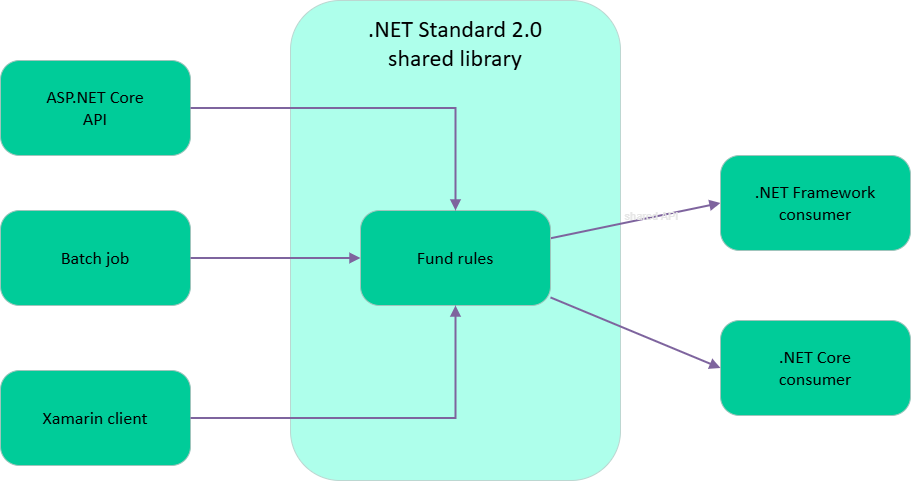
The purple path is the shared library route. Each consumer references the same package, while platform-specific code remains outside the common project.
Why sharing code is important?
Sharing code is important because one tested business rule is easier to maintain than several copied rules. It reduces the chance that the API calculates a different unit eligibility result from the batch process.
The common library must still have a healthy boundary. Do not move web controllers, database contexts or mobile UI code into a shared project only to increase reuse. Share domain types and deterministic rules first.
Supported platforms
The .NET Standard 2.0 contract is supported by the following platform versions,
| Platform | Version |
|---|---|
| .NET Framework | 4.6.1 |
| .NET Core | 2.0 |
| Mono | 5.4 |
| Xamarin.iOS | 10.14 |
| Xamarin.Android | 8.0 |
| UWP | 10.0.16299 |
The .NET Framework compatibility shim helps some older packages work when a .NET Standard library is consumed. .NET Framework 4.6.1 support works best with later package tooling, and upcoming .NET Framework 4.7.1 improves this experience.
Steps to Implement:
Follow the following instructions to create and share the library,
Create the class library
-
Create a .NET Standard 2.0 library,
dotnet new classlib -f netstandard2.0 -n Funds.Shared cd Funds.Shared -
Replace the default class with a small domain service,
public sealed class FundEligibility
{
    public bool IsEligible(Fund fund)
    {
        return fund.IsOpen && fund.Units > 0;
    }
}
Replace the input place holders with actual values when the project name or domain type is different.
Add the reference
-
Add the project reference from an API,
dotnet add ../Funds.Api/Funds.Api.csproj reference Funds.Shared.csproj -
Restore and build both projects,
dotnet restore
dotnet build
Info: The consuming application must target a framework which implements .NET Standard 2.0. A lower .NET Core target cannot consume the library without changing its target or using a compatible library target.
Check package compatibility
-
Add a package only when the shared rule really needs it.
-
Restore with detailed output and inspect warnings,
dotnet restore -
Investigate
NU1701when NuGet says a package was restored using a compatibility framework.
The warning can mean that the package was built for a different framework and is being used through a shim. It may work for a simple API, but test the path which calls it. Do not suppress the warning before understanding the dependency.
Multi-target when required
-
Use
TargetFrameworkswhen a library has a common implementation plus framework-specific support,<PropertyGroup> <TargetFrameworks>netstandard2.0;net461</TargetFrameworks> </PropertyGroup> -
Isolate framework-specific code,
public string PlatformName()
{
#if NET461
    return "Full framework";
#else
    return "Standard";
#endif
}
Multi-targeting is a trade-off. It can help a legacy consumer, but it also creates more build outputs and more test combinations. Use it only when the consumer cannot move to the common target.
Compare with PCL
Portable Class Library projects were selecting a profile of supported platforms. .NET Standard is defining a versioned API contract with a simpler target name and a clearer compatibility story. Keep an old PCL only when an existing consumer cannot move yet; do not create a new PCL for new shared code.
Before moving a type, check its dependencies. A pure calculation for fund units is a good candidate, while a type which opens a database connection belongs in the application or infrastructure project. This separation is making the package easier to test and reducing compatibility warnings.
Pack the library
-
Add package metadata,
<PropertyGroup> <PackageId>Funds.Shared</PackageId> <Version>1.0.0</Version> <Authors>Fund Team</Authors> <Description>Shared fund domain rules</Description> </PropertyGroup> -
Pack the project,
dotnet pack -c Release -
Publish the generated
.nupkgto the internal NuGet feed after the tests pass.
Last year, in the semantic versioning article, we discussed why package changes need a clear version contract. Use a major version for breaking API changes, a minor version for compatible features and a patch version for compatible fixes.
Publish the package to <package-feed> after the review is complete.
Pulse check the consumers
-
Add the package to the API and batch projects.
-
Run each consumer’s tests,
dotnet test -
Check one fund eligibility result in the API, batch job and mobile-facing model.
Note: Keep the shared library independent from an ASP.NET Core request, Entity Framework context and platform UI, otherwise it is no longer a useful common boundary.
Must Do / Should / Don’t
Must Do
- Must target
netstandard2.0only when every required consumer supports it. - Must investigate
NU1701and test compatibility-shim paths. - Must version and package the shared contract consistently.
Should
- Should share business rules and data-transfer types before infrastructure.
- Should multi-target only for a known consumer requirement.
- Should run tests for every supported target framework.
Don’t
- Don’t copy web, database or UI infrastructure into a common library.
- Don’t suppress package warnings without checking the actual API calls.
- Don’t publish a package without a version and a compatibility note.
Wrap up
In this article, we have looked at the .NET Standard 2.0 contract, supported platforms, compatibility shim warnings, multi-targeting, PCL comparison and NuGet packaging.
Thanks for reading this article. In the next article, I will walk you through how to run containers in Azure Container Instances.
Related Posts
How to upgrade from .NET Core 1.x to 2.0?
This guide upgrades an application from .NET Core 1.x to 2.0, covering project files, package changes, tooling, API updates and a controlled path to ASP.NET Core 2.0.
Cloud cost optimization - right-sizing, reserved capacity and auto-shutdown
Azure cloud cost optimisation combines right-sizing, reserved capacity, auto-shutdown, autoscale, tagging, cleanup, Advisor metrics and showback into a repeatable loop.
Cosmos DB vs Azure SQL Database - choosing the right data store
Cosmos DB and Azure SQL Database are compared across data models, consistency, transactions, partitioning, scale and operational fit for a fund workload.