How to migrate an ASP.NET MVC 5 app to ASP.NET Core 1.0?
Migrating an ASP.NET MVC 5 application to ASP.NET Core 1.0 explained through project structure, middleware, dependency injection, configuration, routing and migration risks.
How to migrate an ASP.NET MVC 5 app to ASP.NET Core 1.0?
ASP.NET Core 1.0 was released in June 2016, along with .NET Core 1.0. It is not a new version of ASP.NET MVC 5, it is a complete rewrite, open source, cross platform, modular and much faster. Naturally, every .NET team is asking the same question, should we migrate our existing MVC 5 applications now, and if so, how? We had the same question for one of our internal fund reporting applications, and we did a proof of concept migration to understand what breaks and what is not ready yet.
In this article, I share the options we considered, the step by step migration we followed, the things that break, and the things we decided to wait for.
We can migrate an MVC 5 app in two ways:
| ASP.NET Core on .NET Framework | ASP.NET Core on .NET Core | |
|---|---|---|
| Approach | Use the new ASP.NET Core framework but target the full .NET Framework (net451/net461) | Target .NET Core 1.0, cross platform |
| Pros | + Can still use .NET Framework only libraries (EF6, some third-party packages)<br>+ Lower migration risk<br>+ Get the new pipeline, DI and configuration | + Cross platform (Linux, Docker)<br>+ Smaller, faster deployment<br>+ Side by side versions of the runtime |
| Cons | − Windows only<br>− Still depends on full framework libraries | − Many libraries are not ported yet<br>− No System.Drawing, limited APIs<br>− Bigger code changes |
TL;DR Summary
- ASP.NET Core is a rewrite, the migration is more like porting than upgrading.
- There is no
System.Web, noHttpContext.Current, noGlobal.asaxand no HTTP modules, everything is middleware. - MVC and Web API are unified, one controller base class and one routing system.
- Configuration moved from
web.configtoappsettings.jsonand environment variables. - Dependency injection is built in.
- Targeting the full .NET Framework is the safer first step for existing apps with EF6 and older libraries.
- Wait for SignalR, mature tooling (project.json is going to be replaced with .csproj) and the libraries you depend on.
Challenges
It is a rewrite, not an upgrade
There is no “Upgrade” button. A new project is created and the code is moved into it. Every part of the application which touches System.Web must change.
Third-party libraries
Many NuGet packages we use don’t support .NET Core yet. Before starting, we must check every dependency, otherwise we find the blocker in the middle of the migration.
Tooling is still in preview
The runtime is RTM, but the Visual Studio tooling (”.NET Core Tools Preview 2”) is still a preview, and the project system based on project.json and .xproj is going to be changed to .csproj in a future release. Be mindful, it means another (smaller) migration later.
What changes in ASP.NET Core?
The following diagram depicts the difference between the MVC 5 and ASP.NET Core 1.0 application stack.
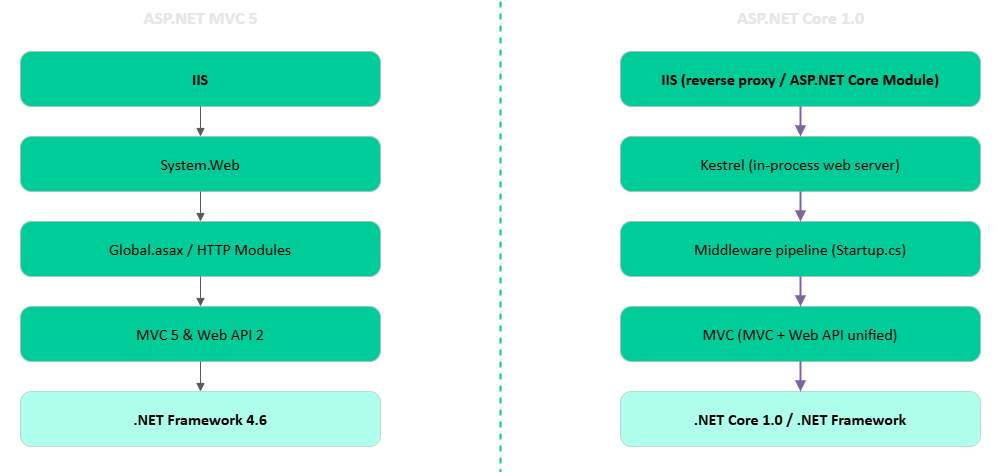
In MVC 5, the application is tightly coupled to IIS and System.Web. In ASP.NET Core, the application is a console application which hosts its own web server called as Kestrel. IIS works as a reverse proxy in front of Kestrel, through the ASP.NET Core Module. The request goes through a pipeline of middleware which we configure in Startup.cs.
| MVC 5 | ASP.NET Core 1.0 |
|---|---|
Global.asax | Program.cs + Startup.cs |
| HTTP Modules and Handlers | Middleware |
web.config appSettings | appsettings.json, environment variables, user secrets |
Controller and ApiController | Controller only (MVC and Web API unified) |
Child actions (Html.Action) | View Components |
BundleConfig (System.Web.Optimization) | Gulp/Grunt or BundlerMinifier |
| Third-party IoC container | Built-in DI (third-party containers still supported) |
packages.config | project.json (for now) |
| Static files anywhere | Static files in wwwroot |
Steps to Implement:
Follow the following instructions to migrate an MVC 5 application. We used the full .NET Framework target for our application.
-
Install Visual Studio 2015 Update 3 and the .NET Core 1.0 tools for Visual Studio.
-
Check all NuGet dependencies for .NET Core / ASP.NET Core support. Make a list of the blockers before writing any code.
-
Create a new “ASP.NET Core Web Application (.NET Framework)” project next to the existing project.
-
Change the framework in
project.jsonif you need a specific version."frameworks": { "net461": { } } -
Review the generated
Program.cs. This is now the entry point of the application.public class Program { public static void Main(string[] args) { var host = new WebHostBuilder() .UseKestrel() .UseContentRoot(Directory.GetCurrentDirectory()) .UseIISIntegration() .UseStartup<Startup>() .Build(); host.Run(); } } -
Move the configuration from
web.configtoappsettings.json.{ "ConnectionStrings": { "FundDb": "<connection string>" }, "Reporting": { "MaxFundsPerReport": 500 } } -
Move the code from
Global.asax,RouteConfig,FilterConfigand the IoC container registrations toStartup.cs.public class Startup { public Startup(IHostingEnvironment env) { Configuration = new ConfigurationBuilder() .SetBasePath(env.ContentRootPath) .AddJsonFile("appsettings.json", optional: false, reloadOnChange: true) .AddJsonFile($"appsettings.{env.EnvironmentName}.json", optional: true) .AddEnvironmentVariables() .Build(); } public IConfigurationRoot Configuration { get; } public void ConfigureServices(IServiceCollection services) { services.Configure<ReportingOptions>(Configuration.GetSection("Reporting")); services.AddScoped<IFundRepository, FundRepository>(); services.AddMvc(); } public void Configure(IApplicationBuilder app, IHostingEnvironment env, ILoggerFactory loggerFactory) { loggerFactory.AddConsole(Configuration.GetSection("Logging")); if (env.IsDevelopment()) app.UseDeveloperExceptionPage(); else app.UseExceptionHandler("/Home/Error"); app.UseStaticFiles(); app.UseMvc(routes => { routes.MapRoute("default", "{controller=Home}/{action=Index}/{id?}"); }); } } -
Move the static files (
Content,Scripts,fonts) towwwroot. -
Copy the controllers, models and views. Change the namespaces from
System.Web.MvctoMicrosoft.AspNetCore.Mvc. -
Change the Web API controllers to inherit from
Controllerand returnIActionResult. ReplaceIHttpActionResultandRequest.CreateResponsewithOk(),NotFound(),BadRequest().Info: The
Microsoft.AspNetCore.Mvc.WebApiCompatShimpackage helps to migrate the Web API controllers with fewer changes, but we recommend using it only as a temporary step. -
Replace
HttpContext.Currentusages. InjectIHttpContextAccessorwhere you really need the context, but most of the time the value should be passed as a parameter. -
Replace child actions with View Components.
-
Replace
ConfigurationManager.AppSettingswith strongly typed options (IOptions<ReportingOptions>). -
Replace bundling with BundlerMinifier (
bundleconfig.json) or a Gulp task. -
Just to pulse check, run the application with
dotnet runand with IIS Express, then run your automated UI and API tests against it.dotnet restore dotnet run -
Publish to Azure App Service. The publish output contains a
web.configwhich configures the ASP.NET Core Module for IIS.dotnet publish -c Release -o ./publish
What breaks?
Here are the things which broke in our proof of concept,
- Every usage of
HttpContext.Currentin the business layer,<N>places[confirm: number from the POC]. - Custom HTTP modules for request logging and an authentication check, rewritten as middleware.
System.Web.Optimizationbundles.- Forms Authentication, replaced with Cookie Authentication middleware. The cookie format is different, so all users had to log in again after the switch.
- Session state usage, it needs
services.AddSession()andapp.UseSession(), and only byte arrays/strings are stored, so objects must be serialized. - Some HTML helpers and custom
ActionFilters which usedSystem.Webtypes.
What to wait for?
Because of the following reasons, we decided not to move this application to production on ASP.NET Core yet,
- SignalR is not available for ASP.NET Core yet, and our application uses it for report progress notifications.
- The tooling is preview, and the move from
project.jsonto.csprojis already announced. - Entity Framework Core 1.0 is missing features we use in EF6 (lazy loading, some
GroupBytranslations), so we stay with EF6 on the full framework for now. - A few internal NuGet packages need to be ported first.
For new small services, especially APIs which we want to run in Docker containers, we started using ASP.NET Core on .NET Core directly.
Note: For a quick start, ASP.NET Core on the full .NET Framework is fine, but if your goal is Linux or Docker, plan the move to .NET Core early, otherwise the full framework dependencies keep growing.
Wrap up
In this article, we have looked at the two ways to migrate, what changes between MVC 5 and ASP.NET Core 1.0, the step by step migration, what breaks and what to wait for. I really appreciate that you took the time to read this article and I hope this article provided you some insights to plan your own migration. In the next article, I will walk you through how to build a Docker image for an ASP.NET Core application.
Related Posts
How to deploy an ASP.NET MVC application to Azure App Service?
Deploying an ASP.NET MVC 5 application to Azure App Service, from creating the web app and publishing with Visual Studio through validation and configuration.
How to store files in Azure Blob Storage from ASP.NET?
Storing files in Azure Blob Storage from ASP.NET, including containers, validation, uploads, private file serving, and separating file metadata.
How to build a Docker image for an ASP.NET Core application?
Building a Docker image for ASP.NET Core explained through Dockerfiles, SDK and runtime images, build commands, containers, configuration and deployment practices.