Semantic versioning for NuGet packages and APIs
Semantic versioning explained through major, minor and patch changes, pre-release labels, package compatibility, API versions and communication with consumers for practical guidance.
Semantic versioning for NuGet packages and APIs
As our applications are growing, we are sharing more and more code between teams through internal NuGet packages and Web APIs. A common logging package, a fund data client, a pricing API used by three different applications. It is a good thing, we reuse instead of duplicate. But it also brings a new problem. When the owner team publishes a new version, the consumer teams don’t know whether it is safe to upgrade. Sometimes a “small fix” release removes a method and breaks the build of another team, sometimes a big change is released with a tiny version change and it breaks in production.
In the previous article, we discussed feature toggles. In this article, we are going to see what is semantic versioning, how to decide the version number for every change, and the guidelines we follow for NuGet packages and Web APIs.
TL;DR Summary
- Semantic Versioning (SemVer) uses MAJOR.MINOR.PATCH, and each number has a meaning.
- MAJOR for breaking changes, MINOR for new backward compatible features, PATCH for backward compatible bug fixes.
- The version number is a promise to the consumers, not a marketing number.
- Use pre-release labels (
1.2.0-beta1) for packages which are not stable yet. - Version 0.x.x means anything can change, don’t stay there for long.
- For APIs, only the MAJOR version is visible to clients (
/v1/,/v2/), and we support the previous major version for an agreed period.
Challenges
Version numbers without meaning
When versions are increased randomly (1.0.37, 1.0.38, 2.0.0 because “it is a big release”), consumers cannot know the impact of an upgrade. They either upgrade blindly and break, or never upgrade and stay on old versions with known bugs.
Breaking changes in disguise
Renaming a public method, changing a return type, making a property required or changing the default behaviour, all of these are breaking changes. When they are released as a PATCH, the consumer team is getting surprised in the next build, or worse, at runtime.
Dependency hell
When package A depends on Common 1.x and package B depends on Common 2.x, the application which uses both A and B is stuck. It is called as dependency hell, and it gets worse as the number of shared packages grows.
What is Semantic versioning?
Semantic Versioning is a versioning scheme, defined at semver.org, where a version number MAJOR.MINOR.PATCH communicates the kind of changes made since the previous version, relative to a documented public API.
In simple terms, the version number tells the consumer “how careful you need to be” before upgrading.
- MAJOR - Increment when you make incompatible (breaking) API changes. Reset MINOR and PATCH to 0.
- MINOR - Increment when you add functionality in a backward compatible manner. Reset PATCH to 0.
- PATCH - Increment when you make backward compatible bug fixes.
Example: 2.4.1 → a bug fix gives 2.4.2, a new method gives 2.5.0, removing a method gives 3.0.0.
The following diagram explains how we decide the next version.
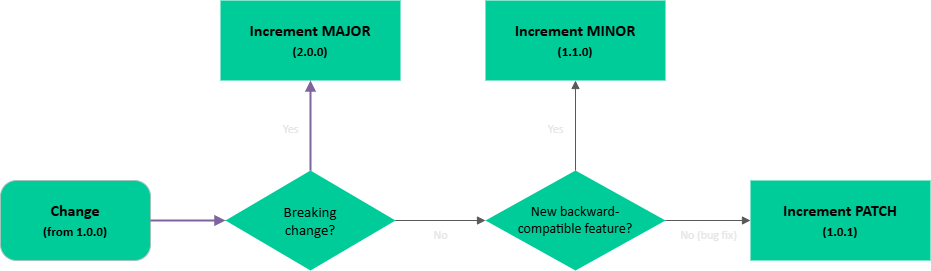
The path highlighted in purple is the one we must be most careful about. A breaking change must always increase the MAJOR version, even when the change looks small.
Why Semantic versioning is important?
In order to let the consumer teams upgrade with confidence, to stop the surprise build breaks and to allow NuGet to resolve the dependencies safely, every shared package and API must follow semantic versioning. When the version number is reliable, consumers can use version ranges like [2.4.0, 3.0.0) and get the bug fixes automatically without the risk of breaking changes.
What is a breaking change?
It is significant to define what “breaking” means for our packages, because most of the mistakes happen here. For a .NET library, the following are breaking changes,
- Removing or renaming a public type, method, property or parameter.
- Changing a method signature or return type.
- Adding an abstract member to a public abstract class, or a member to a public interface.
- Changing the default value of a parameter or a configuration.
- Changing the behaviour which consumers rely on (ex: a method which returned an empty list now returns null).
- Increasing the minimum target framework (ex: from .NET 4.5 to .NET 4.6.1).
The following are not breaking changes,
- Adding a new public type or a new method to a class.
- Adding an optional parameter through a new overload.
- Fixing a bug, as long as nobody depends on the buggy behaviour (in reality, someone usually does, be mindful).
Guidelines for NuGet packages
Find below the quick summary of the guidelines which we follow for all internal NuGet packages.
- Use MAJOR.MINOR.PATCH for all packages, set the version from the build, not by hand.
- Use pre-release labels for unstable versions,
1.3.0-alpha1,1.3.0-beta2,1.3.0-rc1. - Mark obsolete members with
[Obsolete("Use GetFundById instead. Will be removed in 3.0.0")]in a MINOR release before removing them in the next MAJOR. - Write the release notes for every version in the
.nuspecreleaseNotesor a CHANGELOG file. - Keep
AssemblyVersionstable within a MAJOR version (ex:2.0.0.0) and updateAssemblyFileVersionandAssemblyInformationalVersionwith the full version, it reduces the binding redirect pain for strong named assemblies. - Never republish the same version with different content, publish a new version instead.
Note: NuGet 3.x supports SemVer 1.0 style versions. Pre-release labels with dots (
1.0.0-beta.1) and build metadata (+build.5) from SemVer 2.0 are not supported in our current NuGet feeds, so use1.0.0-beta1form.
Steps to Implement:
Follow the following instructions to version the package from the VSTS build.
-
Add the version variables to the build definition,
Major,MinorandPatch. -
Set the build number format to
$(Major).$(Minor).$(Patch)$(Rev:.r). -
Use the “NuGet Packager” task with “Use the build number to version package” option, or pass the version explicitly.
nuget pack FundData.Client.nuspec -Version $(Major).$(Minor).$(Patch) -
For pre-release builds from feature branches, append a label.
nuget pack FundData.Client.nuspec -Version $(Major).$(Minor).$(Patch)-beta$(Build.BuildId) -
Just to pulse check, list the package versions in the feed.
nuget list FundData.Client -AllVersions -PreRelease -Source <your feed url>
Guidelines for Web APIs
APIs are a little different from packages. A package consumer chooses when to upgrade, an API consumer is upgraded when we deploy. Because of this reason,
- Expose only the MAJOR version to clients, in the URL (
/api/v1/funds) or in a header. MINOR and PATCH changes must be backward compatible, so clients don’t need to know about them. - Adding a new endpoint or a new optional field in the response is a MINOR change.
- Removing a field, renaming a field, changing a data type or making a request field required is a MAJOR change, which means a new
/v2/route. - Run the previous MAJOR version side by side for an agreed deprecation period and inform the consumers with a sunset date.
- Clients must ignore unknown fields in responses, otherwise even a MINOR change breaks them.
Info: We will discuss more about API design and versioning in our API design guidelines. For now, the key point is that a breaking change must never be deployed to an existing API version.
Must Do and Don’ts
- Must Do: Increase MAJOR for every breaking change, without exception.
- Must Do: Document the public API of the package, otherwise nobody can say what is breaking.
- Must Do: Deprecate with
[Obsolete]before removing. - Should: Release 1.0.0 as soon as the package is used in production.
- Don’t: increase MAJOR for marketing reasons.
- Don’t: overwrite or delete a published version which consumers may be using.
Wrap up
In this article, we have looked at the challenges of sharing packages and APIs between teams, what is semantic versioning, what is a breaking change, and the guidelines we follow for NuGet packages and Web APIs. I appreciate your time and efforts to read this article. In the next article, I will walk you through Git branching strategies and the difference between Git Flow and GitHub Flow.
Related Posts
Async and await in C# - common mistakes
Async and await explained for web applications, including I/O-bound work, async void, blocking calls, deadlocks, ConfigureAwait, fake async, and sequential awaits.
Code review checklist for .NET teams
A practical .NET code review checklist covering design, readability, correctness, errors, security, performance, testing, operations, and constructive review comments and discussion.
Exception handling best practices in .NET
Exception handling practices for .NET, ASP.NET MVC, and Web API covering swallowed exceptions, stack traces, specific catches, and global error handling.