How to choose a Cosmos DB consistency level and partition key?
Cosmos DB consistency levels and partition keys shape correctness, latency, throughput and cost, with practical guidance for selecting them for a distributed fund workload.
How to choose a Cosmos DB consistency level and partition key?
A distributed document database is giving us scale, but the design decisions are moving from database tables to request units, partitions and read consistency. If a fund application chooses a consistency level without understanding the business requirement, it may pay more latency or RU/s than needed. If it chooses a poor partition key, one hot fund can use the capacity while other partitions are idle.
In this article, we are going to see the five Cosmos DB consistency levels, how to choose one for a fund workload, and how to design a partition key. We will use the Microsoft.Azure.DocumentDB SDK and compare a fund id, document type and date as possible keys.
TL;DR Summary
- Cosmos DB consistency is trading read freshness, latency and RU cost.
- The five levels are Strong, Bounded Staleness, Session, Consistent Prefix and Eventual.
- Session is the default and is a useful starting point for many user-facing applications.
- Strong consistency is not available for accounts with multiple regions; confirm this service constraint before designing.
- A logical partition has a 10 GB limit, and RU/s are provisioned per collection.
- Choose a high-cardinality key which spreads writes and is used in common queries.
Challenges
Freshness versus cost
A fund price screen may need a user to read the value written in the same session, while a search index can accept eventual data. Using Strong consistency for every read is increasing latency and RU cost when the business does not need it.
Hot partitions
If every document is partitioned by a common value such as documentType, one logical partition is receiving most writes. The collection may have enough total RU/s while the hot partition is throttling requests.
Queries across partitions
A key which is excellent for distribution may not be present in the common query. Cross-partition queries are more expensive and can add latency, so the key must balance distribution with the access pattern.
What is Cosmos DB consistency?
Cosmos DB consistency is the guarantee which controls how current and ordered a read is compared with writes in a distributed account.
In simple terms, it tells us what a reader can observe when data is being replicated. Strong gives the freshest guarantee, while Eventual gives the lowest coordination cost and the least freshness guarantee.
The following diagram compares the Cosmos DB consistency levels from strongest to weakest.
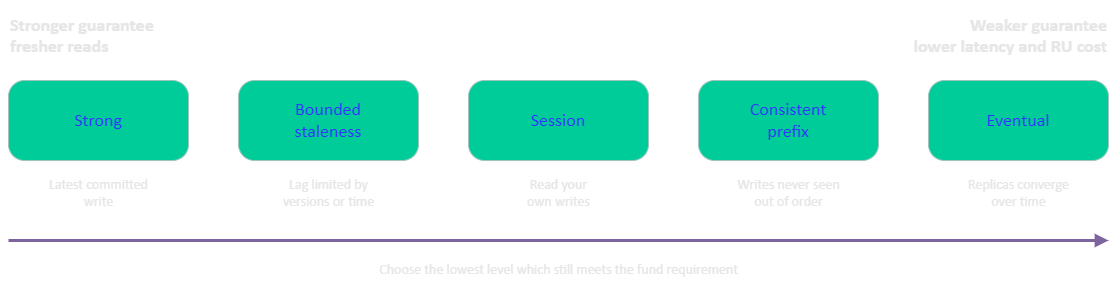
The purple path is the decision direction from a strong business guarantee toward a lower-latency and lower-coordination choice. The correct level is the lowest one which still satisfies the fund requirement.
Why the consistency level is important?
The consistency level is important because it is affecting user-visible data and RU consumption. A unit-value correction should not show an older price to a user who has just submitted an update, but a historical report may not need a globally latest read.
The default consistency is set at the account level, so discuss it with all workloads sharing the account. A client or request can only relax the account setting to a weaker level, not strengthen it. Do not choose Strong for one API without understanding the impact on other collections and regions.
Consistency levels
| Level | Guarantee | Trade-off |
|---|---|---|
| Strong | Read sees the latest committed write | Highest coordination and latency; unavailable for multi-region accounts |
| Bounded Staleness | Read may lag by a configured time or operation count | Predictable lag with more cost than Eventual |
| Session | Read-your-writes in a client session | Good user experience with lower cost than Strong |
| Consistent Prefix | Reads never see out-of-order writes | May not see the latest value |
| Eventual | Lowest ordering and freshness guarantee | Lowest coordination cost and highest availability |
Note:
[confirm: Strong consistency availability for accounts with multiple regions]Confirm the limitation for the account configuration and service release before promising a global Strong guarantee.
What is a partition key?
A partition key is the property used to divide documents into logical partitions, which Cosmos DB maps to physical partitions as the collection grows.
In simple terms, every document with the same key value is grouped together. The key should have enough values to spread storage and requests, but it should also support the queries the application sends most often.
The following diagram explains logical and physical partition distribution for a fund collection.
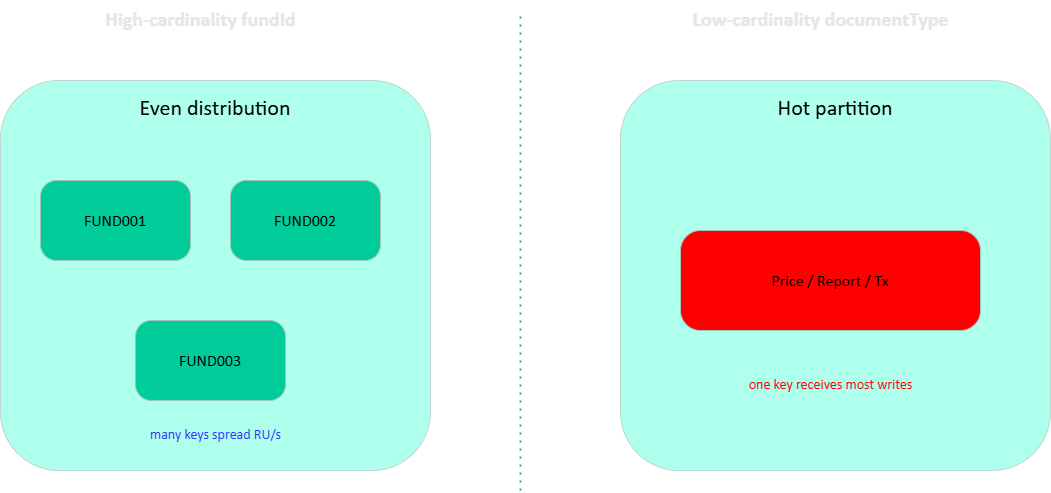
The purple path is the evenly distributed fundId example. A document type or date key can create a hot partition when many documents share the same value.
Steps to Implement:
Follow the following instructions to choose consistency and a partition key,
Describe the access patterns
- List the important reads and writes,
- Record whether the user needs read-your-writes,
- Identify queries which always include a fund, tenant or account,
- Estimate document size and growth for the busiest key.
Replace the input place holders with actual values, including <collection-name>, <partition-key> and <fund-id>.
Choose consistency
- Start with Session for a user-facing fund API,
- Choose Bounded Staleness when a known lag is acceptable,
- Choose Strong only when the business requires the latest committed value,
- Choose Consistent Prefix or Eventual for workloads which do not need the newest value.
The SDK exposes the selected level,
var client = new DocumentClient(
    new Uri("<cosmos-endpoint>"),
    "<cosmos-key>",
    new ConnectionPolicy());

client.ConnectionPolicy.RetryOptions.MaxRetryAttemptsOnThrottledRequests = 3;
The account consistency setting is configured in the Azure service. The client request options can control the consistency for supported operations, but do not use a per-request override to hide an account-wide design problem.
Define the partition key
-
Define the collection with a partition key path,
var definition = new DocumentCollection { Id = "<collection-name>", PartitionKey = new PartitionKeyDefinition { Paths = new Collection<string> { "/fundId" } } }; -
Use the key in a create or replace operation,
var options = new RequestOptions
{
    PartitionKey = new PartitionKey(fundId)
};

await client.CreateDocumentAsync(
    collectionUri,
    document,
    options);
Compare fund-domain keys
fundId is a strong candidate when most requests read one fund and each fund has enough documents to use capacity without exceeding the 10 GB logical partition limit. It is high-cardinality and easy to include in a query.
documentType is usually a poor key when values are only Price, Report and Transaction. Those values are low-cardinality and can create hot partitions.
date can spread a time series, but all writes for the current day can still become hot, and a fund-history query may scan many partitions. A compound value such as fundId plus a time bucket can be useful, but test the query pattern before committing to it.
Use query options deliberately
-
Query one partition when the fund id is known,
var options = new FeedOptions { PartitionKey = new PartitionKey(fundId) }; -
Enable cross-partition queries only when required,
var options = new FeedOptions
{
    EnableCrossPartitionQuery = true
};
Cross-partition queries can use more RU/s and are harder to predict. Add an index and query filter which match the access pattern, but do not expect an index to remove a poor partition-key distribution.
Pulse check
- Load sample documents with the busiest expected fund,
- Run the common fund query with its partition key,
- Run a controlled cross-partition query and record RU charge,
- Watch throttling and partition distribution in the portal,
- Check the total size for the logical partition remains below 10 GB.
Info: Last year, in the DocumentDB article, we discussed the document resource model. Cosmos DB is the evolution of that service, so the same document modelling discipline is still important.
Must Do / Should / Don’t
Must Do
- Must choose consistency from a business read requirement.
- Must choose a partition key from both distribution and query patterns.
- Must account for the 10 GB logical partition limit.
- Must measure RU charge and throttling with realistic data.
Should
- Should use Session as a starting point for user-facing workflows.
- Should keep the fund id in queries which read one fund.
- Should test the busiest key, not only average data.
Don’t
- Don’t choose a low-cardinality key only because it is easy to name.
- Don’t promise Strong consistency for a multi-region account without confirmation.
- Don’t enable cross-partition queries for every request.
Wrap up
In this article, we have looked at the five Cosmos DB consistency levels, their trade-offs, logical and physical partitions, the 10 GB limit, RU/s and fund-domain partition-key choices.
I really appreciate that you took the time to read this article. In the next article, I will walk you through how to set up Sentry for .NET and JavaScript error tracking.
Related Posts
Cosmos DB vs Azure SQL Database - choosing the right data store
Cosmos DB and Azure SQL Database are compared across data models, consistency, transactions, partitioning, scale and operational fit for a fund workload.
Cloud cost optimization - right-sizing, reserved capacity and auto-shutdown
Azure cloud cost optimisation combines right-sizing, reserved capacity, auto-shutdown, autoscale, tagging, cleanup, Advisor metrics and showback into a repeatable loop.
Environment drift - why UAT and production are not the same
Environment drift makes UAT and production behave differently, so this article explains how to control configuration, infrastructure, access policies and deployment evidence.