How to use Azure DocumentDB from .NET?
Azure DocumentDB explained through collections, partition keys, Request Units, consistency levels and .NET operations for creating, querying and updating documents.
How to use Azure DocumentDB from .NET?
For many years, every piece of data in our applications went into a relational database. It works well for transactions and reports, but some data doesn’t fit naturally into tables. A fund factsheet, for example, has different sections, different attributes per fund type, multiple languages and nested lists. When we store it in SQL Server, we end up with 15 tables, many joins and a schema change for every new attribute. Reading one factsheet means joining all of them back together, and the page is getting slower as the data grows.
In the previous article, we discussed how to configure New Relic for Azure Web Apps. In this article, we are going to see what is Azure DocumentDB, the key concepts like collections, partition keys, Request Units and consistency levels, and the step by step instructions to create, read, query and update documents from a .NET application.
TL;DR Summary
- Azure DocumentDB is a fully managed NoSQL document database service which stores JSON documents.
- The resource model is Database Account → Database → Collection → Documents.
- It is schema free, every document in a collection can have a different shape, and all properties are indexed automatically.
- Throughput is reserved in Request Units per second (RU/s) per collection, it is the main cost factor.
- Choose the partition key carefully for partitioned collections, it decides the scale and the query cost.
- It offers four consistency levels, Strong, Bounded Staleness, Session (default) and Eventual.
- Use one
DocumentClientinstance for the lifetime of the application.
Challenges
Rigid schema for flexible data
When every fund type has different attributes, a relational schema either has many nullable columns or an Entity-Attribute-Value (EAV) design, which is hard to query and maintain.
Read performance with many joins
Building one aggregate (like a factsheet) from many tables needs complex queries. As the data grows, these queries become the hot spots of the database.
Scaling the database
Scaling a relational database for global, high read traffic is expensive, and usually means bigger hardware (scale up) instead of adding more nodes (scale out).
What is Azure DocumentDB?
Azure DocumentDB is a fully managed, schema-free NoSQL document database service from Microsoft Azure that stores JSON documents, automatically indexes all properties, supports SQL-like queries and JavaScript stored procedures, and provides predictable throughput and low latency at any scale.
In simple terms, DocumentDB stores our objects as JSON documents, as they are, and lets us query them with a familiar SQL syntax. We don’t manage servers, indexes or schemas.
The following diagram depicts the resource model of DocumentDB.
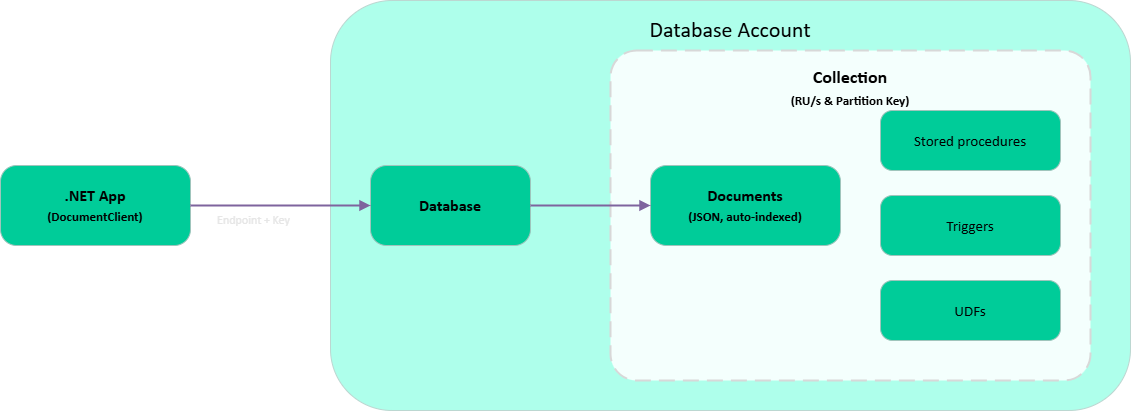
- Database Account - the top level resource, it has the endpoint URI and the keys.
- Database - a logical container of collections and users.
- Collection - the unit of throughput and partitioning, it holds documents, stored procedures, triggers and user defined functions (UDFs).
- Document - a JSON document with an
idproperty which must be unique within the partition.
Key concepts
Request Units (RU)
A Request Unit is the measure of throughput in DocumentDB. Reading a 1 KB document by its id costs about 1 RU. Writes, queries and bigger documents cost more. We reserve the RU/s per collection, and when the application uses more than reserved, the requests are throttled with HTTP status 429. It is significant to measure the RU charge of the important queries, the SDK returns it in every response.
Partition key
Partitioned collections spread the data across multiple physical partitions using a partition key. All documents with the same partition key value are stored together. A good partition key has many distinct values and spreads the reads and writes evenly. For our fund documents, we use the fund’s management company id, because most queries are within one company. Be mindful, the partition key cannot be changed after the collection is created.
Consistency levels
| Level | Meaning | Use when |
|---|---|---|
| Strong | Reads always see the latest write | Correctness is more important than latency |
| Bounded Staleness | Reads lag behind writes by at most K versions or T time | Global apps which need predictable staleness |
| Session (default) | A client always reads its own writes | Most user facing applications |
| Eventual | Reads eventually see all writes, lowest latency | Counters, non-critical data |
Why DocumentDB is important?
In order to store flexible, hierarchical data without a rigid schema, to read an aggregate in a single call instead of many joins, and to scale the throughput on demand without managing servers, a document database like DocumentDB is a good fit for certain parts of our application. It is not a replacement for SQL for everything, we will discuss choosing the right store for each job in the polyglot persistence article.
Steps to Implement:
Follow the following instructions to create a DocumentDB account and use it from a .NET application.
Create the account
-
Login to the Azure portal.
-
Click “New” → “Databases” → “NoSQL (DocumentDB)”.
-
Enter the account ID, select the subscription, resource group and location. Replace the input place holders with actual values.
-
After the deployment, open the account → “Keys” and copy the URI and the primary key.
-
Click “Add Database” to create
FundData, then “Add Collection” to createFactsheetswith the partition key/companyIdand the throughput (ex: 1000 RU/s).Note: For local development, use a separate DocumentDB account or database for each developer, so the tests don’t affect the shared environments.
Connect from .NET
-
Install the DocumentDB .NET SDK.
Install-Package Microsoft.Azure.DocumentDB -
Create a single
DocumentClientand reuse it. Creating a client per request is expensive and exhausts the connections.public static class DocumentDbClientFactory { private static readonly Lazy<DocumentClient> Client = new Lazy<DocumentClient>(() => new DocumentClient( new Uri(ConfigurationManager.AppSettings["DocumentDb:Endpoint"]), ConfigurationManager.AppSettings["DocumentDb:AuthKey"], new ConnectionPolicy { ConnectionMode = ConnectionMode.Direct, ConnectionProtocol = Protocol.Tcp })); public static DocumentClient Instance { get { return Client.Value; } } }
Create a document
-
Define the model. The
idproperty must be mapped withJsonProperty.public class Factsheet { [JsonProperty("id")] public string Id { get; set; } [JsonProperty("companyId")] public string CompanyId { get; set; } public string Isin { get; set; } public string FundName { get; set; } public string Language { get; set; } public List<Holding> TopHoldings { get; set; } public Dictionary<string, decimal> Performance { get; set; } } -
Create the document.
var client = DocumentDbClientFactory.Instance;
var collectionUri = UriFactory.CreateDocumentCollectionUri("FundData", "Factsheets");

var factsheet = new Factsheet
{
    Id = "LU0000000001-en",
    CompanyId = "company-42",
    Isin = "LU0000000001",
    FundName = "Global Equity Fund",
    Language = "en"
};

ResourceResponse<Document> response = await client.CreateDocumentAsync(collectionUri, factsheet);
Trace.TraceInformation("Create cost {0} RU", response.RequestCharge);
Read a document by id
-
Reading by id and partition key is the cheapest operation.
var documentUri = UriFactory.CreateDocumentUri("FundData", "Factsheets", "LU0000000001-en");
var result = await client.ReadDocumentAsync(documentUri,
    new RequestOptions { PartitionKey = new PartitionKey("company-42") });
Factsheet item = (dynamic)result.Resource;
Query documents
-
Use LINQ or SQL. Include the partition key in the filter whenever possible, otherwise the query is sent to all partitions.
var query = client.CreateDocumentQuery<Factsheet>(collectionUri,
        new FeedOptions { MaxItemCount = 100, PartitionKey = new PartitionKey("company-42") })
    .Where(f => f.Language == "en")
    .AsDocumentQuery();

var factsheets = new List<Factsheet>();
while (query.HasMoreResults)
{
    factsheets.AddRange(await query.ExecuteNextAsync<Factsheet>());
}
The same query in DocumentDB SQL,
SELECT * FROM f WHERE f.companyId = "company-42" AND f.language = "en"
Update and delete
-
Replace the whole document, or upsert when you don’t know if it exists.
factsheet.FundName = "Global Equity Fund A";
await client.UpsertDocumentAsync(collectionUri, factsheet);

await client.DeleteDocumentAsync(documentUri,
    new RequestOptions { PartitionKey = new PartitionKey("company-42") });
Pulse check
- Just to pulse check, open the account in the portal → “Document Explorer” and look at the created documents, and use “Query Explorer” to run the SQL query.
Must Do and Don’ts
- Must Do: Use one
DocumentClientper application, and Direct/TCP connection mode for best performance. - Must Do: Choose the partition key based on the main query patterns before creating the collection.
- Must Do: Handle throttling (429), the SDK retries by default, but monitor it and increase RU/s if it happens often.
- Should: Log the
RequestChargeof important operations during development. - Should: Exclude large properties which are never queried from the indexing policy, it reduces the write cost.
- Don’t: use DocumentDB for data which needs multi-document transactions across partitions, or complex reporting joins, use SQL for that.
- Don’t: store the auth key in source control, keep it in Key Vault or app settings.
Wrap up
In this article, we have looked at the challenges of storing flexible data in a relational database, what is Azure DocumentDB, the key concepts of resource model, Request Units, partition key and consistency levels, and the step by step instructions to create, read, query, update and delete documents from .NET. I appreciate your time and efforts to read this article. In the next article, I will walk you through how to integrate systems with Azure Logic Apps.
Related Posts
How to store files in Azure Blob Storage from ASP.NET?
Storing files in Azure Blob Storage from ASP.NET, including containers, validation, uploads, private file serving, and separating file metadata.
How to set up Azure Application Insights for an ASP.NET application?
Azure Application Insights explained through server and browser telemetry, custom events, dependencies, alerts, availability tests and ASP.NET application monitoring.
Getting started with Docker - Part 1
Getting started with Docker through images, containers, Docker Toolbox, Docker Machine, host addresses, and basic Docker 1.x commands for practical first steps.