Environment drift - why UAT and production are not the same
Environment drift makes UAT and production behave differently, so this article explains how to control configuration, infrastructure, access policies and deployment evidence.
Environment drift - why UAT and production are not the same
“It works in UAT” is not giving much confidence when production has a different setting, package, network rule or database migration. The application code may be identical, but a manual hotfix or an Excel checklist has changed the environment around it. The customer is discovering the difference only after release.
In this article, we are going to see what environment drift is, why it is creating a chain of failures, and how IaC, Configuration as Code, immutable deployments and VSTS release pipelines can reduce it. We will also see how Activity Log and terraform plan can help us find changes.
TL;DR Summary
- Environment drift means that environments which should be equivalent are becoming different.
- Manual changes, production hotfixes, incomplete checklists and different data are common causes.
- IaC and PowerShell DSC / Azure Automation DSC can make infrastructure and configuration repeatable.
- VSTS should promote the same artefact through environments.
- Immutable containers reduce changes inside a running host.
- Activity Log and
terraform planprovide useful evidence, but parity still needs ownership and review.
Challenges
Manual changes
A developer changes a setting in UAT, an operator applies a production hotfix and nobody updates the deployment definition. Each action may solve an immediate problem, but the environments are no longer representing the same intended state.
Different release inputs
If UAT builds an image or package again instead of promoting the tested artefact, the production version can include a different dependency or build setting. It is creating a failure which cannot be reproduced in UAT.
Consequence chain
Drift is starting as a small difference. The difference is missed during testing, the release behaves differently, the customer finds the issue, the support team performs a hotfix, and the hotfix creates another difference. This ripple effect is making the next release even less predictable.
What is environment drift?
Environment drift is the unplanned difference between the configuration, infrastructure, dependencies or data assumptions of environments which are expected to be equivalent.
In simple terms, UAT and production are having different answers to “how is this application running?” A different setting may be correct by design, but it must be declared and reviewed rather than appearing through an undocumented manual action.
The following diagram depicts the drift chain and the controlled promotion path.
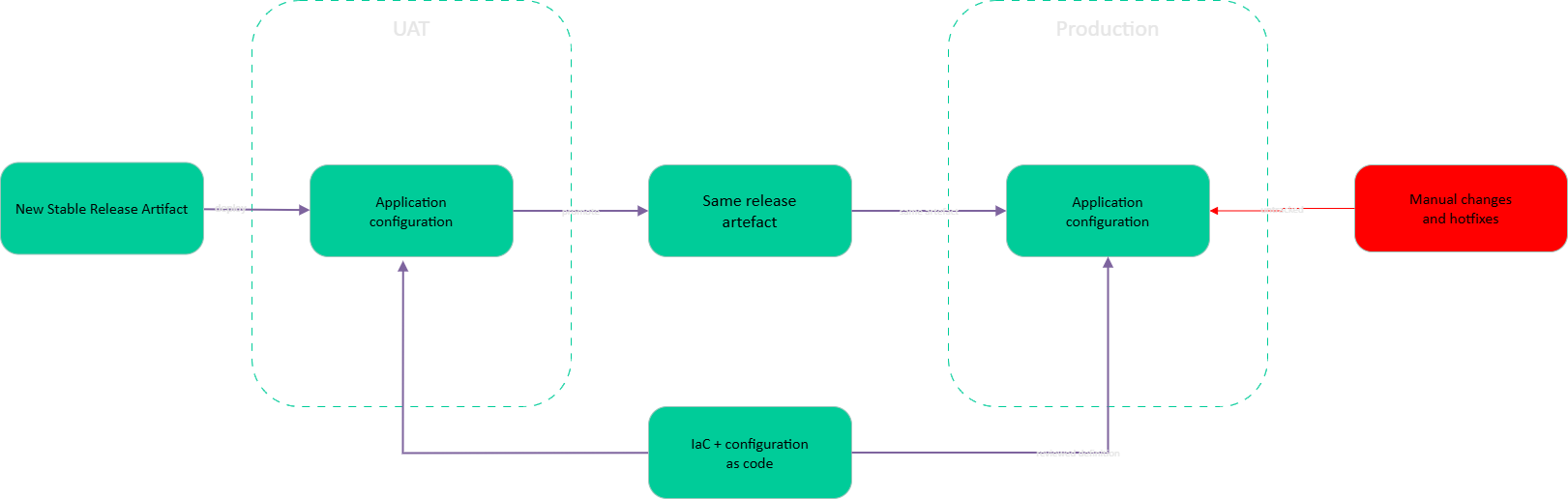
The purple path is the controlled route: one artefact is promoted through environments, definitions are reviewed and differences are detected before production.
Why environment parity is important?
Environment parity is important because testing is useful only when the tested conditions are representative. It is not necessary for every environment to be identical; production may have more nodes and a different endpoint. The important settings and deployment process should be equivalent, and declared differences should be intentional.
In our case, we should first remove differences which are not required by scale or security. A production-only setting can remain when it is documented, parameterised and tested with a representative value in UAT.
Causes and consequences
| Cause | Consequence | Better control |
|---|---|---|
| Portal change | Definition is stale | IaC review and deployment |
| Production hotfix | Next release overwrites or misses it | Fix code and promote a new artefact |
| Excel checklist | Steps are missed or interpreted differently | Automated VSTS release |
| Rebuilt package | UAT and production binaries differ | Promote the same artefact |
| Different host image | Runtime behaviour changes | Immutable image and version |
| Untracked configuration | Application fails only in one environment | Configuration as Code and validation |
Reduce drift with IaC
The previous article compared ARM templates and Terraform. Use one of those approaches to define resource groups, networks, storage, App Service settings and access policies. Keep environment values as parameters, not as separate copied templates.
Use ARM deployment history and Activity Log to see who changed a resource and which operation was performed. For Terraform-managed resources, run,
terraform planThe plan is showing differences between configuration, state and the provider. Review the output carefully because a plan can include a replacement or deletion.
Configuration as Code
Use PowerShell Desired State Configuration (DSC) and Azure Automation DSC when servers require a declared operating-system or application configuration. The configuration should describe the desired state, and the node should report when it is not matching.
Configuration as Code is not meaning that every secret is committed to source control. Keep secrets in a protected store, inject them through the release process and validate that required values are present.
Immutable deployments
An immutable deployment is creating a new image or package instead of changing a running server in place. Containers are a useful implementation for this pattern: build image <image>:<tag>, test it, then deploy the same image to UAT and production.
When a rollback is required, promote the previous known image or artefact. Do not log in to a production host and manually edit the application files, because that creates a difference which the next deployment cannot explain.
Promote one artefact with VSTS
Create a VSTS build which produces the application package or container image once. The release pipeline should promote that exact artefact through development, UAT and production, with environment-specific configuration supplied at release time.
Add approval, health and smoke checks between stages. A production approval is not a substitute for automated parity checks, but it gives the owner a place to review the evidence.
Parity rules
The Twelve-Factor application principles include development and production parity: keep the time gap, people and tools between environments small. Apply the same principle to runtime version, dependency source, configuration names, deployment commands and external-service contracts.
Some differences are valid. Production may have more replicas, a production hostname and stricter access controls. Document these as parameters and test the behaviour which they can change.
Configuration should also be validated at startup. If a required endpoint, certificate or feature setting is missing, the application should fail with a useful health signal rather than starting with a hidden default. This is making an intentional difference visible before a customer operation is reaching the service.
Data parity needs a separate decision. UAT may use masked or smaller data for privacy and cost reasons, but the schema, indexes and representative access patterns should be checked against production. Copying sensitive production data is not an acceptable shortcut for parity.
Must Do / Should / Don’t
Must Do
- Must promote the same artefact through environments.
- Must define infrastructure and important configuration in source control.
- Must review Activity Log and plan output for unexpected changes.
- Must document every intentional environment difference.
Should
- Should use PowerShell DSC / Azure Automation DSC for server configuration.
- Should use immutable containers or packages where practical.
- Should add a parity check to the VSTS release process.
Don’t
- Don’t use an Excel checklist as the only deployment control.
- Don’t apply a production hotfix without capturing it in code and the deployment definition.
- Don’t rebuild an artefact between UAT and production.
- Don’t read or copy tools from an unrelated future environment brief.
Wrap up
In this article, we have looked at environment drift, manual changes, the consequences chain, IaC, DSC, immutable deployments, VSTS promotion and parity rules.
I really appreciate that you took the time to read this article. In the next article, I will walk you through edge-first architecture, security and caching at the CDN or proxy.
Related Posts
Cloud cost optimization - right-sizing, reserved capacity and auto-shutdown
Azure cloud cost optimisation combines right-sizing, reserved capacity, auto-shutdown, autoscale, tagging, cleanup, Advisor metrics and showback into a repeatable loop.
How we reduced over 80% of requests to the web servers?
This case study uses Cloudflare page rules and Workers to cache SPA requests at the edge, reducing origin traffic while balancing performance, security and operational complexity.
Cosmos DB vs Azure SQL Database - choosing the right data store
Cosmos DB and Azure SQL Database are compared across data models, consistency, transactions, partitioning, scale and operational fit for a fund workload.