What are the generations of programming languages? - Part 3
This article follows five generations of programming languages, from binary machine instructions to high-level, very high-level and natural or logic languages, with examples and historical context.
What are the generations of programming languages? - Part 3
Programming languages did not appear in one day. Over the last sixty plus years, every new generation of languages was introduced to solve the pain of the previous one, mostly to make the programmer’s life easier and to bring the instructions closer to the way humans think. When we understand this journey, it is much easier to understand why we have so many languages today and why some are called as low-level and some are called as high-level. In the previous article, we discussed what is a program, programming and programming language. In this article, we are going to see the five generations of programming languages, with a small example from each generation.
Understanding Computers and Programming series:
- How computers solve real-world problems? - Part 1
- What is a program, programming and programming language? - Part 2
- What are the generations of programming languages? (this article)
- How computers execute programs? - Part 4
- How programming languages work behind the scenes? - Part 5
TL; DR Summary
- First generation (1GL) - Machine code, written directly in 0s and 1s.
- Second generation (2GL) - Assembly language, short words like MOV and ADD instead of 0s and 1s.
- Third generation (3GL) - High-level languages like FORTRAN, COBOL, C and Java, close to English and maths.
- Fourth generation (4GL) - Very high-level languages like SQL, we tell what we want, not how to do it.
- Fifth generation (5GL) - Logic and natural language programming like Prolog, we give the facts and rules, the system finds the answer.
- 1GL and 2GL are called as low-level languages, 3GL onwards are called as high-level languages.
- A new generation did not kill the old one, all of them are still used today for different purposes.
Why do we need new generations?
Let us discuss the key concerns which pushed the industry to create a new generation again and again.
The early computers were very expensive and the programmers were few. Writing a program in 0s and 1s took weeks, a single wrong digit could break the whole program and finding that digit was like finding a needle in a haystack. The program written for one computer did not work on another computer, so the same work had to be done again for every new machine. As a result of this, programs were very costly to build and even more costly to change.
Every generation tried to reduce these pains, it means,
- Easier to read and write, so more people can become programmers.
- Fewer mistakes, so the programs are more reliable.
- Portable, so the same program can run on different computers.
- Faster to build, so the business gets the solution sooner.
The following diagram depicts the five generations, from the language closer to the machine on the left to the language closer to the human on the right.
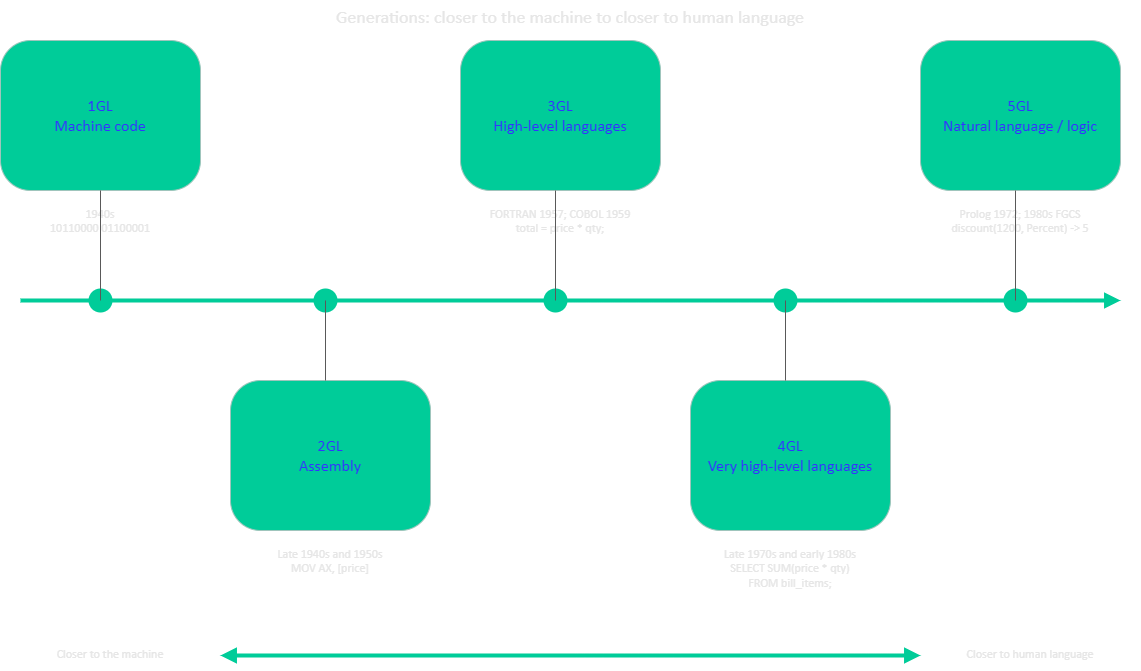
To compare them easily, we will use the same small task from our grocery shop in every generation, multiply the price and quantity and store the total.
First generation: Machine code
Machine code is the language of 0s and 1s which the processor understands directly, without any translation. It is also called as machine language. The first electronic computers in the 1940s were programmed this way, sometimes by setting switches and wires by hand.
Example:
The following is one real instruction for the Intel x86 processor, it moves the value 97 into a register (a small storage inside the processor, we will see this in Part 4),
10110000 01100001Just imagine writing the complete billing program like this.
- Pros - Fastest execution, since there is no translation, and full control of the hardware.
- Cons - Very hard to read, write and debug. It is specific to one processor family, so it is not portable.
Second generation: Assembly language
Assembly language replaced the 0s and 1s with short words called as mnemonics, like MOV for move, ADD for add and MUL for multiply. It came in the late 1940s and 1950s. A program called as assembler translates the assembly code into machine code, we will see this in Part 5.
Example:
The same multiply and store task in x86 assembly,
MOV AX, [price]   ; copy price into register AX
MUL WORD [qty]    ; multiply AX by qty
MOV [total], AX   ; store the result in total
It is much better than 0s and 1s, but still every instruction is one machine step, so we have to think like the processor.
- Pros - Very fast and close to the hardware, readable compared to machine code.
- Cons - Still hard and long to write, and it is still specific to one processor family.
Even today, assembly is used where every byte and every cycle matters, like device drivers, small embedded devices and some parts of the operating system.
Third generation: High-level languages
High-level languages allow us to write instructions using English words and maths symbols, independent of the processor. FORTRAN (1957) for scientific calculations and COBOL (1959) for business applications were the early ones, then came C, C++, Java, C# and many more. A compiler or an interpreter translates them into machine code.
Example:
The same task in C, Java or C#, it is just one line,
total = price * qty;This is the biggest jump in the history of programming. One line in a high-level language can become many machine instructions, and the same source code can be translated for different processors. It means, the programmer can focus on the problem instead of the processor.
- Pros - Easy to read, write and maintain, portable, and it has a large set of ready to use libraries.
- Cons - Slightly slower and less control than assembly, though modern compilers have reduced this gap a lot.
Most of the software we use today, operating systems, browsers, business applications and games, are written in third generation languages.
Fourth generation: Very high-level languages
Fourth generation languages are designed for a specific type of problem, like querying a database or generating a report. The main idea is, we tell the computer what we want and it decides how to do it. This is called as declarative style. The term became popular in the late 1970s and early 1980s. SQL (Structured Query Language) is the best known example, and report generators and form builders also belong to this generation.
Example:
The total of a bill from a table of bill items in SQL,
SELECT SUM(price * qty) AS total
FROM bill_items
WHERE bill_id = 101;
Notice that there is no loop, we didn’t say read each row, multiply and add. We only said what we want, the database finds the best way to get it.
- Pros - Very little code for a common problem, readable even for non-programmers like business analysts.
- Cons - Only good for the specific problem it is designed for. You cannot write a complete operating system in SQL.
Fifth generation: Natural language programming
Fifth generation languages are based on solving the problem with facts, rules and constraints, instead of an algorithm written by the programmer. The system finds the solution by itself. Prolog (1972) is the well-known example and it was used a lot in artificial intelligence research. In the 1980s, Japan started a big national project called as Fifth Generation Computer Systems with the goal of computers which can reason and understand natural language.
Example:
The discount rule of our shop in Prolog,
discount(Total, 5) :- Total > 1000.
discount(Total, 0) :- Total =< 1000.

?- discount(1200, Percent).
Percent = 5.
We only gave the rules, we didn’t write how to check them. Prolog finds the answer from the rules.
- Pros - Very natural for problems based on rules and logic like expert systems.
- Cons - Not suitable for general purpose programs, and slower for normal tasks.
Keep in mind that the dream of writing programs in plain English is not fully achieved yet. Natural language is ambiguous, as we discussed in the previous article, so it is still an active research area.
Comparison of generations
Find below the quick summary of all five generations,
| Generation | Example | Closer to | Portable? | Effort to write |
|---|---|---|---|---|
| 1GL - Machine code | 10110000 01100001 | Machine | No | Very high |
| 2GL - Assembly | MOV, ADD, MUL | Machine | No | High |
| 3GL - High-level | FORTRAN, COBOL, C, Java, C# | Human | Yes | Medium |
| 4GL - Very high-level | SQL, report generators | Human | Yes | Low (for its purpose) |
| 5GL - Logic / natural | Prolog | Human | Yes | Low (for its purpose) |
It is a trade-off, as we move to the right, the language is easier for humans, but we have less control over how the computer does the work. As we move to the left, we get more control and speed, but it costs more effort and more mistakes. So, there is no “best” generation, you must choose the right one depend on the problem. For a beginner, it is highly recommended to start with a third generation language like C, Java or Python, because it teaches the problem solving thinking and it is still close enough to understand how the computer works.
Wrap up
In this article, we have looked at why new generations of programming languages were introduced, the five generations with an example from each, and the trade-off between them. I really appreciate that you took the time to read this article. In the next article, I will walk you through how a computer actually executes a program, the CPU, memory, registers, the execution cycle and the role of the operating system.
Related Posts
How programming languages work behind the scenes? - Part 5
This article explains how source code becomes a running program through compilers, interpreters, assemblers, linkers, loaders, bytecode and runtimes before machine instructions reach the CPU.
What is a program, programming and programming language? - Part 2
This article separates program, programming and programming language, using the grocery billing example to explain how people understand problems, design solutions, write code, test and maintain programs in practice today.
How computers solve real-world problems? - Part 1
This beginner introduction shows how a real-world grocery problem becomes input, output, an algorithm and a program that a computer can execute step by step.