How computers execute programs? - Part 4
This article explains computer components, the CPU instruction cycle and operating system role, using a grocery billing program to show how hardware and software work together.
How computers execute programs? - Part 4
When we double-click a program, it opens in a second and starts doing its work. It looks very simple from outside, but behind the screen, many components are working together, the processor, the memory, the disk and the operating system, and the processor is executing billions of tiny instructions every second. Most of the beginners skip this part and directly start with the coding, then they find it hard to understand why a program is slow, why it is using more memory or why it crashed. In the previous article, we discussed the five generations of programming languages. In this article, we are going to see the main components of a computer, what happens inside the CPU when an instruction is executed and the role of the operating system.
Understanding Computers and Programming series:
- How computers solve real-world problems? - Part 1
- What is a program, programming and programming language? - Part 2
- What are the generations of programming languages? - Part 3
- How computers execute programs? (this article)
- How programming languages work behind the scenes? - Part 5
TL; DR Summary
- CPU (Central Processing Unit) is the brain of the computer, it executes the instructions.
- Main memory (RAM) holds the running program and its data, it is fast but loses everything when the power is off.
- Storage (disk) keeps the programs and files permanently, it is slower than memory.
- Registers are very small and very fast storage inside the CPU.
- CPU executes every instruction in a cycle, Fetch, Decode, Execute and Store, and repeats it billions of times per second.
- Operating system is the manager between the programs and the hardware, it loads the program, gives it memory and CPU time, and talks to the devices.
Main components of a computer
Almost all computers we use today, from a laptop to a big server, follow the same basic design which is called as stored program concept or von Neumann architecture, named after the mathematician John von Neumann who described it in 1945. The key idea is, the program instructions and the data both are stored in the same memory, so the computer can load a different program and do a completely different job without changing the hardware.
The following diagram depicts the main components of a computer and how they are connected.
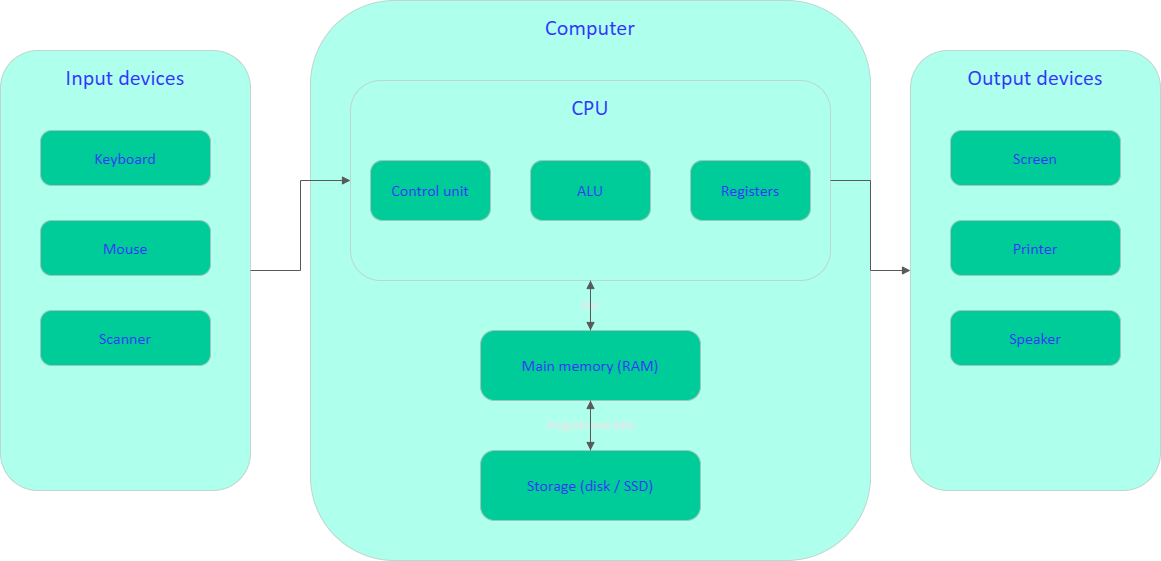
Let us take a closer look at each component,
- Input devices - Keyboard, mouse, scanner, the devices which send data into the computer.
- CPU - It executes the instructions. It has three main parts,
- Control unit - It reads the instructions, understands them and directs the other parts what to do, like a traffic police.
- ALU (Arithmetic Logic Unit) - It does the actual calculations like add, subtract, multiply and comparisons like greater than or equal to.
- Registers - Very small and very fast storage locations inside the CPU, it holds the values the CPU is working on right now.
- Main memory (RAM) - RAM stands for Random Access Memory. It holds the program which is running and its data. It is fast, but it is volatile, it means, everything is lost when the power is off.
- Storage (disk) - Hard disk or the new SSD (Solid State Drive). It keeps the programs and files permanently, even after the power is off, but it is much slower than RAM.
- Bus - The set of wires which carry the data and instructions between CPU, memory and the other devices.
- Output devices - Screen, printer, speaker, the devices which show the result to us.
An analogy
Think about a chef in a restaurant kitchen,
- The chef is the CPU, he does the actual work.
- The cutting board in front of him is the registers, very small, but whatever is on it can be used immediately.
- The kitchen table is the RAM, it has everything needed for today’s orders, he can reach it quickly.
- The store room is the disk, it has everything, but it takes time to go and bring it.
- The recipe is the program, and the vegetables are the data.
It means, the chef will not go to the store room for every onion. He brings what he needs to the table, and from the table to the cutting board. A computer works in the same way, from disk to RAM, from RAM to registers. This is the reason a program becomes very slow when it keeps reading from the disk again and again.
What is an instruction?
An instruction is a single basic operation which the CPU can perform, like load a value from memory, add two numbers, compare two values or jump to another instruction. Every CPU family has its own fixed set of instructions which is called as instruction set, for example, the x86 instruction set used by Intel and AMD processors.
Every instruction has two parts,
- Opcode (operation code) - What to do, like ADD or MOV.
- Operand - On what to do it, like a register, a memory address or a number.
As we discussed in the previous article, one line in a high-level language becomes many instructions. Our total = price * qty will become something like,
LOAD  price into register     (copy price from RAM to register)
MUL   register with qty       (multiply using ALU)
STORE register into total     (copy the result back to RAM)
How CPU executes an instruction?
The CPU executes every instruction through a fixed set of steps and it keeps repeating them until the program ends. It is called as instruction cycle or Fetch-Decode-Execute cycle and it has the following steps,
- Fetch - The control unit reads the next instruction from RAM. A special register called as Program Counter (PC) keeps the address of the next instruction, so the CPU knows where to read from. After reading, PC is moved to the next instruction.
- Decode - The control unit understands what the instruction means, what operation to do and which data is needed.
- Execute - The ALU or other part of the CPU does the actual work, like the multiplication.
- Store - The result is written to a register or back to the memory.
The following diagram depicts the cycle. The flow highlighted in purple is the loop which runs again and again, as long as there are more instructions to execute.
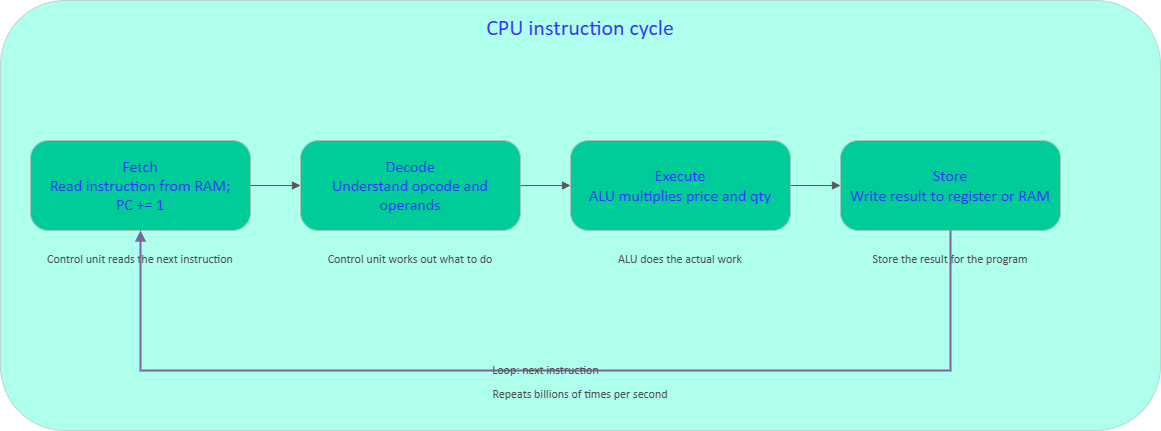
How fast is this loop? The speed of the CPU is measured by its clock speed. A 3 GHz (gigahertz) processor has 3 billion clock ticks per second, and a modern CPU can complete one or more simple instructions in a tick. Most of the processors today also have more than one core, a core is like a complete CPU, so a quad-core processor can work on four sets of instructions at the same time.
Keep in mind that the CPU is not intelligent. It doesn’t know it is calculating a bill, it just fetches, decodes, executes and stores, billions of times. All the intelligence is in the program we wrote.
Role of the operating system
So far we have seen how the CPU executes the instructions, but who brings the program from the disk to RAM? Who decides which program gets the CPU when we have a browser, a music player and our billing program running at the same time? This is the job of the operating system.
An operating system (OS) is the system software which manages the hardware of the computer and provides the common services to all the programs. Windows, Linux and Mac OS X are the examples.
In simple terms, the operating system is the manager of the computer. Programs don’t talk to the hardware directly, they ask the operating system, and the operating system does it for them. The following diagram depicts the operating system as the layer between the programs and the hardware.
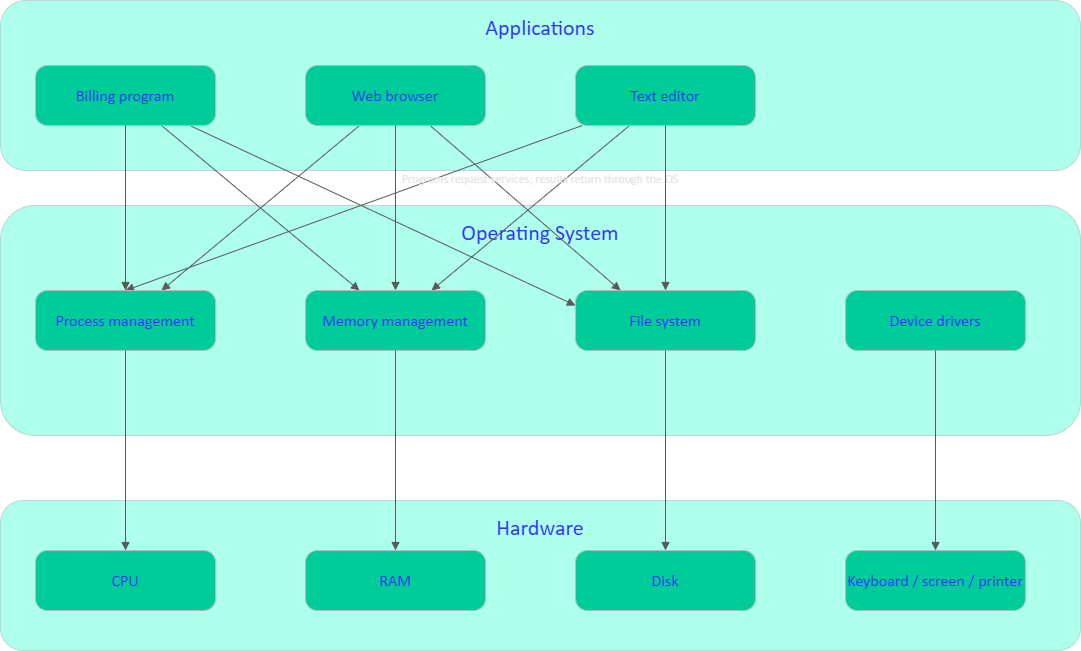
Here are the main responsibilities of the operating system,
- Process management - When we run a program, OS loads it from disk to RAM and creates a process. It switches the CPU between all running processes very quickly, it is called as scheduling, so we feel all the programs are running at the same time.
- Memory management - It gives each process its own memory area and makes sure one program cannot read or overwrite the memory of another program, otherwise one buggy program can crash all others.
- File system - It organizes the data on the disk as files and folders, so the program can just say “open bill.txt” instead of knowing where it is stored on the disk.
- Device drivers - It talks to the keyboard, screen, printer and other devices through small programs called as drivers, so our program can print a bill without knowing the model of the printer.
What happens when we run a program?
Let us put everything together and see what happens when the shopkeeper double-clicks the billing program,
- The OS finds the program file on the disk using the file system.
- The OS loads the program instructions and data into RAM and creates a process.
- The OS sets the Program Counter to the first instruction and gives the CPU to the process.
- The CPU runs the Fetch-Decode-Execute cycle for every instruction.
- When the program wants to read the keyboard or print the bill, it asks the OS, and the OS uses the device driver.
- When the program ends, the OS frees the memory and removes the process.
Wrap up
In this article, we have looked at the main components of a computer, what is an instruction, how the CPU executes the instructions with the Fetch-Decode-Execute cycle and the role of the operating system. I hope this article provided you some insights into what happens inside the computer when a program runs. In the next article, I will walk you through how programming languages work behind the scenes, how our source code becomes machine code with the help of compilers, interpreters and assemblers.
Related Posts
How computers solve real-world problems? - Part 1
This beginner introduction shows how a real-world grocery problem becomes input, output, an algorithm and a program that a computer can execute step by step.
How programming languages work behind the scenes? - Part 5
This article explains how source code becomes a running program through compilers, interpreters, assemblers, linkers, loaders, bytecode and runtimes before machine instructions reach the CPU.
What are the generations of programming languages? - Part 3
This article follows five generations of programming languages, from binary machine instructions to high-level, very high-level and natural or logic languages, with examples and historical context.