How computers solve real-world problems? - Part 1
This beginner introduction shows how a real-world grocery problem becomes input, output, an algorithm and a program that a computer can execute step by step.
How computers solve real-world problems? - Part 1
Computers are part of almost everything we do these days, booking a train ticket, withdrawing money from ATM, paying the bill in a supermarket or sending a mail to a friend. Most of us use them every day without thinking how it is actually working behind the screen. Though a computer looks very smart, it does not understand our problem on its own, someone has to explain the problem to it in a way it can follow, step by step. In this series, I share the fundamentals of computers and programming for those who are just starting the journey. In this article, we are going to see how a real-world problem is translated into something a computer can understand and solve.
Understanding Computers and Programming series:
- How computers solve real-world problems? (this article)
- What is a program, programming and programming language? - Part 2
- What are the generations of programming languages? - Part 3
- How computers execute programs? - Part 4
- How programming languages work behind the scenes? - Part 5
TL; DR Summary
- A computer does not solve a problem by itself, it follows the instructions given by a human.
- Computer is very fast and accurate, but it has no common sense.
- Every problem must be clearly understood and defined before it is given to a computer.
- Almost every computer solution can be explained as Input, Process and Output.
- An algorithm is the step by step solution for a problem, written before the program.
- A program is the algorithm written in a language the computer can follow.
- Verify the result against the original problem, if it is not correct, refine the solution and try again.
Common Challenges
Let us discuss few challenges which beginners usually face when they try to solve a problem with a computer.
Computer has no common sense
Computer is extremely fast and it will never get tired, it can add millions of numbers in a second without a single mistake. On the other hand, it does not know anything about our world. It does not know what is a customer, a discount or a bill. If we ask a person to “calculate the bill”, he will understand it immediately, but a computer needs every step to be explained, what to read, what to multiply, what to add and what to print. When any step is missing, the computer will not guess it, it will just give a wrong result or stop working.
Unclear problem
Most of the time, the real problem is not the code, it is the problem statement itself. “Make the billing faster” is a wish, it is not a problem a computer can solve. Which part is slow? What is the input? What should the output look like? When the problem is not clear, we will build a wrong solution and come to know only when the user is using it, that is the costliest time to find a mistake.
Jumping directly into code
It is normal that beginners tempted to start typing code as soon as they see a problem. It looks like fast progress, but it is not. Without a plan, the code is growing in random directions, the same logic is written many times and it is very hard to find where the mistake is. We will spend more time to fix the code than the time we saved by skipping the planning.
What is a computer?
A computer is an electronic machine that accepts data as input, processes it based on a set of instructions and produces the result as output. It can also store the data and the instructions for later use.
In simple terms, a computer is a very fast and obedient helper. It does exactly what we tell it to do, nothing more and nothing less. This is both its biggest strength and its biggest weakness.
Input, Process and Output
Whatever a computer does, it can be explained with three simple words: Input, Process and Output. This is called as IPO model and it is a good place to start with for beginners.
The following diagram depicts how a computer receives the input from devices like keyboard, mouse or files, processes it with the help of the CPU, memory and storage, then sends the result to the output devices like screen, printer or files.
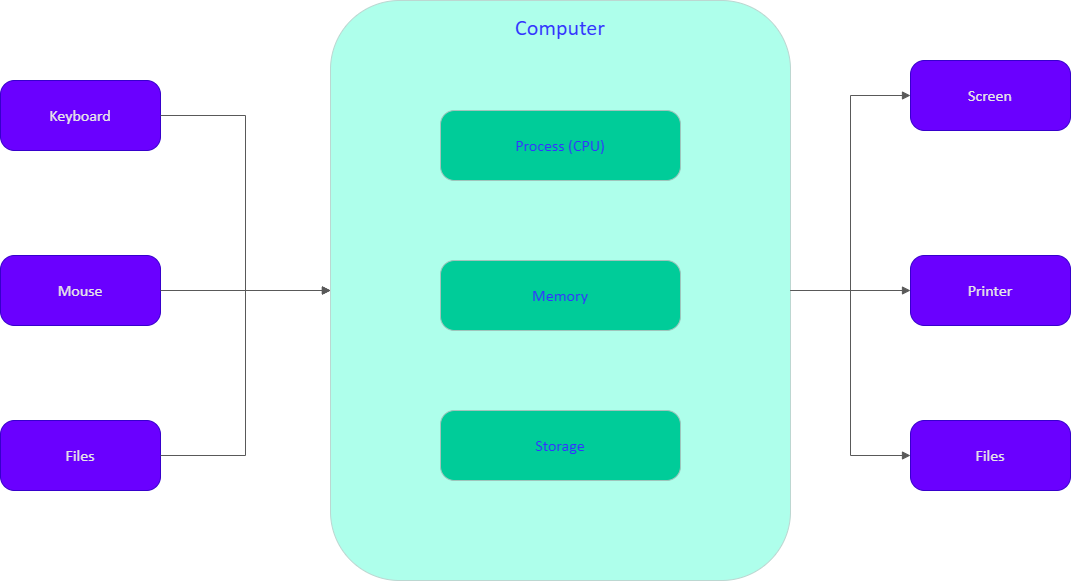
Let us take a small grocery shop as an example. When the shopkeeper bills our items, it is following the IPO model,
- Input - The item name, price and quantity of each item we bought.
- Process - Multiply price and quantity of each item, add them together and apply the discount if any.
- Output - The printed bill with the total amount.
It means, before we explain anything to a computer, we must be clear about what goes in and what should come out. If we know the input and the output, the process in the middle becomes much easier to think about.
How a real-world problem becomes a computer solution?
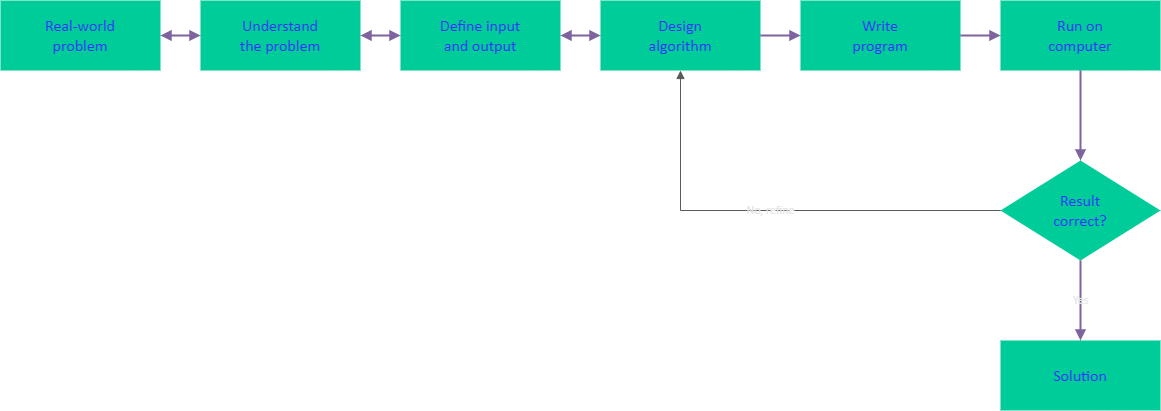
Solving a problem with a computer is not a single step, it is a journey with few stages and we must travel through these stages iteratively. Here are the stages,
- Understand the problem - Talk to the people who has the problem, ask questions and write down what they really need. For our shop, the need is “print the correct bill quickly for every customer”.
- Define the input and output - List all inputs (items, prices, quantities, discount) and the expected output (bill with total amount).
- Design the algorithm - Write the step by step solution in simple English or as a flowchart. We will see more about algorithm in the next section.
- Write the program - Convert the algorithm into instructions using a programming language. We will see this in detail in the next article.
- Run on the computer - The computer follows the instructions and produces the result.
- Verify the result - Compare the result with what we expected. If the bill total is wrong, go back, refine the algorithm and run it again.
The following diagram depicts this journey. The flow highlighted in purple is the happy path, where the result is correct in the first attempt. In real life, it is very common to go through the “No, refine” loop few times before we get the correct solution.
What is an algorithm?
An algorithm is a finite set of well-defined steps to solve a problem or to complete a task.
Simply put, an algorithm is like a cooking recipe. A recipe tells us what ingredients (input) we need, what to do with them in which order (process) and what dish we will get at the end (output). If the recipe says “add some salt”, two people will add two different quantities, but if it says “add one teaspoon of salt”, everyone will get the same taste. A good algorithm must be like the second recipe, clear and without any ambiguity.
Example:
The algorithm to calculate the bill in our grocery shop,
Step 1: Start
Step 2: Set total to 0
Step 3: For each item, read price and quantity
Step 4: Multiply price and quantity, add it to total
Step 5: If total is more than 1000, reduce 5% discount from total
Step 6: Print total
Step 7: Stop
Keep in mind that a good algorithm should have the following properties,
- Input - It should take zero or more well-defined inputs.
- Output - It must produce at least one output, otherwise there is no use of it.
- Definiteness - Every step must be clear and must have only one meaning.
- Finiteness - It must stop after a finite number of steps, otherwise the computer will run forever.
- Effectiveness - Every step must be simple enough to be done exactly, with paper and pencil if needed.
Why it is important to think before coding?
Based on the above stages, you may be wondering why we have to spend so much time before writing a single line of code. The answer is simple, a computer will execute our mistakes as fast as it executes the correct instructions. If the shop bill algorithm forgets the discount rule, every customer will be charged extra, the shopkeeper will lose the customer’s trust and finally lose the business. A mistake in understanding the problem costs very little when it is found on paper, but it costs a lot when it is found by the customer.
Because of the above reasons, it is highly recommended to understand the problem, define input and output and design the algorithm first. Then writing the program becomes the easier part of the job.
Wrap up
In this article, we have looked at why a computer needs clear instructions, the Input, Process and Output model, the journey from a real-world problem to a computer solution and what is an algorithm. I really appreciate that you took the time to read this article and I hope this article provided you some insights into how computers solve real-world problems. In the next article, I will walk you through what is a program, what is programming and what is a programming language.
Related Posts
How computers execute programs? - Part 4
This article explains computer components, the CPU instruction cycle and operating system role, using a grocery billing program to show how hardware and software work together.
How programming languages work behind the scenes? - Part 5
This article explains how source code becomes a running program through compilers, interpreters, assemblers, linkers, loaders, bytecode and runtimes before machine instructions reach the CPU.
What are the generations of programming languages? - Part 3
This article follows five generations of programming languages, from binary machine instructions to high-level, very high-level and natural or logic languages, with examples and historical context.