How programming languages work behind the scenes? - Part 5
This article explains how source code becomes a running program through compilers, interpreters, assemblers, linkers, loaders, bytecode and runtimes before machine instructions reach the CPU.
How programming languages work behind the scenes? - Part 5
We write programs in languages like C, Java or Python, but as we discussed in the previous articles, the CPU only understands machine code, the 0s and 1s of its own instruction set. So there must be someone in the middle who is converting our readable code into machine code, and that someone is a program too. Most of the beginners use these tools every day without knowing it, they just click the “Run” button in the editor and get the output. When a “compilation error” or a “missing library” error comes, they have no idea where it is coming from. In the previous article, we discussed how a computer executes a program with the help of CPU, memory and operating system. In this article, we are going to see what happens between our source code and the running program, compilers, interpreters, assemblers, linkers and runtimes.
Understanding Computers and Programming series:
- How computers solve real-world problems? - Part 1
- What is a program, programming and programming language? - Part 2
- What are the generations of programming languages? - Part 3
- How computers execute programs? - Part 4
- How programming languages work behind the scenes? (this article)
TL; DR Summary
- Source code - The program written by the programmer in a programming language.
- Machine code - The 0s and 1s instructions which the CPU executes directly.
- Translator - A program which converts source code into machine code, compiler, interpreter and assembler are the three types.
- Compiler - Translates the complete program once, before running, and creates an executable file.
- Interpreter - Translates and runs the program line by line, every time it runs.
- Assembler - Translates assembly language into machine code.
- Linker - Joins our code with the library code and creates the final executable.
- Runtime - The environment which supports the program while it is running, like JVM for Java and CLR for .NET.
Common Challenges
Different language, different behaviour
A C program gives a “.exe” file which we can copy and run, a Java program gives a “.class” file which needs Java to be installed, and a Python program is run directly from the source file. For a beginner, it looks like every language has its own magic. Actually, they all are solving the same problem, converting source code into machine code, only the time and the way of conversion is different.
Not knowing when the error is coming
Some errors are found before the program runs, some are found only when a specific line is executed, sometimes after the program is running for hours. If we don’t know how our language is translated, we will not know when to expect an error and we will be taking reactive actions only after the user reported it.
What is source code and machine code?
Source code is the set of instructions written by a programmer in a programming language, which humans can read and understand. It is saved as a simple text file, like bill.c, Bill.java or bill.py.
Machine code is the set of instructions in binary form (0s and 1s) which the CPU can execute directly. It is specific to a CPU family, the machine code for an x86 processor will not run on an ARM processor used in mobile phones.
In simple terms, source code is for humans and machine code is for the CPU. The translator is the interpreter between them, just like a person who translates English into Japanese for a business meeting.
What is a compiler?
A compiler is a program which translates the complete source code of a high-level language into machine code (or another lower-level code), before the program is executed.
Simply put, a compiler is like translating a complete book into another language and printing it. Translation takes time, but once it is printed, anybody can read it any number of times without the translator. Basically, the compiler does the following,
- Reads the complete source code.
- Checks the syntax and reports all errors, if there is even one error, no output is created.
- Translates the code and optimizes it, so it runs faster.
- Creates an object file or an executable file.
C, C++ and Pascal are the examples of compiled languages.
What is an interpreter?
An interpreter is a program which reads the source code and executes it statement by statement, without creating a separate executable file.
Simply put, an interpreter is like a live translator in a meeting. He listens to one sentence, translates it and says it, then listens to the next sentence. There is no printed book at the end, if we want the same speech again, he has to translate it again. Python, PHP, Ruby and JavaScript are normally called as interpreted languages.
Keep in mind that it is not 100% black and white. For example, Python internally converts the source into bytecode before interpreting it, and modern browsers compile JavaScript to machine code on the fly to make it faster. But from a programmer’s point of view, we run the source code directly and errors are found while it is running.
Compiler vs Interpreter
The following diagram depicts the difference between a compiler and an interpreter.
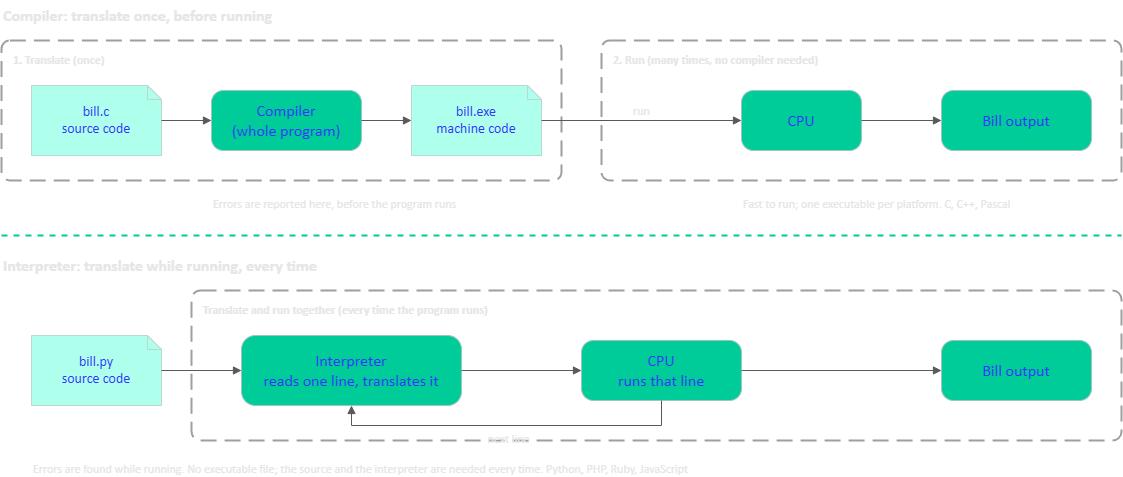
Find below the quick comparison,
| Compiler | Interpreter | |
|---|---|---|
| Translation | Complete program, once | Line by line, every time it runs |
| Output | Executable file | No separate file |
| Execution speed | + Faster | − Slower |
| Errors found | + Before running (syntax errors) | − While running, only when the line is reached |
| Change and test | − Need to compile again after every change | + Change and run immediately |
| Distribution | + Share the executable, source code is not needed | − Source code and interpreter both needed on the machine |
| Portability | − Compile again for every CPU and OS | + Same source runs wherever the interpreter is available |
It is a trade-off between speed of execution and speed of development. If you have a use case where performance is critical, like an operating system or a game, a compiled language is the right choice. If you need to try ideas quickly, like a small script or a web page, an interpreted language is very helpful.
What is an assembler?
An assembler is a program which translates the assembly language (the second generation language we discussed in Part 3) into machine code. Since every assembly instruction is one machine instruction, it is a direct one to one translation, much simpler than a compiler. Most of the C compilers internally create the assembly code first and then use an assembler to convert it into machine code.
What is a linker and a loader?
Our program never works alone. When we use printf to print the bill, we didn’t write the code for printf, it is in a library which comes with the compiler. A library is a collection of ready to use code.
- Linker - It joins the object code of our program with the object code of the libraries and creates one final executable file. If a library is missing, the linker will give “undefined reference” error, though our code is correct.
- Loader - It is part of the operating system. It loads the executable from disk into RAM and starts the execution, as we discussed in the previous article.
Steps to see it yourself
If you have GCC (the GNU C compiler) installed, you can see each step for the shop billing program from Part 2. Follow the following instructions,
-
Compile the source code into assembly code. It creates
bill.s, open it in a text editor and you will see the MOV and MUL instructions.gcc -S bill.c -
Assemble the assembly code into object code. It creates
bill.o, which is machine code, but not yet ready to run.gcc -c bill.s -
Link the object code with the C library and create the executable.
gcc bill.o -o bill -
Just to pulse check, run the program and give the price and quantity.
./bill
Note: In normal practice, we do all the above steps with one command
gcc bill.c -o bill. The separate steps are only to understand what is happening behind the scenes. On Windows, the executable is called asbill.exeand you run it withbill.
What is bytecode and runtime?
Java and C# took a middle path between compiler and interpreter. The compiler does not create machine code for a specific CPU, it creates an intermediate code called as bytecode in Java and IL (Intermediate Language) in .NET. This bytecode is run by a runtime, JVM (Java Virtual Machine) for Java and CLR (Common Language Runtime) for .NET.
A runtime is the environment which supports the program while it is running. Apart from running the bytecode, it also gives the common services like memory management, it means, the runtime automatically frees the memory which is not used anymore, this is called as garbage collection.
Inside the runtime, a JIT (Just-In-Time) compiler converts the bytecode into machine code at the time of execution, so the program runs almost as fast as a compiled program. This is the reason Java says “write once, run anywhere”, the same .class file can run on Windows, Linux or Mac, wherever a JVM is installed.
Example:
javac Bill.java     # compiles into Bill.class (bytecode)
java Bill           # JVM loads Bill.class and runs it
From source code to running program
Let us put everything together. The following diagram depicts the three ways a source code becomes machine instructions on the CPU. The flow highlighted in purple is the compiled path, which we tried ourselves with GCC in the above section.
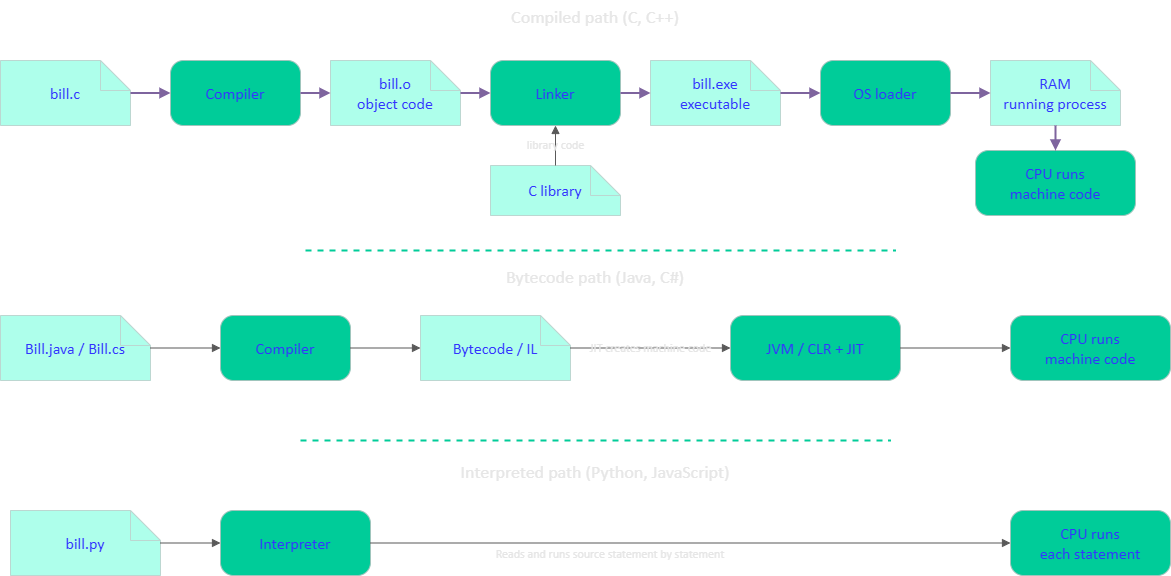
- Compiled (C, C++) - Compiler, then linker, creates an executable with machine code. The OS loader loads it and the CPU runs it directly.
- Bytecode (Java, C#) - Compiler creates bytecode or IL, the runtime with JIT compiler converts it into machine code while running.
- Interpreted (Python, JavaScript) - The interpreter reads the source and executes it statement by statement.
In all three ways, finally the CPU executes the machine instructions with the same Fetch-Decode-Execute cycle. Only the time when the translation is happening is different.
Wrap up
In this article, we have looked at source code and machine code, compilers, interpreters, assemblers, linkers, loaders, bytecode and runtimes, and how they work together to take our source code to the CPU. With this, we have completed the series, starting from how a computer solves a real-world problem until how our code actually runs on the CPU. I really appreciate that you took the time to read this series and I hope it provided you some insights into the fundamentals of computers and programming. In the next series, I will walk you through how to think like a programmer, computational thinking, algorithms and problem solving.
Related Posts
What are the generations of programming languages? - Part 3
This article follows five generations of programming languages, from binary machine instructions to high-level, very high-level and natural or logic languages, with examples and historical context.
What is a program, programming and programming language? - Part 2
This article separates program, programming and programming language, using the grocery billing example to explain how people understand problems, design solutions, write code, test and maintain programs in practice today.
How computers solve real-world problems? - Part 1
This beginner introduction shows how a real-world grocery problem becomes input, output, an algorithm and a program that a computer can execute step by step.