Kubernetes on Azure - ACS vs AKS (preview) vs ACI
ACS, AKS preview and ACI provide different Azure container operating models, and this article compares ownership, control, cost, scheduling and workload fit.
Kubernetes on Azure - ACS vs AKS (preview) vs ACI
Running containers on Azure is giving teams several choices, but the words “Kubernetes on Azure” are not describing one operational model. Azure Container Service (ACS) can create a Kubernetes cluster where we manage the masters. Azure Kubernetes Service (AKS) is arriving as a preview with managed masters, while Azure Container Instances (ACI) is running containers or groups without being a general cluster.
In this article, we are going to compare ACS, AKS preview and ACI, explain who owns each part of the platform, and select an option by workload context. In an upcoming article, I will show how to create an AKS preview cluster, but this article is focusing on the architecture decision.
TL;DR Summary
- ACS creates a Kubernetes cluster and the team manages masters, agents and the selected orchestrator.
- AKS preview manages the Kubernetes masters for free while the customer pays for agent nodes.
- ACI runs single containers or groups with per-second billing and no Kubernetes master.
- The ACI Connector for Kubernetes is experimental and does not turn ACI into a full managed cluster.
- AKS preview has limited regions and is not a production default until the required capabilities are proven.
- Choose from workload shape, control, scale, operations, region and team skills.
Challenges
Cluster control plane
Kubernetes masters need availability, upgrades, certificates and state management. ACS gives us the cluster shape, but the team owns more of this operational work. AKS is reducing the master responsibility, but it is preview and has limited regions.
Container shape
A long-running API needs replicas, service discovery and rolling updates. A short job or simple endpoint may only need a container group. Using a complete cluster for one short workload is adding operations without adding business value.
Preview capability
Preview services are changing and may not have every integration required by production. A managed master is useful, but it does not provide a complete network, security, monitoring or application strategy.
What is the Azure container platform choice?
ACS is an Azure service for creating container clusters with a selected orchestrator such as Kubernetes, DC/OS or Swarm. The customer is managing the cluster masters and agent nodes.
AKS is a preview managed Kubernetes service where Azure manages the masters and the customer pays for the agent nodes.
ACI is a preview container service for running individual containers or multi-container groups with per-second billing. It is not a general Kubernetes cluster.
In simple terms, ACS is a cluster we operate, AKS is a cluster with managed masters, and ACI is a fast container execution boundary.
The following diagram compares the control boundaries of ACS, AKS preview and ACI.
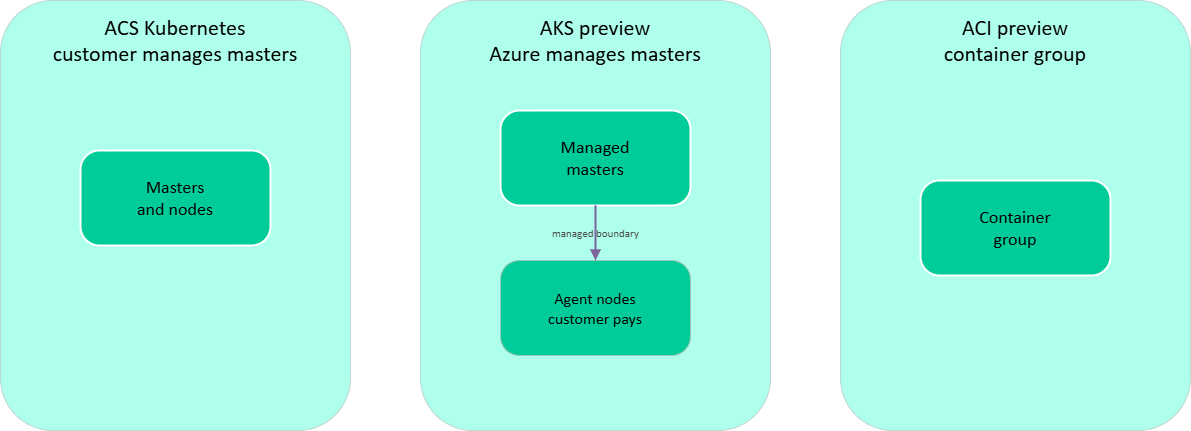
The purple path is the managed-master route through AKS. ACS places more platform responsibility with our team, while ACI removes the cluster boundary for a small container workload.
Why this decision is important?
This decision is important because it is defining the operational workload and failure boundary. A team can choose AKS to reduce master operations, but still needs to size and patch agent nodes, configure networking and monitor pods. ACI can be fast and cost-effective, but it is not automatically a replacement for a cluster.
In our case, a long-running fund API with multiple services is starting with ACS or AKS depending on preview risk and required control. A small burst worker is starting with ACI. We should select the simplest option which meets availability and deployment requirements.
Comparison table
| Concern | ACS Kubernetes | AKS preview | ACI preview |
|---|---|---|---|
| Cluster masters | Customer manages | Azure manages | No Kubernetes masters |
| Agent nodes | Customer pays and manages | Customer pays and manages | No cluster nodes |
| Workload | Long-running cluster workloads | Long-running managed Kubernetes | Single containers or groups |
| Billing | Nodes and cluster resources | Agent nodes and resources | Per second |
| Regions | ACS availability | Limited preview regions | Limited preview regions |
| Orchestration | Kubernetes plus selected ACS choice | Kubernetes | Container group lifecycle |
| Main trade-off | More control and more operations | Less master work, preview risk | Less orchestration and control |
Selection criteria
Workload duration and shape
Choose ACI for a short-lived or simple container group. Choose ACS or AKS for services which need replicas, rolling updates, service discovery, namespaces and cluster scheduling.
Control and operations
Choose ACS when the team needs direct master control or a supported orchestrator choice. Choose AKS when managed masters reduce the operational burden and the preview region and features are acceptable.
Region and support
Check the region, networking, registry, monitoring and identity requirements before choosing AKS preview. If one required capability is not available, ACS or another hosting model may be the more healthy option.
Connector expectations
The ACI Connector for Kubernetes is experimental. It can be useful for testing a mixed scheduling idea, but it should not be treated as the same operational contract as a managed Kubernetes node.
Ask who is responding when a pod is pending, a node is full or a master upgrade is required. If the answer is not clear, the platform choice is not complete. The service boundary should be written in the architecture decision and included in the support process.
Also check the image registry and network path. A cluster which can schedule a pod but cannot pull its image or expose its service is not meeting the workload requirement. The decision should include registry credentials, outbound access, ingress, monitoring and the recovery path.
Recommendation by context
| Context | Recommendation | Reason |
|---|---|---|
| Existing ACS Kubernetes team | Continue ACS while evaluating AKS | Existing operations are understood |
| New long-running API and preview is acceptable | AKS preview | Managed masters reduce control-plane work |
| Regulated or production-critical cluster | ACS or another proven platform | Preview limitations need explicit acceptance |
| Short burst container job | ACI | Per-second run and no cluster operations |
| Multiple services with service discovery | ACS or AKS | Cluster primitives are required |
In an upcoming article, we will see how to create an AKS preview cluster step by step. The creation steps are also useful for validating whether the region and managed-master model fit the selected workload.
Must Do / Should / Don’t
Must Do
- Must identify who owns masters, nodes, networking, upgrades and monitoring.
- Must check preview regions and required capabilities.
- Must test the workload shape before selecting ACI or a cluster.
Should
- Should use AKS preview for a controlled evaluation of managed masters.
- Should use ACS when direct cluster control and a proven workflow are required.
- Should use ACI for simple containers and burst execution.
Don’t
- Don’t call ACI a Kubernetes cluster.
- Don’t use AKS preview for production without accepting its preview limitations.
- Don’t assume a managed master manages the agent nodes or application.
- Don’t use the experimental connector as a guarantee of Kubernetes parity.
Wrap up
In this article, we have looked at ACS, AKS preview, ACI, managed masters, cluster operations, per-second containers and context-based selection.
I really appreciate that you took the time to read this article. In the next article, I will walk you through cloud cost optimization with right-sizing, reserved capacity and auto-shutdown.
Related Posts
How to create an AKS cluster? (preview)
This guide creates an AKS preview cluster, covering resource groups, regions, managed masters, agent nodes, networking, credentials and the first application deployment.
How to deploy an application to Kubernetes with Helm charts?
Helm charts package Kubernetes manifests into repeatable releases, with this guide covering chart structure, values, templating, Tiller, installation, upgrades and rollback.
What is resiliency and why do we need a DR strategy? - Part 1
What resiliency is, why we need a DR strategy, how high availability, disaster recovery and backup differ and the principles we follow.