How we simplified one of the complex filter pages with Azure Search?
An Azure Search case study showing how a complex filter page moved from dynamic SQL and slow queries to a derived search index and faster filtering.
How we simplified one of the complex filter pages with Azure Search?
Few years ago, we built a fund selector page for one of our web applications. The idea was simple, users can find the right funds by filtering on many attributes like asset class, currency, region, risk rating, fund size, performance range, share class and so on, and see the count of funds for each filter value on the side. Over the time, the business added more filters, more languages and more clients with their own fund universes. The page became one of the most used pages of the application, and also one of the most complex and expensive pages to run. One of the constraint was that the filter counts must always reflect the current selection, otherwise users see “Equity (120)” and get only 30 funds after clicking it.
Hmm, it was one of those pages everyone was afraid to touch!
In this article, I share how this page was built originally, why it was slow and costly, and ultimately how we simplified it, and improved both the price and performance with Azure Search.
The Crux Of The Problem
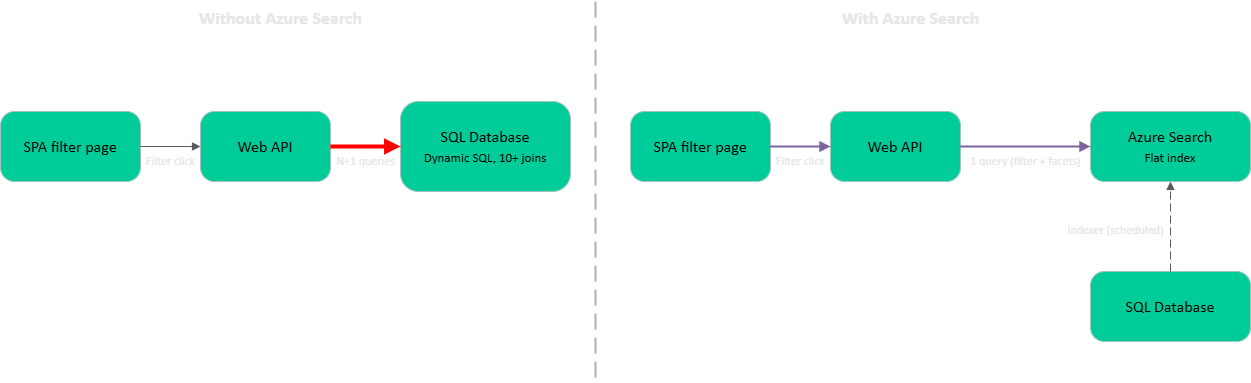
Let us take a closer look at the context of the problem. The fund data lives in our SQL database, normalized across many tables, funds, share classes, prices, ratings, classifications, translations and client universes. For every change in the filter, the page sent a request to our Web API, and the API built a dynamic SQL query with all the selected filters.
But the filter results were only half of the work. For the counts next to each filter value (we call them facets), the API ran a separate GROUP BY query for every filter group, with all the other selected filters applied. With <N> filter groups [confirm: number], one user click was creating <N + 1> heavy queries with 10+ joins each.
As a result of this,
- The average response time of the filter API was
<before value>seconds, and much higher in the peak hours[confirm]. - The SQL database was consuming about
<value>% DTU in the business hours, mostly because of this page[confirm]. - We had to scale up the Azure SQL Database to the
<tier>tier just to keep this page responsive, which was a big part of our monthly Azure bill[confirm]. - Every new filter requested by the business was a change in the dynamic SQL builder, the indexes and the tests. It was taking
<value>days for a simple filter[confirm].
The Heuristics
Initially, we tried to optimize the SQL. We added covering indexes, rewrote the dynamic SQL and moved some calculations to indexed views. It helped, the response time was reduced by about <value>% [confirm], but the number of queries per click was still the same, and the indexes made our nightly price imports slower.
Next step, we added caching in the API with Redis. It worked well for the default page with no filters, but there are millions of possible filter combinations, so the cache hit ratio was very low for real user selections.
So, what else now? The problem was not a slow query, it was that we were using a transactional database for a search and faceting workload.
Why SQL wasn’t effective in our case?
Based on the above stats, you may be wondering why a well indexed SQL database couldn’t handle it. The answer to this question boiled down to the shape of the workload,
- Faceted navigation needs counts for every value of every filter group, for every combination of the other filters. In SQL, it means one aggregation query per facet group.
- The filters are combined freely by the users, so no single index can serve all combinations.
- The data is read thousands of times between each update (prices change once a day, classifications rarely), so we were paying the cost of normalization on every read.
Because of the above reasons, the SQL approach turned out to be ineffective, especially in our use case.
Azure Search for the rescue
Azure Search is a fully managed search-as-a-service in Azure, which provides full text search, filters, sorting, paging and faceted navigation over an index which we define, through a simple REST API and .NET SDK. Fundamentally, it does exactly what our page needed, filter and count in one call, over a flat, denormalized index. To find out more about Azure Search, refer to the Azure documentation.
The following diagram depicts the page before and after Azure Search.
The following diagram explains how we exactly implemented it for our use case.
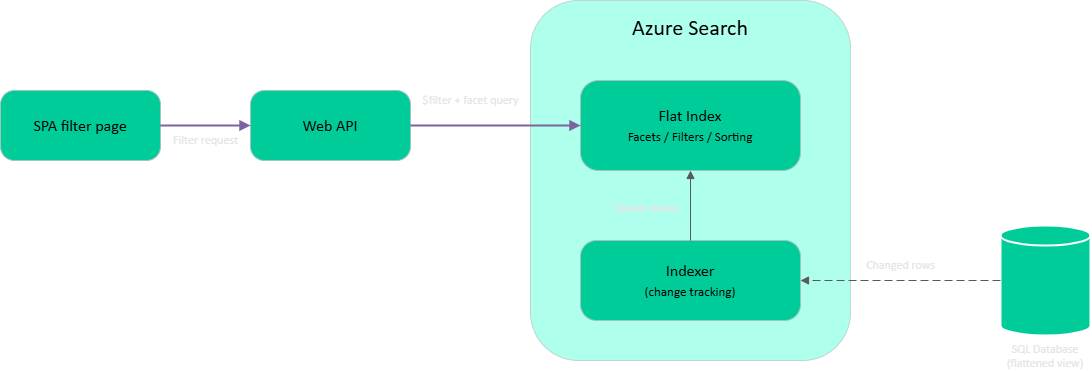
The flow highlighted in purple is the one doing the magic. The filter page calls our Web API, the API translates the selection into one Azure Search query with $filter and facet parameters, and Azure Search returns the funds and all the facet counts in a single response. SQL is not in the query path anymore.
Here is how we built it,
-
We designed one flat index document per share class, with all the filterable attributes as fields. Attributes like regions and client universes became
Collection(Edm.String)fields.{ "name": "fund-shareclasses", "fields": [ { "name": "id", "type": "Edm.String", "key": true }, { "name": "isin", "type": "Edm.String", "searchable": true, "filterable": true }, { "name": "fundName", "type": "Edm.String", "searchable": true, "sortable": true }, { "name": "assetClass", "type": "Edm.String", "filterable": true, "facetable": true }, { "name": "currency", "type": "Edm.String", "filterable": true, "facetable": true }, { "name": "regions", "type": "Collection(Edm.String)", "filterable": true, "facetable": true }, { "name": "riskRating", "type": "Edm.Int32", "filterable": true, "facetable": true, "sortable": true }, { "name": "fundSizeMillions", "type": "Edm.Double", "filterable": true, "facetable": true, "sortable": true }, { "name": "universes", "type": "Collection(Edm.String)", "filterable": true } ] } -
We created a SQL view which flattens the data into this shape, and an Azure Search indexer on top of it with a change tracking policy, so only the changed rows are re-indexed on a schedule. For the translations, we created one index per language.
-
The Web API builds one query per user click. The client universe is always applied as a filter, so a user sees only the funds of his universe.
GET https://<search service>.search.windows.net/indexes/fund-shareclasses/docs ?api-version=2016-09-01 &search=* &$filter=universes/any(u: u eq 'client-42') and currency eq 'EUR' and riskRating le 4 &facet=assetClass&facet=currency&facet=regions&facet=riskRating &facet=fundSizeMillions,values:100|500|1000 &$orderby=fundName&$top=25&$skip=0&$count=true -
We used the
Microsoft.Azure.Search.NET SDK with a query key (read only) in the API, the admin key is used only by the deployment scripts.
Note: Facet counts in Azure Search reflect the current
$filter. To show “what you would get” counts for the values of a group which is already selected (multi-select facets), we send one additional query without that group’s filter. It is still 2 queries instead of<N + 1>.
Here are some stats about the filter page before and after Azure Search.
Filter API response time:
Before Azure Search: <before value> ms average [confirm]
After Azure Search: <after value> ms average [confirm]
SQL Database:
Before Azure Search: <tier / DTU %> [confirm]
After Azure Search: <tier / DTU %> [confirm]
Monthly cost (SQL + Search):
Before: <value> — After: <value> [confirm]
Inference:
- One query per click instead of
<N + 1>removed the biggest load from the SQL database. - We could scale down the SQL Database, and the saving was more than the cost of the Azure Search
<tier>service[confirm]. - Adding a new filter is now a new field in the index and the view,
<value>hours instead of<value>days[confirm]. - The search results are eventually consistent, a price change is visible in the page after the next indexer run (
<interval>in our case), which was accepted by the business. - We have one more service to monitor and one more place where the data lives, so we added alerts on the indexer failures.
TL;DR; – summary
- Azure Search is a managed search service with filters, facets, sorting, paging and full text search in one API call.
- Faceted navigation is a search workload, not a transactional workload. SQL can do it, but at a high price in queries, indexes and DTUs.
- Design the index for the page, flat and denormalized, one document per item the user sees.
- Use an indexer with change tracking from Azure SQL to keep the index updated without custom code, or push the changes from the application when you need near real time updates.
- Keep in mind that the index is eventually consistent, agree the acceptable delay with the business before you start.
- Always apply the security filters (like client universes) in the API, never trust the filter sent by the browser.
- It is a trade-off, we gained performance, lower cost and simpler code, and added one more service to operate and monitor.
- Monitoring is an important component of operations, it is important to measure the response time, DTU and cost before and after the change.
Related Posts
How to create your first Azure Function?
Creating an Azure Function explained through preview-era triggers, bindings, hosting plans, timer and HTTP functions, deployment and retry-safe execution for practical guidance.
How to share code with .NET Standard 2.0 libraries?
.NET Standard 2.0 libraries allow shared business rules across applications, and this guide covers project setup, API compatibility, package versioning and practical testing.
How to upgrade from .NET Core 1.x to 2.0?
This guide upgrades an application from .NET Core 1.x to 2.0, covering project files, package changes, tooling, API updates and a controlled path to ASP.NET Core 2.0.