How to use Managed Service Identity to access Key Vault without secrets?
Managed Service Identity lets Azure-hosted applications access Key Vault without storing bootstrap secrets, covering identity setup, permissions, token flow and troubleshooting.
How to use Managed Service Identity to access Key Vault without secrets?
An application needs secrets such as database passwords, certificates and API keys, but putting those values in source control or deployment variables is creating a security risk. Last year, in the article about storing application secrets in Azure Key Vault, we used a client secret or certificate to authenticate to Key Vault. That creates a chicken-and-egg problem: the application needs a secret to obtain the secret it really wants.
In this article, we are going to see how Managed Service Identity (MSI) preview can give an Azure App Service, Function or virtual machine an identity, how to grant that identity Key Vault permissions, and how to read a secret with AzureServiceTokenProvider.
TL;DR Summary
- MSI gives an Azure resource an identity managed by the platform, so application code does not need a client secret.
- The preview supports App Service, Functions and virtual machines.
- Assign an identity, grant Key Vault
getandlist, then use the MSI token endpoint through the App Authentication library. AzureServiceTokenProvideruses the local MSI endpoint in Azure and Azure CLI login during local development.- Keep the Key Vault policy narrow and do not log tokens or secret values.
- The CLI support for MSI is new in preview, confirm the command against your installed CLI version.
Challenges
Secret to get the secret
The application needs a credential before it can call Key Vault. A client secret in an app setting is better than a password in source code, but it still needs rotation, access control and secure deployment. If the setting is copied to a developer laptop or a build log, the protection is reduced.
Different local and Azure authentication
Developers need to run the fund API locally, while the deployed application should use its resource identity. If every environment uses a different code path, the authentication behaviour is difficult to test and maintain.
Broad Key Vault access
Giving an application complete access to a vault is making one compromise more dangerous. The API should read only the secrets it requires and should not have permission to delete or change them.
What is Managed Service Identity?
Managed Service Identity is an Azure preview capability which gives an Azure resource a service identity that can obtain tokens for supported Azure services without storing credentials in the application.
In simple terms, Azure is providing a local token endpoint to the resource. The application asks for a token for Key Vault, and Azure validates the resource identity before returning it.
The following diagram depicts the MSI token path from an App Service to Key Vault.
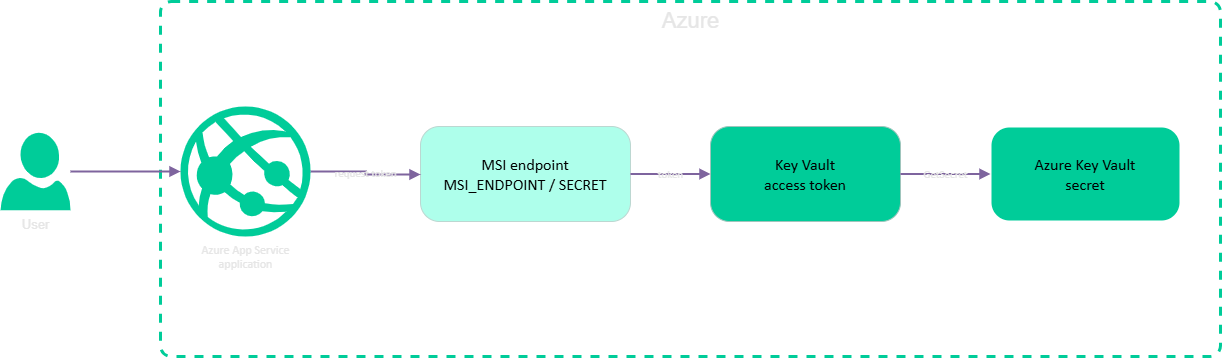
The purple path is the token flow: the application calls the local MSI endpoint, receives a Key Vault access token, and calls Key Vault with that token. The secret value is returned only after the vault policy allows the identity to read it.
Why MSI is important?
MSI is important because it removes a client secret from the application bootstrap path. The platform is managing the identity lifecycle, while Key Vault is managing the secret lifecycle. If the application code is copied to another resource without the identity permission, it cannot read the same secret.
The security boundary is still requiring careful identity and vault configuration. MSI is not a reason to give every application access to every secret.
Option comparison
| Approach | Pros | Cons |
|---|---|---|
| Managed Service Identity | + No application credential + Azure manages identity endpoint | − Preview support and platform dependency − Works only for supported Azure resources |
| Client secret or certificate | + Works across more hosting choices + Familiar OAuth flow | − Credential must be stored and rotated − Creates the bootstrap problem |
Steps to Implement:
Follow the following instructions to use MSI with Key Vault,
Create or select the resource
-
Select an App Service, Function or virtual machine in a supported subscription.
-
Sign in and select the subscription,
az login az account set --subscription <subscription-id> -
Assign an identity to the App Service,
az webapp assign-identity \
  --resource-group <resource-group> \
  --name <app-name>
Replace the input place holders with actual values.
Note:
[confirm: CLI command name in the installed az version]The CLI support for MSI is new in preview. Runaz webapp --helpand confirm the installed Azure CLI syntax before using it in a pipeline.
The command returns the principal id. Save the id as a deployment output, not as an application secret.
Grant Key Vault permissions
-
Give the identity only the permissions it needs,
az keyvault set-policy \ --name <vault-name> \ --object-id <principalId> \ --secret-permissions get list -
Check the policy in the vault before running the application.
Do not grant set, delete or certificate permissions when the API only needs to read a secret. A separate operator identity should manage the secret.
Add the App Authentication package
-
Add the preview package,
dotnet add package Microsoft.Azure.Services.AppAuthentication -
Create a token provider and Key Vault client,
using System.Threading.Tasks;
using Microsoft.Azure.KeyVault;
using Microsoft.Azure.Services.AppAuthentication;

public class SecretReader
{
    private readonly KeyVaultClient client;

    public SecretReader()
    {
        var tokenProvider = new AzureServiceTokenProvider();
        client = new KeyVaultClient(
            new KeyVaultClient.AuthenticationCallback(
                tokenProvider.KeyVaultTokenCallback));
    }

    public async Task<string> ReadAsync(string vaultUri, string secretName)
    {
        var secret = await client.GetSecretAsync(vaultUri, secretName);
        return secret.Value;
    }
}
The callback obtains the token without a client secret in application settings.
Understand the local endpoint
When the application is running in App Service, the platform exposes a local endpoint through MSI_ENDPOINT and protects it with MSI_SECRET. AzureServiceTokenProvider reads these environment values and requests a token for Key Vault.
During local development, the library can use an Azure CLI login instead of the App Service endpoint,
az login
az account set --subscription <subscription-id>
The developer identity must have a Key Vault role or access policy which allows the same secret read. Replace the input place holders with actual values, and never copy MSI_SECRET into source control.
Read a secret and pulse check
- Configure only the vault URI and secret name as application settings.
- Start the API and request one protected operation.
- Check the application log for a successful operation without writing the token or secret value.
- Change the secret in Key Vault through the operator process and verify the application can read the updated value when its cache expires.
Info: Last year, in the Key Vault article, we used a client secret or certificate. MSI removes the chicken-and-egg credential from the application bootstrap, but the vault policy and resource identity still need to be deployed correctly.
Must Do / Should / Don’t
Must Do
- Must grant only
getandlistwhen reading Key Vault secrets. - Must confirm the installed CLI command before automating preview commands.
- Must test Azure and local authentication separately.
- Must keep tokens and secret values out of logs.
Should
- Should keep vault URI and secret name in configuration, not secret values.
- Should use a separate operator identity for changing secrets.
- Should monitor failed token and Key Vault requests.
Don’t
- Don’t store a client secret as the permanent solution when MSI is supported.
- Don’t grant all vault permissions to an application identity.
- Don’t copy
MSI_SECRET, access tokens or secret values into source control.
Wrap up
In this article, we have looked at the MSI preview, assigning an identity, granting Key Vault permissions, using AzureServiceTokenProvider, and the local and Azure token paths.
I appreciate your time and efforts to read this article. In the next article, I will walk you through how to react to Azure events with Event Grid.
Related Posts
What is resiliency and why do we need a DR strategy? - Part 1
What resiliency is, why we need a DR strategy, how high availability, disaster recovery and backup differ and the principles we follow.
Cloud cost optimization - right-sizing, reserved capacity and auto-shutdown
Azure cloud cost optimisation combines right-sizing, reserved capacity, auto-shutdown, autoscale, tagging, cleanup, Advisor metrics and showback into a repeatable loop.
Containers vs PaaS vs Serverless - which one for which workload?
VMs, PaaS, containers and serverless offer different control and operational trade-offs, with workload context guiding the right Azure hosting model.