How to solve problems with algorithms? - Part 2
This article presents a practical problem-solving process using algorithms, pseudocode, flowcharts, sample tracing, testing and search comparisons for a grocery billing system before writing code.
How to solve problems with algorithms? - Part 2
Every program we use is built on top of one or more algorithms, the search box in a website, the route in a GPS device and even the total in our shop bill. For the same problem, there can be many algorithms, some are simple and slow, some are clever and fast, and some are simply wrong for few special cases. A good programmer is not the one who knows all the algorithms, it is the one who can design an algorithm, check it is correct and choose the better one. In the previous article, we discussed computational thinking and its four pillars. In this article, we are going to see a practical step by step approach to solve problems, how to write an algorithm using pseudocode and flowchart, how to trace it with sample data and how to compare two algorithms.
Thinking Like a Programmer series:
- What is computational thinking? - Part 1
- How to solve problems with algorithms? (this article)
- How data and information are represented in a computer? - Part 3
- What are data structures? - Part 4
- What are programming paradigms? - Part 5
TL; DR Summary
- Problem solving has clear steps, understand, plan, write, trace, code and test.
- Pseudocode is the algorithm written in simple English like structure, without worrying about the syntax of any language.
- Flowchart is the algorithm drawn as a diagram with standard symbols.
- Tracing (dry run) is running the algorithm on paper with sample data to find the mistakes before coding.
- Always test the edge cases, empty input, one item, the maximum and the boundary values.
- For the same problem, different algorithms take very different time, so it is important to compare them.
- Big O notation is the common way to say how the time is growing when the input is growing.
Common Challenges
It works for my example
Beginners usually test the algorithm with one nice example and stop there. The algorithm works for 3 items, but what happens with zero items? What happens when the total is exactly 1000, is the discount applied or not? These special cases are called as edge cases and most of the bugs are hiding there. The customer will find them for us, if we don’t find them first.
It works, but it is too slow
An algorithm which checks every item one by one is fine for a small shop with 100 items. The same algorithm in a supermarket with millions of products in the database, will keep the customer waiting at the counter. When the data is growing, a slow algorithm is becoming a real business problem.
Problem-solving steps
Find below the step by step approach which works for most of the problems,
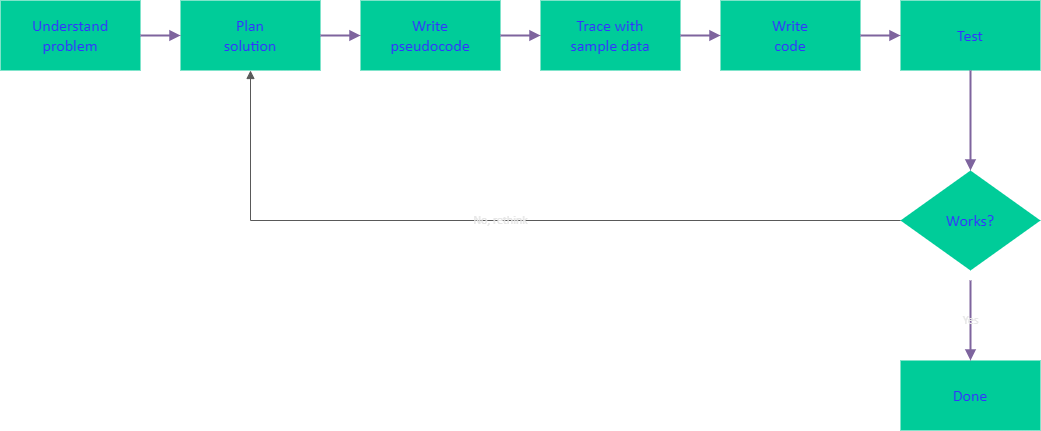
- Understand problem - Read it again, write the input and output, ask questions until there is no doubt. Refer the Understanding Computers and Programming - Part 1 for more information.
- Plan solution - Use the computational thinking pillars from the previous article. Check whether you have solved a similar problem before.
- Write pseudocode - Write the steps in simple words, or draw a flowchart.
- Trace with sample data - Run the steps on paper with few inputs, including the edge cases.
- Write code - Convert the pseudocode into the programming language.
- Test - Run the program with the same inputs and compare with the trace.
The following diagram depicts these steps. The flow highlighted in purple is the happy path. When the test fails, we go back to the plan, not only to the code, because most of the time the mistake is in the thinking, not in the typing.
What is pseudocode?
Pseudocode is an informal way of writing an algorithm using simple English words and basic programming structures like IF, FOR and WHILE, without following the syntax of any specific language.
In simple terms, pseudocode is the rough draft of the program. The word “pseudo” means “not real”, so it is not a real code, no computer can run it, but any programmer can read it and convert it into any language. There is no single standard for pseudocode, the only rule is, it must be clear.
Example:
Find the most expensive item in a bill,
FUNCTION FindMaxPrice(prices)
    IF prices is empty THEN
        RETURN "No items"
    END IF
    SET max to prices[1]
    FOR each price in prices
        IF price > max THEN
            SET max to price
        END IF
    END FOR
    RETURN max
END FUNCTION
What is a flowchart?
A flowchart is a diagram which represents an algorithm using standard symbols connected with arrows to show the flow.
It is very helpful when the algorithm has many decisions, since we can see all the paths at one glance. Here is the list of common symbols,
- Oval - Start and Stop.
- Rectangle - A process step, like “Add price to total”.
- Diamond - A decision, with Yes and No paths, like “Is total > 1000?”.
- Parallelogram - Input or Output, like “Read price” or “Print bill”.
- Arrow - The direction of the flow.
We have already used flowcharts in this series, the problem-solving steps diagram above is one of them.
What is tracing?
Tracing, also called as dry run, is executing the algorithm manually on paper with sample input, step by step, and writing down the value of each variable after every step.
It is the cheapest way to find the mistakes, no computer, no compiler, just pen and paper. Let us trace the FindMaxPrice algorithm with the prices 40, 120, 75,
| Step | price | price > max? | max |
|---|---|---|---|
| Start | - | - | 40 |
| 1st item | 40 | No | 40 |
| 2nd item | 120 | Yes | 120 |
| 3rd item | 75 | No | 120 |
| Return | - | - | 120 |
The result is 120, which is correct. Now, trace it again with an empty list and with only one item. If we didn’t have the “IF prices is empty” check, the algorithm would try to read prices[1] from an empty list and fail. This is exactly the kind of mistake tracing helps us to find before it is reaching the customer.
Note: Keep the edge cases in mind while tracing, empty input, single item, all items same, the smallest and the largest values, and the boundary of every condition (for our discount, exactly 1000).
How to compare algorithms?
For the same problem, we can have more than one correct algorithm. Let us take a common problem, find a price in a list of prices. Here are two ways to solve it.
Linear search
Check each item from the first to the last until we find it. It is simple and it works on any list, sorted or not sorted. If the list has 1000 items, in the worst case we will check all 1000.
Binary search
This works only when the list is sorted. Check the middle item, if the value we are looking for is bigger, drop the left half, otherwise drop the right half, and repeat with the remaining half. Every check removes half of the list. It is the same way we search a word in a dictionary, we don’t read it from the first page, we open the middle and decide which side to go.
The following diagram depicts searching for 57 in a sorted list of 8 prices. Linear search needs 7 checks, binary search needs only 3.
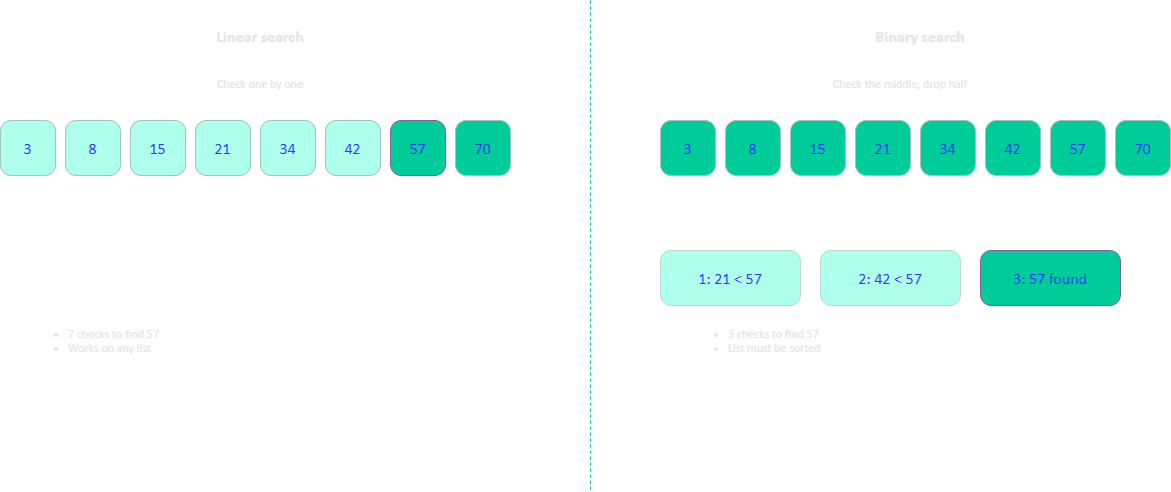
The difference is becoming huge when the list is growing,
| Number of items | Linear search (worst case) | Binary search (worst case) |
|---|---|---|
| 8 | 8 checks | 4 checks |
| 1,000 | 1,000 checks | 10 checks |
| 1,000,000 | 1,000,000 checks | 20 checks |
What is Big O notation?
Big O notation is the way to describe how the running time (or memory) of an algorithm is growing when the size of the input is growing. We write the input size as n.
- O(1) - Constant, the time is same whatever the input size, like reading the first item of a list.
- O(log n) - Logarithmic, the time grows very slowly, like binary search.
- O(n) - Linear, double the input, double the time, like linear search.
- O(n²) - Quadratic, double the input, four times the time, like comparing every item with every other item.
Simply put, Big O doesn’t tell the exact seconds, it tells how the algorithm will behave when the data is growing, and that is what matters when the business is growing.
Though binary search is faster, it is not always the right choice. It needs a sorted list, and sorting also takes time. If you search only once in a small list, linear search is simpler and good enough. If you search many times in a big list, sort it once and use binary search. Again, it is a trade-off and you must choose based on your use case.
Wrap up
In this article, we have looked at the problem-solving steps, pseudocode, flowcharts, tracing with sample data and edge cases, and how to compare algorithms with linear search, binary search and Big O notation. I appreciate your time and efforts to read this article. In the next article, I will walk you through how data and information are represented inside a computer, bits, bytes, number systems and data types.
Related Posts
What are data structures? - Part 4
This article introduces arrays, linked lists, stacks, queues, hash tables, trees and graphs, explaining how data structures organize grocery items, customers and bills for efficient programs.
What is computational thinking? - Part 1
This article introduces computational thinking through decomposition, pattern recognition, abstraction and algorithm design, showing beginners how the same pillars help solve a grocery billing problem.
How data and information are represented in a computer? - Part 3
This article explains how computers represent data as bits and bytes, including numbers, text, images and sound, and why representation choices affect grocery billing programs.