How data and information are represented in a computer? - Part 3
This article explains how computers represent data as bits and bytes, including numbers, text, images and sound, and why representation choices affect grocery billing programs.
How data and information are represented in a computer? - Part 3
Everything we see in a computer, the numbers in a bill, the name of a customer, a photo from our camera or a song, is stored inside the computer as 0s and 1s. As we discussed in the previous series, a computer only understands two states, ON and OFF. So, how a letter “A”, the price 49.50 and a holiday photo all become 0s and 1s? When we don’t understand this, we will be surprised by strange bugs, a bill total showing 0.30000000000000004, a name printed as question marks or a number suddenly becoming negative. In the previous article, we discussed how to solve problems with algorithms. In this article, we are going to see the difference between data and information, bits and bytes, the binary number system and how numbers, text, images and sound are represented, and finally the data types we use in programs.
Thinking Like a Programmer series:
- What is computational thinking? - Part 1
- How to solve problems with algorithms? - Part 2
- How data and information are represented in a computer? (this article)
- What are data structures? - Part 4
- What are programming paradigms? - Part 5
TL; DR Summary
- Data is raw facts, information is the processed data which has meaning.
- Bit is the smallest unit, a single 0 or 1. A byte is 8 bits.
- Computers use the binary (base 2) number system to store everything.
- Text is stored using character codes like ASCII and Unicode.
- Decimal numbers like prices are stored approximately as floating point, so don’t use float or double for money.
- Images are stored as pixels and sound is stored as samples, both are finally numbers.
- Data types tell the computer how to read the 0s and 1s and how much memory to use.
What is data and information?
Data is a collection of raw facts and figures, which doesn’t have a meaning on its own. Information is the data which is processed, organized and given a context, so it is useful for taking a decision.
In simple terms, “Rice, 50, 2” is data, it is just a word and two numbers. When we process it and say “Total bill is 140”, it is information, now the customer knows how much to pay. The following diagram depicts how the data of two items becomes the information of the bill.
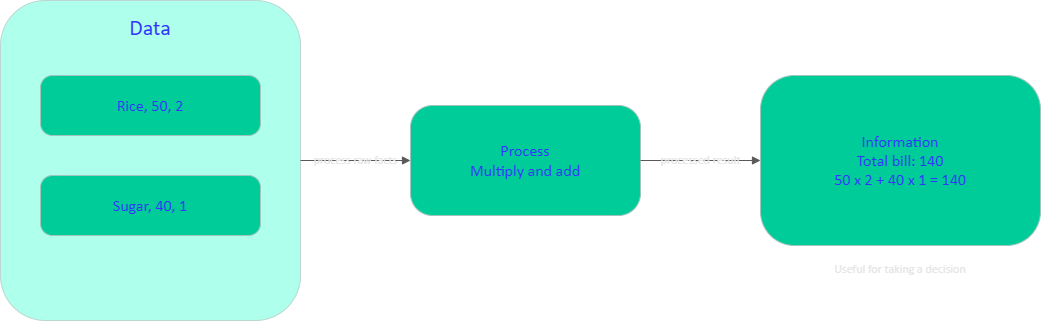
It means, a program is basically a machine which converts data into information. And also, the quality of the information can never be better than the quality of the data, if the price is entered wrong, the bill will be wrong, however good the program is. This is called as GIGO, Garbage In, Garbage Out.
What is bit and byte?
A bit (binary digit) is the smallest unit of data in a computer, it can have only one of two values, 0 or 1.
A byte is a group of 8 bits. With 8 bits, we can make 2⁸ = 256 different patterns, from 00000000 to 11111111, so one byte can store a number from 0 to 255 or one English character.
Find below the common units,
| Unit | Size | Rough example |
|---|---|---|
| Bit | 0 or 1 | One ON/OFF switch |
| Byte | 8 bits | One English letter |
| Kilobyte (KB) | 1,024 bytes | A short text file |
| Megabyte (MB) | 1,024 KB | A photo from a mobile phone |
| Gigabyte (GB) | 1,024 MB | A full length movie |
| Terabyte (TB) | 1,024 GB | A hard disk of a desktop computer |
Note: Hard disk manufacturers normally use 1 KB = 1,000 bytes, while operating systems like Windows use 1,024. This is the reason a “500 GB” disk shows only about 465 GB in Windows.
Binary number system
We humans use the decimal (base 10) system, it has ten digits from 0 to 9, because we have ten fingers. Computers use the binary (base 2) system, it has only two digits, 0 and 1, because the electronic circuit has only two states.
In decimal, each position is a power of 10, units, tens, hundreds. In binary, each position is a power of 2, 1, 2, 4, 8, 16 and so on.
Example:
The decimal number 13 in binary,
Position value:   8   4   2   1
Binary digit:     1   1   0   1
                  8 + 4 + 0 + 1 = 13
So, 13 in decimal is 1101 in binary. Long binary numbers are hard to read, so programmers also use hexadecimal (base 16), digits 0 to 9 and A to F, where one hexadecimal digit represents exactly 4 bits. For example, 11111111 in binary is FF in hexadecimal and 255 in decimal. You will see hexadecimal a lot in memory addresses and colour codes like #FF0000 for red.
How numbers are represented?
Integers
Whole numbers like quantity are stored as integers. A 32-bit integer can store values from -2,147,483,648 to 2,147,483,647. One bit is used for the sign, positive or negative, using a method called as two’s complement.
Be mindful of the limit. If we add 1 to the largest value, it doesn’t give an error in most languages, it simply wraps around to the smallest negative value. This is called as overflow and it is the reason a counter suddenly becomes negative. If you expect bigger numbers, use a 64-bit integer (long).
Floating point numbers
Numbers with a decimal point like 49.50 are stored as floating point numbers, following a standard called as IEEE 754. It stores the number in two parts, the digits and the position of the decimal point, similar to the scientific notation 4.95 × 10¹.
Keep in mind that many decimal values like 0.1 cannot be stored exactly in binary, just like 1/3 cannot be written exactly in decimal (0.3333…). So the computer stores the nearest value. It is the reason why, in many languages,
0.1 + 0.2 = 0.30000000000000004For scientific calculations, this small difference is fine. For money, it is not, otherwise few paise or cents will go missing in every bill and the accounts will never match.
Must Do: Don’t use float or double for money. Use the decimal type (decimal in C#, BigDecimal in Java) or store the amount in the smallest unit as an integer (4950 paise instead of 49.50 rupees).
How text is represented?
Text is stored by giving a number to every character, this number is called as character code. The computer stores the number in binary.
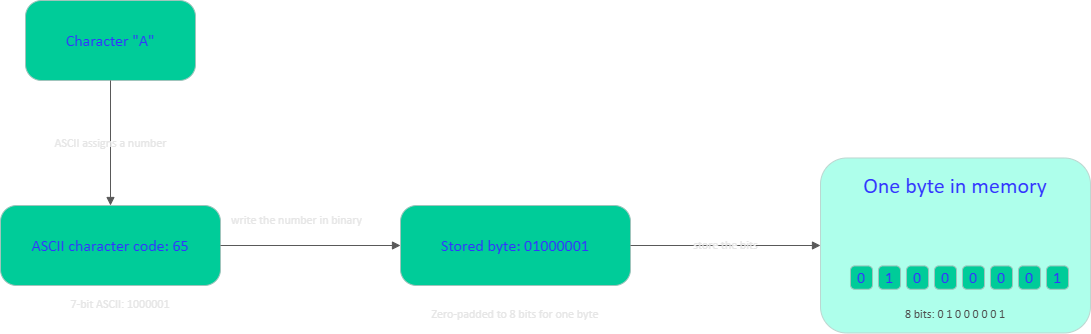
ASCII (American Standard Code for Information Interchange) is the early standard, it uses 7 bits and has 128 characters, English letters, digits and some symbols. In ASCII, “A” is 65, “B” is 66 and “a” is 97. The following diagram depicts how the character “A” is stored in memory.
ASCII is enough for English, but not for Tamil, Hindi, Chinese, Arabic and other languages of the world. Unicode is the standard which gives a unique number to every character in all languages, it has more than 100,000 characters. UTF-8 is the most common way to store Unicode, it uses 1 byte for English characters (same as ASCII) and 2 to 4 bytes for other characters.
When a program saves the text in one encoding and reads it with another, the characters will be shown as question marks or strange symbols. It is mandatory to use the same encoding, preferably UTF-8, across the database, the program and the web page.
How images and sound are represented?
An image is divided into a grid of tiny dots called as pixels. Each pixel’s colour is stored as three numbers, Red, Green and Blue (RGB), each from 0 to 255, which is one byte each. So, a photo of 1000 × 1000 pixels needs 1,000,000 × 3 bytes, about 3 MB before compression. Formats like JPEG and PNG compress it to reduce the size.
Sound is a wave. The computer measures the height of the wave many times every second, each measurement is called as a sample. A music CD takes 44,100 samples per second for each of the two speakers. Again, each sample is just a number, and formats like MP3 compress it.
It means, whatever the data is, text, image or sound, finally it is numbers, and numbers are 0s and 1s.
What are data types?
A data type tells the computer what kind of value a variable is holding, how much memory it needs and what operations are allowed on it.
The same 0s and 1s can mean different things. 01000001 is 65 if we read it as a number and “A” if we read it as a character. The data type is the instruction how to read it. Here is the list of common primitive (basic) data types, with the names used in C# and Java,
| Data type | Size | Stores | Example from our shop |
|---|---|---|---|
| bool / boolean | 1 byte (typically) | true or false | isDiscountApplied |
| char | 2 bytes | One character | grade = ‘A’ |
| int | 4 bytes | Whole numbers | quantity = 2 |
| long | 8 bytes | Large whole numbers | barcode = 8901234567890 |
| double | 8 bytes | Decimal numbers (approximate) | weight = 1.25 |
| decimal (C#) | 16 bytes | Decimal numbers (exact) | price = 49.50m |
| string | Varies | Text | itemName = “Rice” |
Info: string is not a primitive type in Java and C#, it is a sequence of characters, but it is so common that it is treated almost like one.
Use the right data type for the right data, otherwise we waste memory, lose precision or get wrong results. Storing the quantity as double, the barcode as int (too small, it will overflow) or the price as float are the common mistakes.
Structured data
Real-world things are not just one value. An item in our shop has name, barcode, price and quantity together. We group these values into a record (also called as structure, struct or object), so we can treat them as one thing,
Item
    name     : string   = "Rice"
    barcode  : long     = 8901234567890
    price    : decimal  = 50.00
    quantity : int      = 2
When we send this data to another system or save it to a file, we use formats like CSV, XML or JSON, so that the other side knows how to read it. And when we have many items, we need a way to organize them, which is the topic of the next article.
Wrap up
In this article, we have looked at data and information, bits and bytes, the binary and hexadecimal number systems, how numbers, text, images and sound are represented, and the common data types. I really appreciate that you took the time to read this article and I hope this article provided you some insights into what is happening with our data inside the computer. In the next article, I will walk you through the data structures, arrays, lists, stacks, queues, hash tables, trees and graphs.
Related Posts
How to solve problems with algorithms? - Part 2
This article presents a practical problem-solving process using algorithms, pseudocode, flowcharts, sample tracing, testing and search comparisons for a grocery billing system before writing code.
What are data structures? - Part 4
This article introduces arrays, linked lists, stacks, queues, hash tables, trees and graphs, explaining how data structures organize grocery items, customers and bills for efficient programs.
What are programming paradigms? - Part 5
This article compares procedural, object-oriented, functional, declarative and event-driven programming paradigms using the same grocery billing example and different ways to think about solutions for beginners.