What are data structures? - Part 4
This article introduces arrays, linked lists, stacks, queues, hash tables, trees and graphs, explaining how data structures organize grocery items, customers and bills for efficient programs.
What are data structures? - Part 4
A shop with ten items can keep everything in one notebook, but a supermarket with fifty thousand products needs racks, sections, labels and a proper stock register, otherwise nobody can find anything. Programs have the same problem. When we have few values, simple variables are enough, but when we have thousands of items, customers and bills, the way we organize the data decides how fast and how simple our program is. In the previous article, we discussed how data is represented inside the computer using bits, bytes and data types. In this article, we are going to see what is a data structure, the common data structures every programmer must know and how to choose the right one.
Thinking Like a Programmer series:
- What is computational thinking? - Part 1
- How to solve problems with algorithms? - Part 2
- How data and information are represented in a computer? - Part 3
- What are data structures? (this article)
- What are programming paradigms? - Part 5
TL; DR Summary
- A data structure is a way of organizing and storing data so it can be used efficiently.
- Array - Items in a continuous block, very fast to read by position.
- Linked list - Items connected with links, easy to add and remove in the middle.
- Stack - Last In, First Out (LIFO), like a pile of plates.
- Queue - First In, First Out (FIFO), like a billing counter line.
- Hash table - Key and value pairs, very fast to find by key.
- Tree - Hierarchy of items, like folders in a computer.
- Graph - Items connected in any way, like roads between cities.
- There is no best data structure, choose based on the operations your program is doing most.
Common Challenges
Everything in one list
Beginners usually put everything in one list and search it every time. To find the price of a barcode, the program checks every item one by one. As we discussed in the previous article with linear search, it is fine for 100 items, but at the supermarket counter with fifty thousand products and hundreds of bills per hour, the customer will be waiting and the queue will be growing.
Algorithm and data are thought separately
The algorithm depends on how the data is organized. Binary search only works because the data is sorted. If we choose the wrong structure, even the best algorithm cannot help. Niklaus Wirth, the creator of Pascal, wrote a book in 1976 with the title “Algorithms + Data Structures = Programs”, and it is still true today.
What is a data structure?
A data structure is a specific way of organizing, storing and managing data in memory, so that it can be accessed and modified efficiently.
In simple terms, a data structure is a container with rules. The rules decide where a new item is kept, how we find an item and how we remove it. The following diagram depicts the common data structures we are going to discuss in this article.
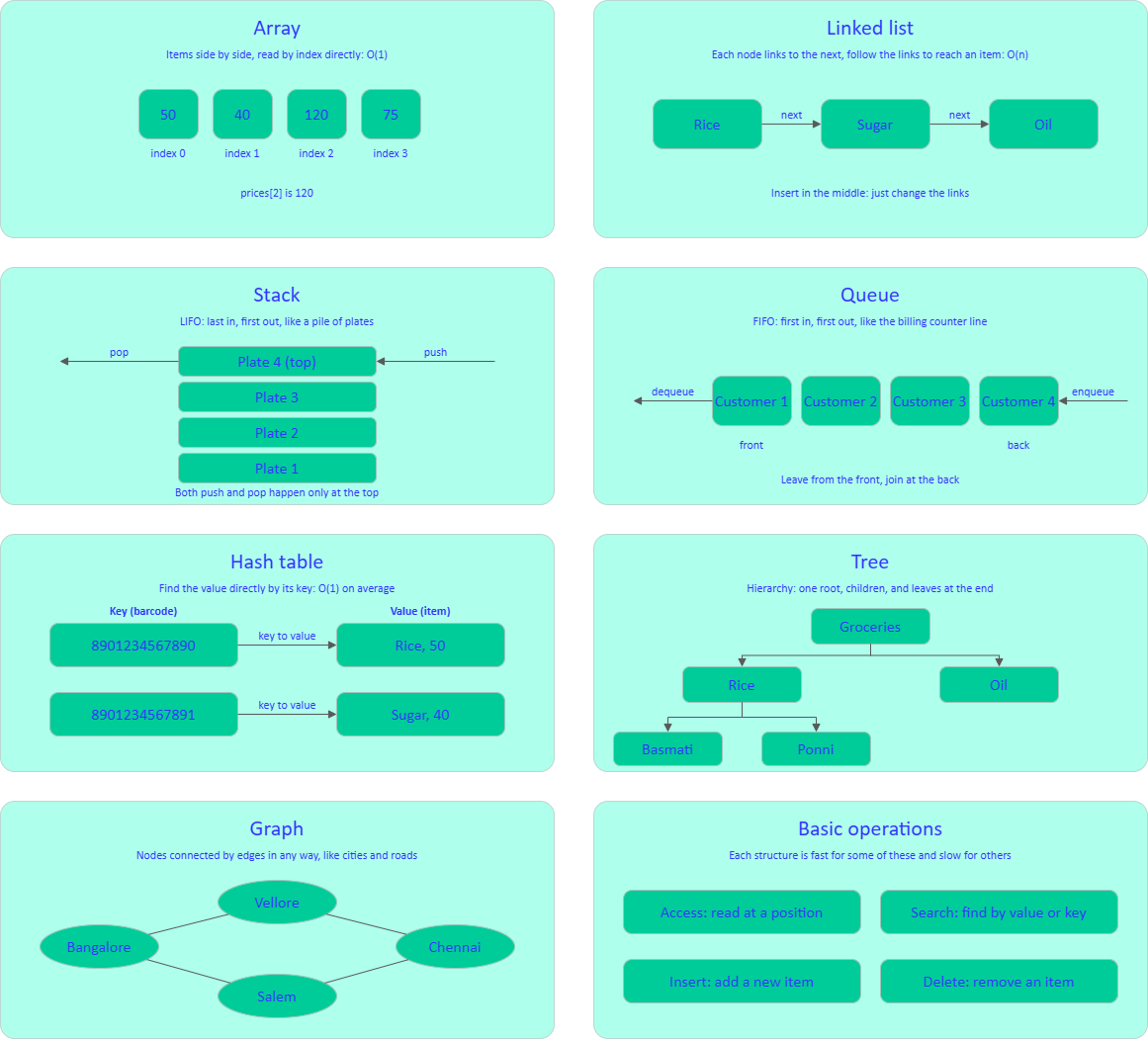
Every data structure supports some basic operations, here is the list,
- Access - Read an item at a given position.
- Search - Find an item by its value or key.
- Insert - Add a new item.
- Delete - Remove an item.
Each data structure is fast for some operations and slow for others, that is the trade-off we must understand.
Array
An array is a collection of items of the same type, stored in a continuous block of memory, where each item is accessed by its position called as index.
Think about the lockers in a railway station, numbered 0, 1, 2 and so on. If you know the locker number, you can go directly to it. In most languages, the index starts from 0.
Example:
prices = [50, 40, 120, 75]
prices[0] is 50
prices[2] is 120- Pros - Very fast to read by index, O(1), since the computer can calculate the memory address directly.
- Cons - The size is fixed when it is created in many languages. Inserting or deleting in the middle is slow, since all other items must be shifted.
Use an array when the number of items is known and you mostly read by position. Most languages also give a resizable array, like ArrayList in Java and List in C#, which grows automatically.
Linked list
A linked list is a collection of items called as nodes, where each node stores the value and a link (reference) to the next node. The nodes don’t need to be continuous in memory.
It is like a treasure hunt, each clue tells where the next clue is. To reach the fifth clue, we must follow the first four.
- Pros - Adding or removing an item in the middle is fast, just change the links, no shifting needed.
- Cons - To reach an item, we must start from the first and follow the links, O(n). It also uses extra memory for the links.
Stack
A stack is a collection where the item added last is the first one to be removed. It is called as LIFO, Last In First Out.
Think about a pile of plates in a wedding buffet, we always put a new plate on the top and always take the plate from the top. Adding an item is called as push and removing an item is called as pop.
Stacks are used everywhere in computers, the “Undo” in a text editor (the last change is undone first), the “Back” button in a browser and the way the CPU keeps track of function calls.
Queue
A queue is a collection where the item added first is the first one to be removed. It is called as FIFO, First In First Out.
The billing counter in our shop is a queue, the customer who came first is billed first, the new customer joins at the back. Adding an item is called as enqueue and removing an item is called as dequeue.
Queues are used when the work must be done in the order it arrived, the print jobs waiting for a printer, the orders waiting to be packed or the messages waiting to be processed by a server.
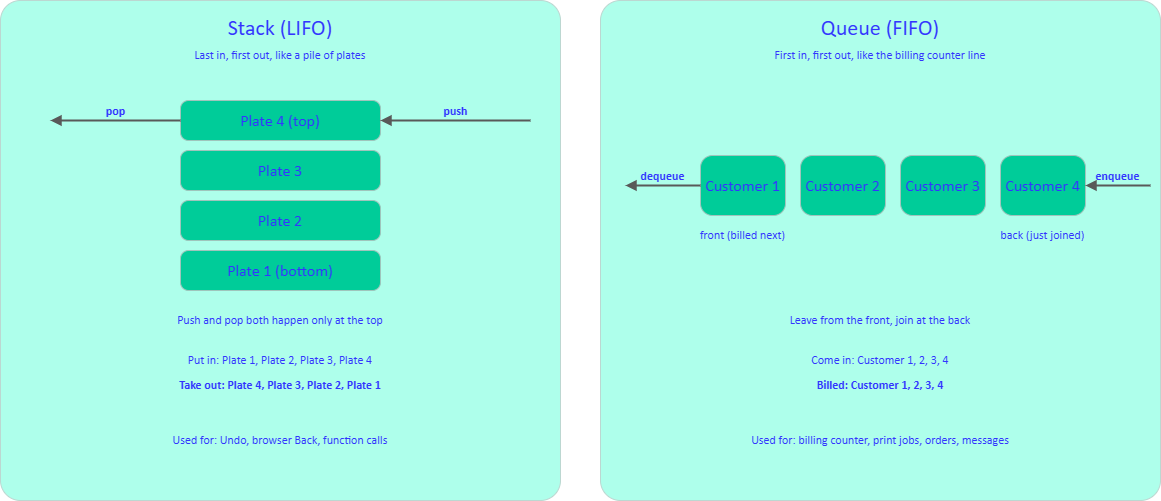
The following diagram depicts the difference between a stack and a queue. In the stack, push and pop both happen at the top, so the plate kept last is taken first. In the queue, the customer joins at the back and leaves from the front, so the customer who came first is billed first.
Hash table
A hash table is a collection of key and value pairs, where a function called as hash function converts the key into a position, so the value can be found directly without searching.
This is the right answer for our barcode problem. The barcode is the key, the item details are the value. The hash function converts the barcode into a position, and we go directly there, whether we have fifty items or fifty thousand. It is also called as dictionary or map, Dictionary in C#, HashMap in Java and dict in Python.
Example:
items = {
    8901234567890 : ("Rice", 50),
    8901234567891 : ("Sugar", 40)
}
items[8901234567891] is ("Sugar", 40)- Pros - Very fast search, insert and delete by key, O(1) on average.
- Cons - No order of items, so it is not suitable when you need the items sorted. Searching by the value (instead of the key) is still slow.
Sometimes two keys give the same position, it is called as collision. The hash table handles it internally, but if the hash function is poor and there are too many collisions, it becomes slow.
Tree
A tree is a hierarchical data structure with a root node at the top, and each node can have child nodes, without any loops.
The folders in our computer are a tree, C drive is the root, it has folders, each folder has more folders and files. The categories in our shop are also a tree, Groceries has Rice and Oil, Rice has Basmati and Ponni.
A special type called as Binary Search Tree (BST) keeps smaller values on the left and bigger values on the right of every node. It works like the binary search we discussed in Part 2, every step drops half of the tree, so search, insert and delete are O(log n) when the tree is balanced. Databases use a similar tree (B-tree) for their indexes, this is the reason a search with an index is much faster.
Graph
A graph is a collection of nodes (also called as vertices) connected by edges, where any node can be connected to any other node.
A road map is a graph, cities are nodes and roads are edges. A social network is a graph, people are nodes and friendships are edges. The edges can have a direction (one way road) and a weight (distance in km).
Graphs are used to find the shortest route for a delivery van, to suggest “people you may know” or to find the dependencies between tasks. A tree is actually a special type of graph, with one root and no loops.
How to choose the right data structure?
Find below the quick comparison of the common data structures,
| Data structure | Fast for | Slow for | Use it for |
|---|---|---|---|
| Array | Read by index | Insert/delete in middle | Fixed list, read by position |
| Linked list | Insert/delete in middle | Read by index, search | Frequent changes in the middle |
| Stack | Push/pop at top | Access other items | Undo, back, function calls |
| Queue | Add at back, remove at front | Access other items | Work in arrival order |
| Hash table | Search by key | Ordered access | Lookup by ID, barcode, name |
| Tree (BST) | Search, sorted order | Simple full scan | Sorted data, hierarchy, indexes |
| Graph | Relationships | Simple lookups | Networks, routes, dependencies |
Basically, ask the following questions before choosing,
- Which operation is the program doing most, read, search, insert or delete?
- Does the order of items matter?
- How many items do we expect now and when the business is growing?
- Is there a natural shape in the data, a line, a hierarchy or a network?
For our shop, the product catalogue is a hash table (find by barcode), the items in a bill are a list (in the order they are scanned), the customers waiting are a queue and the product categories are a tree. Again, one program uses many data structures, each one for the job it is good at.
Note: For beginners, it is not necessary to write these data structures from scratch. All modern languages give them out of the box, use them. But it is important to know how they work inside, so you can choose the right one.
Wrap up
In this article, we have looked at what is a data structure, arrays, linked lists, stacks, queues, hash tables, trees and graphs, and how to choose the right one. I appreciate your time and efforts to read this article. In the next article, I will walk you through the programming paradigms, the different ways of thinking about a solution, procedural, object-oriented, functional, declarative and event-driven.
Related Posts
How to solve problems with algorithms? - Part 2
This article presents a practical problem-solving process using algorithms, pseudocode, flowcharts, sample tracing, testing and search comparisons for a grocery billing system before writing code.
What is computational thinking? - Part 1
This article introduces computational thinking through decomposition, pattern recognition, abstraction and algorithm design, showing beginners how the same pillars help solve a grocery billing problem.
How data and information are represented in a computer? - Part 3
This article explains how computers represent data as bits and bytes, including numbers, text, images and sound, and why representation choices affect grocery billing programs.