How to react to Azure events with Event Grid?
Azure Event Grid reacts to resource and application events, covering event sources, subscriptions, filtering, delivery handling, retry behaviour and preview-era constraints.
How to react to Azure events with Event Grid?
Applications are needing to react when resources are created, subscriptions change or a business integration publishes an event. Polling an endpoint every few minutes is delaying the reaction and creating unnecessary requests. A common event service can deliver notifications to handlers without every application building its own polling process.
In this article, we are going to see how to use Azure Event Grid in preview with management events, Event Hubs Capture and custom topics. We will create a topic and subscription, explain the webhook validation handshake, inspect the event schema, and publish a custom event with an access key.
TL;DR Summary
- Event Grid is a preview event-routing service for publishers and subscribers.
- Azure subscriptions and resource groups can publish management events.
- Event Hubs Capture and custom topics are available publisher options in this preview.
- A webhook must answer the validation handshake before Event Grid sends normal events.
- Events contain fields such as
id,eventType,subject,eventTimeanddata. - The preview pricing and exact resource-event CLI syntax must be confirmed before production automation.
Challenges
Polling creates delay and noise
When a fund resource or deployment changes, a polling job may wait for the next interval before reacting. It is also calling the management API when nothing has changed, so the system is using capacity for empty checks.
Every integration has a different payload
A handler needs a stable event envelope to decide which code should run. Without a common schema, every publisher is creating a different parsing and retry implementation.
Webhook endpoints are not immediately ready
Event Grid validates a webhook before delivering normal events. If the endpoint does not answer the validation event correctly, the subscription is not becoming usable and the team may believe that publishing is broken.
What is Event Grid?
Azure Event Grid is a preview event-routing service which receives events from publishers and delivers them to subscribers such as webhooks, Azure Functions and Logic Apps.
In simple terms, Event Grid is a notification hub between an event producer and a handler. The producer does not need to know every handler, and the handler can react without polling the producer.
The following diagram depicts Event Grid publishers, a topic and subscribers.
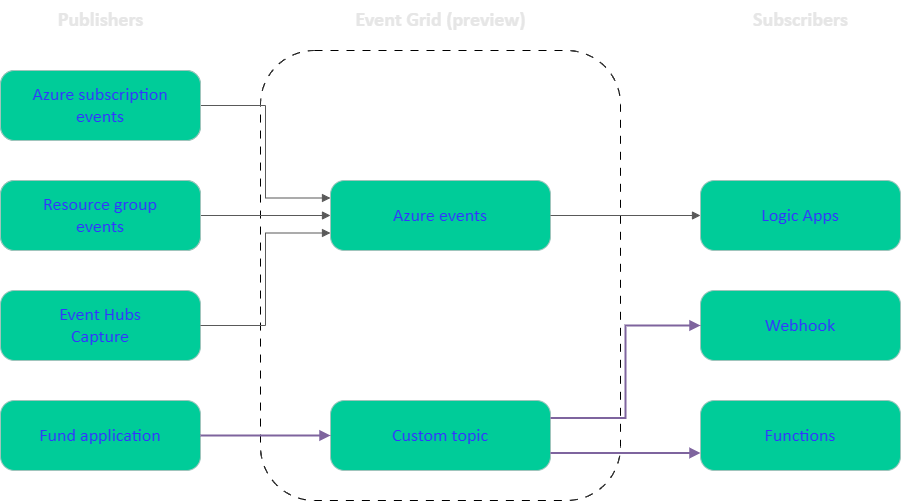
The purple path is a custom event route from a publisher to a topic and then to a webhook or function. Management events and Event Hubs Capture can use the same event-routing idea.
Why Event Grid is important?
Event Grid is important because it is reducing polling and allowing handlers to respond near the time of the change. This is useful for starting a fund document process after a resource event or notifying an operations workflow when a subscription operation has completed.
Event delivery is not the same as a completed business transaction. The handler must be idempotent, validate the event and record failures. Event Grid is improving the notification path, not removing application reliability work.
Publisher options
| Approach | Pros | Cons |
|---|---|---|
| Azure subscription or resource group events | + Management events are available from Azure resources + No custom publisher code | − Event data is focused on management operations − Preview syntax can change |
| Event Hubs Capture | + React to captured stream data + Useful for event-processing workflows | − Requires Event Hubs Capture setup − Handler still needs filtering |
| Custom topic | + Application controls the event contract + Good for business events | − Publisher must send events − Topic key and endpoint need protection |
Choose the publisher from the ownership boundary. Azure management events are useful when the resource operation itself is the trigger. A custom topic is better when the fund application owns the event meaning, because the application can version and validate its own data contract.
Steps to Implement:
Follow the following instructions to create and consume an Event Grid event,
Install the CLI extension
-
Sign in and select a subscription,
az login az account set --subscription <subscription-id> -
Add the preview extension,
az extension add --name eventgrid
Replace the input place holders with actual values. Keep the extension version recorded in the automation because preview commands can change.
Create a custom topic
-
Create the topic,
az eventgrid topic create \ --resource-group <resource-group> \ --name <topic-name> \ --location <region> -
Get the topic endpoint and key,
az eventgrid topic show \
  --resource-group <resource-group> \
  --name <topic-name>

az eventgrid topic key list \
  --resource-group <resource-group> \
  --name <topic-name>
Protect the topic key. It is granting publishing permission and should not appear in a public document.
Create a webhook subscription
-
Create a subscription for the webhook,
az eventgrid topic event-subscription create \ --resource-group <resource-group> \ --topic-name <topic-name> \ --name <subscription-name> \ --endpoint <webhook-url> -
Return the validation response from the webhook before processing normal events.
Note: A webhook receives a subscription validation event containing a
validationCode. Return a successful response with the same code invalidationResponse, then Event Grid can activate the subscription.
For a resource-group subscription, use the preview resource event command and confirm the installed extension syntax,
az eventgrid resource event-subscription create \
  --resource-group <resource-group> \
  --name <subscription-name> \
  --endpoint <webhook-url>
Info:
[confirm: exact preview CLI syntax for az eventgrid resource event-subscription create]Verify the command withaz eventgrid resource event-subscription --helpbecause the preview resource command shape may differ by extension version.
Read the event envelope
-
Parse the common event fields,
{
  "id": "<event-id>",
  "eventType": "Fund.PriceUpdated",
  "subject": "/funds/<fund-id>",
  "eventTime": "2017-10-17T10:00:00Z",
  "data": {
    "fundId": "<fund-id>",
    "price": 10.5
  }
}
Validate eventType, subject and the data shape before calling a downstream service. Store the event id when the operation is idempotent, so a retry does not create duplicate work.
Publish a custom event
-
Publish an event with the topic endpoint and
aeg-sas-key,curl -X POST \ -H "Content-Type: application/json" \ -H "aeg-sas-key: <topic-key>" \ --data '[{"id":"<event-id>","eventType":"Fund.PriceUpdated","subject":"/funds/<fund-id>","eventTime":"2017-10-17T10:00:00Z","data":{"fundId":"<fund-id>","price":10.5}}]' \ <topic-endpoint>
Never commit the topic key or print it in a build log.
Add a handler and pulse check
- Implement the webhook or choose Azure Functions / Logic Apps as the handler.
- Return the validation response for a new subscription.
- Publish one test event and check the handler log.
- Publish the same event again and confirm the handler does not create duplicate work.
Note:
[confirm: Event Grid preview pricing and first 100K free operation allowance]Confirm the current preview pricing before writing a cost estimate.
Must Do / Should / Don’t
Must Do
- Must implement the webhook validation handshake.
- Must validate the event schema and event type.
- Must protect the topic key and avoid logging it.
- Must make the handler idempotent.
Should
- Should use custom topics for application-owned business events.
- Should use Azure Functions or Logic Apps for small handlers.
- Should monitor delivery failures and handler latency.
Don’t
- Don’t treat an event as proof that the business transaction succeeded.
- Don’t assume every Azure resource event is available in this preview.
- Don’t assume event publishers outside the documented preview set are available.
Wrap up
In this article, we have looked at Event Grid preview publishers, custom topics, webhook validation, event fields, publishing with aeg-sas-key and handler options.
Thanks for reading this article. In the next article, I will walk you through how to create an AKS cluster (preview).
Related Posts
Cloud cost optimization - right-sizing, reserved capacity and auto-shutdown
Azure cloud cost optimisation combines right-sizing, reserved capacity, auto-shutdown, autoscale, tagging, cleanup, Advisor metrics and showback into a repeatable loop.
Cosmos DB vs Azure SQL Database - choosing the right data store
Cosmos DB and Azure SQL Database are compared across data models, consistency, transactions, partitioning, scale and operational fit for a fund workload.
Environment drift - why UAT and production are not the same
Environment drift makes UAT and production behave differently, so this article explains how to control configuration, infrastructure, access policies and deployment evidence.