How to configure Azure API Management policies - rate limiting and caching
Azure API Management policies control rate limits, quotas and caching across scopes, with examples covering policy order, request flow, cache safety and testing with curl.
How to configure Azure API Management policies - rate limiting and caching?
An API is becoming difficult to operate when every client can send unlimited requests and every request is reaching the backend. A sudden client retry can consume the fund API capacity, while a repeated reference-data request is reading the same result from the origin again and again. Azure API Management (APIM) policies give us a central place to control traffic and cache safe responses.
In this article, we are going to see the APIM policy scopes, the inbound, backend, outbound and error sections, rate limits, quotas and cache lookup/store policies. We will test the policy with curl and explain why policy order matters. Refer to this article, Why we need a Healthy API Management Solution, for the wider API lifecycle and governance discussion.
TL;DR Summary
- APIM policies can be applied globally, to a product, API or operation.
- A policy contains
<inbound>,<backend>,<outbound>and<on-error>sections, usually with<base />. - Rate limits protect short-term request capacity; quotas control longer usage periods.
- Cache lookup must happen before the backend call, and cache store must happen after a successful response.
- A 429 response tells the client that the rate limit was exceeded.
- Policy order is important, and the built-in cache has tier and SLA considerations.
Challenges
Unlimited traffic
One client can consume the API capacity by sending requests in a loop, while other clients are waiting. A policy at the front door can limit requests before they reach the application.
Repeated backend reads
Reference data and stable fund metadata are often requested repeatedly. If every request reaches the origin, the API is paying the latency and capacity cost for the same response.
Rules at the wrong scope
A global policy is useful for a common security or limit rule, but a product or operation may need a different value. Applying a rule at the wrong scope is making exceptions difficult and can affect unrelated clients.
What are APIM policies?
APIM policies are XML statements which run at defined points in the API request and response pipeline. They can transform, limit, route, cache and handle requests.
In simple terms, a policy is a central instruction in front of the fund API. It is running before the backend, around the backend response or when an error occurs, so clients receive a consistent behaviour.
The following diagram depicts the policy pipeline with a cache-hit path.
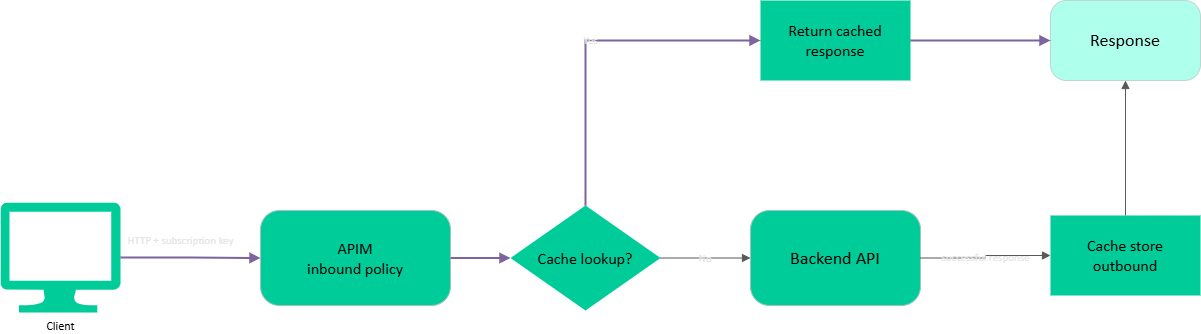
The purple path is a cache hit: APIM checks the cache and returns a stored response without calling the backend. On a miss, the request continues to the backend and stores a safe response on the way out.
Why APIM policies are important?
APIM policies are important because they are centralising controls which otherwise would be copied into every API. Rate limits protect the backend, quotas make product consumption predictable and caching improves response time for suitable data.
Policies are not a replacement for backend authorization, validation or resilience. The API must still protect resources and handle failures when a request reaches it.
Policy scopes
| Scope | Applies to | Example |
|---|---|---|
| Global | All APIs in the APIM service | Common headers or baseline limit |
| Product | APIs in one product | Partner product quota |
| API | Every operation in one API | Fund API rate limit |
| Operation | One operation | Cache a reference-data GET |
The effective policy is a combination of scopes. Keep <base /> where the parent policy should continue to run, and document deliberate overrides.
Steps to Implement:
Follow the following instructions to configure rate limiting and caching,
Open the policy editor
- Select the APIM service and API in the Azure portal.
- Select the policy scope, such as the API or operation.
- Keep the policy in source control as an XML file or documented deployment input.
Replace the input place holders with actual values, including <subscription-id>, <api-name>, <calls> and <renewal-period>.
Add policy sections
-
Start with the four policy sections,
<policies>
  <inbound>
    <base />
  </inbound>
  <backend>
    <base />
  </backend>
  <outbound>
    <base />
  </outbound>
  <on-error>
    <base />
  </on-error>
</policies>
inbound runs before the backend, backend controls the backend request, outbound handles the response and on-error handles a policy or backend error.
Add a rate limit
-
Limit calls for a subscription,
<inbound> <base /> <rate-limit calls="60" renewal-period="60" /> </inbound> -
Limit by a subscription or client key,
<inbound> <base /> <rate-limit-by-key calls="60" renewal-period="60" counter-key="@(context.Subscription.Id)" /> </inbound> -
Use the caller IP when the subscription is not the correct identity,
<rate-limit-by-key
    calls="30"
    renewal-period="60"
    counter-key="@(context.Request.IpAddress)" />
Choose a limit from observed traffic and the backend capacity. When the limit is reached, APIM returns HTTP 429. The client should handle that response with a bounded delay, not an immediate retry storm.
Add a quota
-
Apply a longer-period quota by key,
<quota-by-key calls="10000" bandwidth="100000000" renewal-period="86400" counter-key="@(context.Subscription.Id)" /> -
Use
quotawhen the policy applies to the whole scope.
Rate limits are short-window protection, while quotas are controlling consumption over a longer period. It is possible to use both, but explain the limits to API consumers.
Add cache lookup and store
-
Look up a response before the backend call,
<inbound> <base /> <cache-lookup vary-by-developer="false" downstream-caching-type="none"> <vary-by-query-parameter>fundId</vary-by-query-parameter> <vary-by-header>Accept</vary-by-header> </cache-lookup> </inbound> -
Store a successful response after the backend,
<outbound>
  <base />
  <cache-store duration="300" />
</outbound>
Use vary-by-query-parameter and vary-by-header so one fund response is not returned for another fund or media type. Cache only responses which are safe to share and have a clear expiry.
Note: The built-in APIM cache depends on the service tier. Do not promise a Developer-tier SLA for production traffic, and confirm the cache behaviour of the selected tier.
Test with curl
-
Call the operation with the subscription key,
curl -i \ -H "Ocp-Apim-Subscription-Key: <subscription-key>" \ "https://<apim-name>.azure-api.net/<api-name>/funds?fundId=<fund-id>" -
Send the request repeatedly and inspect the status code and response headers.
-
Exceed the configured rate and confirm HTTP 429.
-
Send the same safe GET after the first response and confirm a cache hit through the APIM trace or response headers.
Info: A cache hit must not call the backend. A cache miss should call the backend once, and the outbound policy should store only the response which is allowed to be cached.
Pulse check policy order
- Check rate limiting before expensive backend work.
- Check cache before the backend call.
- Store the response only after the backend succeeds.
- Keep
<base />where parent policies are required. - Test an error path and verify the
on-errorsection does not expose internal details.
Must Do / Should / Don’t
Must Do
- Must choose the smallest scope which expresses the business rule.
- Must use a stable counter key and document the expected 429 behaviour.
- Must vary cached responses by every query parameter and header which changes the result.
- Must test cache hit, cache miss and rate-limit paths.
Should
- Should keep policy XML in source control and review it like code.
- Should combine short rate limits with longer quotas when the product needs both.
- Should use APIM tracing in a non-production environment to inspect policy order.
Don’t
- Don’t cache private or user-specific responses without a safe key and policy.
- Don’t place cache lookup after the backend call.
- Don’t assume a policy at one scope automatically replaces all parent rules.
- Don’t retry HTTP 429 immediately from every client.
Wrap up
In this article, we have looked at APIM policy scopes, the four policy sections, rate limits, quotas, cache lookup and store, HTTP 429 and curl testing.
I appreciate your time and efforts to read this article. In the next article, I will walk you through Getting started with Docker - Part 3 and Docker Swarm basics.
Related Posts
Edge-first architecture - security and caching at the CDN / proxy
Edge-first architecture moves security and caching decisions toward Azure CDN or Cloudflare, reducing origin load while covering WAF, TLS, rate limits and origin protection.
What is resiliency and why do we need a DR strategy? - Part 1
What resiliency is, why we need a DR strategy, how high availability, disaster recovery and backup differ and the principles we follow.
Cloud cost optimization - right-sizing, reserved capacity and auto-shutdown
Azure cloud cost optimisation combines right-sizing, reserved capacity, auto-shutdown, autoscale, tagging, cleanup, Advisor metrics and showback into a repeatable loop.