Getting started with Docker - Part 3
Docker Swarm mode adds managers, workers, Raft quorum, services, routing mesh, overlay networks, stack deployment and secrets for multi-container production workloads.
Getting started with Docker - Part 3
Last year, in Getting started with Docker - Part 2, we discussed volumes, networks and Docker Compose, which are the building blocks for running a multi-container application. A developer can run the fund API and cache locally, but production needs scheduling, service replicas, rolling updates and a way to recover when a container is failing.
In this article, we are going to see Docker Swarm basics, including managers, workers, Raft quorum, services, routing mesh, overlay networks, stack deployment and secrets. We will also compare Swarm mode with Kubernetes, so you can choose the right orchestration approach for the workload.
TL;DR Summary
- Swarm mode turns Docker engines into a cluster of managers and workers.
- Managers keep cluster state with Raft; use an odd number of managers for quorum.
- A service defines the desired replicas, image, ports and update behaviour.
- Routing mesh publishes a service port through the swarm nodes.
- Overlay networks connect services across nodes, and Docker secrets keep sensitive values out of images.
docker stack deployuses Compose file version3and thedeploykey for a stack.
Challenges
One container is not a production service
A single container can stop, be rescheduled or become overloaded. Starting it again by hand is not a deployment strategy, and the customer is receiving an outage while the team is performing the manual recovery.
Replicas need a scheduler
Running three copies of a fund API means deciding where the copies are placed and how a failed copy is replaced. A cluster should keep the desired state instead of asking a person to run commands after every failure.
Updates need a safe path
Changing the image for every replica at the same time can create an outage. A rolling update with a delay and a bounded parallelism gives the team a chance to detect a bad image before all replicas are replaced.
What is Docker Swarm mode?
Docker Swarm mode is the native clustering and orchestration mode in Docker 1.12 and later, including Docker CE 17.x.
In simple terms, a swarm is a group of Docker engines which agree on services and tasks. Managers keep the desired state and schedule tasks, while workers run the containers assigned to them.
The following diagram depicts Swarm managers, workers, a service and the routing mesh.
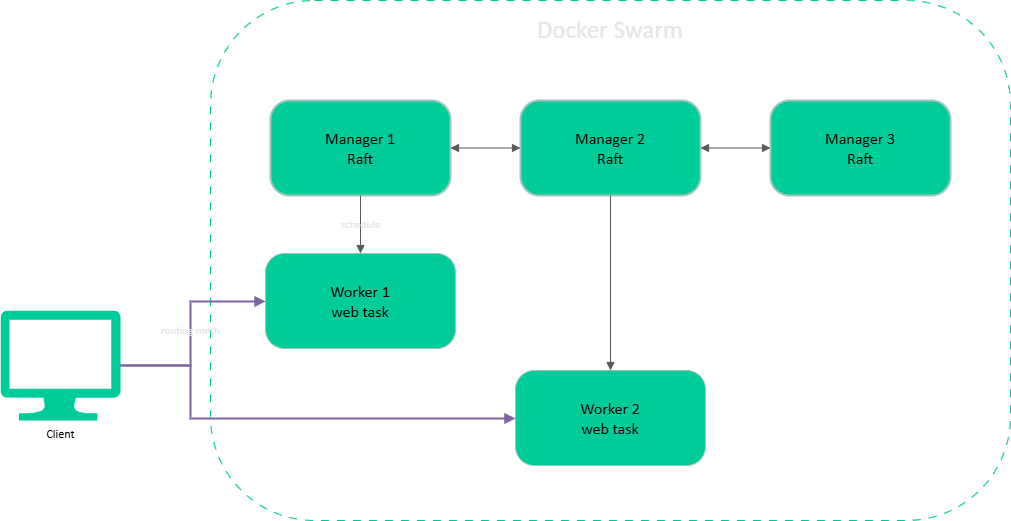
The purple path is a request entering the routing mesh and reaching one of the replicated web tasks. Managers use Raft to keep cluster state, while workers execute the service tasks.
Why Swarm mode is important?
Swarm mode is important because it is extending the simple Docker workflow to a multi-node application. The same image and service command can be used on a cluster, while the orchestrator keeps the desired replica count.
Kubernetes is an alternative with a broader ecosystem and a different operational model. Docker announced Kubernetes support at DockerCon EU in October 2017, so teams evaluating orchestration should compare both rather than treating Swarm as the only option.
Option comparison
| Approach | Pros | Cons |
|---|---|---|
| Docker Swarm mode | + Simple Docker commands + Native service and stack workflow + Lower learning curve for Docker teams | − Smaller ecosystem − Fewer platform integrations |
| Kubernetes | + Broad ecosystem and extensibility + Rich scheduling and service primitives | − More concepts and operations − Higher learning curve |
Steps to Implement:
Follow the following instructions to create a small Docker Swarm,
Initialise the manager
-
Create a swarm on the first Docker engine,
docker swarm init --advertise-addr <manager-ip> -
Copy the worker join command returned by Docker.
Replace the input place holders with actual values. The advertise address must be reachable by the other Docker engines.
Join workers and managers
-
Join a worker node,
docker swarm join \ --token <worker-token> \ <manager-ip>:2377 -
Add another manager only when the cluster needs a higher control-plane availability,
docker swarm join-token manager -
List the nodes from a manager,
docker node ls
Managers are also able to run tasks unless their availability is changed. Use an odd number of managers, such as three or five, so Raft can retain quorum after a failure. Do not run a large number of managers without understanding the consensus and network cost.
Create a replicated service
-
Create three web replicas,
docker service create \ --replicas 3 \ --name web \ -p 8080:80 \ nginx -
Inspect the service and tasks,
docker service ls
docker service ps web
The service scheduler is maintaining three desired replicas. If a task stops, Docker is creating another task on an available node.
Scale and update the service
-
Scale the service,
docker service scale web=5 -
Update the image with a rolling update,
docker service update \ --image <registry>/<web>:<new-tag> \ --update-parallelism 1 \ --update-delay 10s \ web -
Inspect the update,
docker service ps web
One task is updated at a time with a ten-second delay. Set the values based on health checks and capacity, and stop the update when the new image is failing.
Use the routing mesh
-
Publish a port on the service,
docker service update --publish-add 8080:80 web -
Call any swarm node on the published port,
curl http://<node-ip>:8080
The routing mesh is forwarding the request to a task even when that task is running on another node. This is convenient, but external load balancer and client source-IP requirements should be tested.
Create an overlay network
-
Create the network,
docker network create \ --driver overlay \ fund-network -
Attach a service to it,
docker service update \
  --network-add fund-network \
  web
Use the overlay network for service-to-service communication instead of hard-coded task IP addresses. Service discovery is using the service name.
Deploy a stack
-
Create a Compose file with version
3and thedeploykey,version: '3' services: fund-api: image: <registry>/fund-api:<tag> ports: - "8080:80" networks: - fund-network deploy: replicas: 3 update_config: parallelism: 1 delay: 10s cache: image: redis networks: - fund-network networks: fund-network: driver: overlay -
Deploy the stack,
docker stack deploy \ -c docker-compose.yml \ fund -
Inspect the stack,
docker stack services fund
docker stack ps fund
The deploy section is used by swarm mode, while local Compose behaviour may not apply every deployment setting.
Note: Run stack commands from a manager node, and check the manager quorum before changing services.
Create a secret
-
Create a secret from standard input,
printf '<database-password>' | docker secret create fund-db-password - -
Grant a service access to the secret,
docker service update \
  --secret-add fund-db-password \
  fund_fund-api
The secret is mounted for the service instead of being written into the image. Replace the input place holders with actual values through a protected process.
Pulse check and remove
-
Check nodes, services and tasks,
docker node ls docker service ls docker service ps fund_fund-api -
Call the API and check one fund response.
-
Remove the stack when the test is complete,
docker stack rm fund
Must Do / Should / Don’t
Must Do
- Must keep a quorum of managers and use an odd number where possible.
- Must define health checks, replica count and rolling-update settings.
- Must use overlay networks for cross-node service communication.
- Must keep passwords and tokens in Docker secrets, not images.
Should
- Should test node failure and task rescheduling before production.
- Should use
docker service psduring every update. - Should keep Compose version
3and stack files in source control. - Should compare Swarm with Kubernetes before committing to an orchestrator.
Don’t
- Don’t run one manager and call the cluster highly available.
- Don’t update every replica at once without a rollback plan.
- Don’t hard-code task IP addresses.
- Don’t put a secret in a Dockerfile or a public Compose file.
Wrap up
In this article, we have looked at Docker Swarm mode, managers, workers, Raft quorum, services, rolling updates, routing mesh, overlay networks, stack deployment and secrets.
I really appreciate that you took the time to read this article. This article closes the 2017 Cloud How-to series.
Related Posts
Cloud cost optimization - right-sizing, reserved capacity and auto-shutdown
Azure cloud cost optimisation combines right-sizing, reserved capacity, auto-shutdown, autoscale, tagging, cleanup, Advisor metrics and showback into a repeatable loop.
Cosmos DB vs Azure SQL Database - choosing the right data store
Cosmos DB and Azure SQL Database are compared across data models, consistency, transactions, partitioning, scale and operational fit for a fund workload.
Environment drift - why UAT and production are not the same
Environment drift makes UAT and production behave differently, so this article explains how to control configuration, infrastructure, access policies and deployment evidence.