Infrastructure as Code (IaC) - ARM templates vs Terraform
Infrastructure as Code compares ARM templates and Terraform through state, deployment modes, provider coverage, resource examples and the criteria for choosing an approach.
Infrastructure as Code (IaC) - ARM templates vs Terraform
Creating a resource manually in the Azure portal is quick for the first environment, but it is becoming a problem when UAT and production need to be the same. A person is repeating clicks, recording values in a document and hoping that no setting is missed. When an environment must be recovered or reviewed, the real configuration is not visible in source control.
In this article, we are going to compare Infrastructure as Code (IaC) with Azure Resource Manager (ARM) templates and Terraform 0.10. We will see the state model, deployment commands, sample resources, VSTS integration and the criteria for choosing one approach.
TL;DR Summary
- IaC describes infrastructure in source-controlled files which can be reviewed and deployed repeatedly.
- ARM templates use JSON and are native to Azure; Azure itself is the state authority.
- Terraform 0.10 uses HCL, a state file and providers, with
"${var.location}"interpolation. - ARM supports Incremental and Complete deployment modes, linked templates and Azure Quickstart templates.
- Terraform supports multi-cloud workflows and remote state in Azure Storage, but provider coverage can lag ARM features.
- Both approaches can run in VSTS; the choice should follow cloud scope, coverage, team skills and state requirements.
Challenges
Manual configuration is not repeatable
A portal deployment is recording the final state but not always the decisions which created it. A second environment may have a different SKU, network rule or app setting, and the difference is found only when the application is failing.
State needs an owner
ARM is reading the state from Azure Resource Manager. Terraform is keeping a state file which maps configuration resources to real resources. If the state file is lost, shared incorrectly or changed outside Terraform, the next plan is becoming difficult to trust.
Azure-native features versus multi-cloud
ARM has first-class access to Azure resources and new Azure capabilities. Terraform can manage Azure and other clouds from a common workflow, but an azurerm provider feature may arrive after the native ARM capability.
What is Infrastructure as Code?
Infrastructure as Code is the practice of defining infrastructure in machine-readable files and applying those definitions through a repeatable deployment process.
In simple terms, the resource group, network, storage account and App Service plan are code. We review them, test them and deploy them from VSTS instead of depending on a person to remember portal settings.
The following diagram compares native ARM deployment with the Terraform workflow.
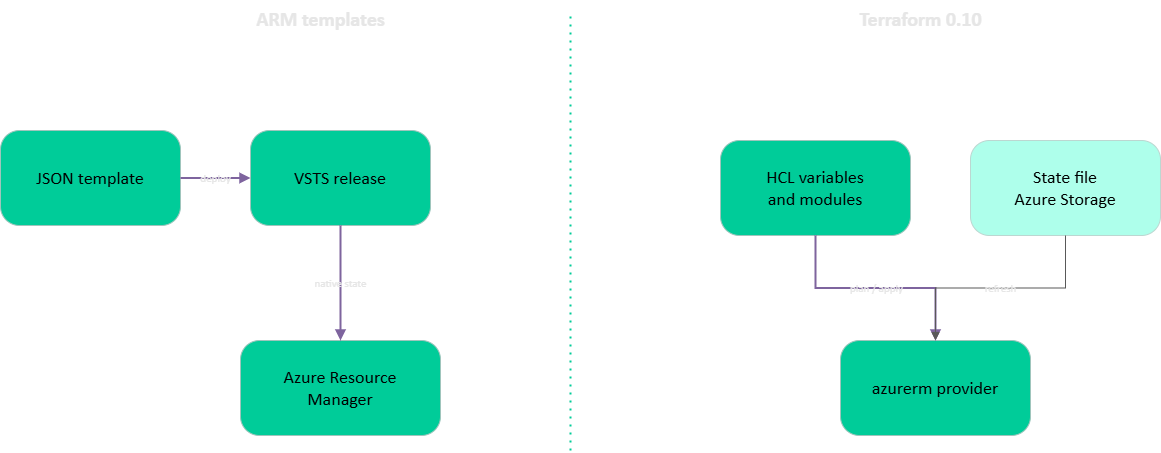
The purple path is the Terraform plan and apply flow through its state file and provider. ARM sends the template directly to Azure Resource Manager and uses Azure as the state authority.
Why IaC is important?
IaC is important because it is reducing environment drift, improving review and making recovery repeatable. A code review can see that a storage account changed from one SKU to another before the change reaches production.
In our case, ARM is a pragmatic choice for Azure-native infrastructure and features which must be available immediately. Terraform is useful when the organisation is managing more than Azure or wants one HCL workflow across providers. Do not choose a tool before checking the resources and provider coverage required by the platform.
Comparison table
| Concern | ARM templates | Terraform 0.10 |
|---|---|---|
| Language | JSON | HCL with "${var.name}" interpolation |
| State | Azure Resource Manager | Terraform state file |
| Cloud scope | Azure only | Multi-cloud providers |
| Azure coverage | Native and early feature access | azurerm provider coverage can lag ARM |
| Deployment | az group deployment create | terraform init, plan, apply |
| Modes | Incremental or Complete | Plan and apply against state |
| Team fit | Azure-focused teams | Teams needing provider workflow |
ARM template example
A small storage account template looks like this,
{
  "$schema": "https://schema.management.azure.com/schemas/2015-01-01/deploymentTemplate.json#",
  "contentVersion": "1.0.0.0",
  "parameters": {
    "storageName": {
      "type": "string"
    }
  },
  "resources": [
    {
      "name": "[parameters('storageName')]",
      "type": "Microsoft.Storage/storageAccounts",
      "apiVersion": "2016-01-01",
      "location": "[resourceGroup().location]",
      "sku": {
        "name": "Standard_LRS"
      },
      "kind": "Storage",
      "properties": {}
    }
  ]
}
Deploy it with Azure CLI,
az group deployment create \
  --resource-group <resource-group> \
  --template-file azuredeploy.json \
  --parameters storageName=<storage-name>
Use Incremental mode when the deployment should add or update resources without deleting resources which are not in the template. Use Complete mode only when the template is the complete intended resource set and deletion is understood.
Linked templates are useful when a large deployment has separate network, data and application modules. Azure Quickstart templates provide starting examples, but review them before using them in a production subscription.
Keep deployment mode visible in the release definition. Incremental mode is safer for a shared resource group, while Complete mode can remove resources which are not declared. The right choice depends on whether the template owns the entire resource group or only one application boundary.
Terraform example
Terraform 0.10 uses HCL and separately managed providers, including the azurerm provider,
provider "azurerm" {
  version = "~> 0.1.0"
}

variable "location" {
  default = "West Europe"
}

resource "azurerm_resource_group" "fund" {
  name     = "<resource-group>"
  location = "${var.location}"
}

resource "azurerm_storage_account" "fund" {
  name                     = "<storage-name>"
  resource_group_name      = "${azurerm_resource_group.fund.name}"
  location                 = "${var.location}"
  account_type             = "Standard_LRS"
}
Note: The
azurermprovider is young and changing quickly, so pin the provider version.[confirm: azurerm 0.1.x storage account arguments]
Run the workflow,
terraform init
terraform plan
terraform apply
Terraform stores the mapping between configuration and Azure resources in a state file. Use an Azure Storage backend for shared state when the team is ready, protect the state because it can contain sensitive values and never edit it casually.
Selection criteria
Azure coverage
Choose ARM when an Azure feature, policy or resource property is required and the azurerm provider does not support it. Choose Terraform when the required Azure resources are covered and the same workflow is needed for other providers.
State and team workflow
ARM is allowing Azure to answer what exists, while Terraform is comparing configuration with its state file and then refreshing provider data. Terraform needs a clear state ownership and locking process. ARM needs deployment history and resource-group governance.
Deployment safety
Run validation and a preview plan in VSTS before applying. Keep changes small, review deletions and protect production credentials. Neither tool makes an unsafe template safe automatically.
Modules and reuse
Use ARM linked templates or nested modules for Azure. Use Terraform modules for reusable provider configuration. Reuse only when the abstraction is making the environment clearer, otherwise it is hiding the resource details.
Must Do / Should / Don’t
Must Do
- Must store templates, variables and deployment scripts in VSTS.
- Must review changes and understand deletion behaviour.
- Must protect Terraform state and deployment credentials.
- Must test the same definition in a non-production resource group.
Should
- Should use ARM for Azure-native features with immediate coverage needs.
- Should use Terraform when multi-cloud consistency is a real requirement.
- Should run
terraform planor an ARM validation step before applying.
Don’t
- Don’t edit production resources manually and leave the code unchanged.
- Don’t commit state files containing secrets to a public repository.
- Don’t use Complete mode or a destructive Terraform apply without checking the resource set.
Wrap up
In this article, we have looked at IaC, ARM JSON, Terraform 0.10 HCL, state, deployment modes, provider coverage and VSTS automation.
Thanks for reading this article. In the next article, I will walk you through environment drift and why UAT and production are not the same.
Related Posts
What is resiliency and why do we need a DR strategy? - Part 1
What resiliency is, why we need a DR strategy, how high availability, disaster recovery and backup differ and the principles we follow.
Cloud cost optimization - right-sizing, reserved capacity and auto-shutdown
Azure cloud cost optimisation combines right-sizing, reserved capacity, auto-shutdown, autoscale, tagging, cleanup, Advisor metrics and showback into a repeatable loop.
Containers vs PaaS vs Serverless - which one for which workload?
VMs, PaaS, containers and serverless offer different control and operational trade-offs, with workload context guiding the right Azure hosting model.