How to implement DR for Azure resources? - Part 4
Resource-wise DR guidelines for Azure storage, SQL Database and Cosmos DB, the implementation patterns and the thumb rules we follow.
How to implement DR for Azure resources? - Part 4
A DR strategy is only as strong as its weakest resource. An application may run in two regions, but if its storage account is not replicated or it can’t find the new database endpoint after a failover, the whole strategy fails. Each Azure resource has its own replication and failover options, and the application code also needs to be ready for failures. In the previous article, we discussed the DR strategy patterns and how to choose one. In this article, we are going to see the resource wise DR guidelines for Azure Storage, Azure SQL and Cosmos DB, and the implementation patterns which make an application resilient.
DR Guidelines series:
- What is resiliency and why do we need a DR strategy?
- How to measure resiliency? RTO, RPO, MTTR and SLA
- What are the DR strategy patterns and how to choose one?
- How to implement DR for Azure resources? (this article)
- How to define a DR strategy for your application? A worked example
TL;DR Summary
- Storage: use RA-GRS for read access from the secondary region, and GRS or above with failover for read and write.
- Azure SQL: use active geo-replication with failover groups, point-in-time restore and auditing; write through the read-write listener.
- Cosmos DB: enable geo-replication, availability zones and automatic failover; choose single or multi region write based on your write pattern.
- Read from the local endpoint for better performance and write through the load balanced read-write endpoint for better availability.
- Make the application resilient with health endpoint monitoring, retry, circuit breaker, queue based load leveling and leader election.
Resource wise guidelines
All the diagrams in this section use the same setup as the previous article: the portal goes through Cloudflare and Traffic Manager to the Web App in the primary region, and Traffic Manager fails over to the secondary region on an outage.
Note: The RTO and RPO values in this section are based on these given architectures and resource configurations. For a different architecture (for example, a different resource tier, data size, replication option or failover process), the actual RTO and RPO will vary. Validate them with a DR drill before you commit to the business.
Storage Account - Read Access
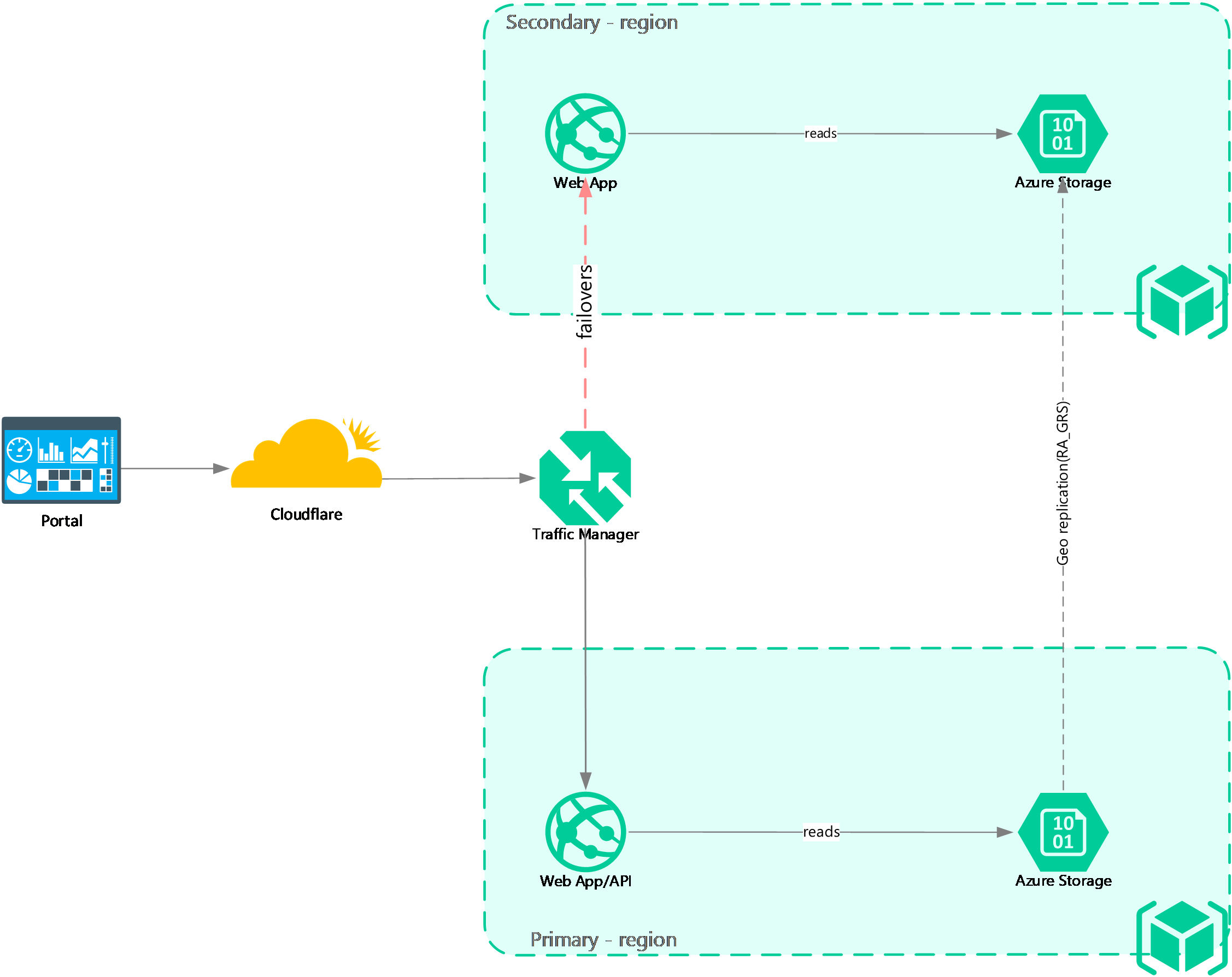
Use RA-GRS (Read-Access Geo-Redundant Storage) when you want to read from the secondary region directly, and use the secondary region endpoint to read.
| RTO | RPO |
|---|---|
| 1 min | 0 seconds |
Since the secondary endpoint is always readable, there is no failover needed for read-only data, and this is why the RTO is about a minute (just the Traffic Manager switch).
Must Be Aware: The geo-replication of storage is asynchronous. Data written to the primary just before an outage may not be available in the secondary yet. The 0 seconds RPO holds for data which doesn’t change at runtime, like static files uploaded during the deployment.
Storage Account - Read & Write
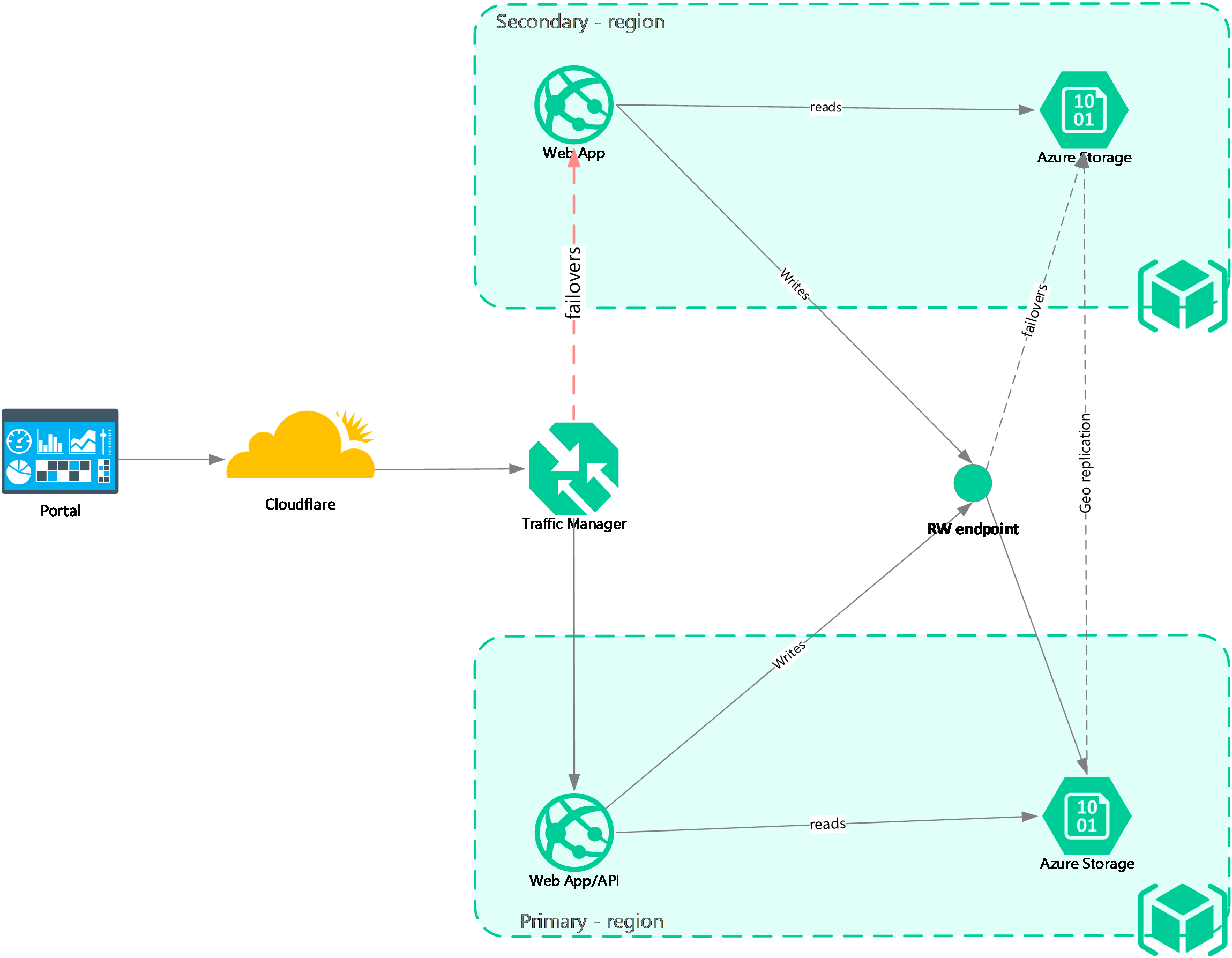
When you have read and write requirements for the storage account, use GRS or above replication. On an outage, switch from the primary region to the secondary region with either manual or automated failover, depending on your DR strategy. If you are not able to isolate the read and write operations, use the read-write endpoint.
| RTO | RPO |
|---|---|
| 1 hour for auto failover by Azure, 10 mins for manual failover by Azure Automation | 15 mins |
SQL PaaS
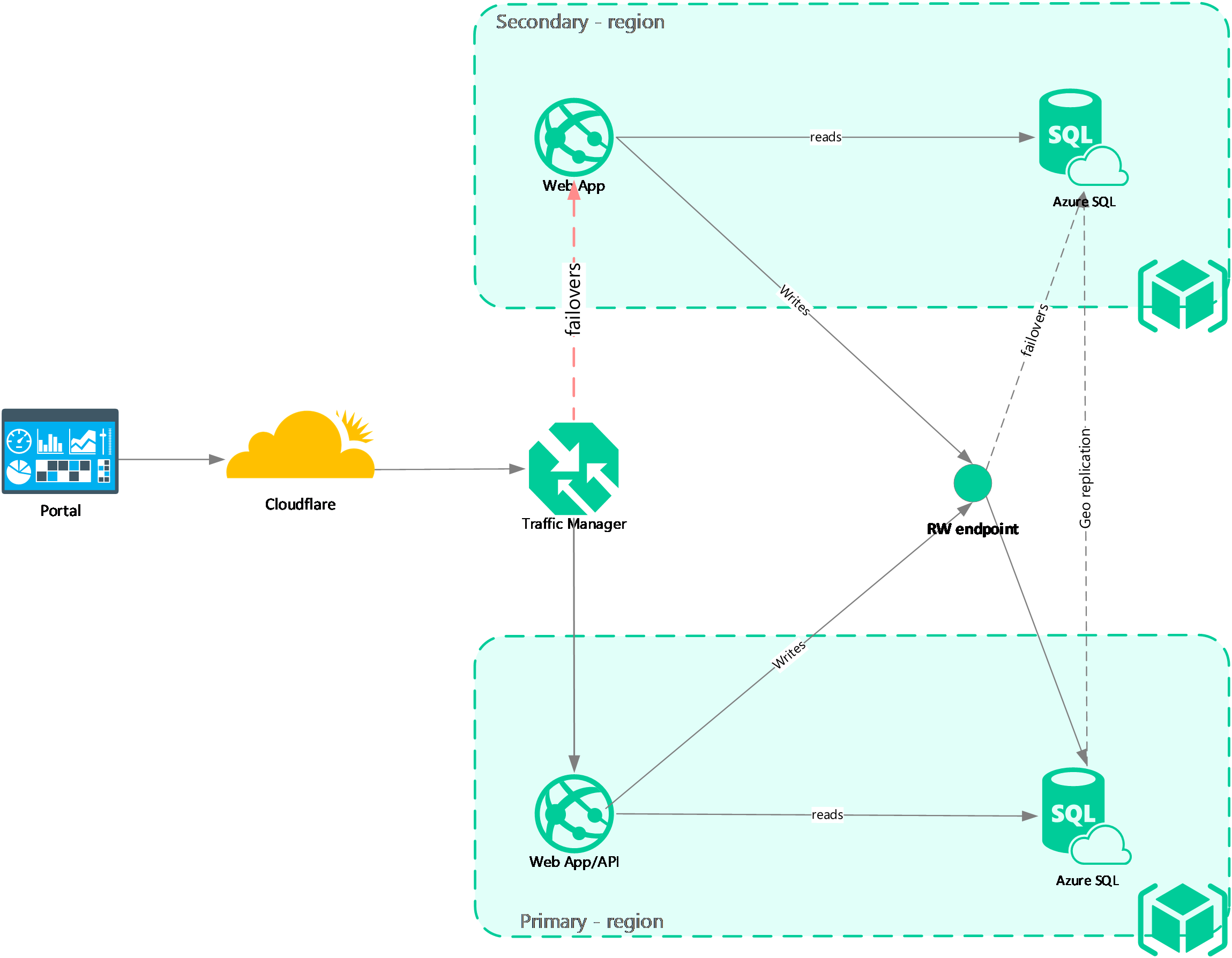
For Azure SQL, use active geo-replication together with failover groups, and use point-in-time restore for the data corruption cases. Enable the database auditing as well. When your application requires the CQRS (Command Query Responsibility Segregation) pattern, use a readable replica. On an outage, switch from the primary region to the secondary region with either manual or automated failover, depending on your DR strategy, and use the read-write endpoint when you are not able to isolate the read and write operations.
| RTO | RPO |
|---|---|
| 1 hour for auto failover by Azure, 10 mins for manual failover by Azure Automation | 5 seconds |
The failover group gives two listener endpoints: a read-write listener which always points to the current primary, and a read-only listener which points to the secondary. When the application uses these listeners instead of the server names, it doesn’t need any configuration change after a failover.
Note: Define clearly who initiates the failover for each resource. In our case, the DBA is responsible to initiate the failover for the SQL Managed Instance.
Cosmos DB with Single Region Write
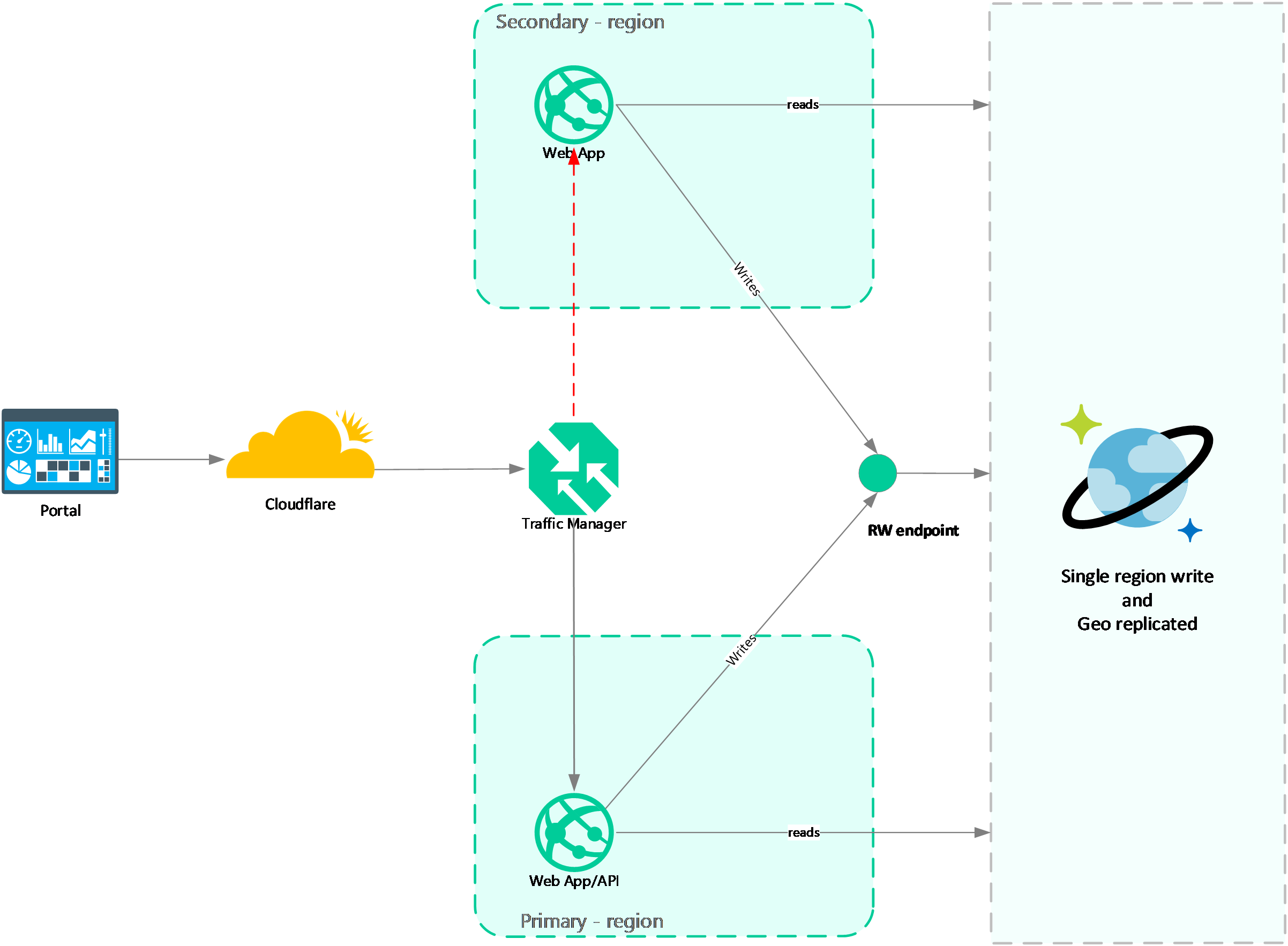
Enable geo-replication to the secondary regions, use single region write, and enable the availability zones and the automatic failover. Cosmos DB provides separate read endpoints in both regions, so use the local endpoints to read the data when your application requires the CQRS pattern.
| RTO | RPO |
|---|---|
| 15 mins for auto failover by Azure Cosmos DB | 15 mins |
Cosmos DB with Multi Region Write
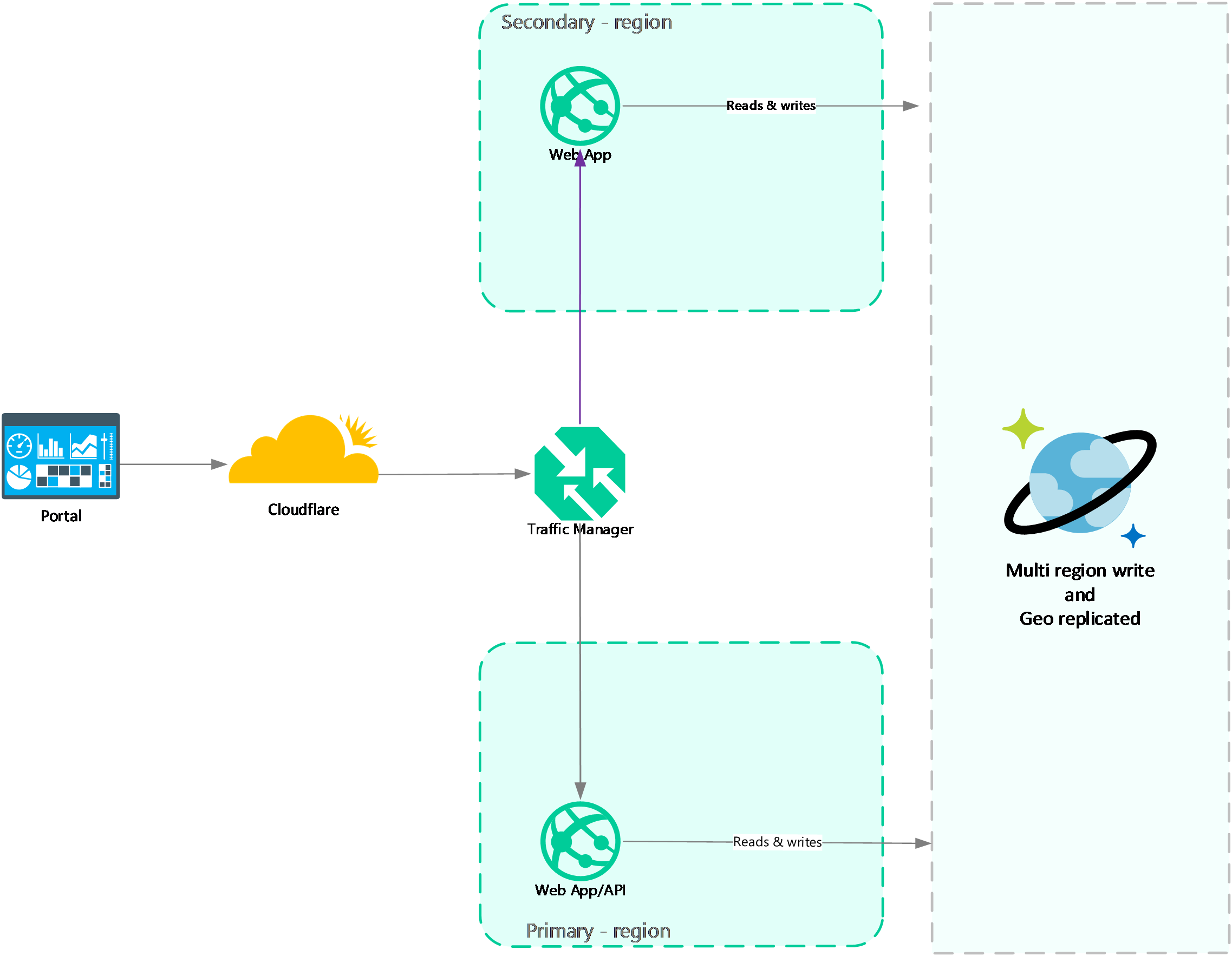
Here also, enable geo-replication to the secondary regions, the availability zones and the automatic failover. The difference is that you enable multi region write, so the application reads and writes from the local regions.
| RTO | RPO |
|---|---|
| 15 mins for auto failover by Azure Cosmos DB | 15 mins |
Must Consider: With multi region write, the same item can be updated in two regions at the same time. Choose the conflict resolution policy (last writer wins or custom) before you enable it.
Resource guidelines at a glance
| Resource | Replication | Failover | RTO | RPO |
|---|---|---|---|---|
| Storage (read only) | RA-GRS | Not required, read from secondary endpoint | 1 min | 0 seconds |
| Storage (read & write) | GRS or above | Auto (1 hour) or manual by Azure Automation (10 mins) | 10 mins - 1 hour | 15 mins |
| Azure SQL | Active geo-replication with failover groups | Auto (1 hour) or manual by Azure Automation (10 mins) | 10 mins - 1 hour | 5 seconds |
| Cosmos DB (single region write) | Geo-replication, availability zones | Automatic | 15 mins | 15 mins |
| Cosmos DB (multi region write) | Geo-replication, availability zones | Automatic | 15 mins | 15 mins |
The RTO and RPO of an application can’t be better than the worst resource in its critical path, so use this table to check whether your resources can meet the RTO and RPO you agreed with the business. Keep in mind that the values in this table are for the architectures given in this article, and they will vary for other architectures.
Implementation Patterns
Infrastructure redundancy alone doesn’t make an application resilient. The application code must detect failures and handle them gracefully. We use the following cloud design patterns,
| Pattern | What it does | Why we need it |
|---|---|---|
| Health endpoint monitoring | Exposes a health endpoint which checks the application and all its critical dependencies (database, storage, cache, downstream APIs) | Traffic Manager, Front Door and Application Insights use this endpoint to decide whether a region is healthy |
| Retry | Retries the transient failures (like a timeout or a throttled request) with an increasing delay between the attempts | Most Azure SDKs have built-in retry policies, so configure them instead of writing your own |
| Circuit breaker | Stops calling a dependency which keeps failing for a while, and fails fast instead | Protects the dependency from being flooded and protects our application from waiting on timeouts |
| Queue based load leveling | Puts a queue between the application and a service which can be overloaded | The spikes are absorbed by the queue and processed at a steady rate, and the requests are safe when the service is temporarily down |
| Leader election | Elects one instance as the leader to coordinate the work when multiple instances run the same background job | The job doesn’t run twice, and a new leader takes over when the current one fails |
Must Do: Your health endpoint should embrace all critical failures of the dependent components. A health endpoint which returns 200 while the database is down will never trigger the failover.
Thumb Rules
Find below the thumb rules which we follow for every DR implementation, grouped by the area,
Strategy and design
Be proactive and choose your DR strategy wisely, and don’t implement Active-active without the right use case. Identify and remove all single points of failure from both the infrastructure and the application. On an outage of the primary, do a complete switch to the secondary region; don’t run half of the application in one region and half in another.
Endpoints and health
Use the local read endpoint for the read operations for better performance, and use the load balanced read-write endpoint for the write operations for better availability. Your health endpoint should embrace all critical failures of the dependent components.
Automation and operations
Automate everything, i.e. infrastructure spin up, deployment, alerting, site switch and smoke test, and use the same ARM template to spin up the active and passive environments. Use Azure Monitor to trigger alerts and other actions. Define who initiates the failover for each resource (in our case, the DBA initiates the failover for the SQL Managed Instance).
Wrap up
In this article, we have looked at the DR guidelines for Azure Storage, Azure SQL and Cosmos DB, the implementation patterns which make an application resilient, and the thumb rules we follow. I really appreciate that you took the time to read this article. In the next and last article, I will walk you through the end-to-end process to define a DR strategy for an application with a worked example, from identifying the critical systems to DR drills.
Related Posts
What is resiliency and why do we need a DR strategy? - Part 1
What resiliency is, why we need a DR strategy, how high availability, disaster recovery and backup differ and the principles we follow.
How to define a DR strategy for your application? A worked example - Part 5
Define a DR strategy for your application with a worked example: the process to identify the strategy, a worked example and the DR lifecycle.
What are the DR strategy patterns and how to choose one? - Part 3
The DR strategy patterns from Redeploy to Active-active, their architecture, RTO and RPO, a side by side comparison and a simple guide to choose one.