What are the DR strategy patterns and how to choose one? - Part 3
The DR strategy patterns from Redeploy to Active-active, their architecture, RTO and RPO, a side by side comparison and a simple guide to choose one.
What are the DR strategy patterns and how to choose one? - Part 3
There is no single DR strategy which fits all applications. A strategy which brings an application back in a minute costs a lot more to build and run than one which brings it back in two hours, and for many applications two hours is perfectly acceptable. The art is to match the strategy to the business need. In the previous article, we discussed the resiliency metrics: RTO, RPO, MTTR and SLA. In this article, we are going to see the DR strategy patterns, from redeploy to active-active, with their architecture, RTO, RPO and when to choose each one.
DR Guidelines series:
- What is resiliency and why do we need a DR strategy?
- How to measure resiliency? RTO, RPO, MTTR and SLA
- What are the DR strategy patterns and how to choose one? (this article)
- How to implement DR for Azure resources?
- How to define a DR strategy for your application? A worked example
TL;DR Summary
- The DR strategy patterns are Redeploy, Backup and restore, Lite touch, Active-passive (warm standby) and Active-active (hot, multi-site).
- As we move from Redeploy to Active-active, the RTO and RPO reduce, but the implementation cost and complexity increase.
- Redeploy (RTO 2 hours, RPO 1 hour) fits applications which can bear more than 2 hours of outage.
- Active-passive (RTO 10 mins to 1 hour, RPO 5 seconds) is our recommended strategy for most applications.
- Don’t implement Active-active without the right use case, like distributing the load geographically; consult the architects first.
- For static sites and SPAs, Active-active with Azure Front Door gives RTO of 1 min and RPO of 0 seconds.
- The RTO and RPO values are based on the given architectures. For other architectures they will vary, so validate them with a DR drill.
DR Strategy Patterns
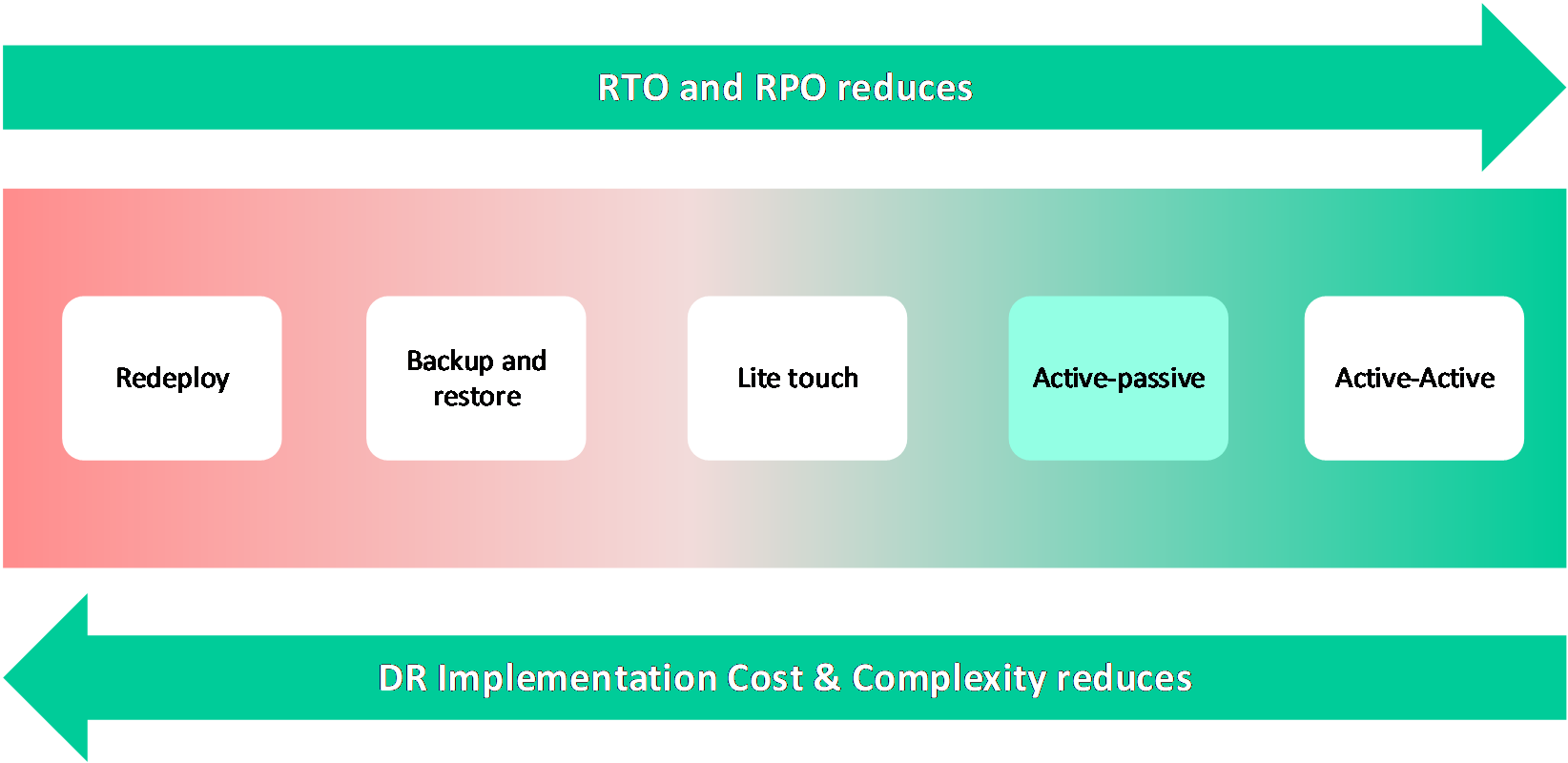
We use five DR strategy patterns: Redeploy, Backup and restore, Lite touch, Warm (also called as active-passive or standby) and Hot (also called as active-active, hot spare or multi-site). The following diagram depicts the trade-off between them. The RTO and RPO reduce as we move from Redeploy to Active-active, and the cost and complexity increase in the same direction.
Before we look at each pattern, let us understand the state of the resources in the secondary region, since the patterns mostly differ in this,
| State | What it means | What happens on failover |
|---|---|---|
| Cold | The resources don’t exist or are stopped in the secondary region | They need to be created or started |
| Warm | The resources exist and are ready in the secondary region, but they don’t serve the traffic | The traffic is switched to them |
| Hot | The resources exist and serve the traffic in both regions all the time | Nothing to start, the traffic is already there |
All the architectures below use a common setup: the users access the portal through Cloudflare, and Azure Traffic Manager (or Azure Front Door for static sites) routes the traffic to the right region, while Azure Monitor watches the health and triggers critical alerts.
Note: The RTO and RPO values in this article are based on these given architectures and their resources. If your architecture is different (for example, different resources, database size, replication settings or failover steps), the actual RTO and RPO will vary. Always validate them for your own architecture with a DR drill.
Redeploy
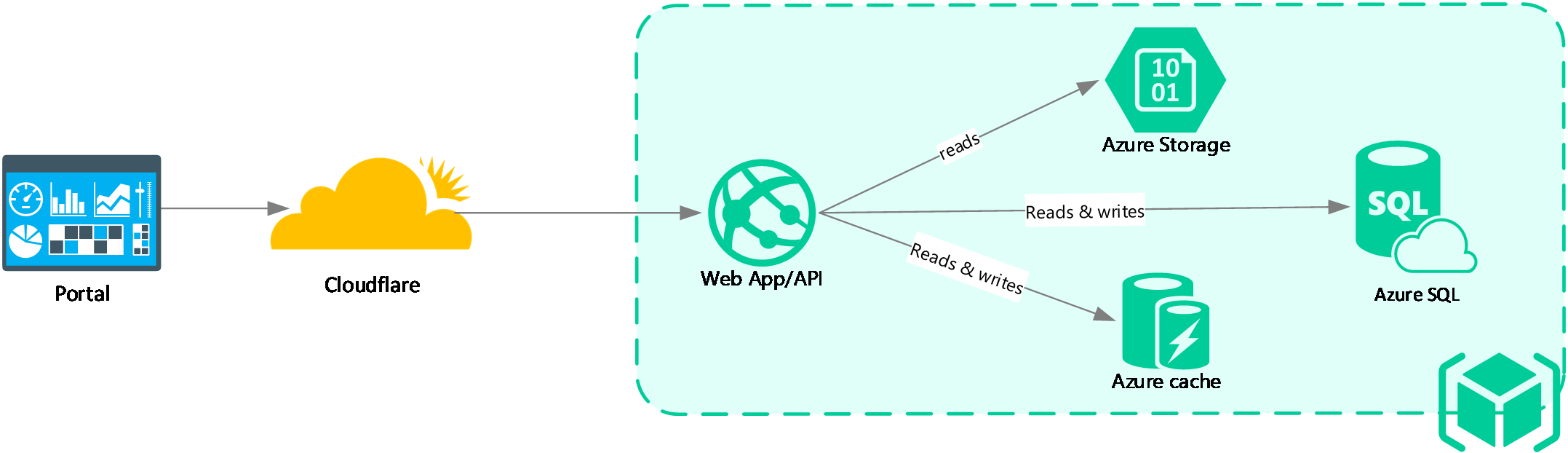
In this strategy, the application runs only in the primary region. The database backup is scheduled every one hour, and some static data files are uploaded to the storage account during the deployment. On a disaster, the infrastructure is spun up and the application is redeployed in the secondary region, and the database is restored from the latest backup.
| RTO | RPO |
|---|---|
| 2 hours | 1 hour |
When to choose: This strategy is recommended when an application can bear more than 2 hours of outage and data loss of about an hour or more.
Must Do: Redeploy works only when the whole infrastructure and deployment is automated (Infrastructure as Code). A manual redeploy in the middle of an incident will never meet the 2 hours RTO.
Backup and Restore
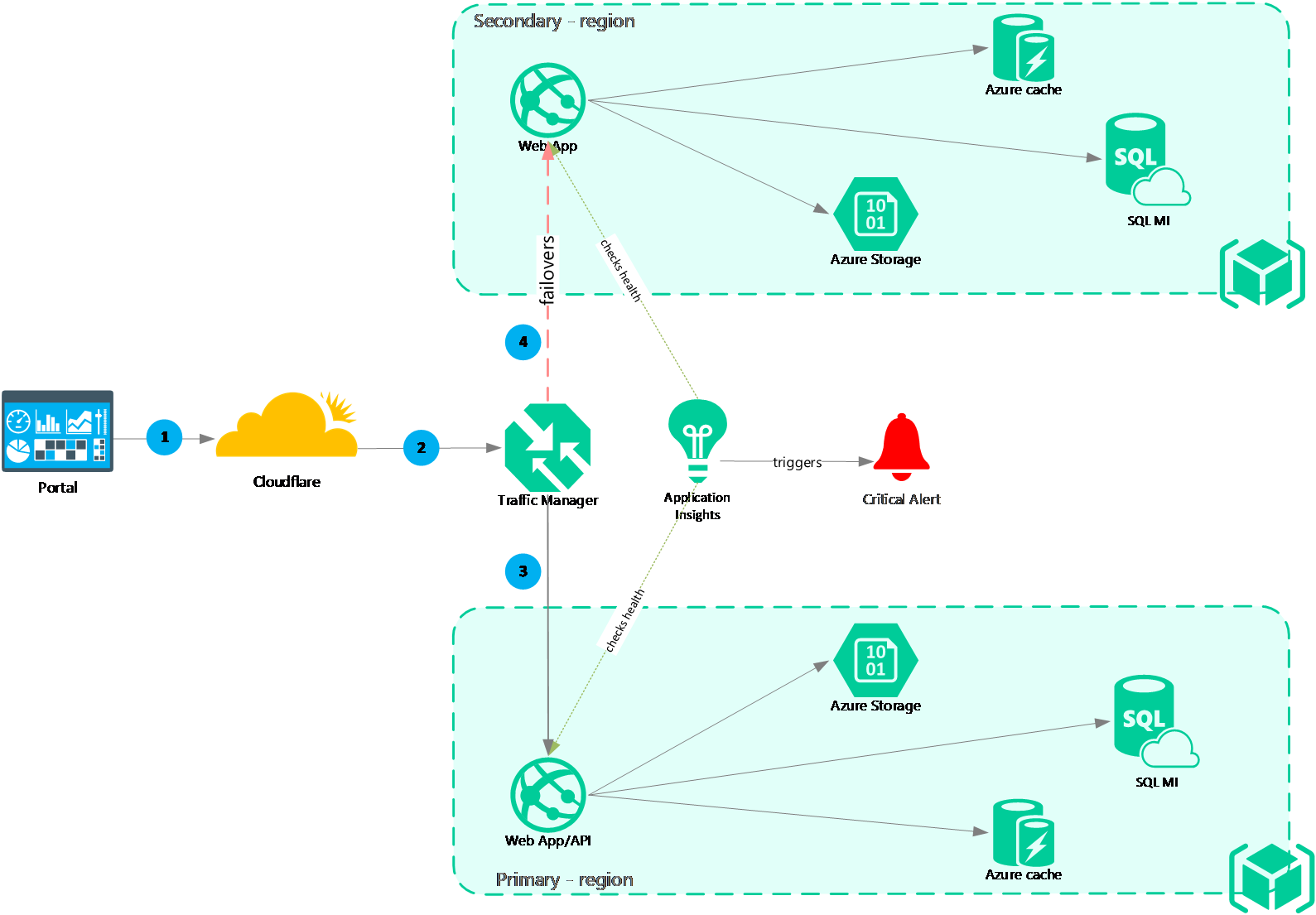
Here, there is no replication for the SQL database. Some data files are uploaded to the storage account during the deployment, and the database backup is scheduled every one hour. The backup is restored to the secondary database before the deployment or during the failover. Application Insights checks the health of both regions and triggers the critical alert, and Traffic Manager fails over the traffic to the secondary region (steps 1 to 4 in the diagram).
| RTO | RPO |
|---|---|
| 1 hour | 1 hour |
When to choose: This is not a recommended strategy. It costs almost as much as Active-passive since the secondary resources exist, but it still loses up to an hour of data.
Lite Touch
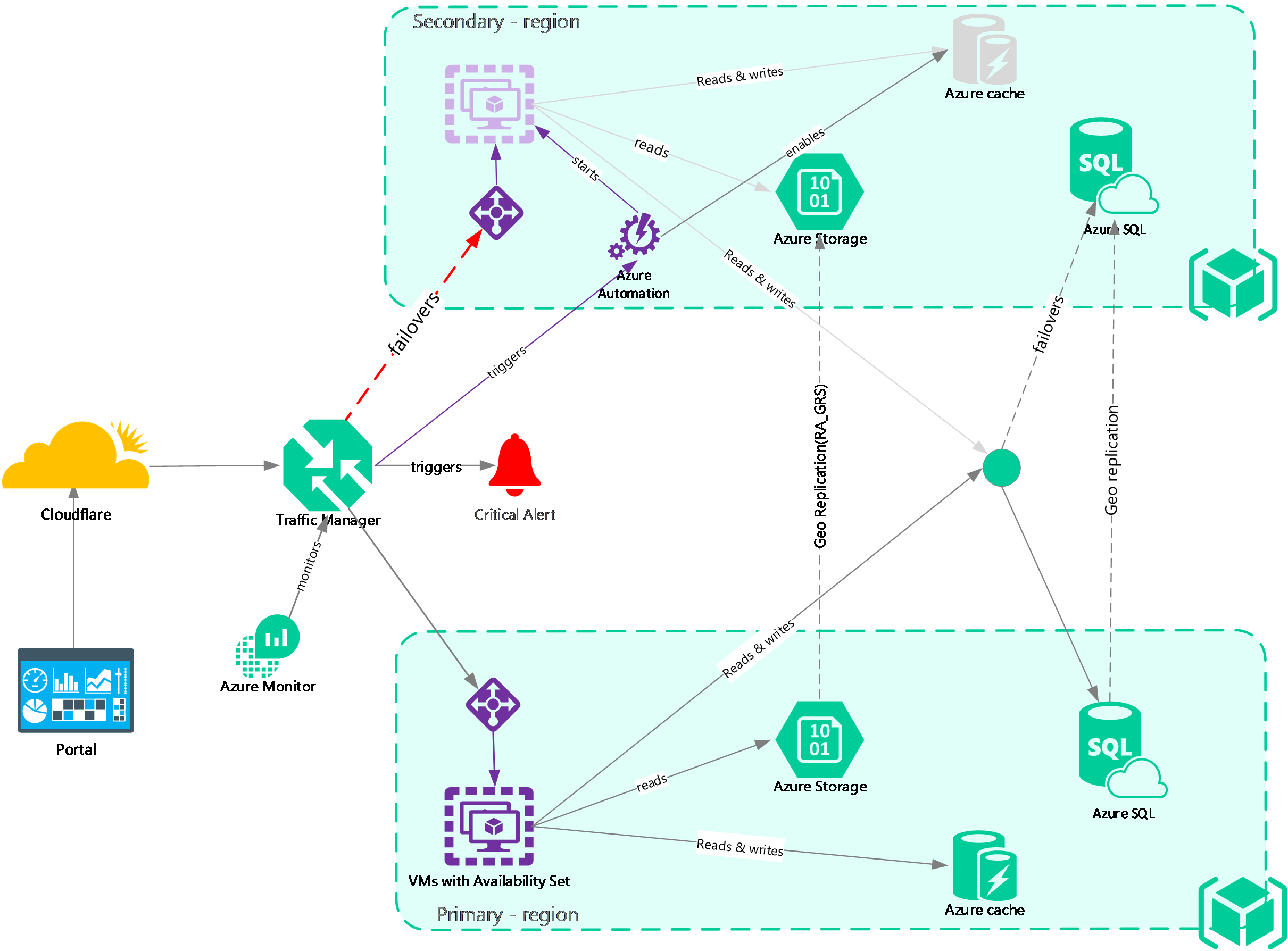
Geo-replication is enabled for both the SQL database and the Azure storage account, and some of the secondary region resources (like the VMs and the cache) are put in a cold state. Some data files are uploaded to the storage account during the deployment. During an outage, auto failover is initiated by SQL Server. On failover, Traffic Manager triggers Azure Automation, which starts the secondary VMs and enables the cache.
| RTO | RPO |
|---|---|
| 1 hour for SQL auto failover by Azure, 10 mins for manual failover | 5 seconds |
When to choose: This strategy is recommended for applications that are hosted in VMs and can bear up to one hour of outage for an incident. It saves the cost of running the secondary VMs all the time.
Active-Passive (Auto failover)
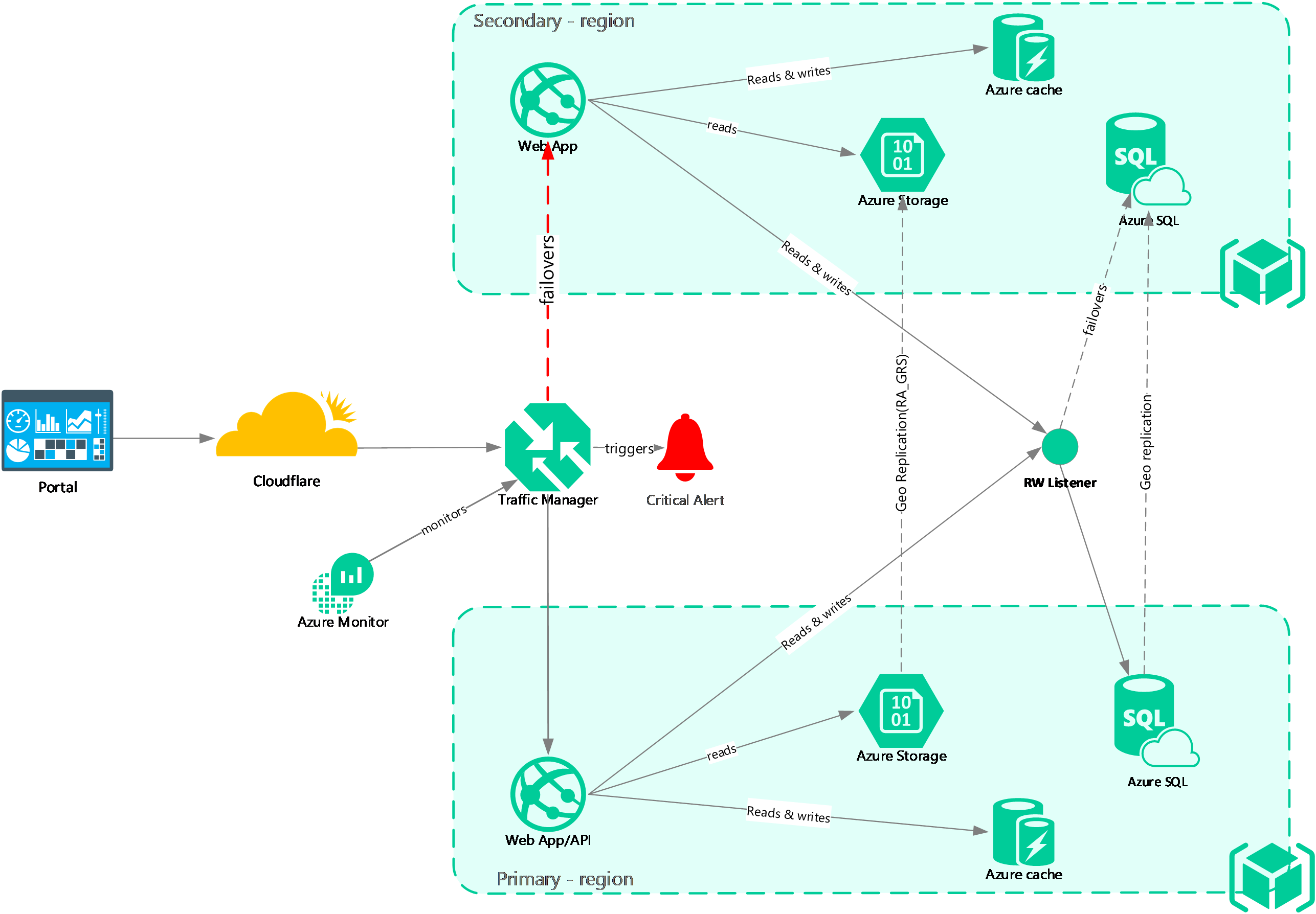
Geo-replication is enabled for both the database and the storage account (RA-GRS), and all the secondary region resources are put in a warm state. The application writes through the read-write (RW) listener of the failover group, so it doesn’t need a configuration change after the database failover. During an outage, auto failover is initiated by SQL Server.
| RTO | RPO |
|---|---|
| 1 hour | 5 seconds |
When to choose: This strategy is recommended for applications that can bear up to one hour of outage for an incident.
The RTO is one hour because the automatic failover policy of the SQL failover group waits for a grace period (one hour by default) before it fails over, to avoid failing over for a short glitch.
Active-Passive (Manual failover)
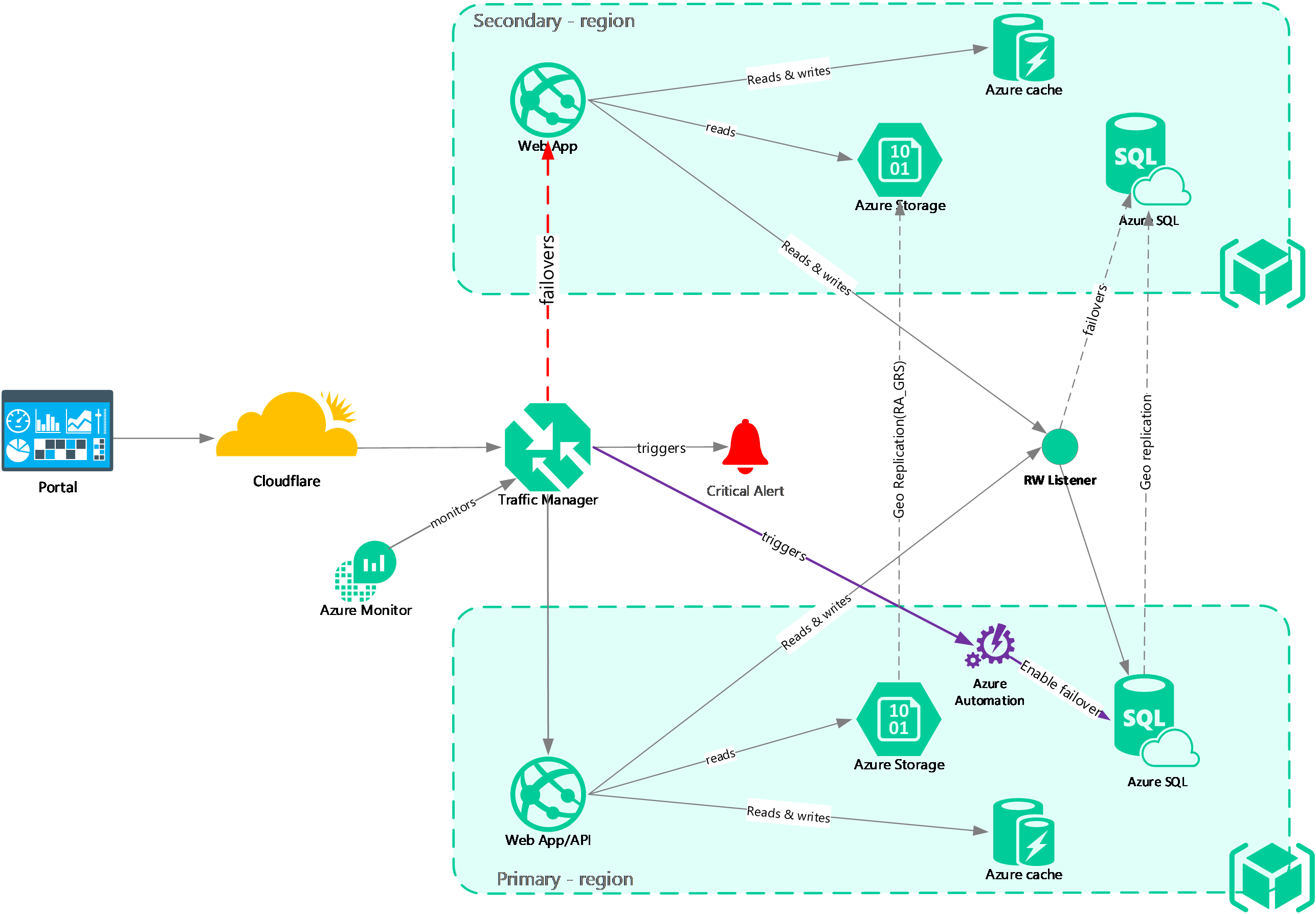
The replication and the warm secondary region are the same as the auto failover. The difference is on failover: Traffic Manager triggers Azure Automation, which initiates the failover of the SQL database. It is called as “manual” failover, but it is automated by us instead of waiting for Azure.
| RTO | RPO |
|---|---|
| 10 mins | 5 seconds |
When to choose: This strategy is recommended for applications that can bear up to 10 to 15 mins of outage for an incident.
Active-Active
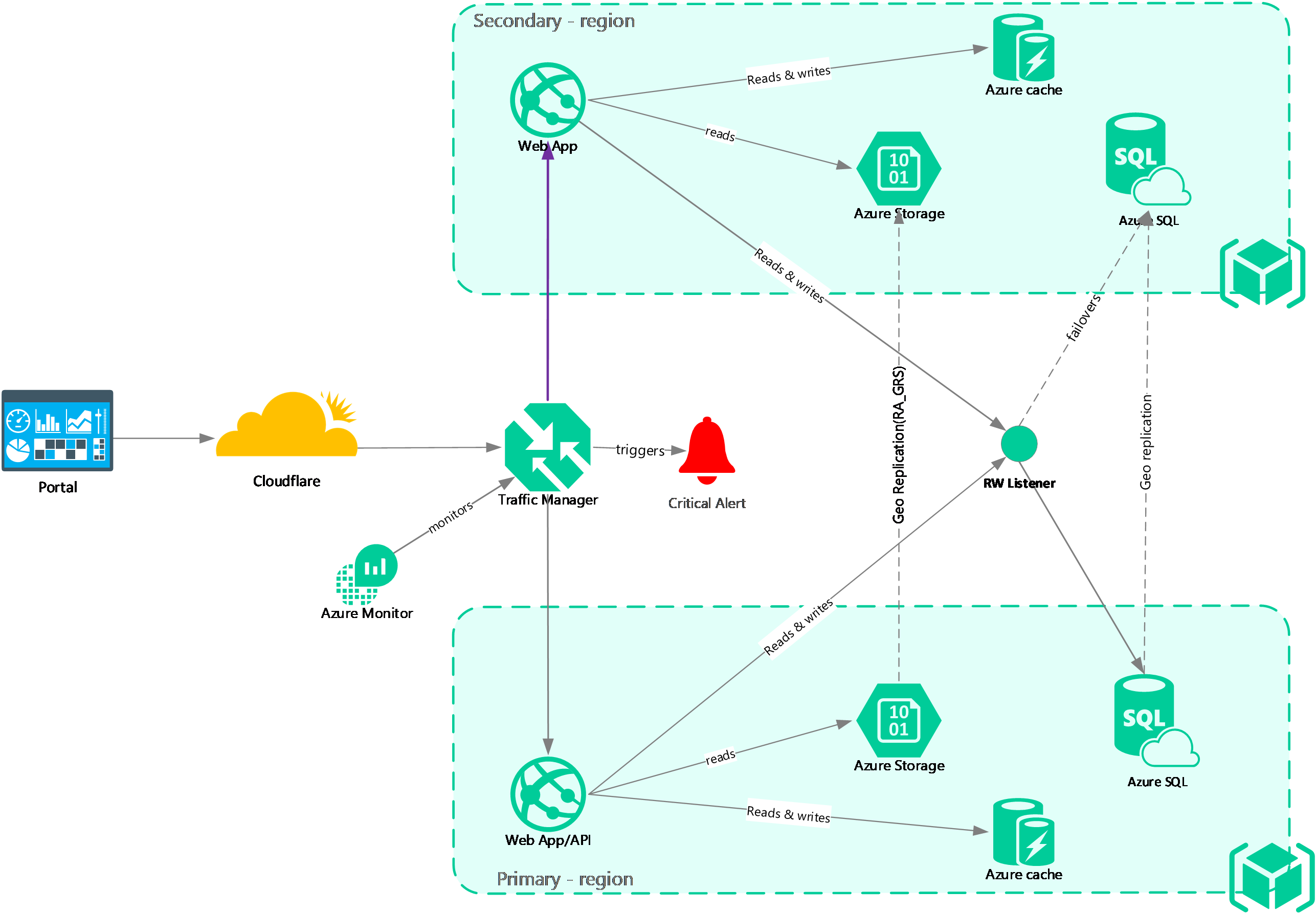
Geo-replication is enabled for both the database and the storage account, and all the secondary region resources are put in a hot state and serve the traffic. Automatic failover is initiated by SQL Server. In the secondary region, use the local read endpoint for the read operations for better performance, and use the write endpoint (RW listener) for the write operations.
| RTO | RPO |
|---|---|
| 1 hour for automatic failover, 10 mins for manual failover | 5 seconds |
When to choose: This strategy is not recommended in the first place, unless we have a certain use case like distributing the load geographically. In case you require this strategy, consult with the architects.
Notice that the RTO is the same as Active-passive. Since the database still has a single write region, Active-active doesn’t recover faster from a region failure; it mainly helps with performance and load distribution, at a much higher cost and complexity.
Active-Active for Static Sites
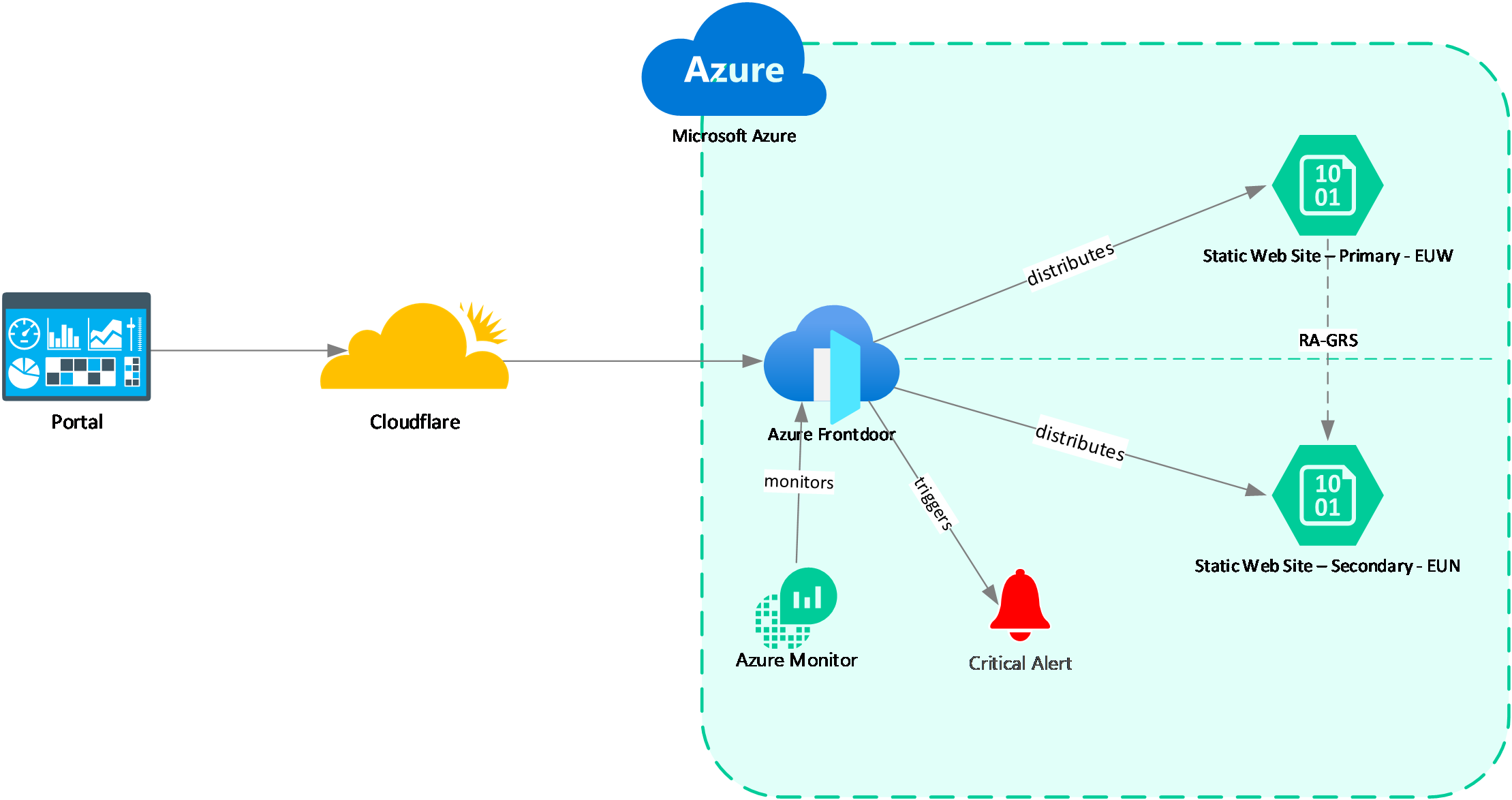
Azure Front Door is used here, since Traffic Manager doesn’t support Azure static websites. Front Door distributes the traffic to the static websites in both regions (West Europe and North Europe), and the content is replicated with RA-GRS.
| RTO | RPO |
|---|---|
| 1 min | 0 seconds |
When to choose: This strategy is more appropriate for static sites or SPAs (Single Page Applications). Since there is no server-side state, Active-active is cheap and simple here.
Comparison chart
The following chart compares all the strategies side by side. The SLA is calculated based on the defined RTOs, as we discussed in the previous article.
| # | DR Strategy | Additional notes | RTO | RPO | SLA (%) | When to choose |
|---|---|---|---|---|---|---|
| 1 | Redeploy | Database backup every one hour; some data files uploaded to storage during deployment | 2 hours | 1 hour | 99.78 | When an application can bear more than 2 hours of outage and data loss of about an hour or more |
| 2 | Lite Touch | Geo-replication for SQL DB and storage; some secondary resources cold; data files uploaded during deployment; SQL auto failover | 1 hour | 5 seconds | 99.8 | When an application is hosted in VMs and can bear up to an hour of outage |
| 3 | Active-Passive | Geo-replication for database; SQL auto failover | 1 hour | 5 seconds | 99.8 | When an application can bear less than 1 hour of outage |
| 4 | Active-Passive | Geo-replication for database; manual failover by Azure Automation | 10 mins | 5 seconds | 99.81 | When an application can bear less than 15 mins of outage |
| 5 | Active-Active | Geo-replication for database; SQL auto failover | 1 hour | 5 seconds | 99.8 | Not recommended in the first place; use it when you want to distribute the load geographically and consult the architects |
| 6 | Active-Active | Geo-replication for database; manual failover by Azure Automation | 10 mins | 5 seconds | 99.81 | Not recommended in the first place; use it when you want to distribute the load geographically and consult the architects |
| 7 | Active-Active | Static site | 1 min | 0 seconds | 99.98 | Static sites and SPAs |
How to choose?
Use the RTO and RPO agreed with the business (see Part 2) and walk through the following questions in order. Stop at the first question where your answer is yes,
| Order | Question | Choose |
|---|---|---|
| 1 | Is it a static site or an SPA? | Active-active with Azure Front Door |
| 2 | Can the application bear more than 2 hours of outage and an hour of data loss? | Redeploy |
| 3 | Is the application hosted in VMs and can it bear up to an hour of outage? | Lite touch |
| 4 | Can it bear up to an hour of outage? | Active-passive with auto failover |
| 5 | Can it bear only up to 10 to 15 mins of outage? | Active-passive with manual (automated) failover |
| 6 | Do you need to serve users from multiple geographies with low latency? | Active-active (only then, and consult the architects) |
Must Consider: Active-passive is our recommended strategy for most applications. It gives an RPO of seconds and a predictable RTO, at a reasonable cost.
Wrap up
In this article, we have looked at the DR strategy patterns from Redeploy to Active-active, their architecture, RTO and RPO, a side by side comparison and a simple guide to choose the right one. I really appreciate that you took the time to read this article. In the next article, I will walk you through the resource wise DR guidelines for Azure Storage, Azure SQL and Cosmos DB, and the implementation patterns which make an application resilient.
Related Posts
What is resiliency and why do we need a DR strategy? - Part 1
What resiliency is, why we need a DR strategy, how high availability, disaster recovery and backup differ and the principles we follow.
How to define a DR strategy for your application? A worked example - Part 5
Define a DR strategy for your application with a worked example: the process to identify the strategy, a worked example and the DR lifecycle.
How to implement DR for Azure resources? - Part 4
Resource-wise DR guidelines for Azure storage, SQL Database and Cosmos DB, the implementation patterns and the thumb rules we follow.