What are the styles of integration? - Part 2
The five styles of integration, file transfer, shared database, RPC, API and messaging, with fund-data examples, trade-offs and selection criteria.
What are the styles of integration? - Part 2
There is no single way for applications to exchange information. A fund manager may send a batch file, an internal service may read a shared SQL Server database, an older application may expose a Windows Communication Foundation (WCF) SOAP endpoint, and a newer consumer may call a REST API. Choosing the style without understanding the business need creates unnecessary coupling or unnecessary complexity. In the previous article, we discussed what enterprise integration is and why point-to-point connections become difficult. In this article, we are going to see five common styles of integration, their mutual fund examples, trade-offs and when to use each one.
Enterprise Integration Patterns series:
- What is enterprise integration and why do we need it? - Part 1
- What are the styles of integration? - Part 2 (this article)
- What are messages, commands and events? - Part 3
- How do messages flow from producer to consumer? - Part 4
- How to make messaging reliable and consistent? - Part 5
- What is event-driven architecture? - Part 6
- What is event sourcing? - Part 7
TL;DR Summary
- File transfer is good for provider batches, especially when latency can be measured in minutes or hours.
- Shared databases are simple for closely governed applications, but they create schema and deployment coupling.
- Remote Procedure Call (RPC), including WCF and SOAP, gives a direct operation but couples caller and receiver in time.
- REST over HTTP is a useful resource-oriented style for synchronous access and external consumers.
- Messaging uses queues or topics to provide asynchronous communication and temporal decoupling; Part 3 defines these channels in detail.
- The right choice depends on latency, ownership, reliability, data volume, consumer count and operational maturity.
Why do integration styles matter?
The integration style decides more than the shape of a request. It decides who must be available, when the data is transferred, how failure is reported and how a contract changes. For example, a daily provider file may be the most reliable choice for end-of-day reconciliation, while a website may need an HTTP API to read the latest available fund profile.
If we choose a synchronous call for a long-running calculation, the caller waits and a temporary failure becomes a customer-facing error. If we choose a shared database for teams with independent release cycles, one schema migration can break several applications. If we choose messaging for a caller which needs an immediate answer, we may make a simple question difficult to answer.
So, the style must follow the business interaction. Let us discuss the common choices one by one.
Style 1: File transfer
File transfer means a producer creates a file and places it in a location from which the consumer collects it. The location may be Azure Blob Storage, Azure Storage queues used as a notification around a blob, or an agreed secure file transfer location. The file can be CSV, XML, JSON or another documented format.
Fund data example
A fund administrator sends an end-of-day file containing fund name, ISIN, share class, currency, NAV, bid, offer and price date. The ingestion process discovers the file, checks its name and checksum, parses the records, maps them to data points and moves the file to an archive or rejected location.
Benefits and drawbacks
| Benefits | Drawbacks |
|---|---|
| Good for large batches and provider-controlled schedules | Data is not immediately available |
| Easy to archive and replay after a parsing fix | File naming, duplicate files and partial uploads need control |
| Provider does not need to expose an online service | A malformed row can affect the complete batch without careful handling |
| Simple contract for organisations with batch processes | Consumers need polling or notifications |
Use file transfer when the provider naturally works in batches, the data volume is high or the business accepts a known delay. Do not use it to simulate real-time integration by creating a file for every small change; that produces operational noise and difficult latency.
Must Be Aware: A file appearing in a storage location does not always mean that it is complete. Use an atomic naming convention, a manifest or a completion marker, otherwise the consumer may read a partially uploaded file.
Style 2: Shared database
Shared database integration means two or more applications read or write the same database tables. In the fund platform, a factsheet process and an internal reporting application may both read a governed fund data store. A legacy application may also write a staging table which the ingestion process consumes.
Fund data example
The provider adapter writes a validated static data record to SQL Server. A website API reads the current fund profile, while a reconciliation process reads the original provider value and the mapped value. The database provides a familiar transaction and query model.
Benefits and drawbacks
| Benefits | Drawbacks |
|---|---|
| Easy to query and join related data | Schema is a shared contract and changes affect many applications |
| A database transaction can protect multiple writes | Teams become coupled to indexes, tables and stored procedures |
| Useful for reporting and current-state views | Database availability becomes a shared dependency |
| Familiar to many teams | It is difficult to express asynchronous work and ownership |
Shared database integration is reasonable when the applications belong to one team, the schema has one clear owner and the interaction is a current-state query. It is not a good substitute for a message channel between independent services. If a consumer needs to know that a value changed, publish a message rather than making it repeatedly query the whole table.
Must Consider: Do not allow every consumer to write directly to the same business tables. Define one owner for changes, otherwise invalid state can be created without passing through validation.
Style 3: Remote Procedure Call
Remote Procedure Call (RPC) makes a remote operation look like a local method call. WCF and Simple Object Access Protocol (SOAP) services are common examples from the .NET integration landscape in 2018. The caller sends an operation and waits for a response.
Fund data example
A legacy provider may expose GetFundProfile and GetPrice operations through a SOAP service. The adapter sends the ISIN and date, receives a response and maps the fields into our canonical data points. The operation is direct and the service contract can describe the request and response.
Benefits and drawbacks
| Benefits | Drawbacks |
|---|---|
| Clear operation-oriented contract | Caller and receiver must be available at the same time |
| Natural for commands and immediate answers | Network timeout is not the same as operation failure |
| Existing WCF and SOAP tooling can generate clients | Retries can repeat a non-idempotent operation |
| Suitable for a small number of trusted integrations | Changes to the operation can require coordinated releases |
RPC is useful when the caller needs the result before continuing, such as requesting a specific fund profile during an operator workflow. Add timeouts, authentication and a retry policy such as Polly where the operation is safe to repeat. Do not hide a batch process behind thousands of RPC calls if a file or queue is more appropriate.
Style 4: API-based integration
API-based integration normally means a service exposes a documented interface over HTTP. Representational State Transfer (REST) is a resource-oriented style commonly implemented with JSON, HTTP verbs and status codes. For a deeper discussion about resources, verbs, status codes and versioning, refer to the REST API Design Guidelines series.
Fund data example
A website or factsheet service calls GET /funds/{isin} to read the current fund profile and GET /funds/{isin}/prices?from=...&to=... to read a price range. An authorised provider adapter might call a provider API to retrieve the latest NAV. The API can return a clear 200, 404 or 503 response and a documented error body.
Benefits and drawbacks
| Benefits | Drawbacks |
|---|---|
| Familiar to browsers, partners and internal clients | Caller still depends on receiver availability |
| Resource contracts can evolve with versioning and compatibility | A long dependency chain increases latency |
| HTTP infrastructure, security and monitoring are mature | Clients may retry incorrectly or create a thundering herd |
| Good for immediate queries and simple commands | APIs are not automatically durable work queues |
Use an API when the client needs current state or an immediate result. Apply authentication and authorisation, validate input, limit expensive queries and return a stable contract. Use a queue behind the API when the request starts work which may take longer than the HTTP interaction.
Must Do: Define what an HTTP success means. A
202 Acceptedresponse means work has been accepted for later processing; it must not be used when the caller expects the operation to be complete.
Style 5: Messaging
Messaging means a producer sends a message to a channel and a consumer receives it later. A producer creates and sends the message, a channel is the path which carries it, and a consumer receives and handles it. A queue is a channel which gives work to one owner, while a topic is a channel which publishes an event to multiple subscriptions, each with its own consumer. A broker stores and routes messages between these participants.
The basic mental model is:
Producer -> channel -> consumerFor asynchronous messaging, the producer does not need to wait for the consumer to be available. The broker stores the message so that the consumer can receive it later, subject to the retention and delivery policy. A command normally goes through a queue to one owner. An event normally goes through a topic and subscriptions to zero or more interested consumers. We will define commands, events, envelopes and the other building blocks in Part 3.
Azure Service Bus provides queues, topics and subscriptions, and the Microsoft.Azure.ServiceBus .NET Standard client supplies types such as QueueClient, TopicClient and SubscriptionClient.
Fund data example
After storing a NAV, the platform publishes PriceDataPointChanged to a Service Bus topic. The performance subscription recalculates returns, the search subscription updates the index, the factsheet subscription schedules a regeneration and the reconciliation subscription compares the provider value. Each consumer can process at its own speed.
Benefits and drawbacks
| Benefits | Drawbacks |
|---|---|
| Consumer can be temporarily unavailable | Delivery is commonly at least once, so duplicates are possible |
| Queue and topic models reduce direct coupling | Eventual consistency must be explained to users |
| Backlog, retry and dead-letter paths are visible | Ordering needs an explicit design |
| Consumers can scale independently | Replay, schema evolution and monitoring need discipline |
Use messaging when the work can happen asynchronously, when multiple consumers need the same event or when the producer should not wait for a downstream system. Do not use a topic when only one owner should perform a command; use a queue or a subscription with clear ownership.
Comparison of the five styles
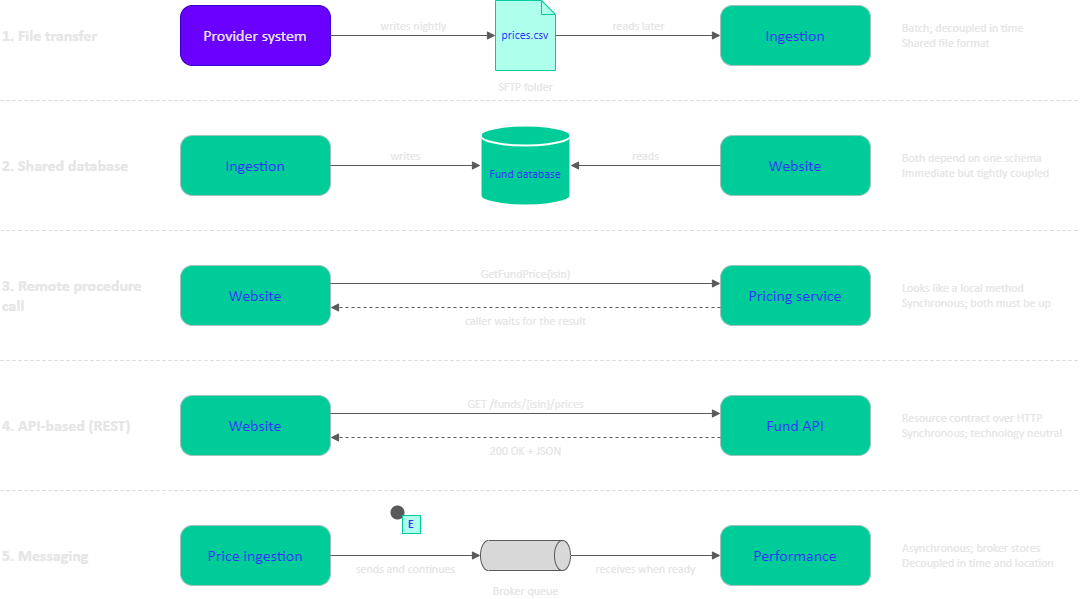
The following diagram depicts the five integration styles side by side, one row per style. Each row shows what sits between the two applications and how they talk: a file in a shared folder, a shared database, a direct procedure call, an HTTP request to an API, or a message in a broker queue. The dashed arrows are the replies the caller waits for, and the note on the right of each row is the key trait of that style.
Read the rows from top to bottom and notice two things. First, file transfer and messaging are the only styles where the two applications don’t need to be running at the same time. Second, RPC and API calls make the caller wait, while messaging lets the producer send and continue. These two properties, coupling in time and waiting, drive most of the trade-offs in the table below.
| Style | Coupling | Typical latency | Reliability approach | Complexity |
|---|---|---|---|---|
| File transfer | Loose in time, contract coupled | Minutes to hours | Archive, checksum, replay and reject path | Low to medium |
| Shared database | High schema and availability coupling | Low for reads | Database transaction and backup | Low at first, high at scale |
| RPC | Tight in time and operation contract | Low to medium | Timeout, retry and compensation | Medium |
| REST API | Medium contract and availability coupling | Low to medium | HTTP status, timeout, retry and throttling | Medium |
| Messaging | Loose in time and location | Low to eventual | Durable queue, retry, idempotency and DLQ | Medium to high |
The table is a guide, not a scorecard. A file may be more reliable than an API for an end-of-day batch, and a REST API may be simpler and safer than messaging for a read-only query. We must select based on the interaction rather than the popularity of the technology.
How should we choose?
Here are some questions to ask before selecting a style,
- Does the caller need an immediate answer, or can the work complete later?
- Is the data naturally a batch, a single resource, a command or a fact?
- Who owns the data and who is allowed to change it?
- Can the producer and consumer be unavailable at different times?
- How large is the payload and how often is it sent?
- Is ordering required for one fund share class or ISIN?
- How will we retry, reject, replay and monitor the interaction?
- Can the receiver safely process the same input twice?
In our case, a provider’s end-of-day file is a good ingestion boundary, a REST API is useful for website reads and Service Bus messaging is useful for publishing a validated data point change to several consumers. A shared database can support current-state queries, but it should not become an accidental integration bus.
Must Consider: Keep the integration style boring where possible. A simple, well-observed file or API is better than a sophisticated message flow that nobody can operate.
Wrap up
In this article, we have looked at file transfer, shared database, RPC, API-based integration and messaging, including their fund-data examples, benefits, drawbacks and selection criteria. I really appreciate that you took the time to read this article. In the next article, I will walk you through messages, commands, events, envelopes, channels, queues, topics, producers, consumers and correlation.
Related Posts
What is enterprise integration and why do we need it? - Part 1
Why a mutual fund data platform needs enterprise integration, the common challenges and why a broker beats point-to-point connections.
How do messages flow from producer to consumer? - Part 4
How messages flow from producer to consumer: channel adapters, claim check, routers, dispatchers, polling and competing consumers, and ordering.
How to make messaging reliable and consistent? - Part 5
Make messaging reliable: guaranteed delivery, retry, poison messages, dead-letter queues, replay, idempotency, deduplication and Saga consistency.