What are messages, commands and events? - Part 3
Messages, envelopes, commands and events, producers and consumers, channels, queues, topics, brokers and buses, explained with a postal-service model.
What are messages, commands and events? - Part 3
Messaging becomes easier to understand when we stop thinking about a queue as a magic storage box and start with a simple everyday model. Think about a postal service. A message is a letter, its envelope carries the address and tracking details, a mailbox is a queue, a newsletter subscription is a topic, and the post office is a broker. In the previous article, we discussed file transfer, shared database, Remote Procedure Call (RPC), API-based integration and messaging. In this article, we are going to build the mental model of messaging with the most important distinction: a command asks one owner to do something, while an event tells interested subscribers that something already happened.
Enterprise Integration Patterns series:
- What is enterprise integration and why do we need it? - Part 1
- What are the styles of integration? - Part 2
- What are messages, commands and events? - Part 3 (this article)
- How do messages flow from producer to consumer? - Part 4
- How to make messaging reliable and consistent? - Part 5
- What is event-driven architecture? - Part 6
- What is event sourcing? - Part 7
TL;DR Summary
- A message is a letter in our postal analogy: information sent from a producer to a consumer through a channel.
- The envelope contains headers such as MessageId, CorrelationId, ContentType, SessionId and custom properties; the body contains business data.
- A command uses an imperative name, has one intended owner and can be accepted or rejected.
- An event uses a past-tense name, records a fact and can have zero or many subscribers; the fact itself cannot be rejected.
- A queue is point-to-point delivery for work such as
ValidateProviderFile, while a topic and subscriptions distribute events such asPriceDataPointChanged. - Producers send messages and consumers handle them; a broker stores and routes them, while a message bus includes the wider integration rules.
- Request-response over messaging uses a reply queue and CorrelationId, but plain HTTP is simpler when the caller needs an immediate answer.
Concepts at a glance
This table gives the vocabulary for the series.
| Group | Concept | Plain definition | Part |
|---|---|---|---|
| Core concepts | Message | Information sent from a producer to a consumer | Part 3 |
| Core concepts | Message envelope | Headers and body carried together | Part 3 |
| Core concepts | Command | An instruction for one owner to perform work | Part 3 |
| Core concepts | Event | A fact which has already happened | Part 3 |
| Core concepts | Producer / publisher | The component which creates and sends a message | Part 3 |
| Core concepts | Consumer / subscriber | The component which receives and handles a message | Part 3 |
| Core concepts | Message channel | A logical path through which messages travel | Part 3 |
| Core concepts | Queue | A point-to-point channel with one message owner | Part 3 |
| Core concepts | Topic and subscription | A publish-subscribe channel with independent receivers | Part 3 |
| Core concepts | Message broker | Infrastructure which stores and routes messages | Part 3 |
| Core concepts | Message bus | The wider communication model around channels and contracts | Part 3 |
| Core concepts | Document / query message | A data document or question sent to a receiver | Part 3 |
| Core concepts | Request-response | A request message matched with a reply message | Part 3 |
| Core concepts | Message correlation | An identifier linking messages in one interaction | Part 3 |
| Moving and consuming messages | Message channel adapter | A bridge from a file, API or external protocol to a channel | Part 4 |
| Moving and consuming messages | Message router | A component which selects a destination | Part 4 |
| Moving and consuming messages | Message dispatcher | A component which selects a handler in a process | Part 4 |
| Moving and consuming messages | Polling consumer | A consumer which asks for work at intervals | Part 4 |
| Moving and consuming messages | Event-driven consumer | A consumer invoked when a message arrives | Part 4 |
| Moving and consuming messages | Competing consumers | Multiple workers sharing one queue | Part 4 |
| Moving and consuming messages | Ordering | The sequence in which messages are handled | Part 4 |
| Moving and consuming messages | Claim check | A small reference to a large payload stored elsewhere | Part 4 |
| Reliability and consistency | Guaranteed delivery | Durable storage, acknowledgement and a failure path | Part 5 |
| Reliability and consistency | Retry | Trying a failed delivery or operation again | Part 5 |
| Reliability and consistency | Poison message | A message which repeatedly fails to process | Part 5 |
| Reliability and consistency | Dead-letter queue | A holding channel for messages needing investigation | Part 5 |
| Reliability and consistency | Replay | Deliberately processing a stored message again | Part 5 |
| Reliability and consistency | Idempotency | Applying the same operation again produces the same result | Part 5 |
| Reliability and consistency | Deduplication | Recognising a repeated message before repeating work | Part 5 |
| Reliability and consistency | Saga | Coordinating local transactions and compensation | Part 5 |
What is a message?
A message is a unit of information sent from a producer to a consumer through a message channel. In the postal analogy, it is the letter. The sender decides why the letter exists, the channel transports it, and the receiver decides what to do after reading it.
In our mutual fund data platform, a message can ask a validation service to process a provider file, or it can state that a NAV data point changed. It can carry a document such as a mapped fund profile or a query such as GetFundProfile. The message needs an owner, a contract and a clear handling outcome.
The following diagram depicts the anatomy of a message. At the top, price ingestion sends a PriceDataPointChanged message to performance; the grey circle on top is the envelope, and the two hatched squares hanging from it are the parts of the body. Below, the same message is opened up: the envelope carries identity, routing and delivery metadata, and the body carries the business data. Notice who reads what: the broker reads only the envelope to route, filter, order and detect duplicates, while the consumer’s business logic reads the body.
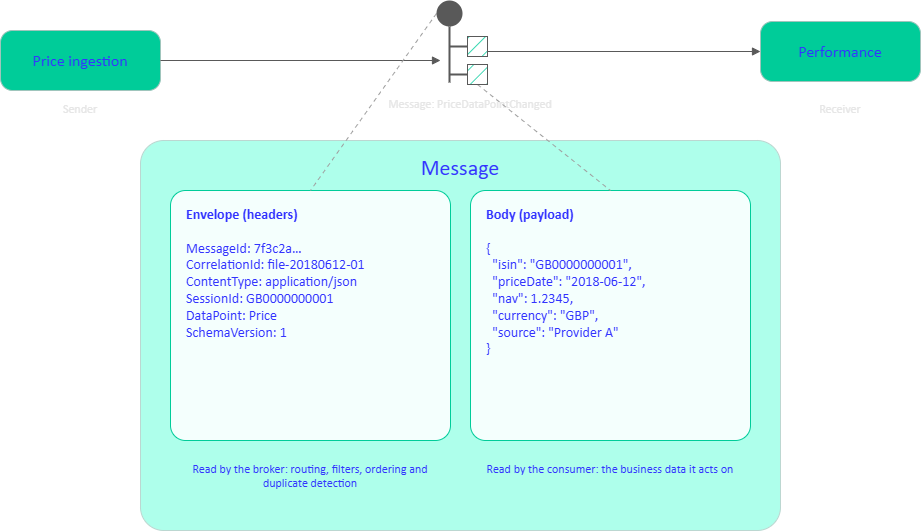
Message envelope: headers and body
The message envelope is the outside part of the message which wraps the business body. In our postal analogy, the envelope tells the postal service where the letter belongs and how it can be tracked; the letter contains the actual content.
Common headers and properties include,
- MessageId - A unique identity for this message. Azure Service Bus duplicate detection uses this value when configured.
- CorrelationId - An identity linking this message to a request, provider file or workflow.
- ContentType - How the body should be decoded, for example
application/json. - SessionId - A grouping key for ordered processing, such as one ISIN or share class.
- Custom properties - Small values used for routing and filtering, such as
DataPoint=PriceorSchemaVersion=1.
The body contains business data such as ISIN, currency, price date, NAV, bid, offer and source. Put technical routing information in the envelope and business information in the body. Do not put credentials or unnecessary personal data in either part, because a message may be stored, retried and copied to a dead-letter queue.
Must Consider: A MessageId identifies a message, while an ISIN identifies a fund instrument and a CorrelationId identifies an interaction. These values solve different problems and should not be substituted for one another.
Command versus event
This is the centrepiece of the messaging mental model.
A command is an instruction asking one owner to perform an action. In simple words, it says, “please do this.” The command uses an imperative name such as ValidateProviderFile or RecalculatePerformance. The receiver owns the command contract because the receiver decides what it can accept, what validation it needs and which errors it can return.
An event is a statement that something already happened. In simple words, it says, “this is now a fact.” The event uses a past-tense name such as PriceDataPointChanged or ProviderFileReceived. The publisher owns the event contract because it owns the meaning of the fact and is responsible for keeping subscribers able to understand it.
The difference is not only grammar. A command has one intended owner and can be accepted or rejected. An event is a fact and cannot be rejected by a subscriber; a subscriber can fail to process it, but that does not make the original fact untrue.
| Concern | Command | Event |
|---|---|---|
| Plain meaning | Please perform this action | This action already happened |
| Naming | Imperative: ValidateProviderFile | Past tense: ProviderFileValidated |
| Intended receiver | One owner | Zero to many subscribers |
| Contract owner | Receiver | Publisher |
| Coupling direction | Sender knows the owner and asks for work | Subscribers choose whether to react |
| Outcome | Accepted, rejected or failed | Fact remains true; reactions can succeed or fail |
| Channel | Usually a queue | Usually a topic and subscriptions |
Command leading to an event
Let us follow one provider file through the platform,
- The provider adapter sends
ValidateProviderFileto the validation queue. - The validation service, which is the one owner, accepts or rejects the command.
- If validation succeeds, the service stores the result and publishes
ProviderFileValidated. - Reconciliation, data mapping and operations subscribers react to the event independently.
- If one subscriber fails, the fact that the provider file was validated does not become false. That subscriber handles its own retry and failure path.
The following diagram depicts this walk-through, with the command on the left and the event on the right. The provider adapter sends the ValidateProviderFile command (C) through the validation queue to exactly one owner, the validation service, which can accept or reject it. When validation succeeds, the validation service publishes the ProviderFileValidated event (E) once to the file-events topic, and every subscriber (data mapping, reconciliation and the operations dashboard) receives it. Notice where the knowledge sits: the adapter knows who must do the work, while the validation service doesn’t know or care who reacts to its event.
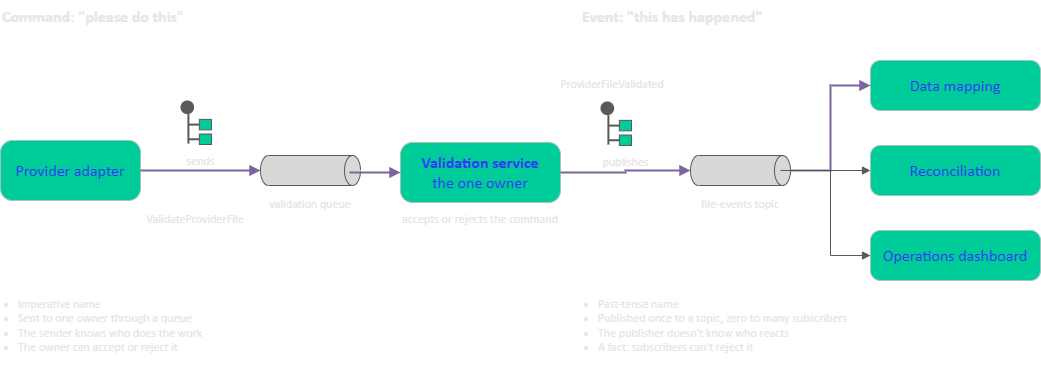
The flow highlighted in purple is one provider file’s journey: the command reaches its owner, and the resulting event reaches data mapping. Reconciliation and the operations dashboard receive their own copy of the same event, while the validation service does not call any of them directly.
The bullets under each half summarise the difference: a command has an imperative name, goes to one owner through a queue and can be rejected; an event has a past-tense name, is published once to a topic for zero to many subscribers and is a fact which no subscriber can reject. The letter on each message icon shows its kind: C for a command and E for an event.
When should we use a command or event?
Use a command when one service owns the decision or operation. ValidateProviderFile, RecalculatePerformance and RegisterShareClass each have an owner which can say yes, no or try later. Use an event when the producer has completed a fact and independent consumers may need to react. ProviderFileReceived, ProviderFileValidated and PriceDataPointChanged are facts which can be observed by different services.
The direction of coupling is different. A command sender must know the command owner and its contract. An event publisher should not need to know all subscribers; subscribers depend on the event contract and decide whether it is useful. This does not mean an event has no ownership. The publisher remains responsible for the event’s meaning, versioning and useful lifetime.
Common mistakes
- A command disguised as an event -
RecalculateReturnsEventasks a service to work, so call itRecalculatePerformanceand send it to the owner. - An event which is too chatty - Publish a meaningful business fact rather than every internal field change.
- An event which is too fat - Do not copy the complete provider file into every event; carry the state consumers need.
- A subscriber treated as an owner - A subscriber reacts to a fact but does not take ownership of another service’s command.
An event can be a small notification containing an identifier, or it can carry the state required by a consumer. We will see event notification versus event-carried state transfer in Part 6. The decision changes payload size, follow-up reads and schema responsibilities.
Command and event classes in C#
C# records were not available in the .NET Core 2.1 era, so these examples use classes:
public sealed class ValidateProviderFile
{
    public string CommandId { get; set; }
    public string CorrelationId { get; set; }
    public string Provider { get; set; }
    public string FileKey { get; set; }
}

public sealed class ProviderFileValidated
{
    public string EventId { get; set; }
    public string CorrelationId { get; set; }
    public string Provider { get; set; }
    public string FileKey { get; set; }
    public DateTime ValidatedAtUtc { get; set; }
    public int RecordCount { get; set; }
}
The command contract is defined with the validation service in mind. The event contract is defined for all consumers which need to understand the completed fact. The technical MessageId can be set from CommandId or EventId, while CorrelationId is copied across the interaction.
Producers, publishers and consumers
A producer or sender creates a message and places it on a channel. A publisher is a producer which announces an event to a topic. In the fund platform, the provider adapter produces ValidateProviderFile, and the data point store publishes PriceDataPointChanged.
A consumer or receiver reads and handles a message. A subscriber is a consumer attached to a topic subscription. The validation service consumes the command; performance, search and factsheet services subscribe to the price event. A consumer owns its processing outcome, so it decides when a message can be completed and what should happen on failure.
Do not make a publisher wait for every event subscriber unless the business contract explicitly requires synchronous completion. The publisher should record that the event was sent, while each consumer records its own processing result.
Message channel, queue and topic
A message channel is the logical path through which messages travel. In the postal analogy, it is the postal route and mailbox arrangement. The channel has a name, an owner, a contract, a delivery policy and an operational dashboard.
A message queue is a point-to-point channel. One message is delivered to one intended consumer at a time, although retries can deliver it again later. A command normally uses a queue because one owner should decide whether ValidateProviderFile is accepted.
A topic and subscription implement publish-subscribe. A publisher sends one event to a topic, and each subscription receives its own copy. An event normally uses a topic because performance, search and factsheet consumers can react independently to PriceDataPointChanged.
The following diagram depicts the one question that separates a queue from a topic: how many copies of a message are delivered? In the top half, the provider adapter sends three ValidateProviderFile commands to the validation queue. Two instances of the validation service read from the same queue, and each command goes to exactly one of them: worker A gets C1 and C3, worker B gets C2. Adding workers shares the load; it never duplicates the work. In the bottom half, price ingestion publishes one PriceDataPointChanged event to the price-events topic. The topic has one subscription per interested service, and each subscription receives its own copy, so performance, search and factsheets all see the same event.
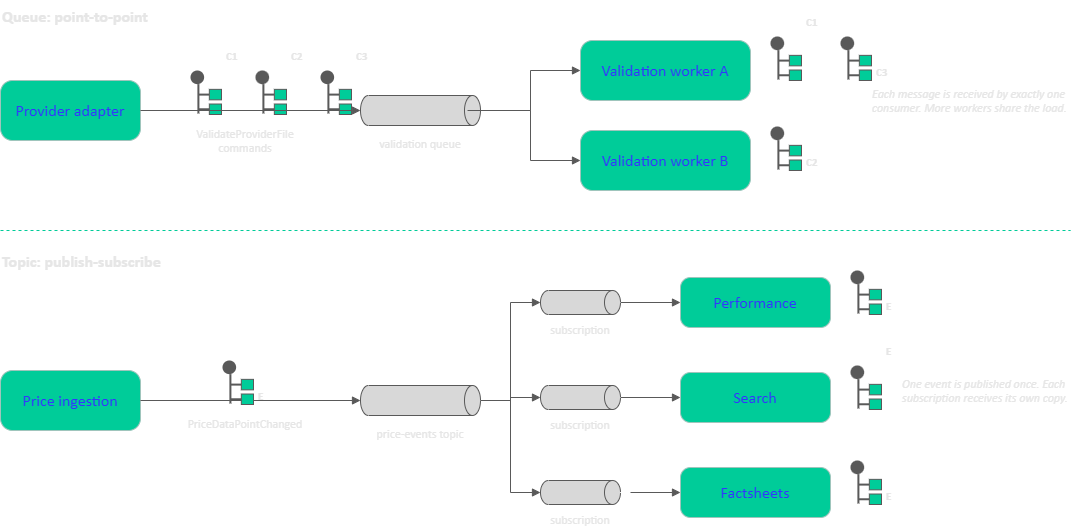
Azure Service Bus provides queues, topics and subscriptions. A QueueClient can send a command, while a TopicClient can publish an event and a SubscriptionClient can receive one subscription’s copy. The channel gives us temporal decoupling: a consumer can be unavailable while a durable message waits, subject to the retention and delivery policy.
The following diagram depicts what a message channel gives the sender and the receiver. Price ingestion sends messages to the price-changes channel; it knows only the channel’s name, not who reads it or where that reader runs. The channel lives inside the messaging system (the broker), which stores the messages (1, 2 and 3 are waiting) until performance takes them. Performance can be busy, restarting or offline for a while; nothing is lost, and price ingestion doesn’t have to wait. This is the temporal decoupling which a direct call can’t give us.
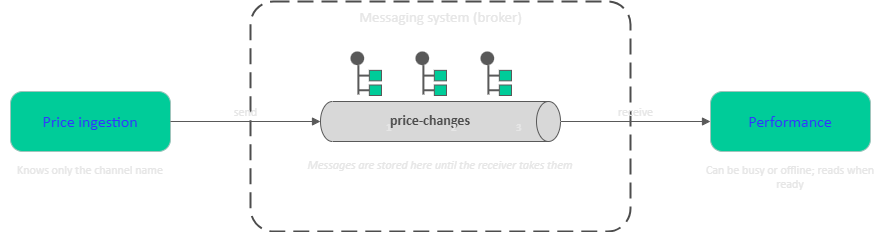
The dashed boundary is the messaging system, and the horizontal pipe is the channel. A channel has a name, an owner and one kind of message; the queue and the topic we saw above are the two shapes a channel can take.
Message broker versus message bus
A message broker is infrastructure which accepts, stores and routes messages between producers and consumers. In the postal analogy, the broker is the post office and its sorting system. Azure Service Bus, RabbitMQ and Apache Kafka can provide broker or transport capabilities, although their delivery models differ.
A message bus is the broader communication and integration model built from channels, message contracts, routing conventions, adapters, ownership and operational rules. In our platform, Azure Service Bus can be the broker and transport, while the fund-data message bus also includes the rules for command ownership, event versioning and consumer monitoring.
| Concern | Message broker | Message bus |
|---|---|---|
| Main focus | Store and deliver messages | Organise communication across the platform |
| Scope | Transport and infrastructure | Transport, contracts, routing and ownership |
| Example | Service Bus queue or RabbitMQ queue | Fund-data integration backbone |
| Main question | Can this message be delivered? | Which channel and owner make sense? |
The terms are sometimes used interchangeably. Buying a broker does not automatically create a healthy message bus.
The following diagram depicts the fund-data message bus as one shared backbone. Price ingestion and static data ingestion put messages on the bus, and performance, search and factsheets take what they need from it; none of them connects to another directly. The legacy ratings system can’t speak the bus’s contracts, so an adapter translates in both directions at its boundary. Underneath, the transport is the broker (Azure Service Bus queues and topics), but the list on the right is what turns that transport into a bus: common message contracts, channel naming conventions, one owner per channel, adapters for systems which can’t speak the bus, and shared monitoring.
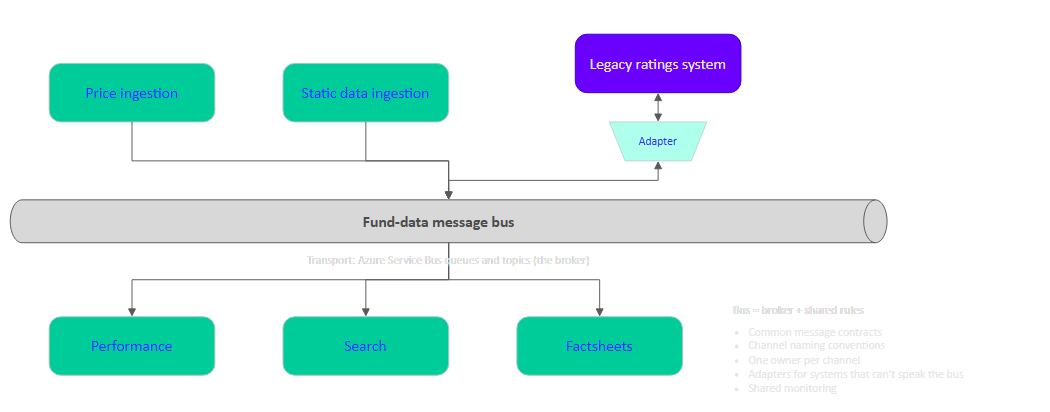
In other words, the broker answers “can this message be delivered?”, while the bus answers “how do all our applications talk to each other?”. A new application joins by plugging into the bus and following its rules, not by agreeing a new connection with every other application.
Request-response and correlation
Request-response messaging sends a request to one channel and returns the result on a reply channel. The request includes a reply queue or reply-to value. The responder sends the result with the same CorrelationId, and the requester matches the reply with its outstanding request.
For example, an operator workflow can send GetFundProfile to a query queue. The data service reads it and sends a fund profile document to a reply queue. The requester uses CorrelationId to match the response and handles a timeout.
Message correlation is the identifier relationship which connects messages in one business interaction. A provider file CorrelationId can link validation, mapping, storage and reconciliation. A request CorrelationId links the request and reply. Keep the business key, such as ISIN, as a separate value because correlation identifies the interaction, not the fund.
Plain HTTP request-response is simpler when the caller needs an immediate answer, the operation is short and both sides can be available together. Messaging request-response is useful when the receiver may be temporarily unavailable, the request must wait durably or the caller needs a reply without holding a network connection open.
The following diagram depicts request-reply over two one-way channels. On the top row, the operator workflow sends a GetFundProfile query (Q) to the query queue. Its envelope carries CorrelationId: 42 and ReplyTo: reply queue, so the fund data service knows where to answer without knowing anything else about the requester. On the bottom row, the fund data service sends the fund profile (R) to the reply queue with the same CorrelationId: 42. The requester doesn’t hold a connection open while it waits; when a reply arrives, it matches it to its outstanding request by the CorrelationId, and if no reply arrives in time, it handles the timeout.
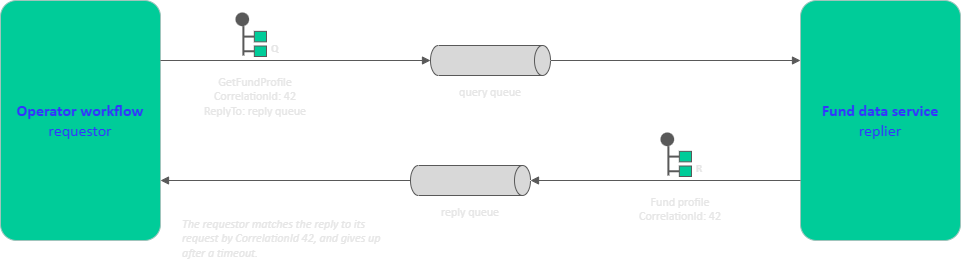
The CorrelationId connects the request and reply; it is not a replacement for the fund’s ISIN.
Note: Do not use messaging request-response only to avoid designing an HTTP API. It adds reply queues, correlation, timeout handling and operational work.
Wrap up
In this article, we have built a postal-service mental model for messaging and looked at messages, envelopes, headers, bodies, commands, events, producers, publishers, consumers, channels, queues, topics, subscriptions, brokers, buses, request-response and correlation. I really appreciate that you took the time to read this article. In the next article, I will walk you through adapters, claim checks, routers, dispatchers, consumer styles, competing consumers and ordering as messages flow through the platform.
Related Posts
How do messages flow from producer to consumer? - Part 4
How messages flow from producer to consumer: channel adapters, claim check, routers, dispatchers, polling and competing consumers, and ordering.
What is enterprise integration and why do we need it? - Part 1
Why a mutual fund data platform needs enterprise integration, the common challenges and why a broker beats point-to-point connections.
What is event-driven architecture? - Part 6
Event-driven architecture with a mutual fund data pipeline in .NET: event contracts, publishing, subscription filters, consumers and the trade-offs.