Twelve-Factor App - what it means for .NET teams
The Twelve-Factor App principles interpreted for .NET teams through codebases, configuration, backing services, processes, logs, deployments and Azure operations for practical guidance.
Twelve-Factor App - what it means for .NET teams
A deployment becomes difficult when an application depends on one developer machine, a checked-in password or a manual sequence of server changes. The Twelve-Factor App principles give teams a vocabulary for making applications portable and repeatable. In the previous article, we discussed idempotent REST APIs and safe retries. In this article, we are going to interpret all twelve factors for a .NET application moving between development, test and Azure.
TL;DR Summary
- The twelve factors are practices for building deployable, observable and portable services.
- Codebase and dependency declarations make the build reproducible.
- Configuration belongs in the environment, not in source code.
- Backing services are attached resources with explicit configuration.
- Processes should be stateless, with durable state in a backing service.
- Logs are an event stream and administrative work must be repeatable.
- The principles are guidance, not permission to ignore .NET and Azure operational realities.
Challenges
Works only on one workstation
A .NET application can depend on a local package cache, machine certificate or manually installed tool. It works for the author and fails on the build agent. These hidden dependencies delay feedback and make a release difficult to reproduce.
Configuration is mixed with code
Connection strings, feature switches and endpoint URLs change between development and production. If they are compiled into the application or committed to a settings file, the release process becomes a secret distribution process.
The process is carrying state
A web process storing sessions, uploaded files or a fund price only in local memory loses that state when the instance is recycled. Scaling out also makes one user see different values. Durable backing services and explicit cache semantics are required.
What is the Twelve-Factor App?
The Twelve-Factor App is a set of principles for developing services which are portable across environments, reproducible to deploy and easy to operate.
In simple terms, it is a checklist for separating code, configuration, dependencies, processes and operations. It is called as a practical way of discussing the application lifecycle.
An everyday analogy is a packed lunch. The recipe and ingredients are the code and dependencies, while the lunchbox is the release artifact. The person’s preference for tea or water is configuration; it should not require rewriting the recipe.
Why the twelve factors are important?
These principles are important because a service is living across source control, build, release and runtime environments. A clean boundary makes App Service, a container or a test runner easier to use. The principles do not remove platform-specific decisions, but they make those decisions visible.
The following diagram groups all twelve factors:
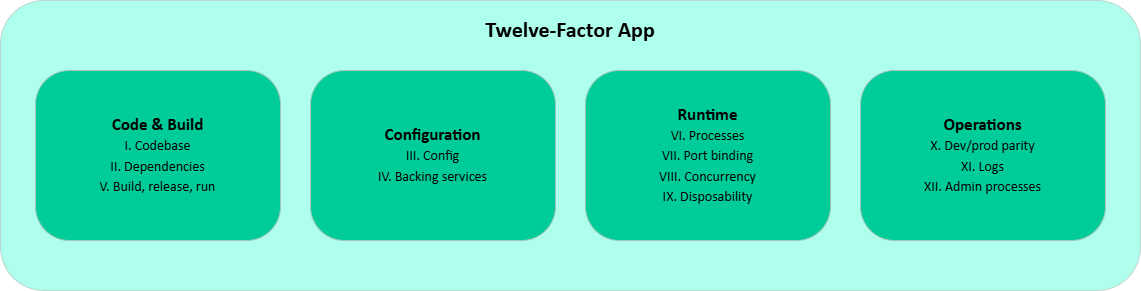
The groups are Code & Build, Configuration, Runtime and Operations. The boxes contain the complete factors, not only headings:
| Factor | .NET mapping |
|---|---|
| I. Codebase | One Git repository or a clearly owned repository |
| II. Dependencies | NuGet package references and a reproducible restore |
| III. Config | Environment variables or App Service settings, not secrets in web.config |
| IV. Backing services | SQL, Redis, DocumentDB and Service Bus as attached resources |
| V. Build, release, run | VSTS build creates an artifact, release promotes it, App Service runs it |
| VI. Processes | Web and worker processes are stateless |
| VII. Port binding | ASP.NET application exposes its configured HTTP port |
| VIII. Concurrency | Scale out workers or Web Apps rather than one giant process |
| IX. Disposability | Fast startup and graceful shutdown for deployment and scale |
| X. Dev/prod parity | Similar SQL, queues, logging and deployment paths across environments |
| XI. Logs | Write structured logs to a stream consumed by Application Insights or another sink |
| XII. Admin processes | Run migrations, imports and repair scripts as repeatable commands |
Configuration in .NET
Classic ASP.NET teams often use web.config transforms:
<connectionStrings>
  <add name="FundDb"
       connectionString="#{FundDbConnection}#" />
</connectionStrings>
The release system can replace a value, but the production secret must not be committed. App Service application settings or the release environment are storing the secret. For ASP.NET Core 1.0, configuration providers are reading JSON, environment values and other sources, with environment values taking precedence according to the setup.
The configuration key is not the same as the secret. KeyVault:Url or FundDb:Name can be visible to the application, while the password is retrieved from Key Vault. Refer the Key Vault article for the access-policy detail.
Dependencies and backing services
NuGet dependencies are declared in the project file or project.json for the relevant .NET Core application. A developer should be able to restore the same versions on a build agent. The application treats SQL, Redis, DocumentDB and Service Bus as replaceable attached services:
var connectionString =
    ConfigurationManager.ConnectionStrings["FundDb"].ConnectionString;
using (var connection = new SqlConnection(connectionString))
{
    await connection.OpenAsync();
}
The code is not assuming that SQL is on localhost or that Redis is always available. A missing backing service should produce a useful startup or dependency error.
Stateless processes and logs
The Web App is keeping sessions in Redis and documents in Blob Storage, not in local disk. A worker is receiving a message and writing durable state before acknowledging it. This makes replacing an instance safe.
Logs are not being written only to a local file which disappears with the process. A structured event can be sent to standard output or Application Insights:
logger.Info("Fund price published",
    new { FundId = 123, CorrelationId = correlationId });
The exact logging library depends on the application, but passwords and tokens must never be included.
Trade-offs
| Practice | Pros | Cons |
|---|---|---|
| Machine-specific deployment | + Fast first experiment<br>+ Flexible local changes | − Cannot be reproduced<br>− Hidden dependencies |
| Twelve-factor approach | + Repeatable build and release<br>+ Clear runtime ownership | − Requires discipline<br>− Legacy components need adaptation |
In our case, we are adopting dependencies, configuration, logs, stateless processes and repeatable release first because these are removing immediate friction. We are not mechanically moving every value into an environment variable without validation and documentation.
Build, release and run in VSTS
The VSTS build is restoring NuGet packages, compiling the .NET solution, running unit tests and publishing one artifact. The release process is promoting that artifact to Development, QA and Production. A production release is not rebuilding from a different commit, because a rebuild can introduce a dependency version which was not tested.
For an ASP.NET application, web.config transforms or release variables are applied at deployment time, while the package remains the same. For an ASP.NET Core 1.0 application, environment variables and the configuration provider provide the same separation. The connection string is not copied into the repository merely because the build needs to start.
The run process is kept disposable. App Service can recycle a process, a container can be replaced and a deployment slot can be swapped. Sessions are in Redis, documents are in Blob Storage, and the authoritative price is in SQL. This allows the process to restart without losing business state.
Administrative tasks are explicit commands. A database migration, a DocumentDB import or a repair of a failed projection is recorded with the version and operator. It is not performed as a secret manual change on one production server. The same command is tested against a small fund universe first.
Dev and production parity does not mean that every environment has the same scale. It means that the application talks to the same kinds of backing services and uses the same deployment path. A local SQL database and an in-memory fake can both be useful for a unit test, but an integration test also runs against the real contract on which production depends.
Disposability is including graceful shutdown. A worker is finishing or returning a message before the process exits, and a Web App is stopping new work while existing requests have a bounded time to complete. This is protecting a document conversion and avoiding an order which is half-written when a slot is swapped.
These practices make the service easier to move between App Service, a container host and a test runner. The application still needs platform-specific monitoring and security settings, but those settings are represented in deployment configuration rather than hidden in a developer’s memory.
Must Do and Don’ts
- Must Do: Restore dependencies from a declared project file, otherwise the build depends on one machine’s package cache.
- Must Do: Separate configuration from the artifact, because the same release should move through environments.
- Must Do: Keep sessions and files in backing services, otherwise scale-out and restart will lose data.
- Must Do: Treat logs as an event stream and include correlation ids, so distributed requests can be diagnosed.
- Don’t: commit passwords in
web.configor JSON, because source history is not a secret store. - Don’t: run a production repair by clicking through a server manually, otherwise the action cannot be repeated or audited.
Wrap up
In this article, we have looked at all twelve factors and mapped them to NuGet, configuration, App Service, SQL, Redis, DocumentDB, Service Bus, logs and VSTS release practices. The principles are making the release repeatable, not making the application fashionable. Thanks for reading this article. In the next article, I will walk you through Event Sourcing and storing history rather than only current state.
Related Posts
Monolith vs Microservices - should we start with microservices?
Monoliths and microservices compared through modular boundaries, extraction signals, scaling, team ownership, distributed failure, and practical starting criteria for growing teams.
Onion architecture vs N-Tier - which one to choose?
Onion architecture and N-Tier compared through dependency direction, project structure, domain boundaries, dependency injection, and criteria for choosing between them.
Repository and Unit of Work patterns with Entity Framework - help or overhead?
Repository and Unit of Work patterns examined with Entity Framework 6, including generic repositories, focused interfaces, persistence leakage, and transaction boundaries.